一 springMvc核心功能
springMvc是基于分层MVC设计模式的spring实现,他的核心功能是:
1 url跳转
2 ioc
3 aop(本次暂不实现)
二springMvc工作流程图
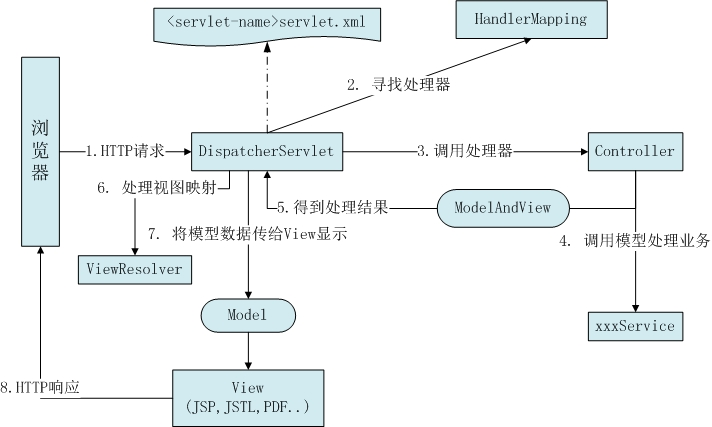
三 接下来,让我们写代码实现springMvc框架
通过注解方式实现了跳转和ioc两个核心功能,工程结构如下:

分别创建注解@Controller
package com.hongsen.annotation;

@Target(ElementType.TYPE)
@Retention(RetentionPolicy.RUNTIME)
@Documented
public @interface Controller {
    String value();
}
创建@RequestMapping注解
package com.hongsen.annotation;

@Target({ElementType.METHOD,ElementType.TYPE})
@Retention(RetentionPolicy.RUNTIME)
@Documented
public @interface RequestMapping {
    String value();
}
创建@resource注解
package com.hongsen.annotation;

@Target(ElementType.FIELD)
@Retention(RetentionPolicy.RUNTIME)
public @interface Resource {
    String value();
}
创建@Service注解
package com.hongsen.annotation;

@Target(ElementType.TYPE)
@Retention(RetentionPolicy.RUNTIME)
@Documented
public @interface Service {
    String value();
}
创建servlet,代码如下:
package com.hongsen.servlet;

/**
 * springMvc 作用
 * <p>
 * 1 跳转
 * 2 ioc
 * 3 aop
 *
 * @author wanghongsen 2018.07.27
 */

public class DispatcherServlet extends HttpServlet {

    private static final long serialVersionUID = 1L;
    private List<String> classList = new ArrayList<>();
    private Map<String, Object> beanInstanceMap = new HashMap<>();
    private Map<String, Method> urlHandlerMap = new HashMap<>();

    /**
     * servlet初始化方法
     * 1 scan扫描包路径
     * 2 构造所有类集合 (list<String>)
     * 3 构造所有bean实例集合 (beanName-> bean)
     * 4 构造所有请求handler跳转(uri -> method)
     */
    public void init() throws ServletException {
        System.out.println("init() start");
        String scanBasePath = "com.hongsen";
        scan(scanBasePath);
        initBeanInstance();
        ioc();
        initUrlHandlerMap();
    }

    private void scan(String scanBasePath) {
        URL url = this.getClass().getResource("/" + scanBasePath.replace(".", "/"));
        String baseFilePath = url.getFile();
        File baseFile = new File(baseFilePath);
        String[] subFilePaths = baseFile.list();
        for (String subFilePath : subFilePaths != null ? subFilePaths : new String[0]) {
            File subFile = new File(baseFilePath + subFilePath);
            if (subFile.isDirectory()) {
                scan(scanBasePath + "." + subFilePath);
            } else {
                classList.add(scanBasePath + "." + subFilePath);
            }
        }
    }

    private void initBeanInstance() {
        for (String beanName : classList) {
            try {
                beanName = beanName.replace(".class", "");
                Class beanClass = Class.forName(beanName);
                try {
                    if (beanClass.isAnnotationPresent(Controller.class)) {
                        Controller controller = (Controller) beanClass.getAnnotation(Controller.class);
                        beanInstanceMap.put(controller.value(), beanClass.newInstance());
                    } else if (beanClass.isAnnotationPresent(Service.class)) {
                        Service service = (Service) beanClass.getAnnotation(Service.class);
                        beanInstanceMap.put(service.value(), beanClass.newInstance());
                    }
                } catch (InstantiationException | IllegalAccessException e) {
                    e.printStackTrace();
                }
            } catch (ClassNotFoundException e) {
                e.printStackTrace();
            }
        }
    }
    private void ioc() {
        for (String beanName : classList) {
            try {
                beanName = beanName.replace(".class", "");
                Class beanClass = Class.forName(beanName);
                Field[] fields = beanClass.getDeclaredFields();
                for (Field field : fields) {
                    if (field.isAnnotationPresent(Resource.class)) {
                        Resource resource = field.getAnnotation(Resource.class);
                        String val = resource.value();
                        try {
                            field.setAccessible(true);
                            Service service = (Service) beanClass.getAnnotation(Service.class);
                            if (service != null) {
                                field.set(beanInstanceMap.get(service.value()), beanInstanceMap.get(val));
                            } else {
                                Controller controller = (Controller) beanClass.getAnnotation(Controller.class);
                                if (controller != null) {
                                    field.set(beanInstanceMap.get(controller.value()), beanInstanceMap.get(val));
                                }
                            }
                        } catch (IllegalAccessException e) {
                            e.printStackTrace();
                        }
                    }
                }
            } catch (ClassNotFoundException e) {
                e.printStackTrace();
            }
        }
    }

    private void initUrlHandlerMap() {
        for (String beanName : classList) {
            try {
                beanName = beanName.replace(".class", "");
                Class beanClass = Class.forName(beanName);
                if (beanClass.isAnnotationPresent(RequestMapping.class)) {
                    RequestMapping baseReqMap = (RequestMapping) beanClass.getAnnotation(RequestMapping.class);
                    if (baseReqMap != null) {
                        String requestBaseUrl = baseReqMap.value();
                        Method[] methods = beanClass.getMethods();
                        for (Method method : methods) {
                            RequestMapping reqMap = method.getAnnotation(RequestMapping.class);
                            if (reqMap != null) {
                                urlHandlerMap.put(requestBaseUrl + reqMap.value(), method);
                            }
                        }
                    }
                }
            } catch (ClassNotFoundException e) {
                e.printStackTrace();
            }
        }
    }

    protected void doPost(HttpServletRequest request, HttpServletResponse response) throws javax.servlet.ServletException, IOException {
        doGet(request, response);
    }

    protected void doGet(HttpServletRequest request, HttpServletResponse response) throws javax.servlet.ServletException, IOException {

        String uri = request.getRequestURI();
        String contextPath = request.getContextPath();
        String requestUrl = uri.replace(contextPath, "");
        Method method = urlHandlerMap.get(requestUrl);
        if (method == null) {
            return;
        }
        Class beanClass = method.getDeclaringClass();
        Controller controller = (Controller) beanClass.getAnnotation(Controller.class);
        Object bean = beanInstanceMap.get(controller.value());
        try {
            Map<String, String[]> requestParameterMap = request.getParameterMap();

            Object[] args = new Object[requestParameterMap.entrySet().size()];
            int index = 0;
            for (Map.Entry entry : requestParameterMap.entrySet()) {
                args[index] = entry.getValue();
                index++;
            }
            method.invoke(bean, args);
        } catch (IllegalAccessException | InvocationTargetException e) {
            e.printStackTrace();
        }
    }
}
创建完servlet后web.xml自动生成相应代码
<load-on-startup>加这个标签,tomcat启动时会自动加载指定的servlet 大于等于0时启动tomcat会加载 servlet的init()方法 数字越小代表加载的优先级越高
<url-pattern>/这个标签是tomcat请求扫描路径,扫到后会调用servlet相应的doGet或doPost方法
<?xml version="1.0" encoding="UTF-8"?>
<web-app xmlns="http://xmlns.jcp.org/xml/ns/javaee"
         xmlns:xsi="http://www.w3.org/2001/XMLSchema-instance"
         xsi:schemaLocation="http://xmlns.jcp.org/xml/ns/javaee http://xmlns.jcp.org/xml/ns/javaee/web-app_3_1.xsd"
         version="3.1">
    <servlet>
        <servlet-name>DispatcherServlet</servlet-name>
        <servlet-class>com.hongsen.servlet.DispatcherServlet</servlet-class>
        <load-on-startup>1</load-on-startup>
    </servlet>

    <servlet-mapping>
        <servlet-name>DispatcherServlet</servlet-name>
        <url-pattern>/</url-pattern>
    </servlet-mapping>

</web-app>
创建Controller类
package com.hongsen.controller;

@Controller("testController")
@RequestMapping("/test")
public class TestController {

    @Resource("testAddService")
    private TestAddServiceImpl testAddService;

    @Resource("testDelService")
    private TestDelServiceImpl testDelService;

    @RequestMapping("/add.json")
    public void testAdd() {
        testAddService.add();
    }
    @RequestMapping("/del.json")
    public void testDel(Object num1, Object num2) {
        testDelService.del(num1.toString(), num2.toString());
    }
}
创建service接口和实现类
package com.hongsen.service;

public interface TestAddService {
    void add(String num);
}
package com.hongsen.service;

@Service("testAddService")
public class TestAddServiceImpl implements TestAddService{
    @Override
    public void add(String num) {
        System.out.println("add方法执行!");
    }
}
部署tomcat启动成功后:
访问:http://localhost:8080/test/add.json
