目录
存在动态绑定数据
在一个文件中可以使用多个 export 来导出多个模块
下面以 module.js 文件为例,导出了 arr、str、fun1 模块
export const  arr = [1, 2, 3, 4, 5];   // 导出常量 arr

export let str = '字符‘';        // 导出变量 srt

export function fun1 (){
    console.log('这是导入的函数fun1')
}    // 导出函数 fun1
当然还有更直观的写法
const  arr = [1, 2, 3, 4, 5];

let str = '字符‘';

function fun1 (){
    console.log('这是导入函数fun1')
}

// 将要导出的模块统一写在一个 export 关键字中是很合适的
export {
    arr,
    str,
    fun1
}
存在动态绑定数据的关系,a 变量的改变,可以传递到调用者哪里去
export let a = 'a';

setTimeout(()=>{a = 'aa'},1000);
export 导出的变量都是只读的,因为它的本质是输入接口,也就是说,不允许在加载模块的脚本里面,改写接口
上面使用了 export 导出了模块,接下来使用 import 导入模块
 import { arr, str, fun1 } from "./module.js";

 console.log(arr , str);

 fun1();
上面的代码加载了module.js 文件,并提取了module.js 文件中的 arr、str、fun1 模块,
module.js 提取模块的名字需要写在 {} 中,想要提取什么模块就写什么模块,但是名字必须和 module.js 文件导出时的名字一样
import也和函数、变量一样存在预编译,即可以先使用,后导入
import './module.js'; 如果这么用,相当于加载了一次modules.js 文件,但是并不会导入在modules.js中定义好的模块或变量
如果是在 html 中的 script 标签中导出模块,那么必须为script 标签添加 script = ' module '
import 不能写在被其他语句包裹
// 这样是不可以的
if (x === 1) {
  import { arr } from './module.js';
} else {
  import { arr } from './module2.js';
}
使用关键字 as 修改模块名,导出和导入模块命都可以修改
// A.js文件
const arr = [1, 2, 3, 4, 5];
const str = 'str';
export { arr as numbers, str };


// B.js文件
import {numbers, str as string} from "./module.js";
console.log(numbers, string);
有时候就是想所有模块都导入,不想把模块都写一遍在 {} 中,那么可以 整体加载
// A.js文件
const arr = [1, 2, 3, 4, 5];
const str = 'str';
export {arr, str};

// B.js文件
// 使用 * 号导入所有模块,然后用 as 重命名,注意这里没有 {} 了
import * as modules from "./components/2.1as";
console.log(modules.arr, modules.str);
export default(默认导出)
export default 和 export 一样都是导出模块,
同样可以导出 函数、数组、对象、字符串、数值等
但是一个文件中, export 可以有多个,而 export default 只能有一个
export 导出的模块,导入时要加 {},而export default 导出模块,导入时不需要 {},但是允许并要求为它重新命名,下例子中取名为 newStr
// A.js文件
let  str = 'str';
export default str;

// B.js文件
import newStr from './module1';
export 和 export default 可以同时存在一个文件中(但并不建议这么做),导入的时候用 ' , ' 分开。下例子中,一定是 fun 写在 {arr} 的前面,而不能 将 {arr} 写在 fun 的前面
// fun 是用 export default 导出的,arr 是用 export,导出的
import fun, {arr} from './module.js';
本质上,export default 导出的是一个 default 的变量/方法,并且 default 后面紧跟的 变量 / 方法 / 值,将会赋值给 default
// 所以下面的写法都是 正确的

export default function a (){
    return 1
}

export default () => {
    return 1
}

export default 4

let str1 = '字符';
let str2 = '字符';
export default {str1, str2}
// 而下面的写法是 错误的

export default var a = 'a';
import () (动态引入)
前面说到 import 不能被其他语句包裹,不能动态引入模块,因为它是在编译时执行的,不向 require 在运行时才加载,因此可以动态引入
但是 import 函数可以实现动态引入模块的目的
import 函数返回的是一个 promise 对象
条件加载
if (condition) {
  import('moduleA').then(...);
} else {
  import('moduleB').then(...);
}
按需加载
button.addEventListener('click', event => {
  import('./dialogBox.js')
  .then(dialogBox => {
    dialogBox.open();
  })
  .catch(error => {
    /* Error handling */
  })
})
动态路径
import(f())
.then(...);
注意
如果使用 export 导出模块,那么 import 函数导入模块后,返回的 promise 对象的值是一个 Module 对象,而这些模块都是 Module 对象中的属性,
// A.js文件
export const  arr = [1, 2, 3, 4, 5];
export let str = '字符';

// B.js文件
import('./A.js')
.then((mod) => {
    console.log(mod);
})
控制台打印如下
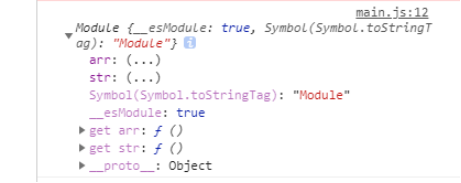
所以最好的使用这些模块的方式,是用对象解构语法
import('./components/1.js')
.then(( {arr, str} )=> {
    console.log(arr, str)
})
如果使用 export default 导出,那么使用 import 函数导入后,返回的 promise 对象的值也是一个 Module 对象,与前者的区别在于模块被赋值到 Module 对象的 default 属性上
下面图片中,导出的是 fun1 函数
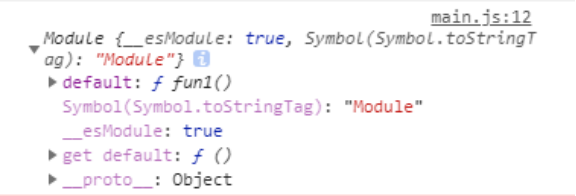
由于 default 是关键字,所以这里就不能直接使用解构了,不过用下面的写法
// 最简单的调用属性
import('./A.js')
.then((mod) => {
  mod.default();
});

// 重命名
import('./A.js')
.then(( {default: fun1} )=> {
    fun1()
})
动态引入模块错误
报错信息有
Module build failed(模块生成失败)
Add @babel/plugin-syntax-dynamic-import (https://git.io/vb4Sv) to the 'plugins' section of your Babel config to enable parsing.(将@babel/plugin syntax dynamic import(https://git.io/vb4sv)添加到babel配置的“plugins”部分以启用解析。)
解决方法
首先安装 @babel/plugin-syntax-dynamic-import
然后配置 "plugins": ["@babel/plugin-syntax-dynamic-import"]