1 import java.awt.Graphics;
 2 import java.awt.event.*;
 3 import javax.swing.*;
 4
 5 public class Test_16_19 extends JFrame{
 6
 7     public Test_16_19(){
 8         JP jp1 = new JP();
 9         add(jp1);
10     }
11     public static void main(String[] args) {
12         // TODO Auto-generated method stub
13         Test_16_19 frame = new Test_16_19();
14         frame.setSize(300,300);
15         frame.setTitle("Test_16_19");
16         frame.setDefaultCloseOperation(JFrame.EXIT_ON_CLOSE);
17         frame.setLocationRelativeTo(null); // Center the frame
18         frame.setVisible(true);
19     }
20     static class JP extends JPanel{
21         private int x_distance, x_co;
22         private int y_distance, y_co;
23         private double distance;
24         private String str="";
25         public JP(){
26             addMouseMotionListener(new MouseMotionAdapter(){
27                 public void mouseMoved(MouseEvent e){
28                     x_co = e.getX();y_co = e.getY();
29                     distance =Math.sqrt(x_distance*x_distance+y_distance*y_distance);
30
31                     if(distance>50)
32                         str = "out of the circle";
33                     else str = "in the circle";
34                     repaint();
35                 }
36             });
37         }
38     protected void paintComponent(Graphics g){
39         int xCenter = getWidth()/2;
40         int yCenter = getHeight()/2;
41         x_distance = Math.abs(x_co - xCenter);
42         y_distance = Math.abs(y_co - yCenter);
43
44         super.paintComponent(g);
45         g.drawOval(xCenter -50, yCenter - 50, 100, 100);
46         g.drawString(str, x_co, y_co);
47         g.drawString(x_co+","+y_co, x_co, y_co-10);
48 //        System.out.println(getX() + " " + getY());
49     }
50     }
51 }
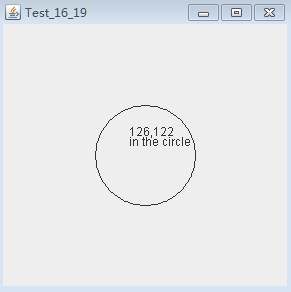
效果图: