加速计是整个IOS屏幕旋转的基础,依赖加速计,设备才可以判断出当前的设备方向,IOS系统共定义了以下七种设备方向:
typedef NS_ENUM(NSInteger, UIDeviceOrientation) { UIDeviceOrientationUnknown, UIDeviceOrientationPortrait, // Device oriented vertically, home button on the bottom UIDeviceOrientationPortraitUpsideDown, // Device oriented vertically, home button on the top UIDeviceOrientationLandscapeLeft, // Device oriented horizontally, home button on the right UIDeviceOrientationLandscapeRight, // Device oriented horizontally, home button on the left UIDeviceOrientationFaceUp, // Device oriented flat, face up UIDeviceOrientationFaceDown // Device oriented flat, face down};以及如下四种界面方向:
typedef NS_ENUM(NSInteger, UIInterfaceOrientation) { UIInterfaceOrientationPortrait = UIDeviceOrientationPortrait, UIInterfaceOrientationPortraitUpsideDown = UIDeviceOrientationPortraitUpsideDown, UIInterfaceOrientationLandscapeLeft = UIDeviceOrientationLandscapeRight, UIInterfaceOrientationLandscapeRight = UIDeviceOrientationLandscapeLeft};一、UIKit处理屏幕旋转的流程
当加速计检测到方向变化的时候,会发出 UIDeviceOrientationDidChangeNotification 通知,这样任何关心方向变化的view都可以通过注册该通知,在设备方向变化的时候做出相应的响应。
UIKit的相应屏幕旋转的流程如下:
1、设备旋转的时候,UIKit接收到旋转事件。
2、UIKit通过AppDelegate通知当前程序的window。
3、Window会知会它的rootViewController,判断该view controller所支持的旋转方向,完成旋转。
4、如果存在弹出的view controller的话,系统则会根据弹出的view controller,来判断是否要进行旋转。
二、UIViewController实现屏幕旋转
在响应设备旋转时,我们可以通过UIViewController的方法实现更细粒度的控制,当view controller接收到window传来的方向变化的时候,流程如下:
1、首先判断当前viewController是否支持旋转到目标方向,如果支持的话进入流程2,否则此次旋转流程直接结束。
2、调用 willRotateToInterfaceOrientation:duration: 方法,通知view controller将要旋转到目标方向。如果该viewController是一个container view controller的话,它会继续调用其content view controller的该方法。这个时候我们也可以暂时将一些view隐藏掉,等旋转结束以后在现实出来。
3、window调整显示的view controller的bounds,由于view controller的bounds发生变化,将会触发 viewWillLayoutSubviews 方法。这个时候self.interfaceOrientation和statusBarOrientation方向还是原来的方向。
4、接着当前view controller的 willAnimateRotationToInterfaceOrientation:duration: 方法将会被调用。系统将会把该方法中执行的所有属性变化放到动animation block中。
5、执行方向旋转的动画。
6、最后调用 didRotateFromInterfaceOrientation: 方法,通知view controller旋转动画执行完毕。这个时候我们可以将第二部隐藏的view再显示出来。
整个响应过程如下图所示:
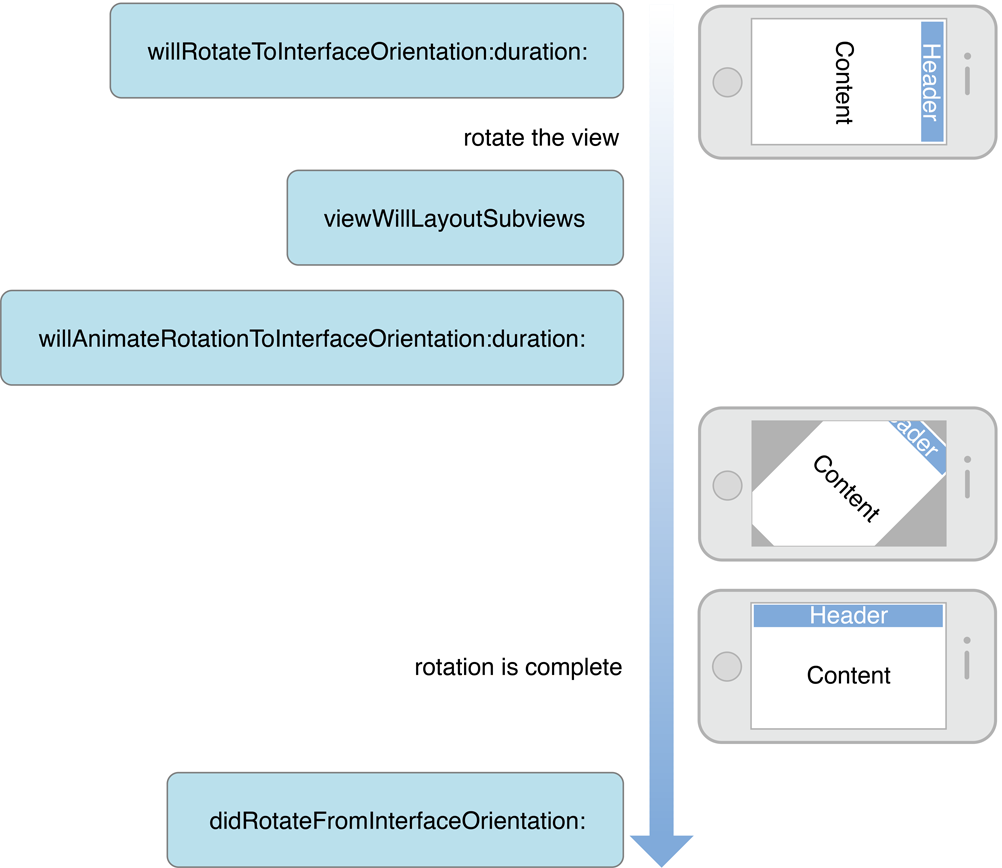
以上就是UIKit下一个完整的屏幕旋转流程,我们只需要按照提示做出相应的处理就可以完美的支持屏幕旋转。
三、注意事项和建议
1)注意事项
当我们的view controller隐藏的时候,设备方向也可能发生变化。例如view Controller A弹出一个全屏的view controller B的时候,由于A完全不可见,所以就接收不到屏幕旋转消息。这个时候如果屏幕方向发生变化,再dismiss B的时候,A的方向就会不正确。我们可以通过在view controller A的viewWillAppear中更新方向来修正这个问题。
2)屏幕旋转时的一些建议
- 在旋转过程中,暂时界面操作的响应。
- 旋转前后,尽量保持当前显示的位置不变。
- 对于view层级比较复杂的时候,为了提高效率在旋转开始前使用截图替换当前的view层级,旋转结束后再将原view层级替换回来。
- 在旋转后最好强制reload tableview,保证在方向变化以后,新的row能够充满全屏。例如对于有些照片展示界面,竖屏只显示一列,但是横屏的时候显示列表界面,这个时候一个界面就会显示更多的元素,此时reload内容就是很有必要的。
注:以上内容和插图全部来自苹果官方文档:View Controller Programming Guide for iOS