https://www.w3school.com.cn/css/pro_css_syntax.asp
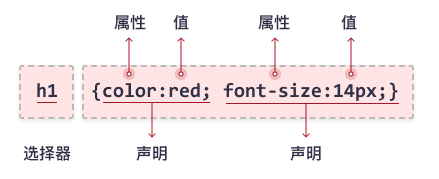
选择器指向您需要设置样式的 HTML 元素。
p {
  color: red;
  text-align: center;
}
CSS 选择器
CSS 选择器用于“查找”(或选取)要设置样式的 HTML 元素。
CSS 选择器分为五类:
- 简单选择器(根据名称、id、类来选取元素)
- 组合器选择器(根据它们之间的特定关系来选取元素)
- 伪类选择器(根据特定状态选取元素)
- 伪元素选择器(选取元素的一部分并设置其样式)
- 属性选择器(根据属性或属性值来选取元素)
CSS 元素选择器
p {
  text-align: center;
  color: red;
}

页面上的所有 <p>元素都将居中对齐,并带有红色文本颜色

元素选择器又称为类型选择器,类型选择器匹配文档语言元素类型的名称。类型选择器匹配文档树中该元素类型的每一个实例。

也可以为 XML 文档中的元素设置样式:
XML 文档:
<?xml version="1.0" encoding="ISO-8859-1"?>
<?xml-stylesheet type="text/css" href="note.css"?>
<note>
<to>George</to>
<from>John</from>
<heading>Reminder</heading>
<body>Don't forget the meeting!</body>
</note>
CSS 文档:
note
  {
  font-family:Verdana, Arial;
  margin-left:30px;
  }

to
  {
  font-size:28px;
  display: block;
  }

from
  {
  font-size:28px;
  display: block;
  }

heading
  {
  color: red;
  font-size:60px;
  display: block;
  }

body
  {
  color: blue;
  font-size:35px;
  display: block;
  }
更多关于为 XML 文档添加样式的知识,请访问 w3school 的 XML 教程
CSS id 选择器
id 选择器以 "#" 来定义
#para1 {
  text-align: center;
  color: red;
}
#green {color:green;} <p id="green">这个段落是绿色。</p>
元素的 id 在页面中是唯一的,因此 id 选择器对应唯一的元素!
这条 CSS 规则将应用于 id="para1" 的 HTML 元素。
注意:id 属性只能在每个 HTML 文档中出现一次。想知道原因吗,请参阅 XHTML:网站重构
id 选择器和派生选择器
在现代布局中,id 选择器常常用于建立派生选择器。
#sidebar p {
    font-style: italic;
    text-align: right;
    margin-top: 0.5em;
    }

#sidebar h2 {
    font-size: 1em;
    font-weight: normal;
    font-style: italic;
    margin: 0;
    line-height: 1.5;
    text-align: right;
    }
在这里,与页面中的其他 p 元素明显不同的是,sidebar 内的 p 元素得到了特殊的处理,同时,与页面中其他所有 h2 元素明显不同的是,sidebar 中的 h2 元素也得到了不同的特殊处理。
CSS 类选择器
.center {
  text-align: center;
  color: red;
}
所有带有 class="center" 的 HTML 元素将为红色且居中对齐 , 多个HTML 元素可以具有同一个class
和 id 一样,class 也可被用作派生选择器:
.fancy td {                 类名为 fancy 的元素内部的 td 元素
	color: #f60;
	background: #666;
	}
类名为 fancy 的更大的元素内部的表格单元都会以灰色背景显示橙色文字。(名为 fancy 的更大的元素可能是一个表格或者一个 div)
元素也可以基于它们的类而被选择:
td.fancy {             td元素并且class="fancy"
    color: #f60; background: #666;
}
类名为 fancy 的表格单元将是带有灰色背景的橙色。
p.center {
  text-align: center;
  color: red;
}
只有具有 class="center" 的 <p> 元素会居中对齐
HTML 元素引用多个类:
<!DOCTYPE html>
<html>
<head>
<style>
p.center {
  text-align: center;
  color: red;
}

p.large {
  font-size: 300%;
}
</style>
</head>
<body>
<h1 class="center">这个标题不受影响</h1>
<p class="center">本段将是红色并居中对齐。</p>
<p class="center large">本段将是红色、居中对齐,并使用大字体。</p>
</body>
</html>
CSS 通用选择器
* {
  text-align: center;
  color: blue;
}
会影响页面上的每个 HTML 元素。
CSS 分组选择器
h1, h2, p {
  text-align: center;
  color: red;
}
CSS 后代选择器
li strong{ font-style: italic; font-weight: normal; }
只有 li 元素中的 strong 元素的样式为斜体字,无需为 strong 元素定义特别的 class 或 id,代码更加简洁
即两个元素之间的层次间隔可以是无限的
CSS 子元素选择器
h1 > strong {color:red;}
h1 元素子元素的 strong 元素。
<h1>This is <strong>very</strong> <strong>very</strong> important.</h1>   有效果
<h1>This is <em>really <strong>very</strong></em> important.</h1>   无效果,孙元素
后台选择器和子选择器的具体应用:
假设有一个文档,其中有一个边栏,背景为蓝色,主区的背景为白色。这两个区都包含链接列表,边栏的链接为白色,主区的链接为蓝色。
解决方法是使用 元素选择器+类选择器+后代选择器。为包含边栏的 div 指定class= "sidebar", 的 属性,主区的 class= "maincontent" :
div.sidebar {background:blue;}
div.maincontent {background:white;}
div.sidebar a:link {color:white;}
div.maincontent a:link {color:blue;}
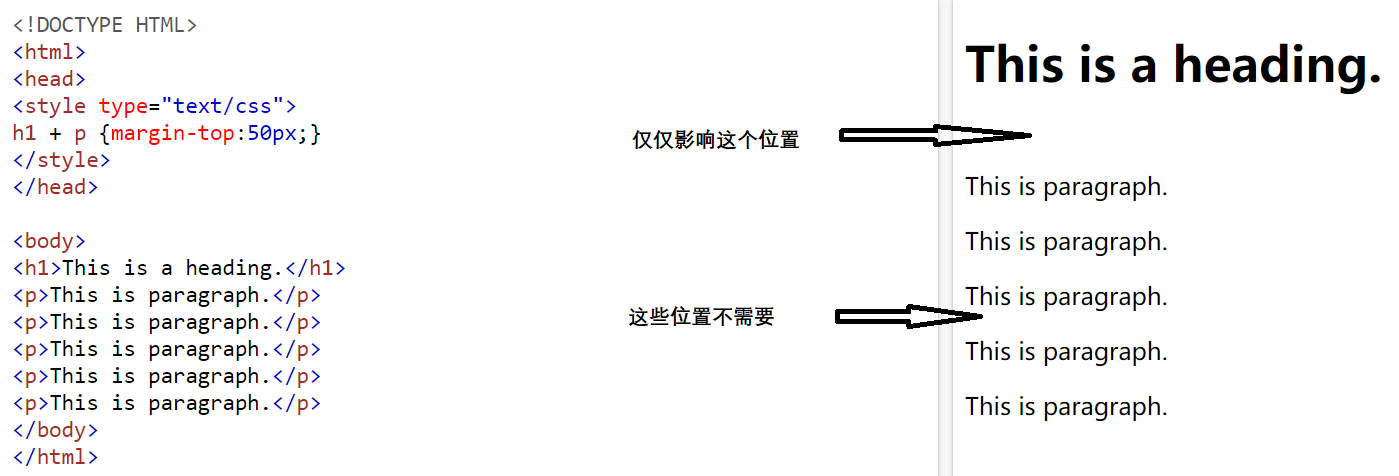
CSS 相邻兄弟选择器
选择紧接在一个元素后的元素,而且二者有相同的父元素。
例如:选择紧接在 h1 元素后出现的段落,h1 和 p 元素拥有共同的父元素