这篇文章的目的是让你知道怎么了解你正在运行的Mongdb是否健康。转载自http://tech.lezi.com/archives/290
mongostat详解
启动mongodb监控,通过下面命令行:

mongostat是mongdb自带的状态检测工具,在命令行下使用。它会间隔固定时间获取mongodb的当前运行状态,并输出。如果你发现数据库突然变慢或者有其他问题的话,你第一手的操作就考虑采用mongostat来查看mongo的状态。
它的输出有以下几列:
- inserts/s 每秒插入次数
- query/s 每秒查询次数
- update/s 每秒更新次数
- delete/s 每秒删除次数
- getmore/s 每秒执行getmore次数
- command/s 每秒的命令数,比以上插入、查找、更新、删除的综合还多,还统计了别的命令
- flushs/s 每秒执行fsync将数据写入硬盘的次数。
- mapped/s 所有的被mmap的数据量,单位是MB,
- vsize 虚拟内存使用量,单位MB
- res 物理内存使用量,单位MB
- faults/s 每秒访问失败数(只有Linux有),数据被交换出物理内存,放到swap。不要超过100,否则就是机器内存太小,造成频繁swap写入。此时要升级内存或者扩展
- locked % 被锁的时间百分比,尽量控制在50%以下吧
- idx miss % 索引不命中所占百分比。如果太高的话就要考虑索引是不是少了
- q t|r|w 当Mongodb接收到太多的命令而数据库被锁住无法执行完成,它会将命令加入队列。这一栏显示了总共、读、写3个队列的长度,都为0的话表示mongo毫无压力。高并发时,一般队列值会升高。
- conn 当前连接数
- time 时间戳
使用profiler

类似于MySQL的slow log, MongoDB可以监控所有慢的以及不慢的查询。
Profiler默认是关闭的,你可以选择全部开启,或者有慢查询的时候开启。

> show dbs
admin          0.000GB
jetty_session  0.009GB
local          0.000GB
tong           0.002GB
> use tong
switched to db tong
> db.setProfilingLevel(2);
{ "was" : 0, "slowms" : 100, "ok" : 1 }
> db.getProfilingLevel()
2
查看Profile日志
> db.system.profile.find().sort({$natural:-1})
{ "op" : "query", "ns" : "tong.system.profile", "query" : { "find" : "system.profile", "filter" : {  }, "limit" : 2, "singleBatch" : false, "sort" : { "natural" : -1 } }, "keysExamined" : 0, "docsExamined" : 0, "hasSortStage" : true, "cursorExhausted" : true, "numYield" : 0, "locks" : { "Global" : { "acquireCount" : { "r" : NumberLong(2) } }, "Database" : { "acquireCount" : { "r" : NumberLong(1) } }, "Collection" : { "acquireCount" : { "r" : NumberLong(1) } } }, "nreturned" : 0, "responseLength" : 92, "protocol" : "op_command", "millis" : 0, "planSummary" : "COLLSCAN", "execStats" : { "stage" : "SORT", "nReturned" : 0, "executionTimeMillisEstimate" : 0, "works" : 4, "advanced" : 0, "needTime" : 3, "needYield" : 0, "saveState" : 0, "restoreState" : 0, "isEOF" : 1, "invalidates" : 0, "sortPattern" : { "natural" : -1 }, "memUsage" : 0, "memLimit" : 33554432, "limitAmount" : 2, "inputStage" : { "stage" : "SORT_KEY_GENERATOR", "nReturned" : 0, "executionTimeMillisEstimate" : 0, "works" : 3, "advanced" : 0, "needTime" : 2, "needYield" : 0, "saveState" : 0, "restoreState" : 0, "isEOF" : 1, "invalidates" : 0, "inputStage" : { "stage" : "COLLSCAN", "nReturned" : 0, "executionTimeMillisEstimate" : 0, "works" : 2, "advanced" : 0, "needTime" : 1, "needYield" : 0, "saveState" : 0, "restoreState" : 0, "isEOF" : 1, "invalidates" : 0, "direction" : "forward", "docsExamined" : 0 } } }, "ts" : ISODate("2017-03-27T10:02:29.994Z"), "client" : "127.0.0.1", "appName" : "MongoDB Shell", "allUsers" : [ ], "user" : "" }
>
3个字段的意义
- ts:时间戳
- info:具体的操作
- millis:操作所花时间,毫秒
不多说,此处有官方文档。注意,造成满查询可能是索引的问题,也可能是数据不在内存造成因此磁盘读入造成。
使用Web控制台
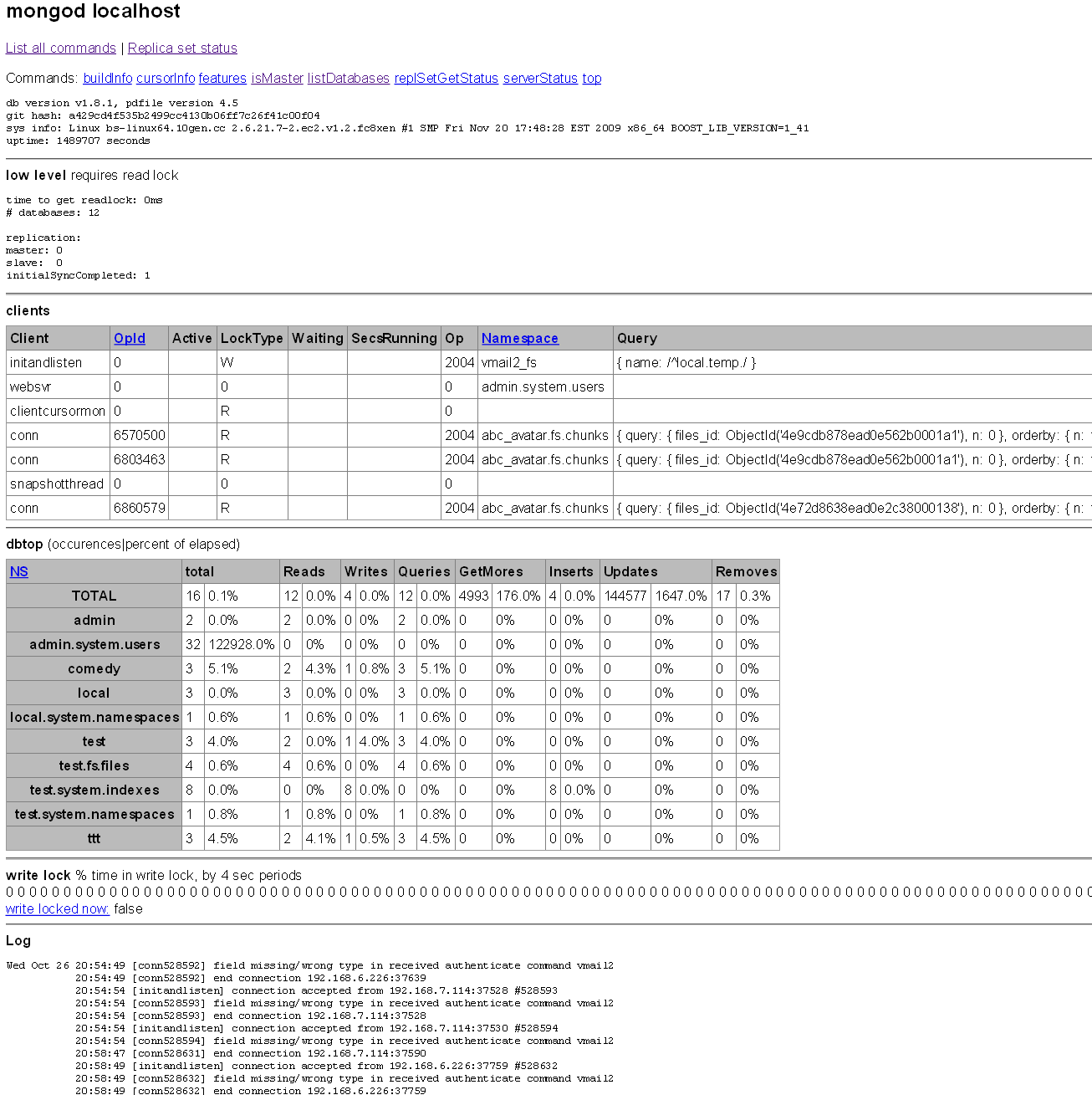 Mongodb自带了Web控制台,默认和数据服务一同开启。他的端口在Mongodb数据库服务器端口的基础上加1000,如果是默认的Mongodb数据服务端口(Which is 27017),则相应的Web端口为28017
这个页面可以看到
- 当前Mongodb的所有连接
- 各个数据库和Collection的访问统计,包括:Reads, Writes, Queries, GetMores ,Inserts, Updates, Removes
- 写锁的状态
- 以及日志文件的最后几百行(CentOS+10gen yum 安装的mongodb默认的日志文件位于/var/log/mongo/mongod.log)
可以参考右边的截图
db.stat()
获取当前数据库的信息,比如Obj总数、数据库总大小、平均Obj大小等
01 |
> use test |
02 |
switched to db test |
03 |
> db.stats() |
04 |
{ |
05 |
"collections" : 9, |
06 |
"objects" : 4278845, |
07 |
"avgObjSize" : 224.56603031892953, |
08 |
"dataSize" : 960883236, |
09 |
"storageSize" : 1195438080, |
10 |
"numExtents" : 59, |
11 |
"indexes" : 13, |
12 |
"indexSize" : 801931264, |
13 |
"fileSize" : 6373244928, |
14 |
"ok" : 1 |
15 |
} |
db.serverStatus()
获取服务器的状态
01 |
{ |
02 |
"version" : "1.6.5", |
03 |
"uptime" : 7208469, |
04 |
"uptimeEstimate" : 7138829, |
05 |
"localTime" : "Wed Oct 26 2011 22:23:07 GMT+0800 (CST)", |
06 |
"globalLock" : { |
07 |
"totalTime" : 7208469556704, |
08 |
"lockTime" : 4959693717, |
09 |
"ratio" : 0.000688036992871448, |
10 |
"currentQueue" : { |
11 |
"total" : 0, |
12 |
"readers" : 0, |
13 |
"writers" : 0 |
14 |
} |
15 |
}, |
16 |
"mem" : { |
17 |
"bits" : 64, |
18 |
"resident" : 3131, |
19 |
"virtual" : 6172, |
20 |
"supported" : true, |
21 |
"mapped" : 4927 |
22 |
}, |
23 |
"connections" : { |
24 |
"current" : 402, |
25 |
"available" : 2599 |
26 |
}, |
27 |
"extra_info" : { |
28 |
"note" : "fields vary by platform", |
29 |
"heap_usage_bytes" : 832531920, |
30 |
"page_faults" : 8757 |
31 |
}, |
32 |
"indexCounters" : { |
33 |
"btree" : { |
34 |
"accesses" : 2821726, |
35 |
"hits" : 2821725, |
36 |
"misses" : 1, |
37 |
"resets" : 0, |
38 |
"missRatio" : 3.543930204420982e-7 |
39 |
} |
40 |
}, |
41 |
"backgroundFlushing" : { |
42 |
"flushes" : 120133, |
43 |
"total_ms" : 73235923, |
44 |
"average_ms" : 609.6236920746173, |
45 |
"last_ms" : 1332, |
46 |
"last_finished" : "Wed Oct 26 2011 22:22:23 GMT+0800 (CST)" |
47 |
}, |
48 |
"cursors" : { |
49 |
"totalOpen" : 0, |
50 |
"clientCursors_size" : 0, |
51 |
"timedOut" : 238392 |
52 |
}, |
53 |
"repl" : { |
54 |
"ismaster" : true |
55 |
}, |
56 |
"opcounters" : { |
57 |
"insert" : 269351, |
58 |
"query" : 19331151, |
59 |
"update" : 14199331, |
60 |
"delete" : 1, |
61 |
"getmore" : 145575, |
62 |
"command" : 55982302 |
63 |
}, |
64 |
"asserts" : { |
65 |
"regular" : 0, |
66 |
"warning" : 0, |
67 |
"msg" : 0, |
68 |
"user" : 27, |
69 |
"rollovers" : 0 |
70 |
}, |
71 |
"ok" : 1 |
72 |
} |
需要关心的地方:
- connections 当前连接和可用连接数,听过一个同行介绍过,mongodb最大处理到2000个连接就不行了(要根据你的机器性能和业务来设定),所以设大了没意义。设个合理值的话,到达这个值mongodb就拒绝新的连接请求,避免被太多的连接拖垮。
- indexCounters:btree:misses 索引的不命中数,和hits的比例高就要考虑索引是否正确建立。你看我的”missRatio” : 3.543930204420982e-7,很健康吧。所以miss率在mongostat里面也可以看
- 其他的都能自解释,也不是查看mongo健康状况的关键,就不说明了。
db.currentOp()
MongoDB 的命令一般很快就完成,但是在一台繁忙的机器或者有比较慢的命令时,你可以通过db.currentOp()获取当前正在执行的操作。
在没有负载的机器上,该命令基本上都是返回空的
1 |
> db.currentOp() |
2 |
{ "inprog" : [ ] } |
以下是一个有负载的机器上得到的返回值样例:
1 |
{ "opid" : "shard3:466404288", "active" : false, "waitingForLock" : false, "op": "query", "ns" : "sd.usersEmails", "query" : { }, "client_s" :"10.121.13.8:34473", "desc" : "conn" }, |
字段名字都能自解释。如果你发现一个操作太长,把数据库卡死的话,可以用这个命令杀死他
1 |
> db.killOp("shard3:466404288") |
MongoDB Monitoring Service
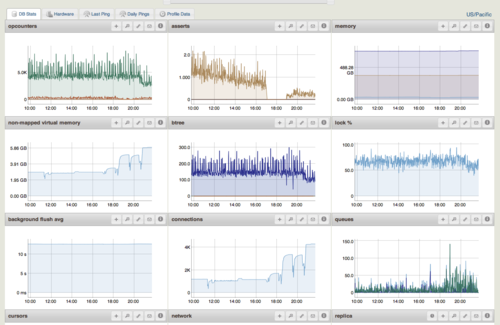
MongoDB Monitoring Service(MMS)是Mongodb厂商提供的监控服务,可以在网页和Android客户端上监控你的MongoDB状况。