1.父传子
父组件:
<template>
    <div class="box">
        <child :fMessage="data2"></child>
        <Button type="primary" @click="chua">传值</Button>
    </div>
</template>
<script>
import child from '../../components/demo3/child.vue'
export default {
    components: { child },
    name: 'demo3',
    computed: {
    },
    data () {
        return {
            data2: '父组件数据data2'
        }
    },
    methods: {
        chua () {
            this.data2 = 'wangjiale'
        }
    }
}
</script>
子组件:
<template>
    <div>
        <p>第二个数据:{{fMessage}}</p>
    </div>
</template>
<script>
export default {
    name: 'child',
    props: ['fMessage'],
    data () {
        return{

        }
    },
    created () {

    }
}
</script>
样式展示
传值之前:
传值以后:
2.子传父
父组件:
<template>
    <div>
        <child-5 @chuachua="changeName"></child-5>
        <div>{{name}}</div>
    </div>
</template>
<script>
import child5 from '../../components/demo5/child5.vue'
export default {
    components: { child5 },
    name:'demo5',
    data () {
        return {
            name:''
        }
    },
    methods: {
        changeName: function (name) {
            this.name = name
        }
    }
}
</script>
子组件:
<template>
    <div>
        <Button type="primary" @click="chua">传值给父组件</Button>
    </div>
</template>
<script>
export default {
    name: 'child5',
    data () {
    },
    methods: {
        chua () {
            this.$emit('chuachua', 'wangjiale')
        }
    }
}
</script>
样式展示
传值之前:
传值以后: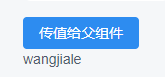
注:
this.$emit('chuachua', 'wangjiale')
此行的第二个参数为子组件向父组件传的值