Lucene简介
Lucene是apache软件基金会4 jakarta项目组的一个子项目,是一个开放源代码的全文检索引擎工具包,即它不是一个完整的全文检索引擎,而是一个全文检索引擎的架构,提供了完整的查询引擎和索引引擎,部分文本分析引擎(英文与德文两种西方语言)。Lucene的目的是为软件开发人员提供一个简单易用的工具包,以方便的在目标系统中实现全文检索的功能,或者是以此为基础建立起完整的全文检索引擎。
Lucene.net简介
Lucene.net是Lucene的.net移植版本,是一个开源的全文检索引擎开发包,即它不是一个完整的全文检索引擎,而是一个全文检索引擎的架构,提供了完整的查询引擎和索引引擎。开发人员可以基于Lucene.net实现全文检索的功能。
Lucene.net工作原理
Lucene.net提供的服务需要两部分:索引文件的写入和索引文件的读取。
1写入流程
源数据字符串经过analyzer处理,将源中需要搜索的信息加入Document的各个字段中,并把需要索引的字段起来并存储。
将索引写入存储器,存储器可以是内存或磁盘。
2读出流程
用户提供搜索关键词,经过analyzer处理。(我们下面代码采用的是盘古分词 ,其相关分词原理 可以再它的官网上可以看到 http://pangusegment.codeplex.com/)
对处理后的关键词搜索索引找出对应的Document,用户根据需要从找到的Document中提取需要的Field。
Lucene.net安装
大家可以去官网看下:https://www.nuget.org/packages/Lucene.Net/3.0.3

盘古分词安装
盘古分词主页:http://pangusegment.codeplex.com/
下载:http://pangusegment.codeplex.com/downloads/get/144143
Lucene.net结合盘古分词使用
http://pangusegment.codeplex.com/downloads/get/144145
大家可以看到相关使用的案列
Lucene.net创建索引(结合盘古分词)
    /*code 释迦苦僧*/
    class Program
    {
        static void Main(string[] args)
        {
            Stopwatch sw = new Stopwatch();//加入时间统计
            //获取 数据列表
            PostBll bll = new PostBll();
            IList<PostInfo> posts = bll.GetAllPost();
            Console.WriteLine(posts.Count);
            //创建Lucene索引文件
            string IndexDic = @"D:Lucenepost";
            sw.Start();
            IndexWriter writer = new IndexWriter(FSDirectory.Open(IndexDic), new PanGuAnalyzer(), true, IndexWriter.MaxFieldLength.LIMITED);
            foreach (PostInfo item in posts)
            {
                Document doc = new Document();
                Field postid = new Field("PostId", item.PostId.ToString(), Field.Store.YES, Field.Index.ANALYZED, Field.TermVector.NO);
                Field title = new Field("Title", item.Title.ToString(), Field.Store.YES, Field.Index.ANALYZED, Field.TermVector.NO);
                Field postscore = new Field("PostScore", item.PostScore.ToString(), Field.Store.YES, Field.Index.ANALYZED, Field.TermVector.NO);
                doc.Add(postid);
                doc.Add(title);
                doc.Add(postscore);
                writer.AddDocument(doc);
            }
            writer.Optimize();
            writer.Commit();
            sw.Stop();
            Console.Write("建立" + posts.Count + "索引,花费: " + sw.Elapsed);
            Console.ReadLine();
        }
    }
如代码所示:
D:Lucenepost 存储Lucene.net生成的索引文件,如下图
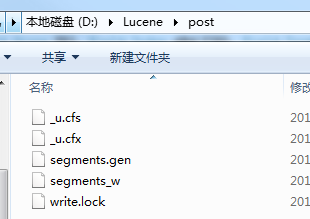
这些索引存储文件存储了PostInfo表中 PostId,Title,PostScore 三个字段信息。
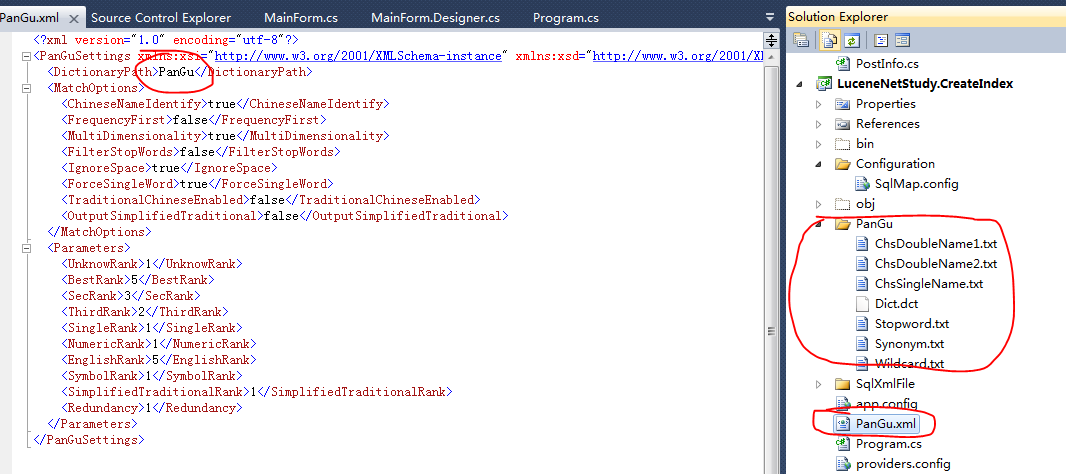
需要注意的是:使用盘古分词操作时,需要将PanGu.xml和盘古分词自带的分词文件放入项目中,如下图:
Lucene.net执行搜索(结合盘古分词)
namespace LuceneNetStudy.Search
{
    /*code 释迦苦僧*/
    public partial class MainForm : Form
    {
        private string IndexDic = @"D:Lucenepost";

        public MainForm()
        {
            InitializeComponent();
        }

        private void btnSearch_Click(object sender, EventArgs e)
        {
            /*开启搜索用的后台线程*/
            BackgroundWorker backWorker = new BackgroundWorker();
            backWorker.DoWork += new DoWorkEventHandler(backWorker_DoWork);
            backWorker.RunWorkerAsync(txtKey.Text.Trim());
        }

        void backWorker_DoWork(object sender, DoWorkEventArgs e)
        {
            string key = e.Argument as string;

            List<PostInfo> result = new List<PostInfo>();
            /*加入时间统计*/
            Stopwatch sw = new Stopwatch();
            sw.Start();

            /*创建 Lucene.net 搜索实例*/
            IndexSearcher search = new IndexSearcher(FSDirectory.Open(IndexDic), true);

            /*为搜索实例 加入搜索分词规则  来源 盘古分词*/
            key = GetKeyWordsSplitBySpace(key, new PanGuTokenizer());
            BooleanQuery bq = new BooleanQuery();
            if (!string.IsNullOrEmpty(key))
            {
                /*如果搜索关键字不为空  知道关键字搜索列为Title*/
                QueryParser queryParser = new MultiFieldQueryParser(Lucene.Net.Util.Version.LUCENE_30, new string[] { "Title" }, new PanGuAnalyzer());
                Query query = queryParser.Parse(key);
                bq.Add(query, Occur.MUST);
            }


            /*指定排序方式  按 PostScore 字段来排序*/
            List<SortField> sorts = new List<SortField>();
            SortField sf = new SortField("PostScore", SortField.DOUBLE, true);
            sorts.Add(sf);
            Sort sort = new Sort(sorts.ToArray());
            TopFieldDocs docs = search.Search(bq, null, search.MaxDoc, sort);
            int allCount = docs.TotalHits;
            /*获取匹配的前10条*/
            ScoreDoc[] hits = TopDocs(0, 10, docs);
            foreach (ScoreDoc sd in hits)//遍历搜索到的结果
            {
                try
                {
                    Document doc = search.Doc(sd.Doc);
                    var model = new PostInfo();
                    model.PostId = Guid.Parse(doc.Get("PostId"));
                    model.PostScore = double.Parse(doc.Get("PostScore"));
                    model.Title = doc.Get("Title");
                    result.Add(model);
                }
                catch
                {

                }
            }
            search.Close();
            search.Dispose();
            sw.Stop();
            if (result != null)
            {
                Invoke(new MethodInvoker(delegate()
                {
                    lblRunTime.Text = "花费: " + sw.Elapsed;

                    txtResult.Text = "";
                    foreach (PostInfo info in result)//遍历搜索到的结果
                    {
                        txtResult.Text += info.PostScore + "	" + info.Title + "
";
                    }
                }));
            }
        }

        public static ScoreDoc[] TopDocs(int start, int limit, TopFieldDocs docs)
        {
            int endIndex = 0;
            int hc = docs.TotalHits;
            if (hc - start > limit)
            {
                endIndex = start + limit;
            }
            else
            {
                endIndex = hc;
            }

            List<ScoreDoc> dl = new List<ScoreDoc>();
            var da = docs.ScoreDocs;
            for (int i = start; i < endIndex; i++)
            {
                dl.Add(da[i]);
            }
            return dl.ToArray();
        }

        static public string GetKeyWordsSplitBySpace(string keywords, PanGuTokenizer ktTokenizer)
        {
            StringBuilder result = new StringBuilder();
            /*执行分词操作 一个关键字可以拆分为多个次和单个字*/
            ICollection<WordInfo> words = ktTokenizer.SegmentToWordInfos(keywords);

            foreach (WordInfo word in words)
            {
                if (word == null)
                {
                    continue;
                }

                result.AppendFormat("{0} ", word.Word);
            }

            return result.ToString().Trim();
        }
    }
}
这是咱这两天的学习成果,研究还不是很透彻,希望能给大家带来些了解,点个赞吧。
作者:释迦苦僧 出处:http://www.cnblogs.com/woxpp/p/3972233.html 本文版权归作者和博客园共有,欢迎转载,但未经作者同意必须保留此段声明,且在文章页面明显位置给出原文连接。