IO流的基本概念
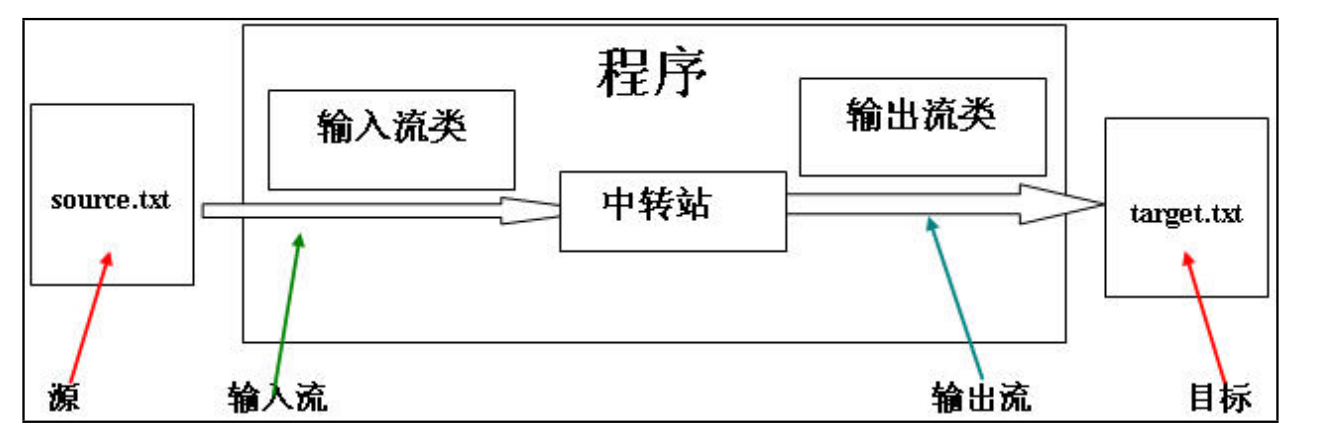
- 在java程序中,对于数据的输入/输出操作以流的形式(stream)方式进行;
- j2SDK提供了各种各样的流的类,用以获取不同种类的数据,程序中通过标准输入或输出数据。
- java的流类型一般位于Java.io包中。
流的概念
- 数据源(data source) 提供原始数据的原始媒介。常见的:数据库、文件、其他程序、网络连接、IO设备。
- 数据源就像水箱,流就像水管中的水流,程序就是我们最终的用户。流是一个抽象的、动态的概念,是一连串连续动态的集合。
流的细分和体系_四大抽象类
流的分类
流的方向:
- (1)输入流:数据源到程序(InputStream、Readr读进去)
- (2)输出流:程序到目的地(OutPutStream、Writer写进去)
处理数据单元
- (1)字节流:按照字节读取数据(InputStream、OutputStream)
- (2)字符流:按照字符读取数据(Reader、Writer)
注意:输入输出是相对于程序而言,而不是相对于源和目标而言。往程序里面来,叫做入。从程序里往外走,叫做出。
功能不同:
- (1)节点流:可以直接从数据源或目的地读写数据
- (2)包装类(包装流):不直接连接到数据源或者目的地,是其他流进行封装。目的主要是简化操作和提高性能。
节点流和处理流的关系:
- (1)节点流处于io操作的第一线,所有操作必须通过他们进行;
- (2)处理流可以对其他流进行处理(提高效率或操作灵活性)。
IO流的体系
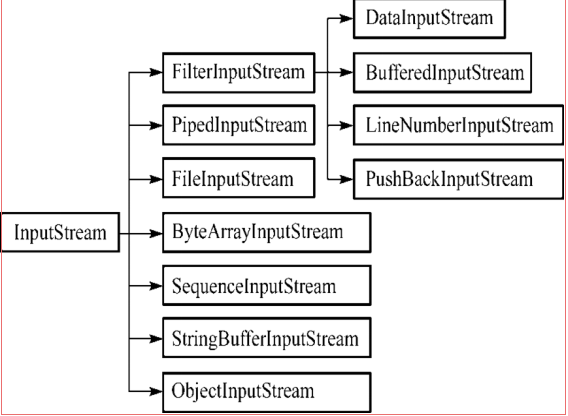
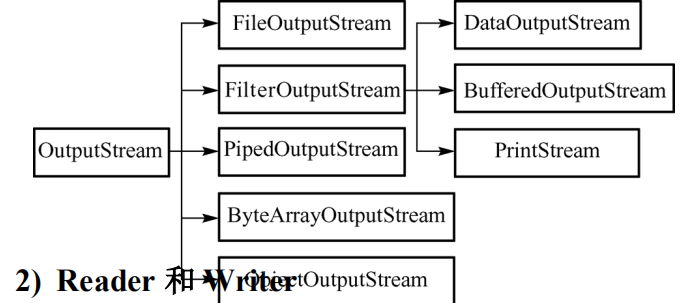
(1)InputStream 和OutputStream
- java语言中最基本的两个字节输入输出类。
- 其他所有字节输入输出流类都继承自这两个基类。
- 这两个类都是抽象类,不能创建他们的实例,只能使用他们的子类。
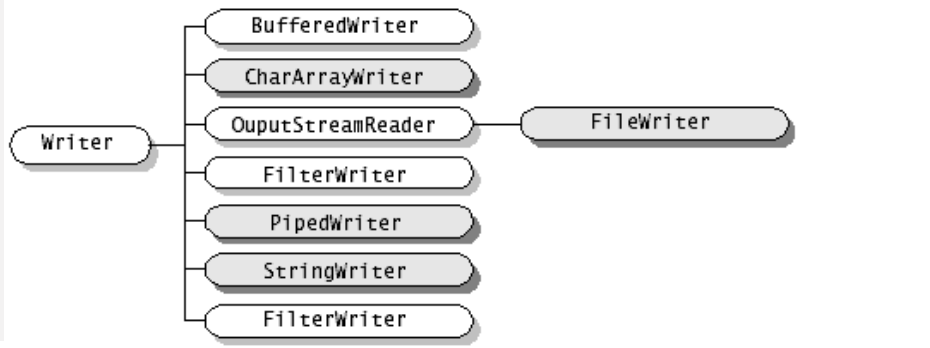
(2)Reader和Writer
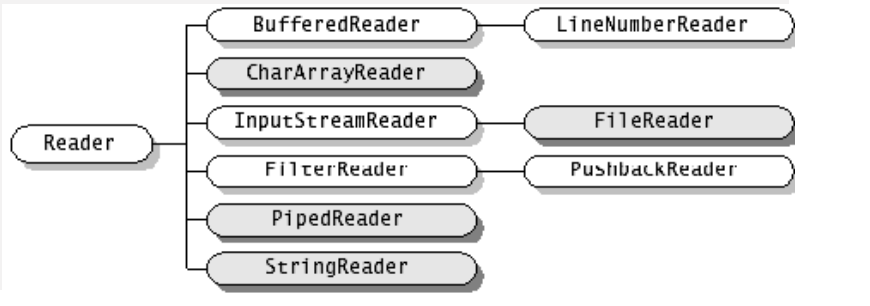
- java语言中最基本的两个字符输入输出类。
- 其他所有字符输入输出流类都继承自这两个基类。
- 这两个类都是抽象类,不能直接创建他们的实例,只能使用他们的子类。
文件字节流
3.1FileInputStream/FileOutputStream
- 使用 FileInputStream 读取文件内容
1) abstract int read( );
2) int read( byte b[ ] );
3) int read( byte b[ ], int off, int len );
4) int available( ); 返回从此输入流中可以读取(或跳过)的剩余字节数的估计值,而不会被下一次调用此输入流的方法阻塞
5) close( );
- 使用 FileOutputStream 写内容到文件
1) abstract void write( int b );
2) void write( byte b[ ] );
3) void write( byte b[ ], int off, int len );
4) void flush( );
5) void close( );
相关代码如下:


import java.io.FileInputStream;
import java.io.IOException;


public class TestInputStream2 {

    public static void main(String[] args) throws IOException {
        // TODO Auto-generated method stub
//搭桥
        FileInputStream fis = new FileInputStream("D:\text.txt");
        //(2)创建大一些的中转站
        byte[] buf=new byte[1024];
        int len=0;//用于存储每次读到的实际字节
        while((len=fis.read(buf))!=-1){
            //借助String类构造方法
            System.out.println(new String(buf,0,len));
        }
        //关闭
        fis.close();
    }

}
import java.io.File;
import java.io.FileInputStream;
import java.io.FileNotFoundException;
import java.io.IOException;


public class TestInputStream {

    public static void main(String[] args) throws IOException {
    //(1)数据源与应用程序之间搭建管道
        FileInputStream fis = new FileInputStream(new File("D:\text.txt"));
        //(2)从数据源开始向程序中读数据
        int count =fis.available();
        System.out.println(count);
        //中转站比较小,一次读一个字节
        //System.out.println(fis.read());//读取一个字节
        int buf=0;
        int i=0;
        while((buf=fis.read())!=-1){
            i++;
            System.out.print((char)buf);;
        }
        //关闭
        fis.close();
        System.out.println(i);
    }

}
import java.io.FileNotFoundException;
import java.io.FileOutputStream;
import java.io.IOException;


public class TestFileOutStream {

    public static void main(String[] args) {
        // TODO Auto-generated method stub
                 //(1)搭桥
        FileOutputStream fos=null;
        try {
            fos = new FileOutputStream("D:\text.txt",true);//true如果磁盘上有文件,而且文件中有内容,将在原来的内容的基础上进行追加。
            //(2)写数据,一次写一个字节
            //fos.write(97);
            //(2)一次写多个字节
            byte [] buf="helloworld".getBytes();
            fos.write(buf);
        } catch (FileNotFoundException e) {
            // TODO Auto-generated catch block
            e.printStackTrace();
        } catch (IOException e) {
            // TODO Auto-generated catch block
            e.printStackTrace();
        }finally{
        //关闭
        try {
            if(fos!=null){
            fos.close();
            }
        } catch (IOException e) {
            // TODO Auto-generated catch block
            e.printStackTrace();
        }
        }
    }

}
 1 import java.io.FileInputStream;
 2 import java.io.FileNotFoundException;
 3 import java.io.FileOutputStream;
 4 import java.io.IOException;
 5
 6
 7 public class TestFileCopy {
 8 public static void main(String[] args) {
 9     //数据源文件
10     FileInputStream fis=null;
11     //目的地
12     FileOutputStream fos=null;
13     try {
14         fis = new FileInputStream("D:\text.txt");
15         fos = new FileOutputStream("D:\SS.txt");
16         byte []buf=new byte[1024];
17         int len=0;
18         while((len=fis.read(buf))!=-1){
19             fos.write(buf,0,len);
20         }
21         /*int b=0;//用于存储读到的字节(中转站)
22         while((b=fis.read())!=-1){
23             fos.write(b);
24         }*/
25     } catch (FileNotFoundException e) {
26         // TODO Auto-generated catch block
27         e.printStackTrace();
28     } catch (IOException e) {
29         // TODO Auto-generated catch block
30         e.printStackTrace();
31     }finally{
32     //关闭
33     try {if(fos!=null){
34         fos.close();
35     }
36     } catch (IOException e) {
37         // TODO Auto-generated catch block
38         e.printStackTrace();
39     }
40     try {if(fis!=null){
41         fis.close();
42     }
43     } catch (IOException e) {
44         // TODO Auto-generated catch block
45         e.printStackTrace();
46     }
47     }
48 }
49 }
文件字符流
相关代码如下:
 1 import java.io.FileNotFoundException;
 2 import java.io.FileReader;
 3 import java.io.IOException;
 4
 5
 6 public class TestFileReader {
 7 public static void main(String[] args) throws IOException {
 8     //(1)搭桥
 9     FileReader reader = new FileReader("D:\text.txt");
10     //(2)读取
11     //int b=reader.read();
12     //System.out.println((char)b);
13     /*int b=0;//用于存储每次读到的字符数据的整数值
14     while((b=reader.read())!=-1){
15         System.out.print((char)b);
16     }*/
17     char []cbuf=new char[1024];
18     int len=0;
19
20     while((len=reader.read(cbuf))!=-1){
21         System.out.println(new String(cbuf,0,len));
22     }
23     //(3)关闭
24     reader.close();
25
26 }
27 }
 1 import java.io.FileWriter;
 2 import java.io.IOException;
 3
 4
 5 public class TestWriter {
 6
 7     public static void main(String[] args) throws IOException {
 8         // TODO Auto-generated method stub
 9         //创建对象
10 FileWriter writer = new FileWriter("D:\a.txt");
11 //写数据
12 try {
13     writer.write("你好吗");//写到了缓冲区中,
14     writer.flush();//如果没有写close就要加上这行
15 } catch (IOException e) {
16     // TODO Auto-generated catch block
17     e.printStackTrace();
18 }finally{
19     if(writer!=null)
20     {
21     try {
22         writer.close();
23     } catch (IOException e) {
24         // TODO Auto-generated catch block
25         e.printStackTrace();
26     }
27     }
28 }
29
30
31     }
32
33 }
缓冲字节流_缓冲字符流
缓冲字节流
BufferedInputStream和BufferedOutputStream
FieInputStream和FileOutputStream是节点流
BufferedInputStream和BufferedOutputStream是处理流(包装流)
- (1)读文件和写文件都使用了缓冲区,减少了读写次数,从而提高了效率。
- (2)当创建这两个缓冲流的对象时,会创建了内部缓冲数组,缺省使用32字节大小的缓冲区。
- (3)当读取数据时,数据按块读入缓冲区,其后的读操作则直接访问缓冲区。
- (4)当写入数据时,首先写入缓冲区,当缓冲区满时,其中的数据写入所连接的输出流。使用方法flush()可以强制将缓冲区的内容全部写入输出流。
- (5)关闭的顺序和打开流的顺序相反,只要关闭高层流即可,关闭高层流其实关闭的底层节点流。
- (6)Flush的使用:手动将buffer中内容写入文件。
 1 package buffered;
 2
 3 import java.io.BufferedInputStream;
 4 import java.io.BufferedOutputStream;
 5 import java.io.FileInputStream;
 6 import java.io.FileOutputStream;
 7 import java.io.IOException;
 8
 9 public class TestCopy {
10
11     public static void main(String[] args) throws IOException{
12         //(1)数据源
13         FileInputStream fis = new FileInputStream("F:\wps\jdk文档\jdk api 1.8.CHM");
14         //(2)目的地
15       FileOutputStream fos = new FileOutputStream("D:\jdk api 1.8.CHM");
16       /**
17        * 使用缓冲流
18        * */
19       BufferedInputStream bis = new BufferedInputStream(fis);
20       BufferedOutputStream bos = new BufferedOutputStream(fos);
21         //(3)读数据和写数据
22       long start=System.currentTimeMillis();
23       byte []buf=new byte[1000];
24       int len=0;
25       while((len=bis.read(buf))!=-1){
26           bos.write(buf,0,len);
27           bos.flush();
28       }
29       long end=System.currentTimeMillis();
30       System.out.println("文件复制一共使用了:"+(end-start)+"毫秒");
31         //(4)关闭
32       bos.close();
33       bis.close();
34     }
35
36 }
缓冲字符流
BufferedReader
readLine()读取一个文本行的数据。
BufferedWriter
newLine() 写入一个行分隔符。
使用缓冲字符流是复制文本文件常用的方式。
 1 package buffered;
 2
 3 import java.io.BufferedReader;
 4 import java.io.BufferedWriter;
 5 import java.io.FileNotFoundException;
 6 import java.io.FileReader;
 7 import java.io.FileWriter;
 8 import java.io.IOException;
 9
10 public class TestBuffered {
11 public static void main(String[] args)  {
12     //缓冲字符流
13     BufferedReader br=null;
14     BufferedWriter bw=null;
15     try {
16         br = new BufferedReader(new FileReader("D:\a.txt"));
17         bw = new BufferedWriter(new FileWriter("D:\copya.txt"));
18         String line=null;
19         while((line=br.readLine())!=null){
20             bw.write(line);
21             bw.newLine();
22             bw.flush();
23         }
24     } catch (FileNotFoundException e) {
25         // TODO Auto-generated catch block
26         e.printStackTrace();
27     } catch (IOException e) {
28         // TODO Auto-generated catch block
29         e.printStackTrace();
30     }finally{
31     if(bw!=null){
32         try {
33             bw.close();
34         } catch (IOException e) {
35             // TODO Auto-generated catch block
36             e.printStackTrace();
37         }
38
39     }
40     if(br!=null){
41         try {
42             br.close();
43         } catch (IOException e) {
44             // TODO Auto-generated catch block
45             e.printStackTrace();
46         }
47     }
48     }
49 }
50 }
转换流
inputStreamReader和OutputStreamWriter
用于将字节流转换成字符流,字符流与字节流之间的桥梁InputStreamReader的作用是把InputStream转换成Reader。OutputStreamWriter的作用是把OutputStream转换成Writer存在将字节流转换成字符流,因为字符流操作文本更简单。不存在把字符流转换成字节流,因为没有必要。System.in代表标准输入,即键盘输入,是InputStream的实例。
 1 package convert;
 2
 3 import java.io.BufferedReader;
 4 import java.io.BufferedWriter;
 5 import java.io.FileNotFoundException;
 6 import java.io.FileOutputStream;
 7 import java.io.IOException;
 8 import java.io.InputStream;
 9 import java.io.InputStreamReader;
10 import java.io.OutputStreamWriter;
11 import java.io.UnsupportedEncodingException;
12
13 public class Test {
14
15     public static void main(String[] args) {
16         // TODO Auto-generated method stub
17 //任务需求,从键盘获取数据,写入磁盘文件
18
19
20         BufferedReader br=null;
21
22         BufferedWriter bw=null;
23         try {
24             //(1)数据源是标准的输入设备,键盘System.in
25             InputStream is=System.in;
26             //(2)需要使用转换流,转换成字符流
27             InputStreamReader isr =new InputStreamReader(is,"gbk");
28             //(3)提高读取效率
29             br = new BufferedReader(isr);
30             //(4)提高写入效率
31             bw = new BufferedWriter(new OutputStreamWriter(new FileOutputStream("D:\system.txt"),"gbk"));
32             //(5)写入磁盘文件
33             String line=null;//用于存储读到字符串
34             while(!"over".equals((line=br.readLine()))){
35                 bw.write(line);
36                 bw.newLine();
37                 bw.flush();
38             }
39         } catch (UnsupportedEncodingException e) {
40             // TODO Auto-generated catch block
41             e.printStackTrace();
42         } catch (FileNotFoundException e) {
43             // TODO Auto-generated catch block
44             e.printStackTrace();
45         } catch (IOException e) {
46             // TODO Auto-generated catch block
47             e.printStackTrace();
48         }finally{
49         //(6)关闭
50             if(bw!=null){
51         try {
52             bw.close();
53         } catch (IOException e) {
54             // TODO Auto-generated catch block
55             e.printStackTrace();
56         }
57         }
58             if(br!=null){
59         try {
60             br.close();
61         } catch (IOException e) {
62             // TODO Auto-generated catch block
63             e.printStackTrace();
64         }
65             }
66     }
67     }
68
69 }
打印流
PrintStream
- (1)PrintStream提供了一系列的print()和println(),可以实现将基本数据类型格式化成字符串输出。对象类型将先调用toString(),然后输出该方法返回的字符串。
- (2)System.out就是PrintStream的一个实例,代表显示器
- (3)System.err也是PrintStream的一个实例,代表显示器
- (4)PrintStream的输出功能非常强大,通常需要输出文本内容,都可以将输出流包装成PrintStream后进行输出。
- (5)PrintStream的方法都不抛出IOException
PrintWriter
- (1)PrintStream的对应字符流,功能相同,方法对应。
- (2)PrintWriter的方法也不抛出IOException
- (3)复制文件时可以使用PrintWriter代替BufferedWriter完成,更简单
 1 package print;
 2
 3 import java.io.FileNotFoundException;
 4 import java.io.FileOutputStream;
 5 import java.io.PrintStream;
 6 import java.io.PrintWriter;
 7 import java.sql.Date;
 8 /**
 9  * 打印流虽然功能强大,但是打印到目的地后,会失去原来的类型,都成为字符型。比如19 会变成‘1’‘9’,需要转换
10  * @author Administrator
11  *
12  */
13 public class Test {
14 public static void main(String[] args) throws FileNotFoundException {
15     //PrintStream ps=System.out;//显示器
16     //PrintStream ps=System.err;
17     //PrintStream ps=new PrintStream(new FileOutputStream("D:\print.txt"));
18     PrintWriter ps=new PrintWriter(new FileOutputStream("D:\print1.txt"));
19     ps.println("helloworld");
20     ps.println(true);
21     ps.println(19);
22     ps.println(98.5);
23     ps.println(new Date(1000).toGMTString());
24     ps.flush();//本来没有字符流,字符流是由字节流在缓存中形成的,而不会到目的地,需要刷新
25     ps.close();
26
27 }
28 }
数据流
DataInputStream和DataOutputStream
- (1)提供了可以存取所有Java基础类型数据(如:int ,double等)和String的方法。
- (2)处理流,只针对字节流,二进制文件
- (3)输入流链和输出流链
- (4)注意:只要关闭上层流即可

 1 package Data;
 2
 3 import java.io.BufferedInputStream;
 4 import java.io.BufferedOutputStream;
 5 import java.io.DataInputStream;
 6 import java.io.DataOutputStream;
 7 import java.io.FileInputStream;
 8 import java.io.FileOutputStream;
 9 import java.io.IOException;
10
11 public class Test {
12     public static void main(String[] args) throws IOException {
13         //write();
14         read();
15     }
16     //读数据的方法
17     public static void read() throws IOException{
18         //(1)数据源
19         /*FileInputStream fis=new FileInputStream("E:\data.txt");
20         //(2)提高读取效率
21         BufferedInputStream bis=new BufferedInputStream(fis);
22         //(3)处理java的基本数据类型和字符串
23         DataInputStream dis=new DataInputStream(bis);*/
24         DataInputStream dis=new DataInputStream(new BufferedInputStream(new FileInputStream("E:\data.txt")));
25         //(4)读数据  --(读数据的顺序要与写数据的顺序完全一致)
26         System.out.println(dis.readInt());
27         System.out.println(dis.readDouble());
28         System.out.println(dis.readBoolean());
29         System.out.println(dis.readChar());
30         System.out.println(dis.readUTF());
31         //关闭
32         dis.close();
33
34     }
35     public static void write() throws IOException{
36         //(1)目的地
37         /*FileOutputStream fos=new FileOutputStream("E:\data.txt");
38         //(2)缓冲流提高写入效率
39         BufferedOutputStream bos=new BufferedOutputStream(fos);
40         //(3)数据流,增加对java基本数据类型和String的处理
41         DataOutputStream dos=new DataOutputStream(bos);*/
42         DataOutputStream dos=new DataOutputStream(new BufferedOutputStream(new FileOutputStream("E:\data.txt")));
43         //(4)写入数据
44         dos.writeInt(98);
45         dos.writeDouble(98.5);
46         dos.writeBoolean(true);
47         dos.writeChar('a');
48         dos.writeUTF("helloworld");
49         //(5)关闭流
50         if(dos!=null){
51             dos.close();
52         }
53     }
54 }
对象流
对象序列化(Serialization)
- ObjectOutputStream->写对象->序列化,将对象以二进制/字节的形式写到文件
- ObjectInputStream->读对象->反序列化
- 将Java对象转换成字节序列(IO字节流)
对象反序列化(DeSerialization)
- 从字节序列化中恢复Java对象
为什么序列化
- 序列化以后的对象可以保存到磁盘上,也可以在网络上传输,使得不同的计算机可以共享对象。(序列化的字节序列是平台无关的)
对象序列化的条件
- 只有实现了Serializable接口的类的对象才可以被序列化。Serializable接口中没有任何的方法,实现该接口的类不需要实现额外的方法。
- 如果对象的属性是对象,属性对应类也必须实现Serializable接口。
如何实现序列化
- 创建ObjectOutputStream对象
- 调用writeObject()输出对象
1 OutputStream fos = new FileOutputStream(new File("d:/java6.txt"));
2 ObjectOutputStream oos = new ObjectOutputStream(fos);
3 oos.writeObject(stu);
4 oos.close();
如何实现反序列化
- 创建ObjectInputStream对象
- 调用readObject()读取对象
1 InputStream fis =new FileInputStream(new File("d:/java5.txt"));
2
3 ObjectInputStream ois=new ObjectInputStream(fis);
4
5 Student stu=(Student) ois.readObject();
6
7 System.out.println(stu.getAge()+"   "+stu.getScore());
package com.bjsxt.object;

import java.io.Serializable;

public class Person implements Serializable {//具备一个能力,可序列化与反序列化的能力
    private String name;
    private int age;
    public Person() {
        super();
    }
    public Person(String name, int age) {
        super();
        this.name = name;
        this.age = age;
    }
    @Override
    public String toString() {
        return "Person [name=" + name + ", age=" + age + "]";
    }
    public String getName() {
        return name;
    }
    public void setName(String name) {
        this.name = name;
    }
    public int getAge() {
        return age;
    }
    public void setAge(int age) {
        this.age = age;
    }
}
package com.bjsxt.object;

import java.io.FileInputStream;
import java.io.FileNotFoundException;
import java.io.FileOutputStream;
import java.io.IOException;
import java.io.ObjectInputStream;
import java.io.ObjectOutputStream;

public class Test {
    public static void main(String[] args) {
        //write();
        read();
    }
    public static void read(){
        //(1)创建对象流对象
        ObjectInputStream ois=null;
        try {

            ois=new ObjectInputStream(new FileInputStream("E:\object.txt"));
            //(2)读对象
            System.out.println(ois.readInt());
            System.out.println(ois.readUTF());
            Person p=(Person) ois.readObject();
            System.out.println(p);
        } catch (FileNotFoundException e) {
            // TODO Auto-generated catch block
            e.printStackTrace();
        } catch (ClassNotFoundException e) {
            // TODO Auto-generated catch block
            e.printStackTrace();
        } catch (IOException e) {
            // TODO Auto-generated catch block
            e.printStackTrace();
        }finally{
            //(3)关闭流
            if(ois!=null){
                try {
                    ois.close();
                } catch (IOException e) {
                    // TODO Auto-generated catch block
                    e.printStackTrace();
                }
            }
    }
    }
    //写对象的方法
    public static void write(){
        //(1)创建对象流对象
        ObjectOutputStream oos=null;
        try {
            oos = new ObjectOutputStream(new FileOutputStream("E:\object.txt"));
            //(2)写对象
            oos.writeInt(98);
            oos.writeUTF("中国梦");
            oos.writeObject(new Person("marry", 20));
        } catch (FileNotFoundException e) {
            // TODO Auto-generated catch block
            e.printStackTrace();
        } catch (IOException e) {
            // TODO Auto-generated catch block
            e.printStackTrace();
        }finally{
            //(3)关闭流
            if(oos!=null){
                try {
                    oos.close();
                } catch (IOException e) {
                    // TODO Auto-generated catch block
                    e.printStackTrace();
                }
            }
        }

    }
}
11.1 序列化与反序列化
1) 序列化能保存的元素
- a) 只能保存对象的非静态成员变量
- b) 不能保存任何成员方法和静态的成员变量
- c) 不保存 transient 成员变量
- d) 如果一个对象的成员变量是一个对象,这个对象的成员变量也会保存
- e) 串行化保存的只是变量的值,对于变量的任何修饰符, 都不能保存
2) 使用对象流把一个对象写到文件时不仅保证该对象是序列化的,而且该对象的成员对象也必须是可序列化的。
3) 如果一个可序列化的对象包含对某个不可序列化的对象的引用,那么整个序列化操作将会失败,并且会抛出一个NotSerializableException。我们可以将这个引用标记为transient,那么对象仍然可以序列化。
11.2 对象序列化注意事项
1) 同一个对象多次序列化的处理
- a) 所有保存到磁盘中的对象都有一个序列化编号
- b) 序列化一个对象中,首先检查该对象是否已经序列化过
- c) 如果没有,进行序列化
- d) 如果已经序列化,将不再重新序列化,而是输出编号即可
2) 如果不希望某些属性(敏感)序列化,或不希望出现递归序列
- a) 为属性添加 transient 关键字(完成排除在序列化之外)
- b) 自定义序列化(不仅可以决定哪些属性不参与序列化, 还可以定义属性具体如何序列化)
3) 序列化版本不兼容
- a) 修改了实例属性后,会影响版本号,从而导致反序列化不成功
- b) 解 决 方 案 : 为 Java 对 象 指 定 序 列 化 版 本 号serialVersionUID
package com.bjsxt.object;

import java.io.Serializable;
import java.util.ArrayList;

public class Classes implements Serializable {
    /**
     *
     */
    private static final long serialVersionUID = 8407410133605121812L;
    private String className;//班级名称
    private ArrayList<Student> al;
    private String address;
    public Classes() {
        super();
    }
    public Classes(String className, ArrayList<Student> al) {
        super();
        this.className = className;
        this.al = al;
    }
    public String getClassName() {
        return className;
    }
    public void setClassName(String className) {
        this.className = className;
    }
    public ArrayList<Student> getAl() {
        return al;
    }
    public void setAl(ArrayList<Student> al) {
        this.al = al;
    }
}
package com.bjsxt.object;

import java.io.Serializable;

public class Student implements Serializable  {
    /**
     *
     */
    private static final long serialVersionUID = -4502633718082654465L;
    private String name;
    private int age;
    public static String schoolName;//学校名称
    private transient String pwd; //属性的值将不再被序列化
    public Student() {
        super();
    }
    public Student(String name, int age, String pwd) {
        super();
        this.name = name;
        this.age = age;
        this.pwd = pwd;
    }
    public String getPwd() {
        return pwd;
    }
    public void setPwd(String pwd) {
        this.pwd = pwd;
    }
    public String getName() {
        return name;
    }
    public void setName(String name) {
        this.name = name;
    }
    public int getAge() {
        return age;
    }
    public void setAge(int age) {
        this.age = age;
    }
    @Override
    public String toString() {
        return "Student [name=" + name + ", age=" + age + ", pwd=" + pwd + "]"+"schoolName="+schoolName;
    }

}
 1 package com.bjsxt.object;
 2
 3 import java.io.FileInputStream;
 4 import java.io.FileNotFoundException;
 5 import java.io.FileOutputStream;
 6 import java.io.IOException;
 7 import java.io.ObjectInputStream;
 8 import java.io.ObjectOutputStream;
 9
10 public class Test {
11     public static void main(String[] args) {
12         //调用写对象的方法
13         //write();
14         //调用读对象的方法
15         read();
16     }
17     public static void write(){
18         ObjectOutputStream oos=null;
19         try {
20             oos=new ObjectOutputStream(new FileOutputStream("E:\student.txt"));
21             Student stu=new Student("marry", 20, "888888");
22             Student.schoolName="JN校区";
23             oos.writeObject(stu);
24         } catch (FileNotFoundException e) {
25             // TODO Auto-generated catch block
26             e.printStackTrace();
27         } catch (IOException e) {
28             // TODO Auto-generated catch block
29             e.printStackTrace();
30         }finally{
31             //关闭
32             if(oos!=null){
33                 try {
34                     oos.close();
35                 } catch (IOException e) {
36                     // TODO Auto-generated catch block
37                     e.printStackTrace();
38                 }
39             }
40         }
41     }
42     public static void read(){
43         ObjectInputStream ois=null;
44         try {
45             ois=new ObjectInputStream(new FileInputStream("E:\student.txt"));
46             Student stu=(Student) ois.readObject();
47             System.out.println(stu);
48         } catch (FileNotFoundException e) {
49             // TODO Auto-generated catch block
50             e.printStackTrace();
51         } catch (ClassNotFoundException e) {
52             // TODO Auto-generated catch block
53             e.printStackTrace();
54         } catch (IOException e) {
55             // TODO Auto-generated catch block
56             e.printStackTrace();
57         }finally{
58             //关闭流
59             if(ois!=null){
60                 try {
61                     ois.close();
62                 } catch (IOException e) {
63                     // TODO Auto-generated catch block
64                     e.printStackTrace();
65                 }
66             }
67         }
68     }
69 }
package com.bjsxt.object;

import java.io.FileInputStream;
import java.io.FileNotFoundException;
import java.io.FileOutputStream;
import java.io.IOException;
import java.io.ObjectInputStream;
import java.io.ObjectOutputStream;
import java.util.ArrayList;

public class TestClasses {
    public static void write(){
        //创建班级对象
                ArrayList<Student> al=new ArrayList<Student>();
                al.add(new Student("marry",20,"888888"));
                al.add(new Student("lili",22,"123456"));
                al.add(new Student("jack",30,"654321"));

                Classes cl=new Classes("jn1001", al);

                //创建对象输出流
                ObjectOutputStream oos=null;
                try {
                    oos=new ObjectOutputStream(new FileOutputStream("E:\classes.txt"));
                    oos.writeObject(cl);
                } catch (FileNotFoundException e) {
                    // TODO Auto-generated catch block
                    e.printStackTrace();
                } catch (IOException e) {
                    // TODO Auto-generated catch block
                    e.printStackTrace();
                }finally{
                    //关闭流
                    if(oos!=null){
                        try {
                            oos.close();
                        } catch (IOException e) {
                            // TODO Auto-generated catch block
                            e.printStackTrace();
                        }
                    }
                }
    }
    public static void read(){
        ObjectInputStream ois=null;
        try {
            ois=new ObjectInputStream(new FileInputStream("E:\classes.txt"));
            Classes cl=(Classes) ois.readObject();
            System.out.println(cl.getClassName()+"	"+cl.getAl());
        } catch (FileNotFoundException e) {
            // TODO Auto-generated catch block
            e.printStackTrace();
        } catch (ClassNotFoundException e) {
            // TODO Auto-generated catch block
            e.printStackTrace();
        } catch (IOException e) {
            // TODO Auto-generated catch block
            e.printStackTrace();
        }finally{
            //关闭流
            if(ois!=null){
                try {
                    ois.close();
                } catch (IOException e) {
                    // TODO Auto-generated catch block
                    e.printStackTrace();
                }
            }
        }
    }
    public static void main(String[] args) {
        //write();
        read();
    }
}
12.文件夹的复制
12.1 复制文件夹
字节流,字符流
- BufferedInputStream,BufferedOutputStream
- FileInputStream,FileOutputStream
问题分解
(1) 复制一个文件
(2) 指定目录下的所有文件
(3) 指定目录下的所有文件及子目录下的所有文件
package com.bjsxt.copy;

import java.io.BufferedInputStream;
import java.io.BufferedOutputStream;
import java.io.File;
import java.io.FileInputStream;
import java.io.FileNotFoundException;
import java.io.FileOutputStream;
import java.io.IOException;

public class TestCopy {
    public static void main(String[] args) {
        /*File srcFile=new File("D:\180416\五一作业.docx");
        File targetFile=new File("E:\五一作业.docx");
        //调用复制文件的方法
        copyFile(srcFile, targetFile);*/
        File srcDir=new File("D:\180416");
        File targetDir=new File("E:\180416");
        //调用复制指定目录下所有文件的方法
        copyDir(srcDir, targetDir);
    }
    public static void copyDir(File srcDir,File targetDir){
        if(!targetDir.exists()){
            targetDir.mkdir();//如果目的地的目录不存在,则需要使用File类的方法进行创建目录
        }
        File []files=srcDir.listFiles(); //获取指定目录下的所有File对象
        for (File file : files) {
            if (file.isFile()) {
                 //复制  srcDir -->D:\180416  拼接  D:\180416\XXXX.doc文件
                //    targetDir-->E:\180416 拼接 E:\180416\XXXX.doc文件
                copyFile(new File(srcDir+"\"+file.getName()), new File(targetDir+"\"+file.getName()));
            }else{
                //继续调用该方法,使用递归实现
                copyDir(new File(srcDir+"\"+file.getName()), new File(targetDir+"\"+file.getName()));
            }
        }
    }
    public static void copyFile(File srcFile,File targetFile){
        //(1)提高读取效率,从数据源
        BufferedInputStream bis=null;
        //(2)提高写入效率,写到目的地
        BufferedOutputStream bos=null;
        try {
            bis = new BufferedInputStream(new FileInputStream(srcFile));

            bos = new BufferedOutputStream(new FileOutputStream(targetFile));
            //(3)边读边写
            byte [] buf=new byte[1024];//中转站
            int len=0;//用于存储读到的字节的个数
            while((len=bis.read(buf))!=-1){
                bos.write(buf,0,len);
            }
        } catch (FileNotFoundException e) {
            // TODO Auto-generated catch block
            e.printStackTrace();
        } catch (IOException e) {
            // TODO Auto-generated catch block
            e.printStackTrace();
        }finally{
        //(4)关闭
            if(bos!=null){
                try {
                    bos.close();
                } catch (IOException e) {
                    // TODO Auto-generated catch block
                    e.printStackTrace();
                }
            }
            if(bis!=null){
                try {
                    bis.close();
                } catch (IOException e) {
                    // TODO Auto-generated catch block
                    e.printStackTrace();
                }
            }

        }
    }
}
13.字节数组流
13.1ByteArrayInutStream 和 ByteArrayOutputStream
- 1) 数据源或目的地为:字节数组
- 2) 只有字节流,没有字符流
- 3) 节点流
package com.bjsxt.array;

import java.io.ByteArrayInputStream;
import java.io.ByteArrayOutputStream;
import java.io.DataOutputStream;
import java.io.IOException;
import java.io.ObjectInputStream;
import java.io.ObjectOutputStream;
import java.util.Date;

public class Test {
    public static void main(String[] args) {
        byte [] buf=write();//调用写对象的方法
        //调用读对象的方法
        read(buf);
    }
    public static byte[] write(){
        //创建字节数组流对象
        ByteArrayOutputStream baos=null;
        ObjectOutputStream oos=null;

        try {
            baos=new ByteArrayOutputStream();//创建字节数组流对象,目的地是字节数组,底层创建一个长度数为32的字节数组
            oos=new ObjectOutputStream(baos);
            oos.writeInt(98);
            oos.writeDouble(98.5);
            oos.writeChar('a');
            oos.writeBoolean(false);
            oos.writeObject(new Date(1000));
        } catch (IOException e) {
            // TODO Auto-generated catch block
            e.printStackTrace();
        }finally{
            //关闭流
            if (oos!=null) {
                try {
                    oos.close();
                } catch (IOException e) {
                    // TODO Auto-generated catch block
                    e.printStackTrace();
                }
            }
        }

        return baos.toByteArray();
    }
    public static void read(byte [] buf){
        ByteArrayInputStream bais=null;
        ObjectInputStream ois=null;
        //创建对象
        try {
            bais=new ByteArrayInputStream(buf); //数据源是byte类型的数组
            ois=new ObjectInputStream(bais);

            //读数据
            System.out.println(ois.readInt());
            System.out.println(ois.readDouble());
            System.out.println(ois.readChar());
            System.out.println(ois.readBoolean());
            System.out.println(ois.readObject());
        } catch (ClassNotFoundException e) {
            // TODO Auto-generated catch block
            e.printStackTrace();
        } catch (IOException e) {
            // TODO Auto-generated catch block
            e.printStackTrace();
        }finally{

            //关闭流
            if(ois!=null){
                try {
                    ois.close();
                } catch (IOException e) {
                    // TODO Auto-generated catch block
                    e.printStackTrace();
                }
            }
        }
    }
}
14.设计模式_装饰器模式
14.1 装饰器模式 Decorator
职责:动态的为一个对象增加新的功能
- 装饰模式是一种用于代替继承的技术,无须通过继承增加子类就能扩展对象的新功能。使用对象的关联关系代替继承关系,更加灵活,同时避免类型体系的快速膨胀。
实现细节:
- (1) 抽象构件角色 ICar
- (2) 具体的构件角色 Car
- (3) 装饰器角色 SuperCar
- (4) 具体的装饰器角色 FlyCar、WaterCar、AICar
优点:
- 1) 扩展对象功能,比继承灵活,不会导致类个数急剧增加
- 2) 可以对一个对象进行多次装饰,创建出不同行为的组合,
- 3) 具体构建类和具体装饰类可以独立变化,用户可以根据需要自己增加新的具体构件子类和具体装饰子类
缺点
- 1) 产生很多小对象。大量小对象占据内存,一定程序上影响性能.
- 2) 装饰模式易于出错,调试排查比较麻烦
IO 流实现细节
- (1)抽象构件角色 InputStream,OutputStream,Reader,Writer
- (2)具体构件角色 FileInputStream,FileOutputStream
- (3)装饰器角色 FilterInputStream,FilterOutputStream持有一个抽象构件的引用
- (4)具体装饰角色 BufferedInputStream,BufferedOutputStream 等
package com.bjsxt.pattern;

public class AICar extends SuperCar{

    public AICar(ICar car) {
        super(car);
        // TODO Auto-generated constructor stub
    }
    @Override
    public void move() {
        // TODO Auto-generated method stub
        super.move();
        this.autoDrive();
    }
    public void autoDrive(){
        System.out.println("可以自动行驶");
    }
}
package com.bjsxt.pattern;

public class Car implements ICar {
    public void move() {
        System.out.println("汽车可以在陆地上行驶");
    }
}
 1 package com.bjsxt.pattern;
 2
 3 public class FlyCar extends SuperCar {
 4
 5     public FlyCar(ICar car) {
 6         super(car);
 7
 8     }
 9     //重写move()方法
10     @Override
11     public void move() {
12         // TODO Auto-generated method stub
13         super.move();  //调用父类的行驶方法
14
15         //调用飞行的方法
16         this.fly();
17     }
18     public void fly(){
19         System.out.println("汽车可以飞行,因为有翅膀");
20     }
21 }
package com.bjsxt.pattern;

public interface ICar {
    void move();//行驶
}
package com.bjsxt.pattern;

public class SuperCar implements ICar {
    private ICar car;
    public SuperCar(ICar car){
        this.car=car;
    }
    @Override
    public void move() {
        car.move();
    }

}
package com.bjsxt.pattern;

import java.io.BufferedInputStream;
import java.io.DataInputStream;
import java.io.FileInputStream;
import java.io.FileNotFoundException;

public class Test {
    public static void main(String[] args) {
        ICar car=new Car();
        car.move();
        System.out.println("
为汽车增加新的功能");
        FlyCar fly=new FlyCar(car);
        fly.move();

        System.out.println("
再为汽车增加自动驾驶的功能");
        AICar ai=new AICar(fly);
        ai.move();

        System.out.println("
以上代码可以简写为");
        AICar ai2=new AICar(new FlyCar(new Car()));
        ai2.move();

        System.out.println("各种组合");
        WaterCar water=new WaterCar(new FlyCar(new AICar(new Car())));
        water.move();

        try {
            BufferedInputStream bis=new BufferedInputStream(new DataInputStream(new FileInputStream("D:\a.txt")));
        } catch (FileNotFoundException e) {
            // TODO Auto-generated catch block
            e.printStackTrace();
        }

    }
}
package com.bjsxt.pattern;

public class WaterCar extends SuperCar {

    public WaterCar(ICar car) {
        super(car);
        // TODO Auto-generated constructor stub
    }
    @Override
    public void move() {
        // TODO Auto-generated method stub
        super.move();
        this.water();
    }
    public void water(){
        System.out.println("汽车可以潜水");
    }
}
15.IO 流体系总结
15.1IO 流整体架构体系
- (1) 字节流 :InputStream,OutputStream
- (2) 字符流:Reader ,Writer
- (3) 数据流:DataInputStream,DataOutputStream
- (4) 对象流:ObjectInputStream,ObjectOutputStream
- (5) 缓冲流:BufferedInputStream,BufferedOutputStream BufferedReader,BufferedWriter
- (6) 转换流:InputStreamReader,OutputStreamWriter
- (7) 数组流: ByteArrayInputStream,ByteArrayOutputStream
- (8) 打印流:PrintStream,PrintWriter