如果需要使用滑块验证:vue登录时人机验证-滑块验证
随机验证码
效果图:
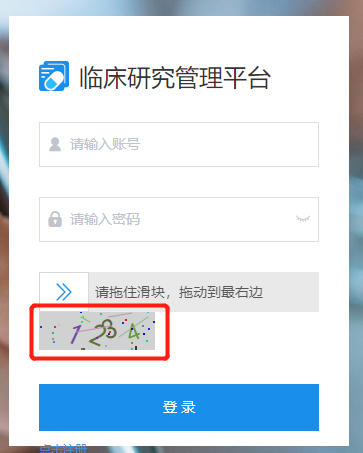
实现步骤:
1、封装Identity组件
<template>
  <div class="s-canvas">
    <canvas id="s-canvas" :width="contentWidth" :height="contentHeight" style="cursor: pointer;"></canvas>
  </div>
</template>
<script>
export default {
  name: 'SIdentify',
  props: {
    identifyCode: {
      //默认注册码
      type: String,
      default: '1234'
    },
    fontSizeMin: {
      // 字体最小值
      type: Number,
      default: 25
    },
    fontSizeMax: {
      // 字体最大值
      type: Number,
      default: 35
    },
    backgroundColorMin: {
      // 验证码图片背景色最小值
      type: Number,
      default: 200
    },
    backgroundColorMax: {
      // 验证码图片背景色最大值
      type: Number,
      default: 220
    },
    dotColorMin: {
      // 背景干扰点最小值
      type: Number,
      default: 60
    },
    dotColorMax: {
      // 背景干扰点最大值
      type: Number,
      default: 120
    },
    contentWidth: {
      //容器宽度
      type: Number,
      default: 116
    },
    contentHeight: {
      //容器高度
      type: Number,
      default: 38
    }
  },
  methods: {
    // 生成一个随机数
    randomNum(min, max) {
      return Math.floor(Math.random() * (max - min) + min)
    },
    // 生成一个随机的颜色
    randomColor(min, max) {
      let r = this.randomNum(min, max)
      let g = this.randomNum(min, max)
      let b = this.randomNum(min, max)
      return 'rgb(' + r + ',' + g + ',' + b + ')'
    },
    drawPic() {
      let canvas = document.getElementById('s-canvas')
      let ctx = canvas.getContext('2d')
      ctx.textBaseline = 'bottom'
      // 绘制背景
      ctx.fillStyle = this.randomColor(this.backgroundColorMin, this.backgroundColorMax)
      ctx.fillRect(0, 0, this.contentWidth, this.contentHeight)
      // 绘制文字
      for (let i = 0; i < this.identifyCode.length; i++) {
        this.drawText(ctx, this.identifyCode[i], i)
      }
      this.drawLine(ctx)
      this.drawDot(ctx)
    },
    drawText(ctx, txt, i) {
      ctx.fillStyle = this.randomColor(50, 160) //随机生成字体颜色
      ctx.font = this.randomNum(this.fontSizeMin, this.fontSizeMax) + 'px SimHei' //随机生成字体大小
      let x = (i + 1) * (this.contentWidth / (this.identifyCode.length + 1))
      let y = this.randomNum(this.fontSizeMax, this.contentHeight - 5)
      var deg = this.randomNum(-30, 30)
      // 修改坐标原点和旋转角度
      ctx.translate(x, y)
      ctx.rotate((deg * Math.PI) / 180)
      ctx.fillText(txt, 0, 0)
      // 恢复坐标原点和旋转角度
      ctx.rotate((-deg * Math.PI) / 180)
      ctx.translate(-x, -y)
    },
    drawLine(ctx) {
      // 绘制干扰线
      for (let i = 0; i < 4; i++) {
        ctx.strokeStyle = this.randomColor(100, 200)
        ctx.beginPath()
        ctx.moveTo(this.randomNum(0, this.contentWidth), this.randomNum(0, this.contentHeight))
        ctx.lineTo(this.randomNum(0, this.contentWidth), this.randomNum(0, this.contentHeight))
        ctx.stroke()
      }
    },
    drawDot(ctx) {
      // 绘制干扰点
      for (let i = 0; i < 30; i++) {
        ctx.fillStyle = this.randomColor(0, 255)
        ctx.beginPath()
        ctx.arc(this.randomNum(0, this.contentWidth), this.randomNum(0, this.contentHeight), 1, 0, 2 * Math.PI)
        ctx.fill()
      }
    }
  },
  watch: {
    identifyCode() {
      this.drawPic()
    }
  },
  mounted() {
    this.drawPic()
  }
}
</script>
2、Login.vue中引入并注册
  import Identify from './components/Identify'

  components: { Identify }
3、页面中添加Identity组件
          <div @click="handleRefreshCode()">
            <Identify :identifyCode="identifyCode"></Identify>
          </div>
4、data中添加两个参数
      identifyCode: '1234', // 验证码初始值
      identifyCodes: '1234567890' // 验证码的随机取值范围
5、methods中添加handleRefreshCode()方法
    // 刷新验证码
    handleRefreshCode() {
      this.identifyCode = ''
      this.makeCode(this.identifyCodes, 4)
    },
    // 生成一个随机整数  randomNum(0, 10) 0 到 10 的随机整数, 包含 0 和 10
    randomNum(min, max) {
      max = max + 1
      return Math.floor(Math.random() * (max - min) + min)
    },
    // 随机生成验证码字符串
    makeCode(data, len) {
      for (let i = 0; i < len; i++) {
        this.identifyCode += data[this.randomNum(0, data.length - 1)]
      }
    },
6、当前默认初始验证码为“1234”,如果初始状态需要随机验证码在页面挂载后触发handleRefreshCode()函数即可
  mounted(){
    this.handleRefreshCode()
  },