最近在为公司的分布式服务框架做支持异步调用的开发,这种新特性的上线需要进行各种严格的测试。在并发性能测试时,性能一直非常差,而且非常的不稳定。经过不断的分析调优,发现Socket通信和多线程异步回调存在较为严重的性能问题。经过多方优化,性能终于达标。下面是原版本、支持异步最初版本和优化后版本的性能比较。差异还是非常巨大的。另外说明一下,总耗时是指10000次请求累计执行时间。
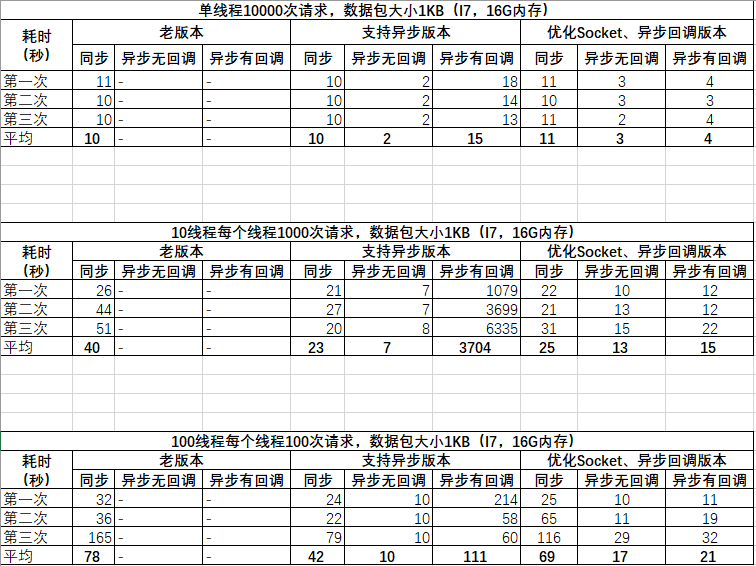
从上图可以看到,支持异步的版本,在单线程模式下,性能的表现与老版本差异并不明显,但是10线程下差异就非常巨大,而100线程的测试结果反而有所好转。通过分析,两个版本的性能差异如此巨大,主要是因为:
- 同步模式会阻塞客户端请求,说白了,在线程内就是串行请求的。但是在异步模式中,线程内的请求不再阻塞,网络流量、后台计算压力瞬间暴涨,峰值是同步模式的100倍。网络传输变成瓶颈点。
- 在压力暴涨的情况下,CPU资源占用也会突变, 并且ThreadPool、Task、异步调用的执行都将变慢。
在网络通信方面,把原先半异步的模式调整为了SocketAsyncEventArgs 模式。下面是Socket通信的几种模型的介绍和示例,总结一下,与大家分享。下次再与大家分享,并发下异步调用的性能优化方案。
APM方式: Asynchronous Programming Model
异步编程模型是一种模式,该模式允许用更少的线程去做更多的操作,.NET Framework很多类也实现了该模式,同时我们也可以自定义类来实现该模式。NET Framework中的APM也称为Begin/End模式。此种模式下,调用BeginXXX方法来启动异步操作,然后返回一个IAsyncResult 对象。当操作执行完成后,系统会触发IAsyncResult 对象的执行。 具体可参考: https://docs.microsoft.com/en-us/dotnet/standard/asynchronous-programming-patterns/asynchronous-programming-model-apm
.net中的Socket异步模式也支持APM,与同步模式或Blocking模式相比,可以更好的利用网络带宽和系统资源编写出具有更高性能的程序。参考具体代码如下:
服务端监听:Socket serverSocket =newSocket(AddressFamily.InterNetwork, SocketType.Stream, ProtocolType.Tcp);//本机预使用的IP和端口IPEndPoint serverIP =newIPEndPoint(IPAddress.Any, 9050);//绑定服务端设置的IPserverSocket.Bind(serverIP);//设置监听个数serverSocket.Listen(1);//异步接收连接请求serverSocket.BeginAccept(ar =>{base.communicateSocket = serverSocket.EndAccept(ar);AccessAciton();},null);
客户端连接:var communicateSocket =newSocket(AddressFamily.InterNetwork, SocketType.Stream, ProtocolType.Tcp);communicateSocket.Bind(newIPEndPoint(IPAddress.Any, 9051));//服务器的IP和端口IPEndPoint serverIP;try{serverIP =newIPEndPoint(IPAddress.Parse(IP), 9050);}catch{thrownewException(String.Format("{0}不是一个有效的IP地址!", IP));}//客户端只用来向指定的服务器发送信息,不需要绑定本机的IP和端口,不需要监听try{communicateSocket.BeginConnect(serverIP, ar =>{AccessAciton();},null);}catch{thrownewException(string.Format("尝试连接{0}不成功!", IP));}
客户端请求:if(communicateSocket.Connected ==false){thrownewException("还没有建立连接, 不能发送消息");}Byte[] msg = Encoding.UTF8.GetBytes(message);communicateSocket.BeginSend(msg,0, msg.Length, SocketFlags.None,ar => {},null);
服务端响应:Byte[] msg =newbyte[1024];//异步的接受消息communicateSocket.BeginReceive(msg, 0, msg.Length, SocketFlags.None,ar => {//对方断开连接时, 这里抛出Socket ExceptioncommunicateSocket.EndReceive(ar);ReceiveAction(Encoding.UTF8.GetString(msg).Trim('',' '));Receive(ReceiveAction);},null);
注意:异步模式虽好,但是如果进行大量异步套接字操作,是要付出很高代价的。针对每次操作,都必须创建一个IAsyncResult对象,而且该对象不能被重复使用。由于大量使用对象分配和垃圾收集,这会影响系统性能。如需要更好的理解APM模式,最了解EAP模式:Event-based Asynchronous Pattern:https://docs.microsoft.com/en-us/dotnet/standard/asynchronous-programming-patterns/event-based-asynchronous-pattern-eap 。
TAP 方式: Task-based Asynchronous Pattern
基于任务的异步模式,该模式主要使用System.Threading.Tasks.Task和Task<T>类来完成异步编程,相对于APM 模式来讲,TAP使异步编程模式更加简单(因为这里我们只需要关注Task这个类的使用),同时TAP也是微软推荐使用的异步编程模式。APM与TAP的本质区别,请参考我的一篇历史博客:http://www.cnblogs.com/vveiliang/p/7943003.html
TAP模式与APM模式是两种异步模式的实现,从性能上看没有本质的差别。TAP的资料可参考:https://docs.microsoft.com/en-us/dotnet/standard/asynchronous-programming-patterns/task-based-asynchronous-pattern-tap 。参考具体代码如下:
服务端:
publicclassStateContext{// Client socket.publicSocketWorkSocket =null;// Size of receive buffer.publicconstintBufferSize = 1024;// Receive buffer.publicbyte[] buffer =newbyte[BufferSize];// Received data string.publicStringBuildersb =newStringBuilder(100);}publicclassAsynchronousSocketListener{// Thread signal.publicstaticManualResetEventreSetEvent =newManualResetEvent(false);publicAsynchronousSocketListener(){}publicstaticvoidStartListening(){// Data buffer for incoming data.byte[] bytes =newByte[1024];// Establish the local endpoint for the socket.IPAddressipAddress =IPAddress.Parse("127.0.0.1");IPEndPointlocalEndPoint =newIPEndPoint(ipAddress, 11000);// Create a TCP/IP socket.Socketlistener =newSocket(AddressFamily.InterNetwork,SocketType.Stream,ProtocolType.Tcp);// Bind the socket to the localtry{listener.Bind(localEndPoint);listener.Listen(100);while(true){// Set the event to nonsignaled state.reSetEvent.Reset();// Start an asynchronous socket to listen for connections.Console.WriteLine("Waiting for a connection...");listener.BeginAccept(newAsyncCallback(AcceptCallback), listener);// Wait until a connection is made before continuing.reSetEvent.WaitOne();}}catch(Exceptione){Console.WriteLine(e.ToString());}Console.WriteLine(" Press ENTER to continue...");Console.Read();}publicstaticvoidAcceptCallback(IAsyncResultar){// Signal the main thread to continue.reSetEvent.Set();// Get the socket that handles the client request.Socketlistener = (Socket)ar.AsyncState;Sockethandler = listener.EndAccept(ar);// Create the state object.StateContextstate =newStateContext();state.WorkSocket = handler;handler.BeginReceive(state.buffer, 0,StateContext.BufferSize, 0,newAsyncCallback(ReadCallback), state);}publicstaticvoidReadCallback(IAsyncResultar){Stringcontent =String.Empty;StateContextstate = (StateContext)ar.AsyncState;Sockethandler = state.WorkSocket;// Read data from the client socket.intbytesRead = handler.EndReceive(ar);if(bytesRead > 0){// There might be more data, so store the data received so far.state.sb.Append(Encoding.ASCII.GetString(state.buffer, 0, bytesRead));// Check for end-of-file tag. If it is not there, read// more data.content = state.sb.ToString();if(content.IndexOf("<EOF>") > -1){Console.WriteLine("读取 {0} bytes. 数据: {1}", content.Length, content);Send(handler, content);}else{handler.BeginReceive(state.buffer, 0,StateContext.BufferSize, 0,newAsyncCallback(ReadCallback), state);}}}privatestaticvoidSend(Sockethandler,Stringdata){byte[] byteData =Encoding.ASCII.GetBytes(data);handler.BeginSend(byteData, 0, byteData.Length, 0,newAsyncCallback(SendCallback), handler);}privatestaticvoidSendCallback(IAsyncResultar){try{Sockethandler = (Socket)ar.AsyncState;intbytesSent = handler.EndSend(ar);Console.WriteLine("发送 {0} bytes.", bytesSent);handler.Shutdown(SocketShutdown.Both);handler.Close();}catch(Exceptione){Console.WriteLine(e.ToString());}}publicstaticintMain(String[] args){StartListening();return0;}
客户端:
publicclassAsynchronousClient{// The port number for the remote device.privateconstintport = 11000;// ManualResetEvent instances signal completion.privatestaticManualResetEventconnectResetEvent =newManualResetEvent(false);privatestaticManualResetEventsendResetEvent =newManualResetEvent(false);privatestaticManualResetEventreceiveResetEvent =newManualResetEvent(false);privatestaticStringresponse =String.Empty;privatestaticvoidStartClient(){try{IPAddressipAddress =IPAddress.Parse("127.0.0.1");IPEndPointremoteEP =newIPEndPoint(ipAddress, port);// Create a TCP/IP socket.Socketclient =newSocket(AddressFamily.InterNetwork,SocketType.Stream,ProtocolType.Tcp);// Connect to the remote endpoint.client.BeginConnect(remoteEP,newAsyncCallback(ConnectCallback), client);connectResetEvent.WaitOne();Send(client,"This is a test<EOF>");sendResetEvent.WaitOne();Receive(client);receiveResetEvent.WaitOne();Console.WriteLine("Response received : {0}", response);// Release the socket.client.Shutdown(SocketShutdown.Both);client.Close();Console.ReadLine();}catch(Exceptione){Console.WriteLine(e.ToString());}}privatestaticvoidConnectCallback(IAsyncResultar){try{Socketclient = (Socket)ar.AsyncState;client.EndConnect(ar);Console.WriteLine("Socket connected to {0}", client.RemoteEndPoint.ToString());connectResetEvent.Set();}catch(Exceptione){Console.WriteLine(e.ToString());}}privatestaticvoidReceive(Socketclient){try{StateContextstate =newStateContext();state.WorkSocket = client;client.BeginReceive(state.buffer, 0,StateContext.BufferSize, 0,newAsyncCallback(ReceiveCallback), state);}catch(Exceptione){Console.WriteLine(e.ToString());}}privatestaticvoidReceiveCallback(IAsyncResultar){try{StateContextstate = (StateContext)ar.AsyncState;Socketclient = state.WorkSocket;intbytesRead = client.EndReceive(ar);if(bytesRead > 0){state.sb.Append(Encoding.ASCII.GetString(state.buffer, 0, bytesRead));client.BeginReceive(state.buffer, 0,StateContext.BufferSize, 0,newAsyncCallback(ReceiveCallback), state);}else{if(state.sb.Length > 1){response = state.sb.ToString();}receiveResetEvent.Set();}}catch(Exceptione){Console.WriteLine(e.ToString());}}privatestaticvoidSend(Socketclient,Stringdata){byte[] byteData =Encoding.ASCII.GetBytes(data);client.BeginSend(byteData, 0, byteData.Length, 0,newAsyncCallback(SendCallback), client);}privatestaticvoidSendCallback(IAsyncResultar){try{Socketclient = (Socket)ar.AsyncState;intbytesSent = client.EndSend(ar);Console.WriteLine("Sent {0} bytes to server.", bytesSent);sendResetEvent.Set();}catch(Exceptione){Console.WriteLine(e.ToString());}}publicstaticintMain(String[] args){StartClient();return0;}}
SAEA方式: SocketAsyncEventArgs
APM模式、TAP模式虽然解决了Socket的并发问题,但是在大并发下还是有较大性能问题的。这主要是因为上述两种模式都会生产 IAsyncResult 等对象 ,而大量垃圾对象的回收会非常影响系统的性能。为此,微软推出了 SocketAsyncEventArgs 。SocketAsyncEventArgs 是 .NET Framework 3.5 开始支持的一种支持高性能 Socket 通信的实现。SocketAsyncEventArgs 相比于 APM 方式的主要优点可以描述如下,无需每次调用都生成 IAsyncResult 等对象,向原生 Socket 更靠近一些。这是官方的解释:
The main feature of these enhancements is the avoidance of the repeated allocation and synchronization of objects during high-volume asynchronous socket I/O. The Begin/End design pattern currently implemented by the Socket class for asynchronous socket I/O requires a System.IAsyncResult object be allocated for each asynchronous socket operation.
SocketAsyncEventArgs主要为高性能网络服务器应用程序而设计,避免了在异步套接字 I/O 量非常大时,大量垃圾对象创建与回收。使用此类执行异步套接字操作的模式包含以下步骤,具体说明可参考:https://msdn.microsoft.com/en-us/library/system.net.sockets.socketasynceventargs(v=vs.110).aspx 。
- 分配一个新的 SocketAsyncEventArgs 上下文对象,或者从应用程序池中获取一个空闲的此类对象。
- 将该上下文对象的属性设置为要执行的操作(例如,完成回调方法、数据缓冲区、缓冲区偏移量以及要传输的最大数据量)。
- 调用适当的套接字方法 (xxxAsync) 以启动异步操作。
- 如果异步套接字方法 (xxxAsync) 返回 true,则在回调中查询上下文属性来获取完成状态。
- 如果异步套接字方法 (xxxAsync) 返回 false,则说明操作是同步完成的。 可以查询上下文属性来获取操作结果。
- 将该上下文重用于另一个操作,将它放回到应用程序池中,或者将它丢弃。
下面是封装的一个组件代码:
classBufferManager{intm_numBytes; // the total number of bytes controlled by the buffer poolbyte[] m_buffer; // the underlying byte array maintained by the Buffer ManagerStack<int> m_freeIndexPool; //intm_currentIndex;intm_bufferSize;publicBufferManager(inttotalBytes,intbufferSize){m_numBytes = totalBytes;m_currentIndex = 0;m_bufferSize = bufferSize;m_freeIndexPool =newStack<int>();}// Allocates buffer space used by the buffer poolpublicvoidInitBuffer(){// create one big large buffer and divide that// out to each SocketAsyncEventArg objectm_buffer =newbyte[m_numBytes];}// Assigns a buffer from the buffer pool to the// specified SocketAsyncEventArgs object//// <returns>true if the buffer was successfully set, else false</returns>publicboolSetBuffer(SocketAsyncEventArgsargs){if(m_freeIndexPool.Count > 0){args.SetBuffer(m_buffer, m_freeIndexPool.Pop(), m_bufferSize);}else{if((m_numBytes - m_bufferSize) < m_currentIndex){returnfalse;}args.SetBuffer(m_buffer, m_currentIndex, m_bufferSize);m_currentIndex += m_bufferSize;}returntrue;}// Removes the buffer from a SocketAsyncEventArg object.// This frees the buffer back to the buffer poolpublicvoidFreeBuffer(SocketAsyncEventArgsargs){m_freeIndexPool.Push(args.Offset);args.SetBuffer(null, 0, 0);}}///<summary>///This class is used to communicate with a remote application over TCP/IP protocol.///</summary>classTcpCommunicationChannel{#regionPrivate fields///<summary>///Size of the buffer that is used to receive bytes from TCP socket.///</summary>privateconstintReceiveBufferSize = 8 * 1024;//4KB///<summary>///This buffer is used to receive bytes///</summary>privatereadonlybyte[] _buffer;///<summary>///Socket object to send/reveice messages.///</summary>privatereadonlySocket_clientSocket;///<summary>///A flag to control thread's running///</summary>privatevolatilebool_running;///<summary>///This object is just used for thread synchronizing (locking).///</summary>privatereadonlyobject_syncLock;privateBufferManagerreceiveBufferManager;privateSocketAsyncEventArgsreceiveBuff =null;#endregion#regionConstructor///<summary>///Creates a new TcpCommunicationChannel object.///</summary>///<param name="clientSocket">A connected Socket object that is///used to communicate over network</param>publicTcpCommunicationChannel(SocketclientSocket){_clientSocket = clientSocket;_clientSocket.Blocking =false;_buffer =newbyte[ReceiveBufferSize];_syncLock =newobject();Init();}privatevoidInit(){//初始化接收Socket缓存数据receiveBufferManager =newBufferManager(ReceiveBufferSize*2, ReceiveBufferSize);receiveBufferManager.InitBuffer();receiveBuff =newSocketAsyncEventArgs();receiveBuff.Completed += ReceiveIO_Completed;receiveBufferManager.SetBuffer(receiveBuff);//初始化发送Socket缓存数据}#endregion#regionPublic methods///<summary>///Disconnects from remote application and closes channel.///</summary>publicvoidDisconnect(){_running =false;receiveBuff.Completed -= ReceiveIO_Completed;receiveBuff.Dispose();if(_clientSocket.Connected){_clientSocket.Close();}_clientSocket.Dispose();}#endregionpublicvoidStartReceive(){_running =true;boolresult = _clientSocket.ReceiveAsync(receiveBuff);}privatevoidReceiveIO_Completed(objectsender,SocketAsyncEventArgse){if(e.BytesTransferred > 0 && e.SocketError ==SocketError.Success && _clientSocket.Connected ==true&& e.LastOperation ==SocketAsyncOperation.Receive){if(!_running){return;}//Get received bytes countDateTimereceiveTime =DateTime.Now;//Copy received bytes to a new byte arrayvarreceivedBytes =newbyte[e.BytesTransferred];Array.Copy(e.Buffer, 0, receivedBytes, 0, e.BytesTransferred);//处理消息....if(_running){StartReceive();}}}///<summary>///Sends a message to the remote application.///</summary>///<param name="message">Message to be sent</param>publicvoidSendMessage(byte[] messageBytes){//Send messageif(_clientSocket.Connected){SocketAsyncEventArgsdata =newSocketAsyncEventArgs();data.SocketFlags =SocketFlags.None;data.Completed += (s, e) =>{e.Dispose();};data.SetBuffer(messageBytes, 0, messageBytes.Length);//Console.WriteLine("发送:" + messageBytes.LongLength);_clientSocket.SendAsync(data);}}}