当你拿到一个新linux服务器时,是不是发现什么工具都没,当想执行yum 命令时,却又报错
一、错误信息

二、解决办法
1、查看redhat 7.0系统本身所安装的那些yum软件包
[root@VMW000004241 ~]# rpm -qa | grep yum
yum-rhn-plugin-2.0.1-10.el7.noarch
yum-metadata-parser-1.1.4-10.el7.x86_64
yum-3.4.3-161.el7.noarch
2、卸载这些软件包
[root@VMW000004241 ~]# rpm -e yum-rhn-plugin-2.0.1-10.el7.noarch --nodeps
[root@VMW000004241 ~]# rpm -e yum-metadata-parser-1.1.4-10.el7.x86_64 --nodeps
[root@VMW000004241 ~]# rpm -e yum-3.4.3-161.el7.noarch --nodeps
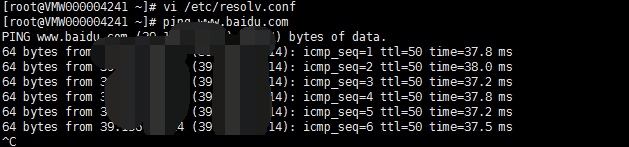
3、保证本机电脑能上网
[root@VMW000004241 ~]# ping www.baidu.com
ping: www.baidu.com: Name or service not known
4、DNS文件配置
vi /etc/resolv.conf
nameserver 8.8.8.8
nameserver 8.8.4.4
5、找到自己所需要的版本下载
wget http://mirrors.163.com/centos/7/os/x86_64/Packages/python-kitchen-1.1.1-5.el7.noarch.rpm
wget http://mirrors.163.com/centos/7/os/x86_64/Packages/python-chardet-2.2.1-1.el7_1.noarch.rpm
wget http://mirrors.163.com/centos/7/os/x86_64/Packages/yum-3.4.3-158.el7.centos.noarch.rpm
wget http://mirrors.163.com/centos/7/os/x86_64/Packages/yum-metadata-parser-1.1.4-10.el7.x86_64.rpm
wget http://mirrors.163.com/centos/7/os/x86_64/Packages/yum-utils-1.1.31-45.el7.noarch.rpm
wget http://mirrors.163.com/centos/7/os/x86_64/Packages/yum-updateonboot-1.1.31-45.el7.noarch.rpm
wget http://mirrors.163.com/centos/7/os/x86_64/Packages/yum-plugin-fastestmirror-1.1.31-45.el7.noarch.rpm
[root@VMW000004241 ~]# wget http://mirrors.163.com/centos/7/os/x86_64/Packages/python-kitchen-1.1.1-5.el7.noarch.rpm
-bash: wget: command not found (真是操蛋了什么都没,也是我是小白哇)
6、只有手动下载了,找到自己所需要的版本下载
下载地址:http://mirrors.163.com/centos/7/os/x86_64/Packages/
百度网盘地址 https://pan.baidu.com/s/18Is5UPCe8NO4jnKgD0rZRg 提取码:8e3e
链接:https://pan.baidu.com/s/18Is5UPCe8NO4jnKgD0rZRg
提取码:8e3e
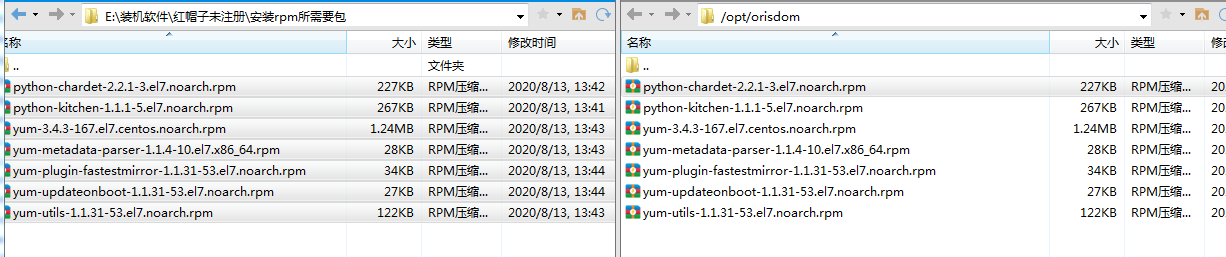
7、安装软件包(下载后传入linux盘中某个目录,然后进行安装)
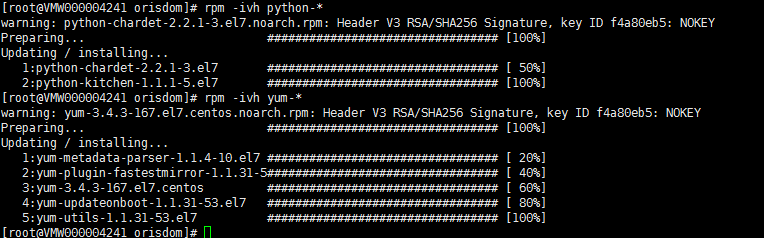
rpm -ivh python-*
rpm -ivh yum-*
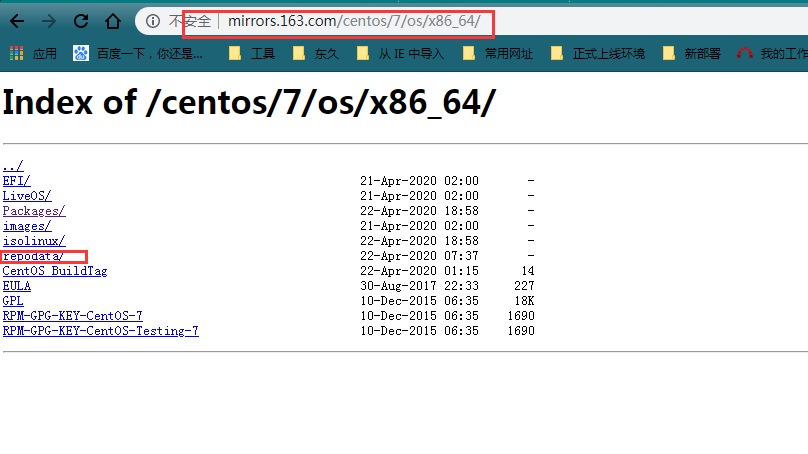
8、新建repo 配置文件(如果是其他版本,则将下面的$releasever改为你当前的版本数字)
vi /etc/yum.repos.d/Centos-7.repo
# CentOS-Base.repo
#
# The mirror system uses the connecting IP address of the client and the
# update status of each mirror to pick mirrors that are updated to and
# geographically close to the client. You should use this for CentOS updates
# unless you are manually picking other mirrors.
#
# If the mirrorlist= does not work for you, as a fall back you can try the
# remarked out baseurl= line instead.
#
#
[base]
name=CentOS-$releasever - Base - mirrors.aliyun.com
failovermethod=priority
baseurl=http://mirrors.aliyun.com/centos/$releasever/os/$basearch/
http://mirrors.aliyuncs.com/centos/$releasever/os/$basearch/
http://mirrors.cloud.aliyuncs.com/centos/$releasever/os/$basearch/
gpgcheck=1
gpgkey=http://mirrors.aliyun.com/centos/RPM-GPG-KEY-CentOS-7
#released updates
[updates]
name=CentOS-$releasever - Updates - mirrors.aliyun.com
failovermethod=priority
baseurl=http://mirrors.aliyun.com/centos/$releasever/updates/$basearch/
http://mirrors.aliyuncs.com/centos/$releasever/updates/$basearch/
http://mirrors.cloud.aliyuncs.com/centos/$releasever/updates/$basearch/
gpgcheck=1
gpgkey=http://mirrors.aliyun.com/centos/RPM-GPG-KEY-CentOS-7
#additional packages that may be useful
[extras]
name=CentOS-$releasever - Extras - mirrors.aliyun.com
failovermethod=priority
baseurl=http://mirrors.aliyun.com/centos/$releasever/extras/$basearch/
http://mirrors.aliyuncs.com/centos/$releasever/extras/$basearch/
http://mirrors.cloud.aliyuncs.com/centos/$releasever/extras/$basearch/
gpgcheck=1
gpgkey=http://mirrors.aliyun.com/centos/RPM-GPG-KEY-CentOS-7
#additional packages that extend functionality of existing packages
[centosplus]
name=CentOS-$releasever - Plus - mirrors.aliyun.com
failovermethod=priority
baseurl=http://mirrors.aliyun.com/centos/$releasever/centosplus/$basearch/
http://mirrors.aliyuncs.com/centos/$releasever/centosplus/$basearch/
http://mirrors.cloud.aliyuncs.com/centos/$releasever/centosplus/$basearch/
gpgcheck=1
enabled=0
gpgkey=http://mirrors.aliyun.com/centos/RPM-GPG-KEY-CentOS-7
#contrib - packages by Centos Users
[contrib]
name=CentOS-$releasever - Contrib - mirrors.aliyun.com
failovermethod=priority
baseurl=http://mirrors.aliyun.com/centos/$releasever/contrib/$basearch/
http://mirrors.aliyuncs.com/centos/$releasever/contrib/$basearch/
http://mirrors.cloud.aliyuncs.com/centos/$releasever/contrib/$basearch/
gpgcheck=1
enabled=0
gpgkey=http://mirrors.aliyun.com/centos/RPM-GPG-KEY-CentOS-7
批量更改执行命令 :sed -i 's/$releasever/7/g' Centos-7.repo
查看对应的版本位置可以:
9、测试
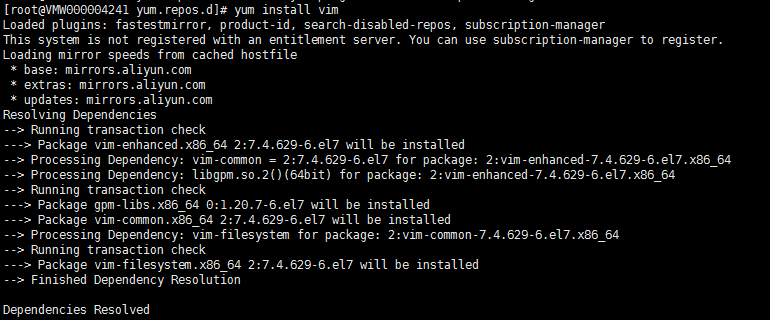
yum install vim