SIGNAL-SLOT是Qt的一大特色,使用起来十分方便。在传统的AWT和Swing编程中,我们都是为要在
监听的对象上添加Listener监听器。被监听对象中保存有Listener的列表,当相关事件发生时,被监听
对象会通知所有Listener。而在Qt中,我们只需通过connect方法连接两个对象上的方法就可以了,非常
方便、优雅地实现了传统的观察者Observer模式。
Qt是如何办到的呢?对于发出SIGNAL的对象,我们需要在其头文件定义中声明Q_Object宏,之后Qt的
预处理器MOC会为我们自动添加上相应的代码来实现SIGNAL-SLOT机制。这与AspectJ自定义了Javac
编译器很类似,都是通过增强编译器来自动添加相应的代码。
增强编译或增加预处理太复杂,怎样能够简单的实现这种机制呢?首先我们实现一个类似的QObject类,
需要发射SIGNAL的类都要继承它。在QObject类中,我们自动为其子类提供监听器列表,查找SLOT方法,
信号发射等功能。
QObject.java
1.在连接方法中,我们将信号和新建的ReceiverSlot类保存到Map中,从而将它们关联起来。
	public static void connect(QObject sender, String signal, Object receiver, String slot) {
		if (sender.signalSlotMap == null)
			sender.signalSlotMap = new HashMap<String, List<ReceiverSlot>>();

		List<ReceiverSlot> slotList = sender.signalSlotMap.get(signal);
		if (slotList == null) {
			slotList = new LinkedList<ReceiverSlot>();
			sender.signalSlotMap.put(signal, slotList);
		}
		slotList.add(createReceiverSlot(receiver, slot));
	}
static class ReceiverSlot {
Object receiver;
Method slot;
Object[] args;
}2.在创建ReceiverSlot时,我们解析SLOT方法名,如将slot(String,String)解析为方法slot,参数两个String。
如果解析失败我们就认为该SLOT仍是一个信号,也就是SIGNAL-SIGNAL的连接。这种情况下,我们需要
传递调用的不是receiver的SLOT方法,而是emit方法继续发射信号。
	private static ReceiverSlot createReceiverSlot(Object receiver, String slot) {
		ReceiverSlot receiverSlot = new ReceiverSlot();
		receiverSlot.receiver = receiver;

		Pattern pattern = Pattern.compile("(\\w+)\\(([\\w+,]*)\\)");
		Matcher matcher = pattern.matcher(slot);
		if (matcher.matches() && matcher.groupCount() == 2) {
			// 1.Connect SIGNAL to SLOT
			try {
				String methodName = matcher.group(1);
				String argStr = matcher.group(2);
				ArrayList<String> argList = new ArrayList<String>();

				pattern = Pattern.compile("\\w+");
				matcher = pattern.matcher(argStr);
				while (matcher.find())
					argList.add(matcher.group());
				String[] arguments = argList.toArray(new String[0]);

				receiverSlot.slot = findMethod(receiver, methodName, arguments);
				receiverSlot.args = new Object[0];
			}
			catch (Exception e) {
				e.printStackTrace();
			}
		}
		else {
			// 2.Connect SIGNAL to SIGNAL
			if (receiver instanceof QObject) {
				receiverSlot.slot = emitMethod;
				receiverSlot.args = new Object[] { slot };
			}
		}

		return receiverSlot;
	}
	private static Method emitMethod;

	protected Map<String, List<ReceiverSlot>> signalSlotMap;

	static {
		try {
			emitMethod = QObject.class.getDeclaredMethod("emit", String.class, Object[].class);
		} catch (Exception e) {
			e.printStackTrace();
		}
	}
3.解析后,如果是SIGNAL-SLOT的连接,那我我们根据方法名和参数找到该方法,准备反射调用。
	private static Method findMethod(Object receiver, String methodName, String[] arguments)
			throws NoSuchMethodException {

		Method slotMethod = null;

		if (arguments.length == 0)
			slotMethod = receiver.getClass().getMethod(methodName, new Class[0]);
		else {
			for (Method method : receiver.getClass().getMethods()) {

				// 1.Check method name
				if (!method.getName().equals(methodName))
					continue;

				// 2.Check parameter number
				Class<?>[] paramTypes = method.getParameterTypes();
				if (paramTypes.length != arguments.length)
					continue;

				// 3.Check parameter type
				boolean isMatch = true;
				for (int i = 0; i < paramTypes.length; i++) {
					if (!paramTypes[i].getSimpleName().equals(arguments[i])) {
						isMatch = false;
						break;
					}
				}
				if (isMatch) {
					slotMethod = method;
					break;
				}
			}

			if (slotMethod == null)
				throw new NoSuchMethodException("Cannot find method[" + methodName +
						"] with parameters: " + Arrays.toString(arguments));
		}

		return slotMethod;
	}
4.发射信号时,我们取到所有与该SIGNAL关联的ReceiverSlot类,逐个发射信号。
	protected void emit(String signal, Object... args) {
		System.out.println(getClass().getSimpleName() + " emit signal " + signal);

		if (signalSlotMap == null)
			return;

		List<ReceiverSlot> slotList = signalSlotMap.get(signal);
		if (slotList == null || slotList.isEmpty())
			return;

		for (ReceiverSlot objSlot : slotList) {
			try {
				if (objSlot.slot == emitMethod)
					objSlot.slot.invoke(objSlot.receiver, objSlot.args[0], args);
				else
					objSlot.slot.invoke(objSlot.receiver, args);
			}
			catch (Exception e) {
				e.printStackTrace();
			}
		}
	}
之后,我们实现一个它的子类QWidget,将常用的Swing控件都封装在QWidget的子类中,为这些控件提供
常见的预定义的SIGNAL,像Qt中的clicked和returnPressed。
QWidget.java
public class QWidget<T extends JComponent> extends QObject implements QSwing<T> {

	protected T widget;

	public QWidget(Class<T> clazz) {
		try {
			widget = clazz.newInstance();
		}
		catch (Exception e) {
			e.printStackTrace();
		}
	}

	@Override
	public T getSwingWidget() {
		return this.widget;
	}

}
以下是封装了JButton和JTextField的QWidget子类。
QPushButton.java
public class QPushButton extends QWidget<JButton> {

	public static final String CLICKED = "clicked";

	public QPushButton(String text) {
		super(JButton.class);

		widget.setText(text);
		widget.addActionListener(new ActionListener() {
			@Override
			public void actionPerformed(ActionEvent e) {
				emit(CLICKED);
			}
		});
	}

}
QLineEdit.java
public class QLineEdit extends QWidget<JTextField> {

	public static final String RETURN_PRESSED = "returnPressed";

	public QLineEdit() {
		super(JTextField.class);

		widget.addActionListener(new ActionListener() {
			@Override
			public void actionPerformed(ActionEvent e) {
				emit(RETURN_PRESSED);
			}
		});
	}

}
下面我们来写个测试类实验下Java版的SIGNAL-SLOT机制,依旧是之前的浏览器的例子。
AddressBar.java
public class AddressBar extends QWidget<JPanel> {

	/**
	 * SIGNAL
	 */
	public static final String NEW_BUTTON_CLICKED = "newButtonClicked";
	public static final String GO_TO_ADDRESS = "goToAddress(String,String)";

	/**
	 * SLOT
	 */
	public static final String HANDLE_GO_TO_ADDRESS = "handleGoToAddress()";


	private QPushButton newButton;
	private QLineEdit addressEdit;
	private QPushButton goButton;


	public AddressBar() {
		super(JPanel.class);

		// 1.Create widget
		newButton = new QPushButton("New");
		addressEdit = new QLineEdit();
		goButton = new QPushButton("Go");

		// 2.Set property
		addressEdit.getSwingWidget().setColumns(10);

		// 3.Connect signal-slot
		connect(newButton, QPushButton.CLICKED, this, NEW_BUTTON_CLICKED);
		connect(addressEdit, QLineEdit.RETURN_PRESSED, this, HANDLE_GO_TO_ADDRESS);
		connect(goButton, QPushButton.CLICKED, this, HANDLE_GO_TO_ADDRESS);

		// 4.Add to layout
		getSwingWidget().add(newButton.getSwingWidget());
		getSwingWidget().add(addressEdit.getSwingWidget());
		getSwingWidget().add(goButton.getSwingWidget());
	}

	public void handleGoToAddress() {
		emit(GO_TO_ADDRESS, addressEdit.getSwingWidget().getText(), "test string");
	}

}
TabBar.java
public class TabBar extends JTabbedPane {

	/**
	 * SLOT
	 */
	public static final String HANDLE_NEW_TAB = "handleNewTab()";
	public static final String HANDLE_GO_TO_SITE = "goToSite(String,String)";


	public TabBar() {
		handleNewTab();
	}

	public void handleNewTab() {
		WebView tab = new WebView();
		add("blank", tab);
	}

	public void goToSite(String url, String testStr) {
		System.out.println("Receive url: " + url + ", " + testStr);

		WebView tab = (WebView) getSelectedComponent();
		tab.load(url);
	}

}
MainWindow.java
public class MainWindow extends JFrame {

	public static void main(String[] args) {
		JFrame window = new MainWindow();
		window.setDefaultCloseOperation(JFrame.EXIT_ON_CLOSE);
		window.setSize(320, 340);
		window.setVisible(true);
	}

	public MainWindow() {
		// 1.Create widget
		AddressBar addressBar = new AddressBar();
		TabBar tabBar = new TabBar();

		// 2.Set property

		// 3.Connect signal-slot
		QObject.connect(addressBar, AddressBar.NEW_BUTTON_CLICKED, tabBar, TabBar.HANDLE_NEW_TAB);
		QObject.connect(addressBar, AddressBar.GO_TO_ADDRESS, tabBar, TabBar.HANDLE_GO_TO_SITE);

		// 4.Add to layout
		GridBagLayout layout = new GridBagLayout();
		setLayout(layout);
		GridBagConstraints grid = new GridBagConstraints();
		grid.fill = GridBagConstraints.BOTH;
		grid.gridx = grid.gridy = 0;
		grid.weightx = 1.0;
		grid.weighty = 0.1;
		add(addressBar.getSwingWidget(), grid);
		grid.fill = GridBagConstraints.BOTH;
		grid.gridx = 0;
		grid.gridy = 1;
		grid.weightx = 1.0;
		grid.weighty = 0.9;
		add(tabBar, grid);
	}

}


@SuppressWarnings("serial")
class WebView extends JEditorPane {

	public WebView() {
		setEditable(false);
	}

	public void load(final String url) {
		SwingUtilities.invokeLater(new Runnable() {
			@Override
			public void run() {
				try {
					WebView.this.setPage(url);
				} catch (IOException e) {
					e.printStackTrace();
				}
			}
		});
	}

}
测试一下吧,运行起来的效果就是这样。
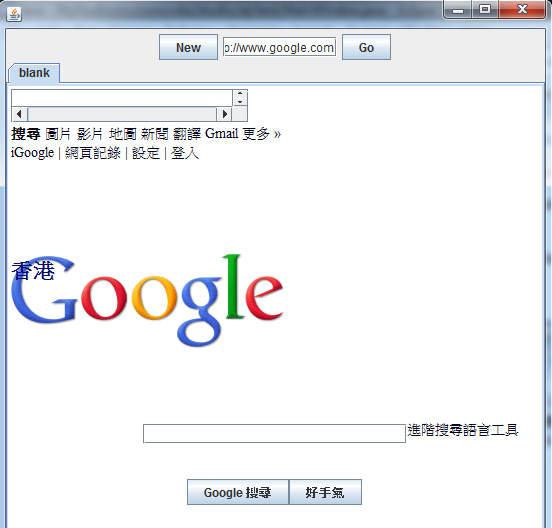
新建Tab页和前往该地址事件都可以成功地从AddressBar传递到TabBar。怎么样,这种Java版的
SIGNAL-SLOT是不是很方便。多开拓自己的视野,借鉴优秀的思想,我们才能做出更好的设计!
希望你喜欢本文。