交换机会有下面的问题
1,单点断开
2,为了防止单点断开,就要做冗余,所以就会产生环路,环路产生后,就会产生广播风暴。
使用,交换机 STP(spanning-tree 生成数)协议 ,可以解决上面的问题。
cisco交换机默认是开启STP功能的。
为了防止环路,在环上选择一个接口,阻塞它。
如何选择阻塞哪个端口呢,根据选举规则。
交换机在广播域发送类似hello包的东西,叫bpdu:bridge protocol data unit
bpdu报文里有bridge id,有优先级,有交换机的mac地址(这个mac地址,不是交换机接口上的mac地址,而是交换机主板上的mac地址)。
交换机的mac地址,实际就是一个,那么每个接口上的mac地址是如何来的呢?
假设交换机主板上的mac地址是ca00.f000.0000,那么接口f0/0的mac地址就是ca00.f000.0001;f0/1接口的mac地址就是ca00.f000.0002,以此类推。
先对比优先级,默认的优先级是32768,范围是0-65535,数字越小越优先
如果优先级相同,再对比主板上的mac地址,mac地址越小越优先。
根据优先级和mac地址,选择出一个最优先的叫root,也叫根桥。
选择出root后,root每2秒发送bpdu,20秒超时。root发送出的bpdu里有root id和bridge id,它们是相同的。
别的交换机接收到了root id后,再向周围的交换机转发,但转发前,把从root过来的bridge id,换成自己的,root id不变。
非root交换机,必须找出一个最优的端口,保持和root联通,这个端口叫根端口。
如何评判是最优的端口呢?根据STA算法,主要看接口的带宽。带宽越宽,越容易成为根接口。
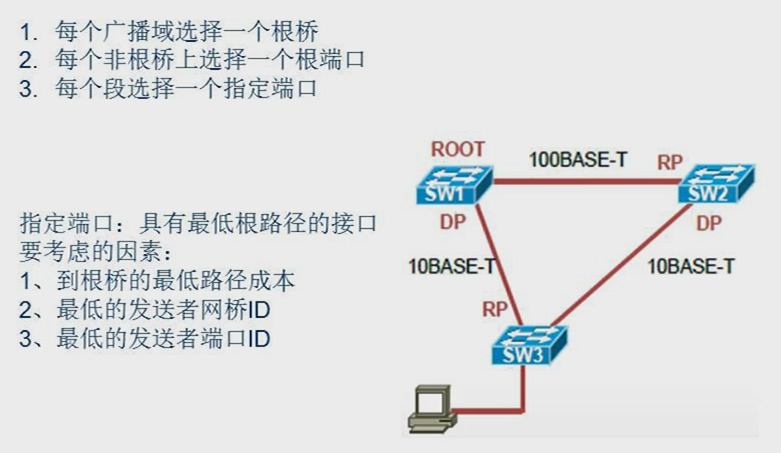
stp操作:

选择出根端口和指定端口后,剩下的端口,就是要作为阻塞端口了,要阻塞它,不能通过它转发流量,完美的解决了交换机的环路问题。
端口角色
-
DP:指定端口
发送bpdu
-
RP:根端口
不发送bpdu,只接受bpdu,能转发流量
-
AP:决定出DP和RP后,剩下的端口,叫非指定端口(阻塞端口)
不发送bpdu,只接受bpdu,不能转发流量
端口状态
- block:初始状态,会过度到listern
- listern:监听bpdu,不能学习mac地址,不能转发数据,停留15秒。任务是确认端口角色。非指定端口(阻塞端口的状态从listern变成block。其他端口进入learn状态。
- learn:可以学习mac地址,不能转发数据。,停留15秒。进入forward状态。
- forward:可以转发数据了。根端口和指定端口就停留在此状态了。
- disable:禁用端口的stp协议功能,不建议使用此状态。有很多办法能解决30秒过慢的问题。
bpdu报文种类:
- Configuration BPDU (CBPDU), used for Spanning Tree computation
- Topology Change Notification (TCN) BPDU, used to announce changes in the network topology
- Topology Change Notification Acknowledgment (TCA)
Linux中只定义了前两种,最后一种是通过TCA flag置1发送config bpdu
环路解决了,那么单点失效的问题怎么解决呢?
当发生单点失效了,就让原来阻塞的端口,不再阻塞,让它转发流量。
但是原来的阻塞接口,即使是不阻塞了,但是交换机是根据mac地址表转发数据的,它没有mac地址表的,还是不能实现转发数据。怎么办?
当检测到某条链路单点失效后,离的最近的交换机的RP端口,会立即转发TCN数据包,一层一层的向上转发,直到根桥接受到了TCN,所以根桥就直到了哪条链路失效了。然后根桥就再发送一个CBPDU数据包,包里面的TC标识位会有值,其他交换机接收到了这个包后,马上让自己所以接口上的mac地址表的老化时间从300秒,变成15秒,15秒后,所有接口的mac地址表都被清空了,再有数据过来后,就泛洪,泛洪几轮后,各个接口就学习到了mac,放到自己的mac地址表,然后网络就又稳定了。
关键点总结:
- 打开阻塞的接口
- 检知到单点失效的交换机从RP接口向上发送TCN报文,一层一层传到根桥
- 根桥再发送一个CBPDU数据包,让TC标识位有值
- 其他交换机发送TC位有值,调整mac地址表的老化时间
以上所说的内容都是STP标准,cisco还有专有的pvst
pvst:per vlan spanning tree。每一个vlan都运行一个生成树。每个vlan里都是标准的STP。
交换机里是有vlan的,标准STP,阻塞接口时,不管这个接口属于哪个vlan,一律阻塞。
pvst就可以精细到,虽然是通过一个接口,可以指定让哪个vlan阻塞,让哪个vlan不阻塞。
实验:验证pvst,谁是根桥,哪个接口被阻塞了。
拓扑图:

1,查看所以vlan的生成树
sw1:
sw1#show spanning-tree

VLAN0001
  Spanning tree enabled protocol rstp
  Root ID    Priority    32769
             Address     aabb.cc00.0100
             This bridge is the root
             Hello Time   2 sec  Max Age 20 sec  Forward Delay 15 sec

  Bridge ID  Priority    32769  (priority 32768 sys-id-ext 1)
             Address     aabb.cc00.0100
             Hello Time   2 sec  Max Age 20 sec  Forward Delay 15 sec
             Aging Time  300 sec

Interface           Role Sts Cost      Prio.Nbr Type
------------------- ---- --- --------- -------- --------------------------------
Et0/0               Desg FWD 100       128.1    Shr
Et0/1               Desg FWD 100       128.2    Shr
Et0/2               Desg FWD 100       128.3    Shr
Et0/3               Desg FWD 100       128.4    Shr
Et1/0               Desg FWD 100       128.5    Shr
Et1/1               Desg FWD 100       128.6    Shr
Et1/2               Desg FWD 100       128.7    Shr
Et1/3               Desg FWD 100       128.8    Shr
 --More--
上面说默认的bridge id是32768,这里为啥是32769呢,由于cisco用的是pvst,所有为了区分是哪个vlan的,在32768的基础上,加 ,vlan号。这时的vlan号是1,所以32768+1=32769。
查看vlan的生成树:show spanning-tree vlan 1
sw2:
sw2#show spanning-tree

VLAN0001
  Spanning tree enabled protocol rstp
  Root ID    Priority    32769
             Address     aabb.cc00.0100
             Cost        100
             Port        1 (Ethernet0/0)
             Hello Time   2 sec  Max Age 20 sec  Forward Delay 15 sec

  Bridge ID  Priority    32769  (priority 32768 sys-id-ext 1)
             Address     aabb.cc00.0200
             Hello Time   2 sec  Max Age 20 sec  Forward Delay 15 sec
             Aging Time  300 sec

Interface           Role Sts Cost      Prio.Nbr Type
------------------- ---- --- --------- -------- --------------------------------
Et0/0               Root FWD 100       128.1    Shr
Et0/1               Desg FWD 100       128.2    Shr
Et0/2               Desg FWD 100       128.3    Shr
Et0/3               Desg FWD 100       128.4    Shr
Et1/0               Desg FWD 100       128.5    Shr
Et1/1               Desg FWD 100       128.6    Shr
Et1/2               Desg FWD 100       128.7    Shr
发送和sw1有下面的区别:
-
Cost 100
自己到根桥的开销。
-
Port 1 (Ethernet0/0)
自己的哪个接口连接着根桥。这个端口一定是最优的,一定会出现在根端口的角色里。
确实它的角色是根端口:
Et0/0 Root FWD 100 128.1 Shr -
mac地址
我的mac地址aabb.cc00.0200,比根桥的mac地址一定要大,根的mac地址是aabb.cc00.0100,所以我在选举的时候没有成为根桥。
sw3:
sw3#show spanning-tree vlan 1

VLAN0001
  Spanning tree enabled protocol rstp
  Root ID    Priority    32769
             Address     aabb.cc00.0100
             Cost        100
             Port        1 (Ethernet0/0)
             Hello Time   2 sec  Max Age 20 sec  Forward Delay 15 sec

  Bridge ID  Priority    32769  (priority 32768 sys-id-ext 1)
             Address     aabb.cc00.0300
             Hello Time   2 sec  Max Age 20 sec  Forward Delay 15 sec
             Aging Time  300 sec

Interface           Role Sts Cost      Prio.Nbr Type
------------------- ---- --- --------- -------- --------------------------------
Et0/0               Root FWD 100       128.1    Shr
Et0/1               Altn BLK 100       128.2    Shr
Et0/2               Desg FWD 100       128.3    Shr
Et0/3               Desg FWD 100       128.4    Shr
Et1/0               Desg FWD 100       128.5    Shr
Et1/1               Desg FWD 100       128.6    Shr
Et1/2               Desg FWD 100       128.7    Shr
发送和sw2有下面的区别:
-
自己的mac地址比sw2还大,是在选举时,最不优先的。
-
自己有个端口是阻塞端口(AP),状态是block。
Et0/1 Altn BLK 100 128.2 Shr
STP的配置点:指定谁是根桥。
指定原则:不能出现在2层网络的接入层。
接入层是啥?看下图。

IOU1和IOU2是接入层,它们不可以是根桥。
实验:人为指定根桥。
拓扑图:
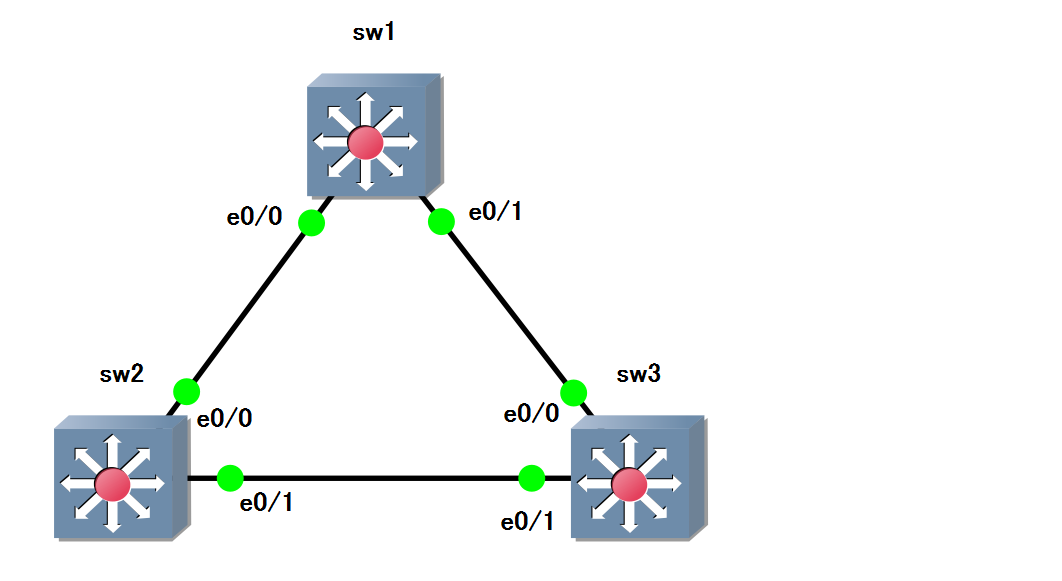
1,手动指定sw3为根桥:
sw3(config)#spanning-tree vlan 1 root ?
  primary    Configure this switch as primary root for this spanning tree
  secondary  Configure switch as secondary root
在root后面可以输入primary和secondary。
- primary:主根桥
- secondary:次根桥。当主根桥down后,不用经过选举,次根桥自动变成主根桥。
sw3:成为了根桥。
sw3#show spanning-tree vlan 1

VLAN0001
  Spanning tree enabled protocol rstp
  Root ID    Priority    24577
             Address     aabb.cc00.0300
             This bridge is the root
             Hello Time   2 sec  Max Age 20 sec  Forward Delay 15 sec

  Bridge ID  Priority    24577  (priority 24576 sys-id-ext 1)
             Address     aabb.cc00.0300
             Hello Time   2 sec  Max Age 20 sec  Forward Delay 15 sec
             Aging Time  300 sec

Interface           Role Sts Cost      Prio.Nbr Type
------------------- ---- --- --------- -------- --------------------------------
Et0/0               Desg FWD 100       128.1    Shr
Et0/1               Desg FWD 100       128.2    Shr
Et0/2               Desg FWD 100       128.3    Shr
Et0/3               Desg FWD 100       128.4    Shr
Et1/0               Desg FWD 100       128.5    Shr
Et1/1               Desg FWD 100       128.6    Shr
Et1/2               Desg FWD 100       128.7    Shr
Et1/3               Desg FWD 100       128.8    Shr
发现
Priority 24577:比默认值小了,所以比sw1和sw2都优先
sw1:没有阻塞接口,mac地址比sw2小。
sw1#show spanning-tree vlan 1

VLAN0001
  Spanning tree enabled protocol rstp
  Root ID    Priority    24577
             Address     aabb.cc00.0300
             Cost        100
             Port        2 (Ethernet0/1)
             Hello Time   2 sec  Max Age 20 sec  Forward Delay 15 sec

  Bridge ID  Priority    32769  (priority 32768 sys-id-ext 1)
             Address     aabb.cc00.0100
             Hello Time   2 sec  Max Age 20 sec  Forward Delay 15 sec
             Aging Time  300 sec

Interface           Role Sts Cost      Prio.Nbr Type
------------------- ---- --- --------- -------- --------------------------------
Et0/0               Desg FWD 100       128.1    Shr
Et0/1               Root FWD 100       128.2    Shr
Et0/2               Desg FWD 100       128.3    Shr
Et0/3               Desg FWD 100       128.4    Shr
Et1/0               Desg FWD 100       128.5    Shr
Et1/1               Desg FWD 100       128.6    Shr
Et1/2               Desg FWD 100       128.7    Shr
sw2:有阻塞接口。
sw2#show spanning-tree vlan 1

VLAN0001
  Spanning tree enabled protocol rstp
  Root ID    Priority    24577
             Address     aabb.cc00.0300
             Cost        100
             Port        2 (Ethernet0/1)
             Hello Time   2 sec  Max Age 20 sec  Forward Delay 15 sec

  Bridge ID  Priority    32769  (priority 32768 sys-id-ext 1)
             Address     aabb.cc00.0200
             Hello Time   2 sec  Max Age 20 sec  Forward Delay 15 sec
             Aging Time  300 sec

Interface           Role Sts Cost      Prio.Nbr Type
------------------- ---- --- --------- -------- --------------------------------
Et0/0               Altn BLK 100       128.1    Shr
Et0/1               Root FWD 100       128.2    Shr
Et0/2               Desg FWD 100       128.3    Shr
Et0/3               Desg FWD 100       128.4    Shr
Et1/0               Desg FWD 100       128.5    Shr
Et1/1               Desg FWD 100       128.6    Shr
Et1/2               Desg FWD 100       128.7    Shr
2,通过指定交换机的优先级,来间接的让谁成为根桥
sw1(config)#spanning-tree vlan 1 priority ?
  <0-61440>  bridge priority in increments of 4096
优先级必须是4096的整数倍。
sw1(config)#spanning-tree vlan 1 priority 1
% Bridge Priority must be in increments of 4096.
% Allowed values are:
  0     4096  8192  12288 16384 20480 24576 28672
  32768 36864 40960 45056 49152 53248 57344 61440
sw1(config)#spanning-tree vlan 1 priority 0
当输入的数字不是4096的整数倍,会提示错误,并提供最接近的数字。
sw1:由于sw1的优先级是1,比sw2和sw3都高,所以成为了根桥。
sw1#show spanning-tree vlan 1

VLAN0001
  Spanning tree enabled protocol rstp
  Root ID    Priority    1
             Address     aabb.cc00.0100
             This bridge is the root
             Hello Time   2 sec  Max Age 20 sec  Forward Delay 15 sec

  Bridge ID  Priority    1      (priority 0 sys-id-ext 1)
             Address     aabb.cc00.0100
             Hello Time   2 sec  Max Age 20 sec  Forward Delay 15 sec
             Aging Time  300 sec

Interface           Role Sts Cost      Prio.Nbr Type
------------------- ---- --- --------- -------- --------------------------------
Et0/0               Desg FWD 100       128.1    Shr
Et0/1               Desg FWD 100       128.2    Shr
Et0/2               Desg FWD 100       128.3    Shr
Et0/3               Desg FWD 100       128.4    Shr
sw2:优先级比sw3小,所以有阻塞接口
sw2#show spanning-tree vlan 1

VLAN0001
  Spanning tree enabled protocol rstp
  Root ID    Priority    1
             Address     aabb.cc00.0100
             Cost        100
             Port        1 (Ethernet0/0)
             Hello Time   2 sec  Max Age 20 sec  Forward Delay 15 sec

  Bridge ID  Priority    32769  (priority 32768 sys-id-ext 1)
             Address     aabb.cc00.0200
             Hello Time   2 sec  Max Age 20 sec  Forward Delay 15 sec
             Aging Time  300 sec

Interface           Role Sts Cost      Prio.Nbr Type
------------------- ---- --- --------- -------- --------------------------------
Et0/0               Root FWD 100       128.1    Shr
Et0/1               Altn BLK 100       128.2    Shr
Et0/2               Desg FWD 100       128.3    Shr
Et0/3               Desg FWD 100       128.4    Shr
sw3:没有阻塞接口。
sw3#show spanning-tree vlan 1

VLAN0001
  Spanning tree enabled protocol rstp
  Root ID    Priority    1
             Address     aabb.cc00.0100
             Cost        100
             Port        1 (Ethernet0/0)
             Hello Time   2 sec  Max Age 20 sec  Forward Delay 15 sec

  Bridge ID  Priority    24577  (priority 24576 sys-id-ext 1)
             Address     aabb.cc00.0300
             Hello Time   2 sec  Max Age 20 sec  Forward Delay 15 sec
             Aging Time  300 sec

Interface           Role Sts Cost      Prio.Nbr Type
------------------- ---- --- --------- -------- --------------------------------
Et0/0               Root FWD 100       128.1    Shr
Et0/1               Desg FWD 100       128.2    Shr
Et0/2               Desg FWD 100       128.3    Shr
Et0/3               Desg FWD 100       128.4    Shr
Et1/0               Desg FWD 100       128.5    Shr
Et1/1               Desg FWD 100       128.6    Shr
Et1/2               Desg FWD 100       128.7    Shr
开启STP功能
sw1(config)#spanning-tree mode ?
  mst         Multiple spanning tree mode
  pvst        Per-Vlan spanning tree mode
  rapid-pvst  Per-Vlan rapid spanning tree mode