前言:
在我们发布我们的APP之后避免不了升级和加入一些新的功能,一般都是进入软件之后进行检测并且发布通知去下载。当然在更新问题上也要注意用相同的key进行打包。然后优化,好了,下面我们来看它的实现方法
实现效果截图:
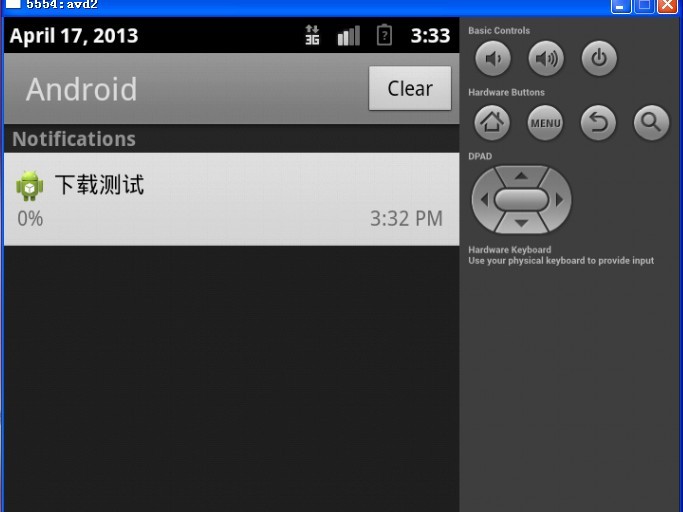
首先上一段代码,查看MainActivity的相关处理:
import com.jay.verioncheck.VersionConfig;
import com.jay.versionService.VersionService;
import android.os.Bundle;
import android.app.Activity;
import android.app.AlertDialog;
import android.content.DialogInterface;
import android.content.Intent;
import android.content.pm.PackageManager.NameNotFoundException;

public class MainActivity extends Activity {

	@Override
	protected void onCreate(Bundle savedInstanceState) {
		super.onCreate(savedInstanceState);
		setContentView(R.layout.activity_main);
		initVersionGlobal();	//初始化本地版本和服务器版本
		checkVersion();			//检查版本,发布通知更新
	}

	//初始化版本信息,赋值给版本配置
	public void initVersionGlobal(){
		try {
			//获取本地软件版本号
			VersionConfig.localVersion = this.getPackageManager().getPackageInfo(this.getPackageName(), 0).versionCode;
			//获取服务器版本号
			VersionConfig.serverVersion = 2;
		} catch (NameNotFoundException e) {
			e.printStackTrace();
		}
	}

	//检查版本更新
	public void checkVersion(){
		//判断本地版本和服务器版本进行比较
		if(VersionConfig.localVersion < VersionConfig.serverVersion){
			//有更新的情况,声明提示对话框
			AlertDialog.Builder alert = new AlertDialog.Builder(this);
			alert.setTitle("升级")
					.setMessage("发现新版本,建议立即更新使用")
					.setPositiveButton("更新", new DialogInterface.OnClickListener() {
						@Override
						public void onClick(DialogInterface dialog, int which) {
							//发送请求到下载服务
							Intent intent = new Intent();
							intent.setClass(MainActivity.this, VersionService.class);
							intent.putExtra("titleId", R.string.app_name);
							startService(intent);
						}
					})
					.setNegativeButton("取消", new DialogInterface.OnClickListener() {
						@Override
						public void onClick(DialogInterface dialog, int which) {
							//做一些清理工作
						}
					})
					.setIcon(R.drawable.ic_launcher);	//标题icon

				alert.create().show();	//显示该对话框
		}else{
			//没有更新的情况
		}
	}
}
版本控制类:
/***
 * 本地版本号控制类
 * @author zhanglei
 *
 */
public class VersionConfig {
	public static int localVersion = 1;
	public static int serverVersion = 2;
	public static String downloadDir = "/downloaddir/";
}
VersionService下载服务代码:
import java.io.File;
import com.jay.verioncheck.VersionConfig;
import com.jay.versionActivity.MainActivity;
import com.jay.versionActivity.R;
import android.app.Activity;
import android.app.Notification;
import android.app.NotificationManager;
import android.app.PendingIntent;
import android.app.Service;
import android.content.Intent;
import android.os.Environment;
import android.os.IBinder;


/***
 * 定义一个下载服务
 * @author zhanglei
 *
 */
public class VersionService extends Service{
	private int titleId;
	private File updateDir = null;
	private File updateFile = null;
	//通知栏
	private NotificationManager updateNotificationManager = null;
	private Notification updateNotification = null;
	//通知栏跳转Intent
	private Intent updateIntent = null;
	private PendingIntent updatePendingIntent = null;

	@Override
	public IBinder onBind(Intent intent) {
		return null;
	}
	@Override
	public void onCreate() {
		super.onCreate();
	}
	@Override
	public void onStart(Intent intent, int startId) {
		titleId = intent.getIntExtra("titleId", 0);
		/***
		 * 1、android.os.Environment.MEDIA_MOUNTED标记安装的状态
		 * 2、android.os.Environment.getExternalStorageState() 得到当前软件的状态
		 */
		if(android.os.Environment.MEDIA_MOUNTED.equals(android.os.Environment.getExternalStorageState())){
			//通过当前运行环境得到的目录+配置的下载目录配置成过度文件的路径
			updateDir = new File(Environment.getExternalStorageDirectory(), VersionConfig.downloadDir);
			updateFile = new File(updateDir.getPath(), getResources().getResourceName(titleId));
		}
		//得到通知管理器,并且赋值通知对象
		this.updateNotificationManager = (NotificationManager) this.getSystemService(NOTIFICATION_SERVICE);
		this.updateNotification = new Notification();
	    //设置下载过程中,点击通知栏,回到主界面
	    updateIntent = new Intent(this, MainActivity.class);
	    updatePendingIntent = PendingIntent.getActivity(this,0,updateIntent,0);
		//配置通知内容
		updateNotification.tickerText = "开始下载";
		updateNotification.icon = R.drawable.ic_launcher;
		updateNotification.setLatestEventInfo(this, "下载测试", "0%", updatePendingIntent);
		//发布通知
		updateNotificationManager.notify(0, updateNotification);
		super.onStart(intent, startId);
	}
}
注册下载service:
<!-- 手动注册一个service -->
        <service
            android:name="com.jay.versionService.VersionService"
            android:enabled="true"
            >
        </service>
说明:
目前本博客只实现了发布通知。由于暂时没有服务器地址并没有做实时更新的下载监控
实现思路:
代码的可读性很高,注释很多,在此不在多做解释,本实现是app运行之后在Activity之后。在onCreate方法中,拿到本地版本和服务器版本后进行比较。得到是否有更新,如果有就提示对话框进行更新。如果用户更新就发布通知进行更新
源码下载地址:
http://pan.baidu.com/share/link?shareid=456005&uk=1997312776