公司做的项目要用到文本上传功能。
网上找了很久,大部分都有一些不成熟的问题,终于让我找到了一个成熟的项目。
1.前台页面引用代码
<%@page language="java" import="java.util.*" pageEncoding="utf-8"%><%@
page contentType="text/html;charset=utf-8"%><%@
page import="org.apache.commons.lang.StringUtils" %><%
/*
更新记录:
2013-01-25 取消对SmartUpload的使用,改用commons-fileupload组件。因为测试发现SmartUpload有内存泄露的问题。
*/
//String path = request.getContextPath();
//String basePath = request.getScheme()+"://"+request.getServerName()+":"+request.getServerPort()+path+"/";
String clientCookie = request.getHeader("Cookie");
%>
<html>
<head>
<metahttp-equiv="Content-Type" content="text/html;charset=utf-8"/>
<title>编辑器完整版实例-1.2.6.0</title>
<scripttype="text/javascript" src="ueditor.config.js" charset="utf-8"></script>
<scripttype="text/javascript" src="ueditor.all.min.js" charset="utf-8"></script>
<linktype="text/css" rel="Stylesheet" href="WordPaster/css/WordPaster.css"/>
<linktype="text/css" rel="Stylesheet" href="WordPaster/js/skygqbox.css" />
<scripttype="text/javascript" src="WordPaster/js/json2.min.js" charset="utf-8"></script>
<scripttype="text/javascript" src="WordPaster/js/jquery-1.4.min.js" charset="utf-8"></script>
<scripttype="text/javascript" src="WordPaster/js/WordPaster.js" charset="utf-8"></script>
<scripttype="text/javascript" src="WordPaster/js/skygqbox.js" charset="utf-8"></script>
</head>
<body>
<textareaname="后台取值的key"id="myEditor">这里写你的初始化内容</textarea>
<scripttype="text/javascript">
var pasterMgr = new WordPasterManager();
pasterMgr.Config["PostUrl"] = "http://localhost:8080/WordPaster2UEditor1.4x/upload.jsp"
pasterMgr.Config["Cookie"] = '<%=clientCookie%>';
pasterMgr.Load();//加载控件
var ue = UE.getEditor('myEditor');
ue.ready(function() {
//设置编辑器的内容
ue.setContent('hello');
//获取html内容,返回: <p>hello</p>
var html = ue.getContent();
//获取纯文本内容,返回: hello
var txt = ue.getContentTxt();
pasterMgr.SetEditor(ue);
});
</script>
</body>
</html>
请求
文件上传的默认请求是一个文件,作为具有“upload”字段的表单数据。
响应:文件已成功上传
当文件成功上传时的JSON响应:
uploaded- 设置为1。
fileName - 上传文件的名称。
url - 上传文件的URL。
响应:文件无法上传
uploaded- 设置为0。
error.message - 要显示给用户的错误消息。
2、粘贴word里面的图片路径是fill://D 这种格式 我理解这种是非浏览器安全的 许多浏览器也不支持
目前项目是用了一种变通的方式:
先把word上传到后台 、poi解析、存储图片 、转换html、替换图片、放到富文本框里显示
(富文本显示有个坑:没找到直接给富文本赋值的方法 要先销毁 记录下
success : function(data) {
$('#content').attr('value',data.imagePath);
var editor = CKEDITOR.instances["content"]; //你的编辑器的"name"属性的值
if (editor) {
editor.destroy(true);//销毁编辑器
}
CKEDITOR.replace('content'); //替换编辑器,editorID为ckeditor的"id"属性的值
$("#content").val(result); //对editor赋值
//CKEDITOR.instances.contentCkeditor.setData($("#content").text());
}
3.接收上传的图片并保存在服务端
<%@page language="java" import="java.util.*" pageEncoding="utf-8"%><%@
page contentType="text/html;charset=utf-8"%><%@
page import = "Xproer.*" %><%@
page import="org.apache.commons.lang.StringUtils" %><%@
page import="org.apache.commons.fileupload.*" %><%@
page import="org.apache.commons.fileupload.disk.*" %><%@
page import="org.apache.commons.fileupload.servlet.*" %><%
/*
更新记录:
2013-01-25 取消对SmartUpload的使用,改用commons-fileupload组件。因为测试发现SmartUpload有内存泄露的问题。
*/
//String path = request.getContextPath();
//String basePath = request.getScheme()+"://"+request.getServerName()+":"+request.getServerPort()+path+"/";
String uname = "";// = request.getParameter("uid");
String upass = "";// = request.getParameter("fid");
// Check that we have a file upload request
boolean isMultipart = ServletFileUpload.isMultipartContent(request);
FileItemFactory factory = new DiskFileItemFactory();
ServletFileUpload upload = new ServletFileUpload(factory);
//upload.setSizeMax(262144);//256KB
List files = null;
try
{
files = upload.parseRequest(request);
}
catch (FileUploadException e)
{// 处理文件尺寸过大异常
out.println("上传文件异常:"+e.toString());
return;
}
FileItem imgFile = null;
// 得到所有上传的文件
Iterator fileItr = files.iterator();
// 循环处理所有文件
while (fileItr.hasNext())
{
// 得到当前文件
imgFile = (FileItem) fileItr.next();
// 忽略简单form字段而不是上传域的文件域(<input type="text" />等)
if(imgFile.isFormField())
{
String fn = imgFile.getFieldName();
String fv = imgFile.getString();
if(fn.equals("uname")) uname = fv;
if(fn.equals("upass")) upass = fv;
}
else
{
break;
}
}
Uploader up = new Uploader(pageContext,request);
up.SaveFile(imgFile);
String url = up.GetFilePathRel();
out.write(url);
response.setHeader("Content-Length",url.length()+"");//返回Content-length标记,以便控件正确读取返回地址。
%>
接下来看一下具体操作吧
对于文档的上传我们需要知道这个项目的逻辑是否符合我们的构造。
运行:
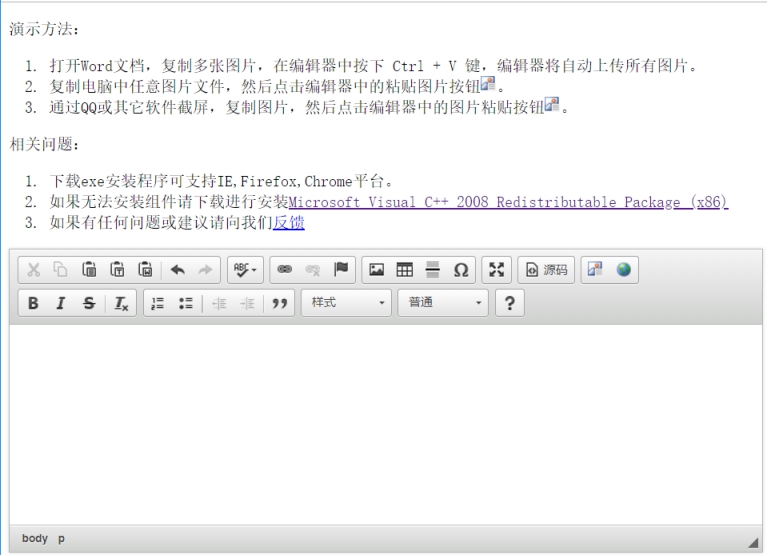
尝试使用文档复制后粘贴进来:
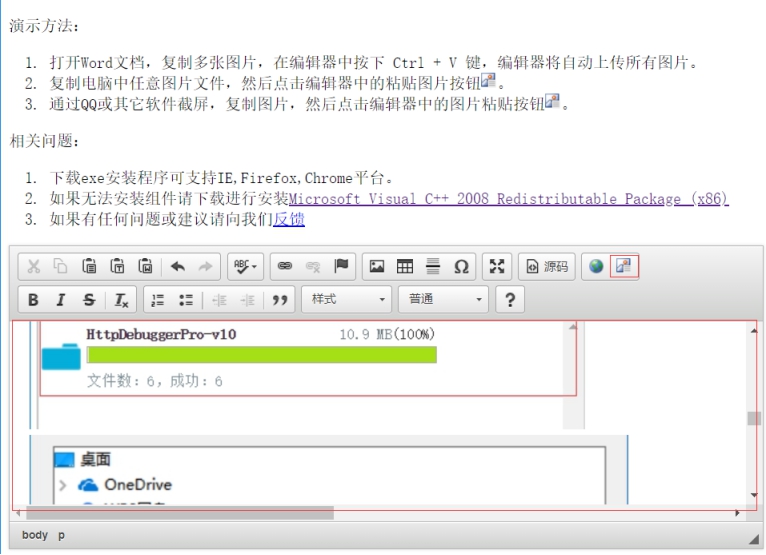
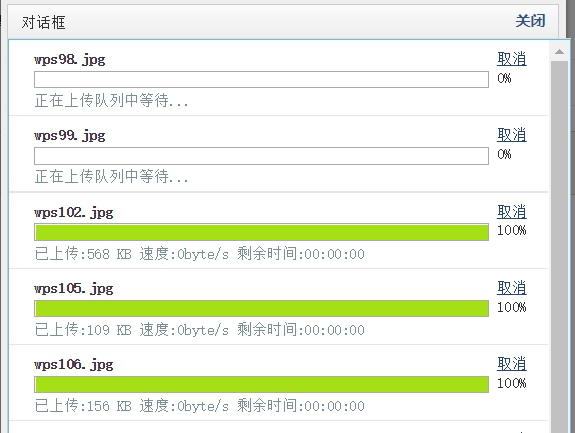
通过粘贴后,文档以及图片被粘贴进来了,看看html代码是否如我们的预期:
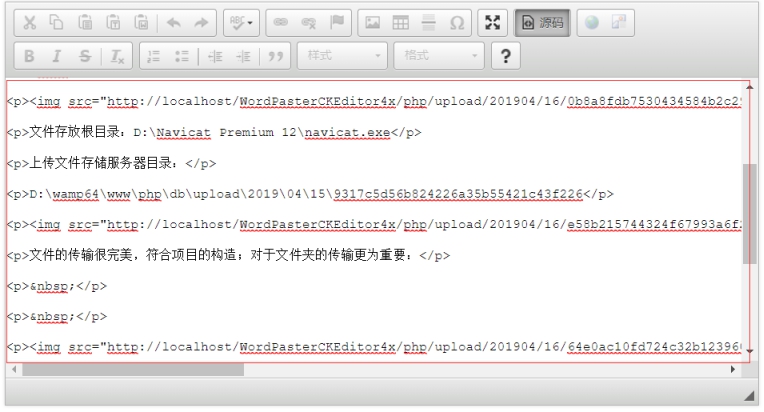
看来这个工程完全符合我们的预期,图片全部使用img标签统一。传输进度条的效果超出了我的意料。
来看看我们的文档图片被放置在哪了:

地址:D:wamp64wwwWordPasterCKEditor4xphpupload20190416
图片被统一放置在文件夹。
由此看来这个项目的实际效果大大超出了我的意料了,带入工程后完美的优化了工程项目,商业前景非常好啊!
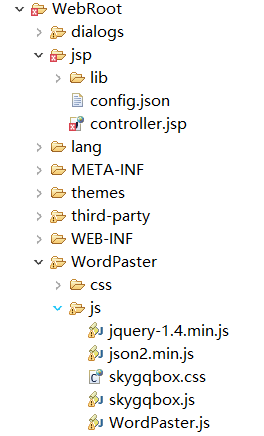
工程目录截图:
控件包:
IE(x86):http://t.cn/AiC6segS
IE(x64):http://t.cn/AiCXv7ti
Chrome:http://t.cn/AiC6s86u
Firefox:http://t.cn/AiCXvMr5
示例下载:
FCKEditor2x:http://sina.lt/gcYu
CKEditor3x:http://sina.lt/gcY5
CKEditor4x:http://sina.lt/gaWw
CuteEditor6x:http://sina.lt/gcYD
KindEditor3x:http://sina.lt/gcYG
KindEditor4x:http://sina.lt/gcYN
TinyMCE3x:http://sina.lt/gcYS
TinyMCE4x:http://sina.lt/gcYU
UEditor1x:http://sina.lt/gcYW
xhEditor1x:http://sina.lt/gcYX
eWebEditor9x:http://sina.lt/gcZa
测试教程:http://sina.lt/gaWK