前面介绍了怎样读取TFS上目录和文件的信息,怎么建立服务器和本地的映射(Mapping)。
本节介绍怎样把TFS服务器上的文件下载到本地。
下载文件可以有两种方式:
using Microsoft.TeamFoundation.VersionControl.Client;
using Microsoft.TeamFoundation.Client;
方式一:使用VersionControlServer对象,如:
string tpcURL = "http://192.168.83.62:8080";
TfsTeamProjectCollection tpc = new TfsTeamProjectCollection(new Uri(tpcURL));
VersionControlServer version = tpc.GetService(typeof(VersionControlServer)) as VersionControlServer;
version.DownloadFile("$/MySolution", "D:\TFS\MySolution");           //从服务器上下载最新版本
VersionSpec spec = new ChangesetVersionSpec(2012);
version.DownloadFile("$/MySolution", 0, spec, "D:\TFS\MySolution");  //从服务器上下载指定版本
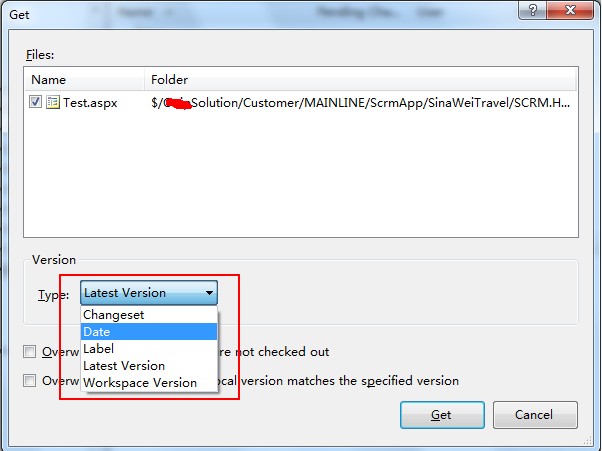
//VersionSpec有如下几个子类:
// ArtifactVersionSpec
// LabelVersionSpec
// DateVersionSpec
// WorkspaceVersionSpec
如果您使用过TFS那么看到下图就能明白上面几个子类的意义了。
方式二:使用Microsoft.TeamFoundation.VersionControl.Client.Item对象,如:
ItemSet items = version.GetItems(serverPath,  RecursionType. Full);               //最新版
//ItemSet items = version.GetItems(serverPath,spec, RecursionType.OneLevel);      //指定版本
foreach (Item item in items.Items)
{
    if (item.ItemType == ItemType.File)
     {
       item.DownloadFile(fileFullName);        //下载到本地文件
       /Stream stream = item.DownloadFile();    //以流的形式返回
      }
}
从上面的代码我们可以看出服务器上的文件或文件夹可以下载到本地任意目录,但在实际应用中,我们要把它们下载到已做过映射的路径下。因为没有映射(Mapping),我们后期对文件所做的操作就无法签入(CheckIn)到服务器。
结合前面所介绍的Workspace和mapping 我们来看一段完整的代码: /// <summary>
 /// 这段代码从零开始完整地演示了从TFS上下载文件到本地的过程
 /// </summary>
 void DownloadFilesFromTFS()
 {
    //第一步:连接到TFS服务器
    string tpcURL = "http://192.168.83.62:8080";
    TfsTeamProjectCollection tpc = new TfsTeamProjectCollection(new Uri(tpcURL));
    VersionControlServer version = tpc.GetService(typeof(VersionControlServer)) as VersionControlServer;
    //第二步:创建工作区(Worksapce),如果已经存在就不创建
    string worksapce = "WorkSpaceTest01";
    Workspace ws;
    Workspace[] wss = version.QueryWorkspaces(worksapce, Environment.UserName, Environment.MachineName);//查询工作区
    if (wss.Length == 0)
     {
         ws = version.CreateWorkspace(worksapce);//创建工作区
     }
     else
     {
         ws = wss[0];
     }

    #region 将$/MySolution/CommDll下的所有文件夹和文件 下载到本地"E:\TFS62\MySolution\CommDll" 下面

    string serverPath = "$/MySolution/CommDll";
    string savePath = "E:\TFS62\MySolution\CommDll";
    //第三步:获取最新版本,也可以使用GetItems其他重载获取特定版本
    ItemSet items = version.GetItems(serverPath, RecursionType.Full);
    foreach (Item item in items.Items)
    {
       string serverItem = item.ServerItem;                                       //如:$/MySolution/CommDll/CommDll.sln
       string localItem = savePath + serverItem.Substring(serverPath.Length);     //存储到本地的路径
       localItem = localItem.Replace("/", "\");
       //第四步:做映射(Mapping)
        if (!ws.IsServerPathMapped(serverItem))
        {
            ws.Map(serverItem, localItem);
        }
        //第五步:创建目录或下载文件
        if (item.ItemType == ItemType.Folder)
        {
            if (!Directory.Exists(localItem))       //如果目录不存在则创建
             {
                  Directory.CreateDirectory(localItem);
              }
        }
        else if (item.ItemType == ItemType.File)
        {
             item.DownloadFile(localItem);            //下载到本地文件
        }
    }
    #endregion
}