一、EFK介绍
k8s开发了一个Elasticsearch附加组件来实现集群的日志管理。分别为:Elasticsearch、Fluentd和Kibana的组合。
- Elasticsearch是一个搜索引擎
- Fluentd负责从K8s收集日志并发送给Elasticsearch
- Kibana提供了一个Web GUI,用户可以浏览和搜索存储在Elasticsearch中的日志
二、部署
Elasticsearch会作为k8s的应用在集群中运行,其YAML配置文件可以从 https://github.com/kubernetes/kubernetes/tree/master/cluster/addons/fluentd-elasticsearch 获取。
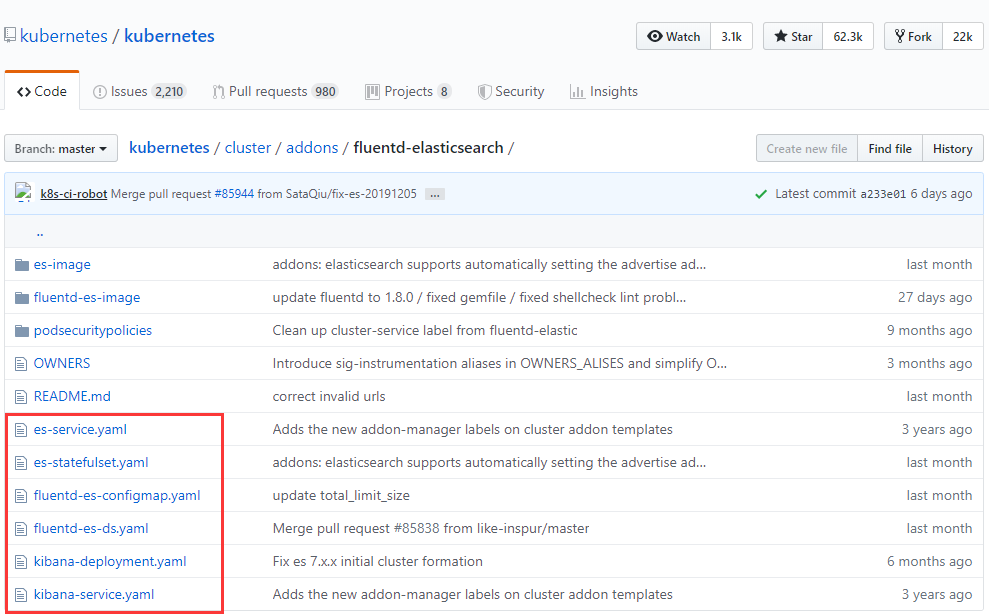
1、下载YAML文件放到/app/addons目录中
[root@k8s-node1 addons]# ll
总用量 632
-rw-r--r-- 1 root root  75357 1月  15 14:48 es-service.yaml
-rw-r--r-- 1 root root 103494 1月  15 14:48 es-statefulset.yaml
-rw-r--r-- 1 root root 189617 1月  15 14:48 fluentd-es-configmap.yaml
-rw-r--r-- 1 root root 109219 1月  15 14:48 fluentd-es-ds.yaml
-rw-r--r-- 1 root root  85657 1月  15 14:48 kibana-deployment.yaml
-rw-r--r-- 1 root root  69946 1月  15 14:49 kibana-service.yaml
2、修改kibana-deployment.yaml配置

部署:
[root@k8s-node1 app]# kubectl apply -f addons/
service "elasticsearch-logging" created
serviceaccount "elasticsearch-logging" created
clusterrole.rbac.authorization.k8s.io "elasticsearch-logging" created
clusterrolebinding.rbac.authorization.k8s.io "elasticsearch-logging" created
statefulset.apps "elasticsearch-logging" created
configmap "fluentd-es-config-v0.2.0" created
serviceaccount "fluentd-es" created
clusterrole.rbac.authorization.k8s.io "fluentd-es" created
clusterrolebinding.rbac.authorization.k8s.io "fluentd-es" created
daemonset.apps "fluentd-es-v2.8.0" created
deployment.apps "kibana-logging" created
service "kibana-logging" created