主界面:

软件升级流程:
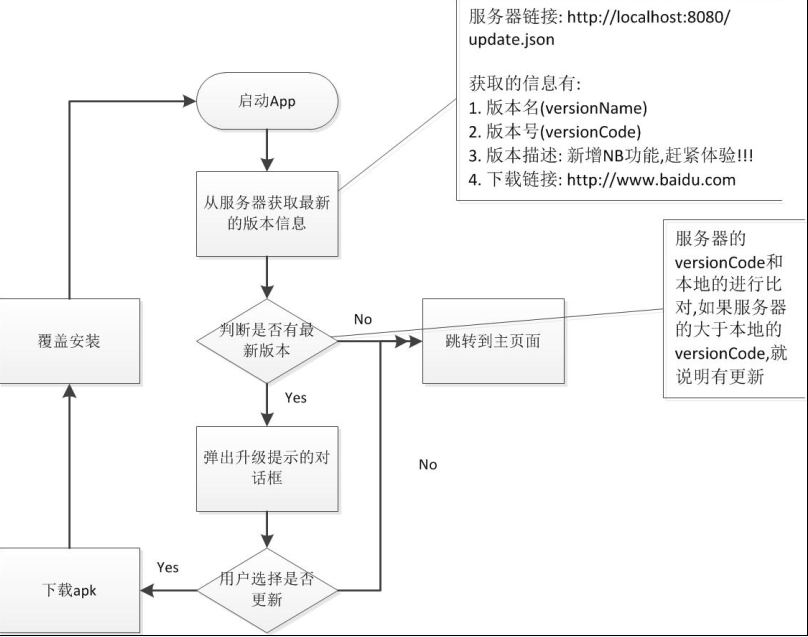
清单文件:
<?xml version="1.0" encoding="utf-8"?>
<manifest xmlns:android="http://schemas.android.com/apk/res/android"
    package="com.itheima52.mobilesafe"
    android:versionCode="1"
    android:versionName="1.0" >        软件的版本

    <uses-sdk
        android:minSdkVersion="8"
        android:targetSdkVersion="16" />

    <uses-permission android:name="android.permission.INTERNET" />
    <uses-permission android:name="android.permission.WRITE_EXTERNAL_STORAGE"/>

    <application
        android:allowBackup="true"
        android:icon="@drawable/ic_launcher"
        android:label="@string/app_name"
        android:theme="@style/AppTheme" >
        <activity
            android:name="com.itheima52.mobilesafe.activity.SplashActivity"
            android:label="@string/app_name" >    入口是闪屏页
            <intent-filter>
                <action android:name="android.intent.action.MAIN" />

                <category android:name="android.intent.category.LAUNCHER" />
            </intent-filter>
        </activity>
        <activity android:name=".activity.HomeActivity" />  主页面,.的前面是上面的包名package="com.itheima52.mobilesafe"
    </application>

</manifest>
闪屏页
<RelativeLayout xmlns:android="http://schemas.android.com/apk/res/android"
    xmlns:tools="http://schemas.android.com/tools"
    android:layout_width="match_parent"
    android:layout_height="match_parent"
    android:background="@drawable/launcher_bg" >  <!-- 闪屏页图片 -->

    <TextView
        android:id="@+id/tv_version"
        android:layout_width="wrap_content"
        android:layout_height="wrap_content"
        android:layout_centerHorizontal="true"
        android:layout_centerVertical="true"
        android:shadowColor="#f00"        阴影颜色
        android:shadowDx="1"            阴影在x坐标的偏移
        android:shadowDy="1"            阴影在y坐标的偏移
        android:shadowRadius="1"        阴影的阴影程度
        android:text="版本号:1.0"
        android:textColor="#000"
        android:textSize="16sp" />

    <ProgressBar
        android:id="@+id/progressBar1"
        android:layout_width="wrap_content"
        android:layout_height="wrap_content"
        android:layout_below="@id/tv_version"
        android:layout_centerHorizontal="true" />    转动的圆圈

    <TextView
        android:id="@+id/tv_progress"
        android:layout_width="wrap_content"
        android:layout_height="wrap_content"
        android:layout_alignParentBottom="true"
        android:layout_alignParentLeft="true"
        android:layout_marginLeft="5dp"
        android:text="下载进度"
        android:textColor="#f00"
        android:textSize="16sp"
        android:visibility="gone" />

</RelativeLayout>
闪屏java类:
package com.itheima52.mobilesafe.activity;

import java.io.File;
import java.io.IOException;
import java.io.InputStream;
import java.net.HttpURLConnection;
import java.net.MalformedURLException;
import java.net.URL;

import org.json.JSONException;
import org.json.JSONObject;

import android.app.Activity;
import android.app.AlertDialog;
import android.content.DialogInterface;
import android.content.DialogInterface.OnCancelListener;
import android.content.DialogInterface.OnClickListener;
import android.content.Intent;
import android.content.pm.PackageInfo;
import android.content.pm.PackageManager;
import android.content.pm.PackageManager.NameNotFoundException;
import android.net.Uri;
import android.os.Bundle;
import android.os.Environment;
import android.os.Handler;
import android.os.Message;
import android.view.View;
import android.widget.TextView;
import android.widget.Toast;

import com.itheima52.mobilesafe.R;
import com.itheima52.mobilesafe.utils.StreamUtils;
import com.lidroid.xutils.HttpUtils;
import com.lidroid.xutils.exception.HttpException;
import com.lidroid.xutils.http.ResponseInfo;
import com.lidroid.xutils.http.callback.RequestCallBack;

public class SplashActivity extends Activity {

    protected static final int CODE_UPDATE_DIALOG = 0;
    protected static final int CODE_URL_ERROR = 1;
    protected static final int CODE_NET_ERROR = 2;
    protected static final int CODE_JSON_ERROR = 3;
    protected static final int CODE_ENTER_HOME = 4;// 进入主页面

    private TextView tvVersion;
    private TextView tvProgress;// 下载进度展示

    // 服务器返回的信息
    private String mVersionName;// 版本名
    private int mVersionCode;// 版本号
    private String mDesc;// 版本描述
    private String mDownloadUrl;// 下载地址

    private Handler mHandler = new Handler() {
        public void handleMessage(android.os.Message msg) {
            switch (msg.what) {
            case CODE_UPDATE_DIALOG:
                showUpdateDailog();
                break;
            case CODE_URL_ERROR:
                Toast.makeText(SplashActivity.this, "url错误", Toast.LENGTH_SHORT)
                        .show();
                enterHome();
                break;
            case CODE_NET_ERROR:
                Toast.makeText(SplashActivity.this, "网络错误", Toast.LENGTH_SHORT)
                        .show();
                enterHome();
                break;
            case CODE_JSON_ERROR:
                Toast.makeText(SplashActivity.this, "数据解析错误",
                        Toast.LENGTH_SHORT).show();
                enterHome();
                break;
            case CODE_ENTER_HOME:
                enterHome();
                break;

            default:
                break;
            }
        };
    };

    @Override
    protected void onCreate(Bundle savedInstanceState) {
        super.onCreate(savedInstanceState);
        setContentView(R.layout.activity_splash);
        tvVersion = (TextView) findViewById(R.id.tv_version);
        tvVersion.setText("版本名:" + getVersionName());
        tvProgress = (TextView) findViewById(R.id.tv_progress);// 默认隐藏
        checkVerson();//检查版本
    }

    /**
     * 获取版本名称
     */
    private String getVersionName() {
        PackageManager packageManager = getPackageManager();
        try {
            PackageInfo packageInfo = packageManager.getPackageInfo(getPackageName(), 0);// 获取包的信息
            /*getPackageName获取的是清单文件的包名com.itheima52.mobilesafe:
            <manifest xmlns:android="http://schemas.android.com/apk/res/android"
                package="com.itheima52.mobilesafe"
                android:versionCode="1"
                android:versionName="1.0"  */
            int versionCode = packageInfo.versionCode;//1
            String versionName = packageInfo.versionName;//1.0
            System.out.println("versionName=" + versionName + ";versionCode="+ versionCode);
            return versionName;
        } catch (NameNotFoundException e) {
            // 没有找到包名的时候会走此异常
            e.printStackTrace();
        }
        return "";
    }

    /**
     * 获取本地app的版本号
     */
    private int getVersionCode() {
        PackageManager packageManager = getPackageManager();
        try {
            PackageInfo packageInfo = packageManager.getPackageInfo(getPackageName(), 0);// 获取包的信息
            int versionCode = packageInfo.versionCode;
            return versionCode;
        } catch (NameNotFoundException e) {
            // 没有找到包名的时候会走此异常
            e.printStackTrace();
        }
        return -1;
    }

    /**
     * 从服务器获取版本信息进行校验
     */
    private void checkVerson() {
        final long startTime = System.currentTimeMillis();
        // 加载网络在子线城,主线程阻塞超过5秒就会出错,启动子线程异步加载数据
        new Thread() {
            @Override
            public void run() {
                Message msg = Message.obtain();
                HttpURLConnection conn = null;
                try {
                    // 本机地址用localhost, 但是如果用模拟器加载本机的地址时,可以用ip(10.0.2.2)来替换
                    URL url = new URL("http://10.0.2.2:8080/update.json");//update.json是tomcat服务器根目录下的update.json文件。
                    conn = (HttpURLConnection) url.openConnection();
                    conn.setRequestMethod("GET");// 设置请求方法
                    conn.setConnectTimeout(5000);// 设置连接超时,5秒连接不上就抛出异常,
                    conn.setReadTimeout(5000);// 设置响应超时, 连接上了,但服务器迟迟不给响应,
                    conn.connect();// 连接服务器
                    int responseCode = conn.getResponseCode();// 获取响应码
                    if (responseCode == 200) {
                        InputStream inputStream = conn.getInputStream();
                        String result = StreamUtils.readFromStream(inputStream);
                        /*public static String readFromStream(InputStream in) throws IOException {
                            ByteArrayOutputStream out = new ByteArrayOutputStream();
                            int len = 0;
                            byte[] buffer = new byte[1024];

                            while ((len = in.read(buffer)) != -1) {
                                out.write(buffer, 0, len);
                            }
                            String result = out.toString();
                            in.close();
                            out.close();
                            return result;
                        }*/
                        // System.out.println("网络返回:" + result);

                        // 解析json
                        /*{"versionName": "2.0", "versionCode": 2,
                            "description": "新增NB功能,赶紧体验!!!",
                            "downloadUrl":  "http://10.0.2.2:8080/360.apk"}*/
                        JSONObject jo = new JSONObject(result);
                        mVersionName = jo.getString("versionName");
                        mVersionCode = jo.getInt("versionCode");
                        mDesc = jo.getString("description");
                        mDownloadUrl = jo.getString("downloadUrl");
                        // System.out.println("版本描述:" + mDesc);

                        if (mVersionCode > getVersionCode()) {// 判断是否有更新
                            // 服务器的VersionCode大于本地的VersionCode
                            // 说明有更新, 弹出升级对话框
                            msg.what = CODE_UPDATE_DIALOG;
                        } else {
                            // 没有版本更新
                            msg.what = CODE_ENTER_HOME;
                        }
                    }
                } catch (MalformedURLException e) {
                    // url错误的异常
                    msg.what = CODE_URL_ERROR;//url错误
                    e.printStackTrace();
                } catch (IOException e) {
                    // 网络错误异常
                    msg.what = CODE_NET_ERROR;//网络错误
                    e.printStackTrace();
                } catch (JSONException e) {
                    // json解析失败
                    msg.what = CODE_JSON_ERROR;//数据解析错误
                    e.printStackTrace();
                } finally {
                    long endTime = System.currentTimeMillis();
                    long timeUsed = endTime - startTime;// 访问网络花费的时间
                    if (timeUsed < 2000) {
                        // 强制休眠一段时间,保证闪屏页展示2秒钟
                        try {
                            Thread.sleep(2000 - timeUsed);
                        } catch (InterruptedException e) {
                            e.printStackTrace();
                        }
                    }
                    mHandler.sendMessage(msg);//子线程不能更新UI
                    if (conn != null) {
                        conn.disconnect();// 关闭网络连接
                    }
                }
            }
        }.start();
    }

    /**
     * 弹出升级对话框
     */
    protected void showUpdateDailog() {
        AlertDialog.Builder builder = new AlertDialog.Builder(this);
        builder.setTitle("最新版本:" + mVersionName);
        builder.setMessage(mDesc);
        // builder.setCancelable(false);//不让用户取消对话框,物理按键返回键无效。 用户体验太差,尽量不要用
        builder.setPositiveButton("立即更新", new OnClickListener() {
            @Override
            public void onClick(DialogInterface dialog, int which) {
                System.out.println("立即更新");
                download();
            }
        });
        builder.setNegativeButton("以后再说", new OnClickListener() {
            @Override
            public void onClick(DialogInterface dialog, int which) {
                enterHome();
            }
        });
        // 设置取消的监听, 用户点击返回键时会触发
        builder.setOnCancelListener(new OnCancelListener() {
            @Override
            public void onCancel(DialogInterface dialog) {
                enterHome();
            }
        });
        builder.show();
    }

    /**
     * 下载apk文件
     */
    protected void download() {
        if (Environment.getExternalStorageState().equals(Environment.MEDIA_MOUNTED)) {//判断有没有sd卡

            tvProgress.setVisibility(View.VISIBLE);// 显示进度

            String target = Environment.getExternalStorageDirectory()+ "/update.apk";//文件的下载位置,sd卡目录。
            // XUtils下载比HttpURLConnection要优
            HttpUtils utils = new HttpUtils();
            utils.download(mDownloadUrl, target, new RequestCallBack<File>() {

                // 下载文件的进度
                @Override
                public void onLoading(long total, long current,boolean isUploading) {
                    super.onLoading(total, current, isUploading);
                    System.out.println("下载进度:" + current + "/" + total);
                    tvProgress.setText("下载进度:" + current * 100 / total + "%");
                }

                // 下载成功
                @Override
                public void onSuccess(ResponseInfo<File> arg0) {
                    System.out.println("下载成功");
                    // 跳转到系统的安装页面
                    Intent intent = new Intent(Intent.ACTION_VIEW);
                    intent.addCategory(Intent.CATEGORY_DEFAULT);
                    intent.setDataAndType(Uri.fromFile(arg0.result),//下载好的apk文件
                            "application/vnd.android.package-archive");
                    // startActivity(intent);
                    startActivityForResult(intent, 0);// 跳转到安装页面会有一个确定取消对话框,如果用户取消安装的话,
                                                        // 会返回结果,回调方法onActivityResult
                }

                // 下载失败
                @Override
                public void onFailure(HttpException arg0, String arg1) {
                    Toast.makeText(SplashActivity.this, "下载失败!",
                            Toast.LENGTH_SHORT).show();
                }
            });
        } else {
            Toast.makeText(SplashActivity.this, "没有找到sdcard!",
                    Toast.LENGTH_SHORT).show();
        }
    }

    // 如果用户取消安装的话,回调此方法
    @Override
    protected void onActivityResult(int requestCode, int resultCode, Intent data) {
        enterHome();
        super.onActivityResult(requestCode, resultCode, data);
    }

    /**
     * 进入主页面
     */
    private void enterHome() {
        Intent intent = new Intent(this, HomeActivity.class);
        startActivity(intent);//跳转Activity
        finish();//不然按返回键就又返回到闪屏页了。
    }

}
主页面:
<?xml version="1.0" encoding="utf-8"?>
<LinearLayout xmlns:android="http://schemas.android.com/apk/res/android"
    android:layout_width="match_parent"
    android:layout_height="match_parent"
    android:orientation="vertical" >

    <TextView
        android:id="@+id/textView1"
        android:layout_width="match_parent"
        android:layout_height="50dp"
        android:background="#8866ff00"
        android:gravity="center"
        android:text="功能列表"
        android:textColor="@color/black"
        android:textSize="22sp" />
        <!-- colors.xml
        <?xml version="1.0" encoding="utf-8"?>
        <resources>
           <color name="black">#000</color>
        </resources> -->

<!--  此xml转换为java对象的时候会调用FocusedTextView的构造函数
    <com.itheima52.mobilesafe.view.FocusedTextView    -->
        <TextView
        android:layout_width="match_parent"
        android:layout_height="wrap_content"
        android:layout_marginBottom="5dp"
        android:layout_marginTop="5dp"
        android:ellipsize="marquee"        走马灯,自己跑起来
        android:focusable="true"
        android:focusableInTouchMode="true"
        android:singleLine="true"        一行
        android:text="横幅滚动条,,,,有了手机卫士, 腰不酸了,腿不疼了,走路也有劲了, 手机卫士太NB了"
        android:textColor="@color/black"
        android:textSize="18sp" />

    <GridView
        android:id="@+id/gv_home"
        android:layout_width="match_parent"
        android:layout_height="0dp"
        android:layout_weight="1"
        android:numColumns="3"                几列
        android:verticalSpacing="20dp" >    垂直距离
    </GridView>

</LinearLayout>
主页面java类:
package com.itheima52.mobilesafe.activity;

import android.app.Activity;
import android.os.Bundle;
import android.view.View;
import android.view.ViewGroup;
import android.widget.BaseAdapter;
import android.widget.GridView;
import android.widget.ImageView;
import android.widget.TextView;

import com.itheima52.mobilesafe.R;

/**
 * 主页面
 */
public class HomeActivity extends Activity {

    private GridView gvHome;

    private String[] mItems = new String[] { "手机防盗", "通讯卫士", "软件管理", "进程管理",
            "流量统计", "手机杀毒", "缓存清理", "高级工具", "设置中心" };

    private int[] mPics = new int[] { R.drawable.home_safe,
            R.drawable.home_callmsgsafe, R.drawable.home_apps,
            R.drawable.home_taskmanager, R.drawable.home_netmanager,
            R.drawable.home_trojan, R.drawable.home_sysoptimize,
            R.drawable.home_tools, R.drawable.home_settings };

    @Override
    protected void onCreate(Bundle savedInstanceState) {
        super.onCreate(savedInstanceState);
        setContentView(R.layout.activity_home);

        gvHome = (GridView) findViewById(R.id.gv_home);
        gvHome.setAdapter(new HomeAdapter());
    }

    class HomeAdapter extends BaseAdapter {

        @Override
        public int getCount() {
            return mItems.length;
        }

        @Override
        public Object getItem(int position) {
            return mItems[position];
        }

        @Override
        public long getItemId(int position) {
            return position;
        }

        @Override
        public View getView(int position, View convertView, ViewGroup parent) {
            View view = View.inflate(HomeActivity.this,
                    R.layout.home_list_item, null);
            //home_list_item.xml
            /*<?xml version="1.0" encoding="utf-8"?>
            <LinearLayout xmlns:android="http://schemas.android.com/apk/res/android"
                android:layout_width="wrap_content"
                android:layout_height="wrap_content"
                android:gravity="center"
                android:orientation="vertical" >
                <ImageView
                    android:id="@+id/iv_item"
                    android:layout_width="wrap_content"
                    android:layout_height="wrap_content"
                    android:src="@drawable/home_apps" />
                <TextView
                    android:id="@+id/tv_item"
                    android:layout_width="wrap_content"
                    android:layout_height="wrap_content"
                    android:layout_marginTop="5dp"
                    android:textColor="@color/black"
                    android:textSize="18sp"
                    android:text="手机防盗" />
            </LinearLayout>*/
            ImageView ivItem = (ImageView) view.findViewById(R.id.iv_item);
            TextView tvItem = (TextView) view.findViewById(R.id.tv_item);
            tvItem.setText(mItems[position]);
            ivItem.setImageResource(mPics[position]);//setImageResource(int resId)根据图片的id就可以找到图片。
            return view;
        }
    }
}
自定义textview:
package com.itheima52.mobilesafe.view;

import android.content.Context;
import android.util.AttributeSet;
import android.widget.TextView;

/**
 * 获取焦点的TextView
 * xml中的控件都是会转换为java对象的,转换为xml对象的时候会经过下列构造函数。
 */
public class FocusedTextView extends TextView {

    // xml文件中FocusedTextView控件有style样式的话会走此方法将xml中的控件转换为java对像,
    public FocusedTextView(Context context, AttributeSet attrs, int defStyle) {
        super(context, attrs, defStyle);
    }

    // xml文件中FocusedTextView控件有属性(background,textColor,textSize)时走此方法
    public FocusedTextView(Context context, AttributeSet attrs) {
        super(context, attrs);
    }

    // 不用xml写而是用代码new这个FocusedTextView对象时,走此方法
    public FocusedTextView(Context context) {
        super(context);
    }

    /**
     * 表示有咩有获取焦点
     *
     * 跑马灯要运行,首先调用此函数判断是否有焦点,是true的话,跑马灯才会有效果 所以我们不管实际上textview有没有焦点,
     * 我们都强制返回true, 让跑马灯认为有焦点
     */
    @Override
    public boolean isFocused() {
        return true;
    }

}
## 代码组织结构 ##

- 根据业务逻辑划分(J2EE开发使用此结构,此结构较复杂)

    - 办公软件

        - 出差 com.itheima.travel
        - 工资 com.itheima.money
        - 会议 com.itheima.meeting

    - 网盘

        - 上传 com.vdisk.upload
        - 下载 com.vdisk.download
        - 分享 com.vdisk.share

- 根据功能模块划分(Android开发推荐此方法,此结构较为简单)

    - Activity com.itheima.mobilesafe.activty
    - 后台服务  com.itheima.mobilesafe.service
    - 广播接受者 com.itheima.mobilesafe.receiver
    - 数据库 com.itheima.mobilesafe.db.dao
    - 对象(java bean) com.itheima.mobilesafe.domain/bean
    - 自定义控件 com.itheima.mobilesafe.view
    - 工具类 com.itheima.mobilesafe.utils
    - 业务逻辑 com.itheima.mobilesafe.engine

## 项目创建 ##

- minimum SDK 要求最低的安装版本,一般选8, 安装apk前,系统会判断当前版本是否高于(包含)此版本, 是的话才允许安装,在手机上面安装的时候用。

- maxSdkVersion 要求最高的安装版本(一般不用)。

- Target SDK 目标SDK, 一般设置为开发时使用的手机版本, 这样的话,系统在运行我的apk时,就认为我已经在该做了充分的测试, 系统就不会做过多的兼容性判断, 从而提高运行效率。

- Compile With 编译程序时使用的版本。


## 闪屏页面(Splash) ##

- 展示logo,公司品牌
- 项目初始化
- 检测版本更新
- 校验程序合法性(比如:判断是否有网络,有的话才运行)

打包apk:右键——Android Tools——Export Signed Application Package——新建一个空签名文件.keystore——输入密码——输入别名,密码,有效期——建立空的apk文件.

## 签名冲突 ##

> 如果两个相同应用程序, 包名相同, 但是签名不同, 就无法覆盖安装。签名是为了防止反编译别人apk后成为自己的软件,从而安装的时候将自己反编译的软件覆盖原始的软件。

> 正式签名

    1. 有效期比较长,一般大于25年
    2. 需要设置密码
    3. 正式发布应用时,必须用正式签名来打包

> 测试签名(debug.keystore),运行eclips时会有默认的签名。
D:andriod
ewfilead5_0sdk.androiddebug.keystore
    1. 有效期是1年,很短
    2. 有默认的别名,密码, alias=android, 密码是androiddebugkey
    3. 在eclipse中直接运行项目时,系统默认采用此签名文件

> 如果正式签名丢失了怎么办?

    1. 修改包名, 发布, 会发现有两个手机卫士, 用户会比较纠结
    2. 请用户先删掉原来的版本,再进行安装, 用户会流失
    3. 作为一名有经验的开发人员,请不要犯这种低级错误

## 常用快捷键 ##

- ctrl + shift + o 全部导包
- ctrl + shift + t 快速查找某个类
ctrl + t 继承关系
- 先按ctrl + 2 ,再点L, 创建变量并命名
- ctrl + o , 在当前类中,快速查找某个方法
- ctrl + k, 向下查找某个字符串
- ctrl + shift + k, 向上查找某个字符串
- alt + 左方向键 跳转上一个页面

## 子类和父类 ##

> 子类拥有父类的所有方法, 而且可以有更多自己的方法

> Activity(有token)是一个context对象, Context(没有token)
> 平时,要获取context对象的话, 优先选择Activity, 避免bug出现, 尽量不用getApplicationContext()