1.IIS7.5详细错误 HTTP 错误 500.19 - Internal Server Error 无法访问请求的页面,因为该页的相关配置数据无效
重复定义了“system.web.extensions/scripting/scriptResourceHandler”
解决方法:
直接删除整个,网上说的改应用程序池的.netframework为2.0都是坑爹的,因为我的web应用程序就是用的.net4.0
<sectionGroup name="scripting" type="System.Web.Configuration.ScriptingSectionGroup, System.Web.Extensions, Version=3.5.0.0, Culture=neutral, PublicKeyToken=31BF3856AD364E35">
                <section name="scriptResourceHandler" type="System.Web.Configuration.ScriptingScriptResourceHandlerSection, System.Web.Extensions, Version=3.5.0.0, Culture=neutral, PublicKeyToken=31BF3856AD364E35" requirePermission="false" allowDefinition="MachineToApplication" />
                <sectionGroup name="webServices" type="System.Web.Configuration.ScriptingWebServicesSectionGroup, System.Web.Extensions, Version=3.5.0.0, Culture=neutral, PublicKeyToken=31BF3856AD364E35">
                    <section name="jsonSerialization" type="System.Web.Configuration.ScriptingJsonSerializationSection, System.Web.Extensions, Version=3.5.0.0, Culture=neutral, PublicKeyToken=31BF3856AD364E35" requirePermission="false" allowDefinition="Everywhere" />
                    <section name="profileService" type="System.Web.Configuration.ScriptingProfileServiceSection, System.Web.Extensions, Version=3.5.0.0, Culture=neutral, PublicKeyToken=31BF3856AD364E35" requirePermission="false" allowDefinition="MachineToApplication" />
                    <section name="authenticationService" type="System.Web.Configuration.ScriptingAuthenticationServiceSection, System.Web.Extensions, Version=3.5.0.0, Culture=neutral, PublicKeyToken=31BF3856AD364E35" requirePermission="false" allowDefinition="MachineToApplication" />
                    <section name="roleService" type="System.Web.Configuration.ScriptingRoleServiceSection, System.Web.Extensions, Version=3.5.0.0, Culture=neutral, PublicKeyToken=31BF3856AD364E35" requirePermission="false" allowDefinition="MachineToApplication" /></sectionGroup></sectionGroup>
2.MVC 3.0 在各个版本IIS中的部署
http://www.cnblogs.com/xiongpq/archive/2011/05/25/2057445.html
3.发布mvc遇到的HTTP错误 403.14-Forbidden解决办法
<system.webServer>
<validationvalidateIntegratedModeConfiguration="false"/>
<modules runAllManagedModulesForAllRequests="true" />
</system.webServer>
在web.config增加<modules runAllManagedModulesForAllRequests="true" />
4.HTTP 403.14

修改:
先IIS节点->ISAPI和CGI限制

如果 Asp.NET v4.0.30319 限制为“不允许”将其更改为“允许”
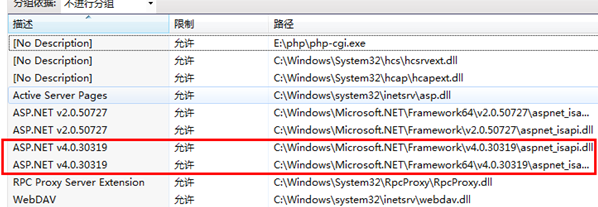
如果里面没有.net4.0,则需要注册:
C:WindowsMicrosoft.NETFrameworkv4.0.30319aspnet_regiis.exe -i
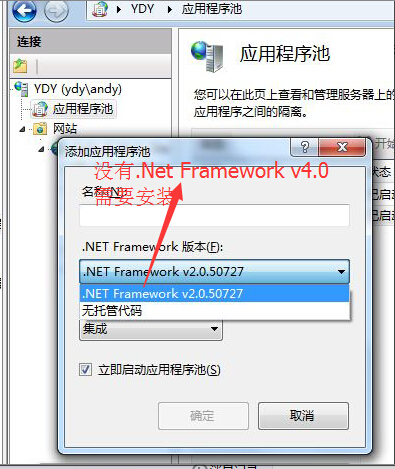
5.如果应用程序池没有.net framework v4.0选择,请先安装.net 4.0
.Net Framwork 4.0下载地址:http://download.microsoft.com/download/9/5/A/95A9616B-7A37-4AF6-BC36-D6EA96C8DAAE/dotNetFx40_Full_x86_x64.exe