Hadoop生态圈-注册并加载协处理器(coprocessor)的三种方式
作者:尹正杰
版权声明:原创作品,谢绝转载!否则将追究法律责任。
到目前为止,大家已经掌握了如何使用过滤器来减少服务器端通过网络返回到客户端的数据量。HBase中还有一些特性让用户甚至可以把一部分计算也移动到数据的存放端,他就是本篇博客的主角:协处理器(coprocessor)。
一.协处理器简介
使用客户端API,配合筛选机制,例如,使用过滤器或限制列族的范围,都可以控制被返回到客户端的数据量。如果可以更进一步优化会更好,例如,数据的处理流程直接存放到服务器端执行,然后仅返回一个小的处理结果集。这类似于一个小型的MapReduce框架,该框架将工作分发到整个集群。
协处理器运行用户在region服务器上运行自己的代码,更准确的说是允许用户执行region级的操作,并且可以使用RDBMS中触发器(trigger)类似的功能。在客户端,用户不用关心操作具体在哪里执行,HBase的分布式框架会帮助用户把这些工作变得透明。这里用户可以监听一些隐式的事件,并利用其来完成一些辅助任务。如果这还不够,用户还可以自己扩展现有的RPC协议引用自己的调用,这些调用有客户端出阿发,并在服务器端执行。
协处理器框架已经提供了一些类,用户可以通过继承这些类来扩展自己的功能。这些类主要分为两大类,即observer和endpoint。以下是各个功能的简要介绍。
1>.observer
这一类协处理器与触发器(trigger)类似:回调函数(也被称作钩子函数,hook)在一些特定时间发生时被执行。这些时间包括一些用户产生的事件,也包括服务器内部自动产生的事件,也包括服务器端内部自动产生的事件。协处理器框架提供的接口如下所示:
a>.RegionObserver:用户可以用这种的处理器处理数据修改时间,他们与表的region联系紧密;
b>.MasterObserve:可以被用作管理或DDL类型的操作,这些是集群级事件;
c>.WALObserver:提供控制WAL的钩子函数;
observer提供了一些设计好的回调函数,每个操作在集群服务器端都可以被调用。
2>.endpoint
除了事件处理之外还需要将用户自定义操作添加到服务器端。用户代码可以被部署到管理数据的服务器端,例如,做一些服务器端计算的工作。endpoint通过添加一些远程过程调用来动态扩展RPC协议。可以把他们理解为与RDBMS中类似的存储过程,endpoint可以与observer的实现组合起来直接作用于服务器端的状态。
二.RegionObserver类
在region级别中介绍的Coprocessor第一个子类是RegionObserver类。从名字中可以看出它属于observer协处理器:当一个特定的region级别的操作发生时,他们的钩子函数会被触发。
BaseRegionObserver类可以作为所有用户实现监听类型协处理器的基类。它实现了所有RegionObserver接口的空方法,所有在默认情况下基础这个类的协处理器没有任何功能。用户需要重载他们干星期的方法实现自己的功能。接下来我们体验一下observer。
1>.编写MyRegionObserver.java 文件
  1 /*
  2 @author :yinzhengjie
  3 Blog:http://www.cnblogs.com/yinzhengjie/tag/Hadoop%E8%BF%9B%E9%98%B6%E4%B9%8B%E8%B7%AF/
  4 EMAIL:y1053419035@qq.com
  5 */
  6 package cn.org.yinzhengjie.coprocessor;
  7
  8 import org.apache.hadoop.hbase.Cell;
  9 import org.apache.hadoop.hbase.CoprocessorEnvironment;
 10 import org.apache.hadoop.hbase.client.Delete;
 11 import org.apache.hadoop.hbase.client.Durability;
 12 import org.apache.hadoop.hbase.client.Get;
 13 import org.apache.hadoop.hbase.client.Put;
 14 import org.apache.hadoop.hbase.coprocessor.BaseRegionObserver;
 15 import org.apache.hadoop.hbase.coprocessor.ObserverContext;
 16 import org.apache.hadoop.hbase.coprocessor.RegionCoprocessorEnvironment;
 17 import org.apache.hadoop.hbase.regionserver.wal.WALEdit;
 18
 19 import java.io.*;
 20 import java.util.List;
 21
 22 public class MyRegionObserver extends BaseRegionObserver {
 23     File f = new File("/home/yinzhengjie/coprocessor.log");
 24
 25     @Override
 26     public void start(CoprocessorEnvironment e) throws IOException {
 27         super.start(e);
 28
 29         if(!f.exists()){
 30             f.createNewFile();
 31         }
 32         FileOutputStream fos = new FileOutputStream( f, true);
 33         fos.write("this is a start function
".getBytes());
 34         fos.close();
 35     }
 36
 37     @Override
 38     public void stop(CoprocessorEnvironment e) throws IOException {
 39         super.stop(e);
 40         if(!f.exists()){
 41             f.createNewFile();
 42         }
 43         FileOutputStream fos = new FileOutputStream(f, true);
 44         fos.write("this is a stop function
".getBytes());
 45         fos.close();
 46     }
 47
 48     @Override
 49     public void postFlush(ObserverContext<RegionCoprocessorEnvironment> e) throws IOException {
 50         super.postFlush(e);
 51         if(!f.exists()){
 52             f.createNewFile();
 53         }
 54
 55         //
 56         String table = e.getEnvironment().getRegionInfo().getTable().getNameAsString();
 57
 58         FileOutputStream fos = new FileOutputStream(f, true);
 59         fos.write(("this is a flush function, table: " + table +  "被刷新了
 ").getBytes());
 60         fos.close();
 61
 62     }
 63
 64     @Override
 65     public void postGetOp(ObserverContext<RegionCoprocessorEnvironment> e, Get get, List<Cell> results) throws IOException {
 66         super.postGetOp(e, get, results);
 67         if(!f.exists()){
 68             f.createNewFile();
 69         }
 70         //通过put得到操作行
 71         String row = new String(get.getRow());
 72
 73         //
 74         String table = e.getEnvironment().getRegionInfo().getTable().getNameAsString();
 75
 76         FileOutputStream fos = new FileOutputStream(f, true);
 77         fos.write(("this is a get function, table: " + table + ",row: " + row + "发生了修改
 ").getBytes());
 78         fos.close();
 79     }
 80
 81     @Override
 82     public void postPut(ObserverContext<RegionCoprocessorEnvironment> e, Put put, WALEdit edit, Durability durability) throws IOException {
 83         super.postPut(e, put, edit, durability);
 84
 85         if(!f.exists()){
 86             f.createNewFile();
 87         }
 88
 89         //通过put得到操作行
 90         String row = new String(put.getRow());
 91
 92         //
 93         String table = e.getEnvironment().getRegionInfo().getTable().getNameAsString();
 94
 95         FileOutputStream fos = new FileOutputStream(f, true);
 96         fos.write(("this is a put function, table: " + table + ",row: " + row + "发生了修改
 ").getBytes());
 97         fos.close();
 98
 99     }
100
101     @Override
102     public void postDelete(ObserverContext<RegionCoprocessorEnvironment> e, Delete delete, WALEdit edit, Durability durability) throws IOException {
103         super.postDelete(e, delete, edit, durability);
104
105         if(!f.exists()){
106             f.createNewFile();
107         }
108         //通过put得到操作行
109         String row = new String(delete.getRow());
110
111         //
112         String table = e.getEnvironment().getRegionInfo().getTable().getNameAsString();
113
114         FileOutputStream fos = new FileOutputStream(f, true);
115         fos.write(("this is a delete function, table: " + table + ",row: " + row + "发生了修改
 ").getBytes());
116         fos.close();
117     }
118 }
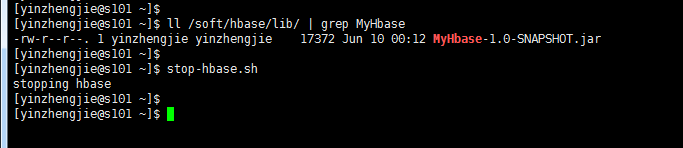
2>.将以上代码进行打包操作,并将其放置/soft/hbase/lib下。并关闭hbase
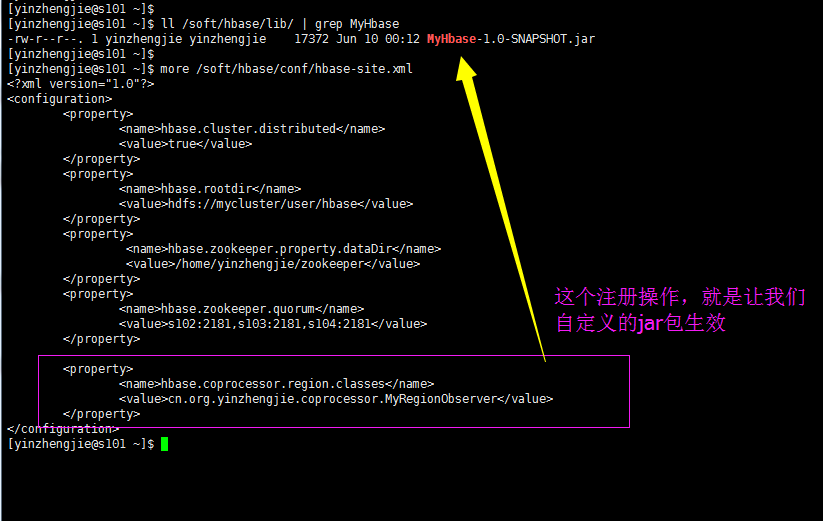
3>.注册(/soft/hbase/conf/hbase-site.xml),目的是使用咱们写的jar包。
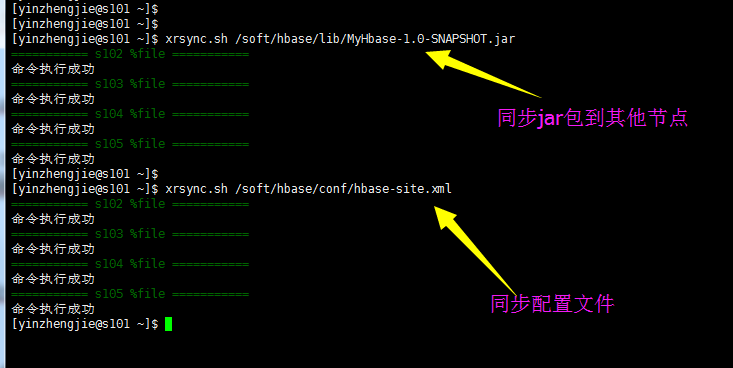
4>.同步文件


[yinzhengjie@s101 ~]$ more `which xrsync.sh`
#!/bin/bash
#@author :yinzhengjie
#blog:http://www.cnblogs.com/yinzhengjie
#EMAIL:y1053419035@qq.com

#判断用户是否传参
if [ $# -lt 1 ];then
    echo "请输入参数";
    exit
fi


#获取文件路径
file=$@

#获取子路径
filename=`basename $file`

#获取父路径
dirpath=`dirname $file`

#获取完整路径
cd $dirpath
fullpath=`pwd -P`

#同步文件到DataNode
for (( i=102;i<=105;i++ ))
do
    #使终端变绿色
    tput setaf 2
    echo =========== s$i %file ===========
    #使终端变回原来的颜色,即白灰色
    tput setaf 7
    #远程执行命令
    rsync -lr $filename `whoami`@s$i:$fullpath
    #判断命令是否执行成功
    if [ $? == 0 ];then
        echo "命令执行成功"
    fi
done
[yinzhengjie@s101 ~]$
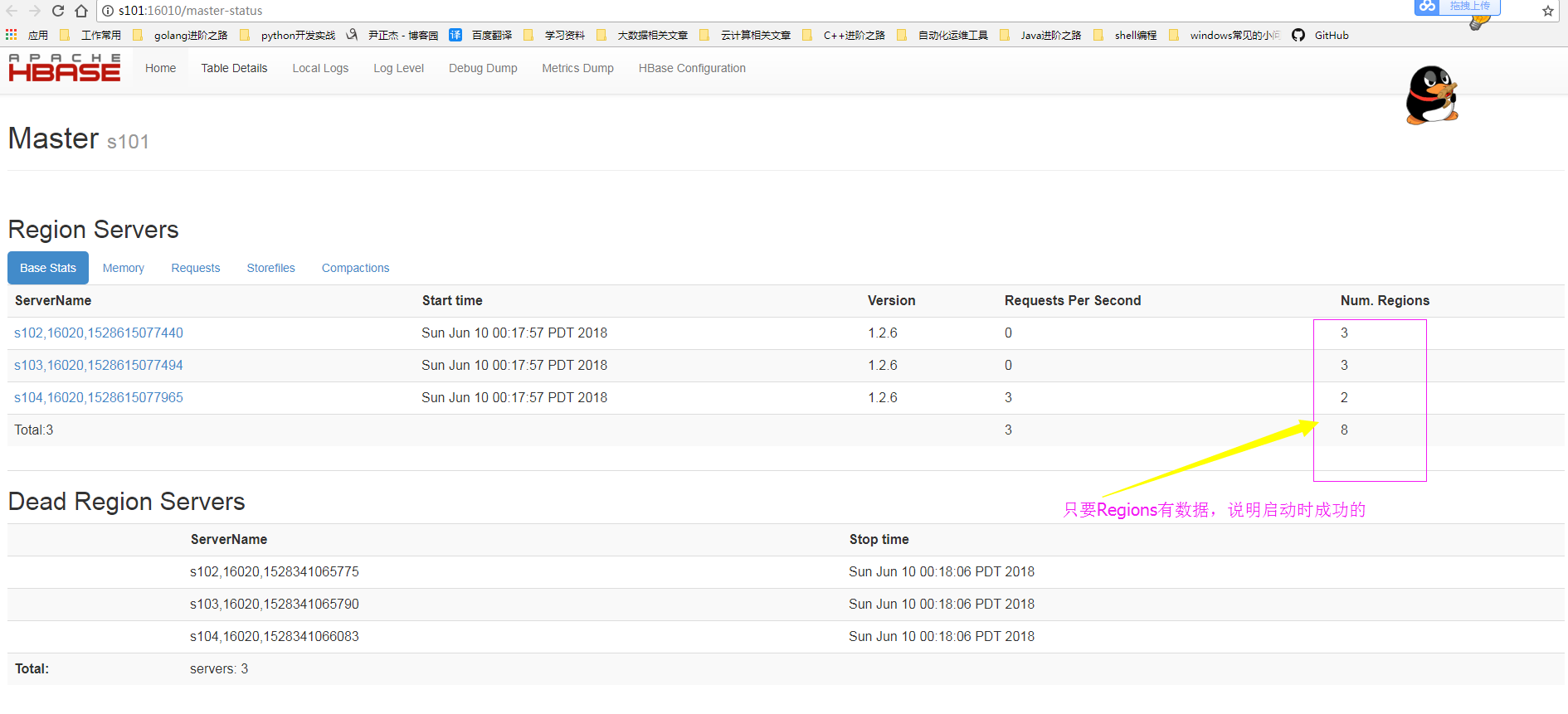
5>.启动hbase
[yinzhengjie@s101 ~]$ start-hbase.sh
starting master, logging to /soft/hbase/bin/../logs/hbase-yinzhengjie-master-s101.out
Java HotSpot(TM) 64-Bit Server VM warning: ignoring option PermSize=128m; support was removed in 8.0
Java HotSpot(TM) 64-Bit Server VM warning: ignoring option MaxPermSize=128m; support was removed in 8.0
s104: starting regionserver, logging to /soft/hbase/bin/../logs/hbase-yinzhengjie-regionserver-s104.out
s103: starting regionserver, logging to /soft/hbase/bin/../logs/hbase-yinzhengjie-regionserver-s103.out
s102: starting regionserver, logging to /soft/hbase/bin/../logs/hbase-yinzhengjie-regionserver-s102.out
s104: Java HotSpot(TM) 64-Bit Server VM warning: ignoring option PermSize=128m; support was removed in 8.0
s104: Java HotSpot(TM) 64-Bit Server VM warning: ignoring option MaxPermSize=128m; support was removed in 8.0
s103: Java HotSpot(TM) 64-Bit Server VM warning: ignoring option PermSize=128m; support was removed in 8.0
s103: Java HotSpot(TM) 64-Bit Server VM warning: ignoring option MaxPermSize=128m; support was removed in 8.0
s102: Java HotSpot(TM) 64-Bit Server VM warning: ignoring option PermSize=128m; support was removed in 8.0
s102: Java HotSpot(TM) 64-Bit Server VM warning: ignoring option MaxPermSize=128m; support was removed in 8.0
[yinzhengjie@s101 ~]$
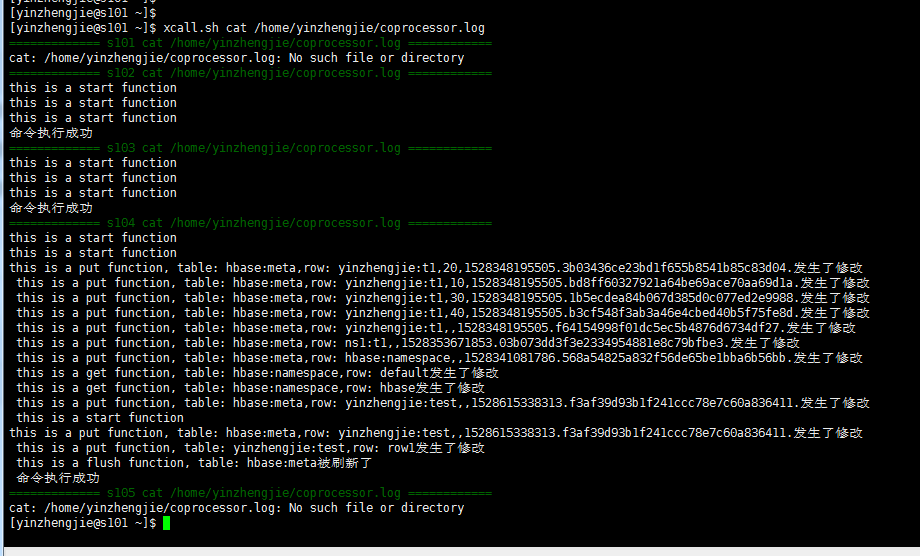
6>.验证(get,put,还有delete等操作都会在“/home/yinzhengjie/coprocessor.log”文件中记录)
[yinzhengjie@s101 ~]$ hbase shell
SLF4J: Class path contains multiple SLF4J bindings.
SLF4J: Found binding in [jar:file:/soft/hbase-1.2.6/lib/slf4j-log4j12-1.7.5.jar!/org/slf4j/impl/StaticLoggerBinder.class]
SLF4J: Found binding in [jar:file:/soft/hadoop-2.7.3/share/hadoop/common/lib/slf4j-log4j12-1.7.10.jar!/org/slf4j/impl/StaticLoggerBinder.class]
SLF4J: See http://www.slf4j.org/codes.html#multiple_bindings for an explanation.
SLF4J: Actual binding is of type [org.slf4j.impl.Log4jLoggerFactory]
HBase Shell; enter 'help<RETURN>' for list of supported commands.
Type "exit<RETURN>" to leave the HBase Shell
Version 1.2.6, rUnknown, Mon May 29 02:25:32 CDT 2017

hbase(main):001:0> list
TABLE
ns1:t1
yinzhengjie:t1
2 row(s) in 0.2120 seconds

=> ["ns1:t1", "yinzhengjie:t1"]
hbase(main):002:0> create 'yinzhengjie:test','f1'
0 row(s) in 1.3300 seconds

=> Hbase::Table - yinzhengjie:test
hbase(main):003:0> list
TABLE
ns1:t1
yinzhengjie:t1
yinzhengjie:test
3 row(s) in 0.0080 seconds

=> ["ns1:t1", "yinzhengjie:t1", "yinzhengjie:test"]
hbase(main):004:0> put 'yinzhengjie:test','row1','f1:name','yinzhengjie'
0 row(s) in 0.1720 seconds

hbase(main):005:0>
三.注册并加载协处理器的三种方式
1.使用XML文件进行注册(范围:世界级)
可以参考上面的配置。
2.使用代码,在创建表的时候,加载协处理器 (范围:表级)
1>.将jar包上传到hdfs中
[yinzhengjie@s101 data]$ ll
total 105228
-rw-r--r--. 1 yinzhengjie yinzhengjie    546572 May 27 18:07 fastjson-1.2.47.jar
-rw-r--r--. 1 yinzhengjie yinzhengjie 104659474 Jun 15  2017 hbase-1.2.6-bin.tar.gz
-rw-r--r--. 1 yinzhengjie yinzhengjie     17372 Jun 10 00:03 MyHbase-1.0-SNAPSHOT.jar
-rw-r--r--. 1 yinzhengjie yinzhengjie   2514708 Jun  4 03:31 temptags.txt
-rw-r--r--. 1 yinzhengjie yinzhengjie      7596 Jun  4 23:11 yinzhengjieCode-1.0-SNAPSHOT.jar
[yinzhengjie@s101 data]$ hdfs dfs -put MyHbase-1.0-SNAPSHOT.jar /myhbase.jar
[yinzhengjie@s101 data]$
2>.停止HBase服务并清空之前的测试数据
[yinzhengjie@s101 data]$ stop-hbase.sh
stopping hbase................
[yinzhengjie@s101 data]$
[yinzhengjie@s101 data]$ more `which xcall.sh`
#!/bin/bash
#@author :yinzhengjie
#blog:http://www.cnblogs.com/yinzhengjie
#EMAIL:y1053419035@qq.com


#判断用户是否传参
if [ $# -lt 1 ];then
        echo "请输入参数"
        exit
fi

#获取用户输入的命令
cmd=$@

for (( i=101;i<=105;i++ ))
do
        #使终端变绿色
        tput setaf 2
        echo ============= s$i $cmd ============
        #使终端变回原来的颜色,即白灰色
        tput setaf 7
        #远程执行命令
        ssh s$i $cmd
        #判断命令是否执行成功
        if [ $? == 0 ];then
                echo "命令执行成功"
        fi
done
[yinzhengjie@s101 data]$
[yinzhengjie@s101 data]$ xcall.sh rm -rf /home/yinzhengjie/coprocessor.log
============= s101 rm -rf /home/yinzhengjie/coprocessor.log ============
命令执行成功
============= s102 rm -rf /home/yinzhengjie/coprocessor.log ============
命令执行成功
============= s103 rm -rf /home/yinzhengjie/coprocessor.log ============
命令执行成功
============= s104 rm -rf /home/yinzhengjie/coprocessor.log ============
命令执行成功
============= s105 rm -rf /home/yinzhengjie/coprocessor.log ============
命令执行成功
[yinzhengjie@s101 data]$
3>.编辑配置文件(将之前实现的配置删除,具体保留配置如下)
[yinzhengjie@s101 data]$ more /soft/hbase/conf/hbase-site.xml
<?xml version="1.0"?>
<configuration>
    <property>
        <name>hbase.cluster.distributed</name>
        <value>true</value>
    </property>
    <property>
        <name>hbase.rootdir</name>
        <value>hdfs://mycluster/user/hbase</value>
    </property>
    <property>
         <name>hbase.zookeeper.property.dataDir</name>
         <value>/home/yinzhengjie/zookeeper</value>
    </property>
    <property>
        <name>hbase.zookeeper.quorum</name>
        <value>s102:2181,s103:2181,s104:2181</value>
    </property>

</configuration>
[yinzhengjie@s101 data]$
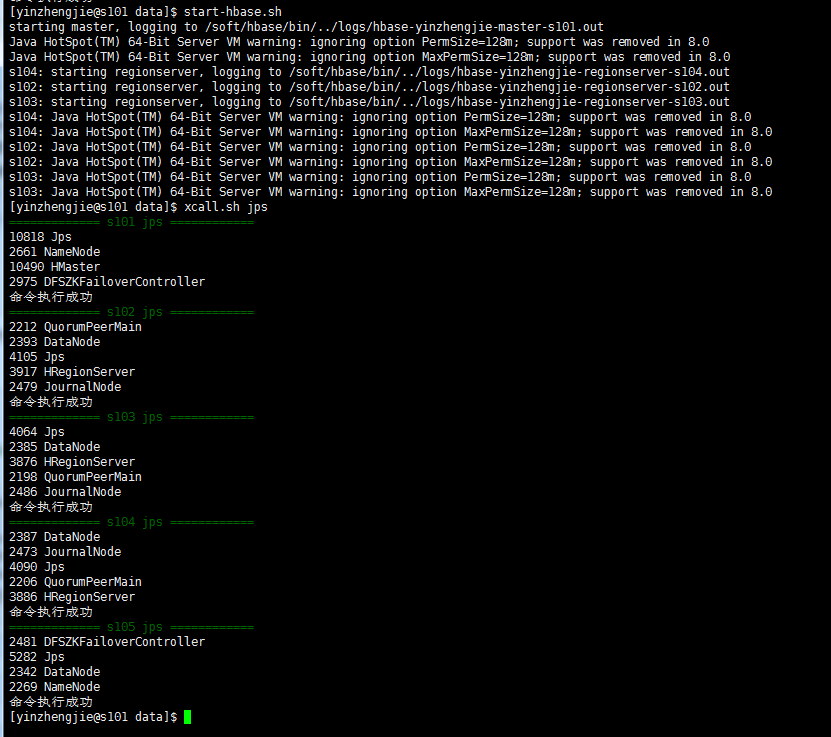
4>.启动HBase并运行以下代码,创建ns1:observer表并指定加载协处理器
 1 /*
 2 @author :yinzhengjie
 3 Blog:http://www.cnblogs.com/yinzhengjie/tag/Hadoop%E8%BF%9B%E9%98%B6%E4%B9%8B%E8%B7%AF/
 4 EMAIL:y1053419035@qq.com
 5 */
 6 package cn.org.yinzhengjie.coprocessor;
 7
 8 import org.apache.hadoop.conf.Configuration;
 9 import org.apache.hadoop.fs.Path;
10 import org.apache.hadoop.hbase.HBaseConfiguration;
11 import org.apache.hadoop.hbase.HColumnDescriptor;
12 import org.apache.hadoop.hbase.HTableDescriptor;
13 import org.apache.hadoop.hbase.TableName;
14 import org.apache.hadoop.hbase.client.Admin;
15 import org.apache.hadoop.hbase.client.Connection;
16 import org.apache.hadoop.hbase.client.ConnectionFactory;
17
18 public class AssignCopro {
19
20     public static void main(String[] args) throws Exception {
21
22         Configuration conf = HBaseConfiguration.create();
23         //先建立连接
24         Connection conn = ConnectionFactory.createConnection(conf);
25         Admin admin = conn.getAdmin();
26         //列描述符
27         HColumnDescriptor f1 = new HColumnDescriptor("f1");
28         HColumnDescriptor f2 = new HColumnDescriptor("f2");
29         HTableDescriptor htd = new HTableDescriptor(TableName.valueOf("ns1:observer"));
30
31         htd.addCoprocessor("cn.org.yinzhengjie.coprocessor.MyRegionObserver",
32                 new Path("/myhbase.jar"), 2, null);
33
34         //表中添加列族
35         htd.addFamily(f1);
36         htd.addFamily(f2);
37         admin.createTable(htd);
38         admin.close();
39     }
40 }
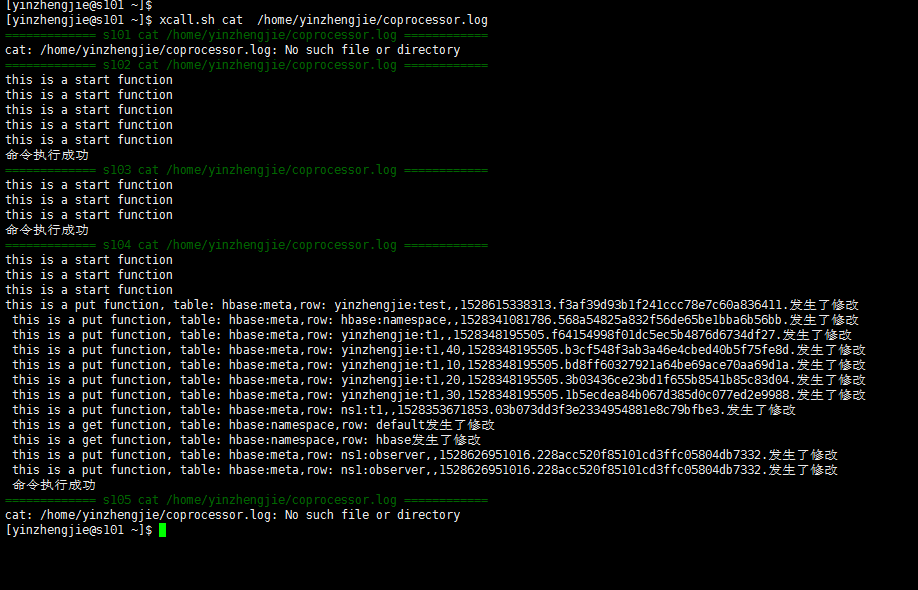
5>.运行以下代码后,查看“/home/yinzhengjie/coprocessor.log”文件如下:
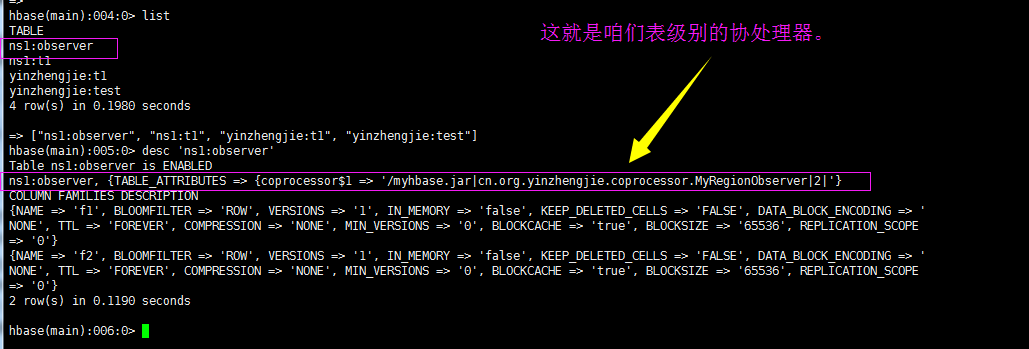
查看HBase内容如下:
3.使用命令激活协处理器(范围:表级)
hbase(main):001:0> list
TABLE
ns1:observer
ns1:t1
yinzhengjie:t1
yinzhengjie:test
4 row(s) in 0.0210 seconds

=> ["ns1:observer", "ns1:t1", "yinzhengjie:t1", "yinzhengjie:test"]
hbase(main):002:0> disable 'ns1:t1'
0 row(s) in 2.3300 seconds

hbase(main):003:0> alter 'ns1:t1', 'coprocessor'=>'hdfs://mycluster/myhbase.jar|cn.org.yinzhengjie.coprocessor.MyRegionObserver|0|'
Updating all regions with the new schema...
1/1 regions updated.
Done.
0 row(s) in 1.9440 seconds

hbase(main):004:0> enable 'ns1:t1'
0 row(s) in 1.2570 seconds

hbase(main):005:0>
移除协处理器步骤如下:
