1 建立工程名webclient,文件安排
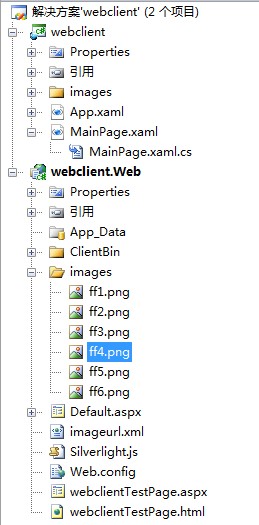
2 图片






3 建立xml文件名:imageurl.xml
<images>
<image Address="images/ff1.png"/>
<image Address="images/ff2.png"/>
<image Address="images/ff3.png"/>
<image Address="images/ff4.png"/>
<image Address="images/ff5.png"/>
<image Address="images/ff6.png"/>
</images>
4 MainPage.xmal文件
xmlns="http://schemas.microsoft.com/winfx/2006/xaml/presentation"
xmlns:x="http://schemas.microsoft.com/winfx/2006/xaml"
xmlns:d="http://schemas.microsoft.com/expression/blend/2008" xmlns:mc="http://schemas.openxmlformats.org/markup-compatibility/2006"
mc:Ignorable="d" d:DesignWidth="640" d:DesignHeight="480">
<Grid x:Name="LayoutRoot">
<Button x:Name="load_btn" Content="Download Image" Margin="20,20,0,0"
VerticalAlignment="Top" HorizontalAlignment="Left"
Width="100" Height="30"/>
<StackPanel x:Name="imageholder" VerticalAlignment="Top"
Margin="20,100,10,10" Orientation="Horizontal"/>
</Grid>
</UserControl>
5 MainPage.xmal.cs文件
using System.Collections.Generic;
using System.Linq;
using System.Net;
using System.Windows;
using System.Windows.Controls;
using System.Windows.Documents;
using System.Windows.Input;
using System.Windows.Media;
using System.Windows.Media.Animation;
using System.Windows.Shapes;
using System.Windows.Browser;//允许访问和操作浏览器的文档对象模型 (DOM)。
using System.Xml;//命名空间为处理 XML 提供基于标准的支持。
using System.IO;//System.IO 命名空间包含允许读写文件和数据流的类型以及提供基本文件和目录支持的类型。
//添加引用,包含 LINQ to XML 的类。LINQ to XML 是内存中的 XML 编程接口,使您可以轻松有效地修改 XML 文档。
using System.Xml.Linq;
//提供与 Silverlight 图像处理相关的类型。
using System.Windows.Media.Imaging;
namespace webclient
{
public partial class MainPage : UserControl
{
public MainPage()
{
InitializeComponent();
load_btn.Click += new RoutedEventHandler(load_btn_Click);
}
void load_btn_Click(object sender, RoutedEventArgs e)
{
Uri imageaddress=new Uri(HtmlPage.Document.DocumentUri,"imageurl.xml");
//WebClient 类提供向 URI 标识的任何本地、Intranet 或 Internet 资源
//发送数据以及从这些资源接收数据的公共方法。
WebClient client =new WebClient();
client.DownloadStringAsync(imageaddress);
client.DownloadStringCompleted+=new DownloadStringCompletedEventHandler(client_downloadstringcomplete);
}
void client_downloadstringcomplete(object sender,DownloadStringCompletedEventArgs e)
{
XmlReader reader = XmlReader.Create(new StringReader(e.Result));
XDocument doc = XDocument.Load(reader);
//使用Linq to xml读取xml文档
List<Uri> imagesuri = (from image in doc.Descendants("image")//按文档顺序返回此文档或元素的子代元素集合。
select new Uri(HtmlPage.Document.DocumentUri,
image.Attribute("Address").Value)).ToList();
//添加图片对象
foreach (Uri uri in imagesuri)
{
Image image = new Image();
image.Width = 100;
image.Height = 100;
image.Source=new BitmapImage(uri);
image.Margin=new Thickness(10,10,10,10);
imageholder.Children.Add(image);
}
}
}
}
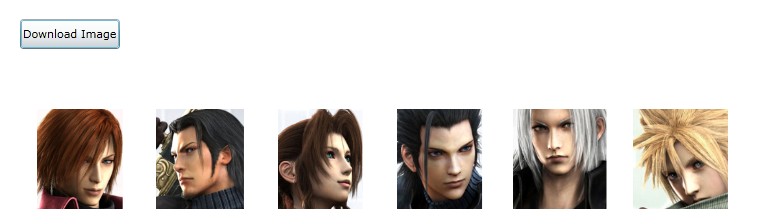
6 点击Download Image运行效果:
7 总结
7.1 load_btn.Click += new RoutedEventHandler(load_btn_Click);
RoutedEventHandler表示将处理各种路由事件的方法,这些路由事件不包含除所有路由事件共有数据之外的其他特定事件数据。这类路由事件有很多;显著示例包括 Click 和 Loaded。
例如:
xaml文件
c#文件
{
// You must cast the sender object as a Button element, or at least as FrameworkElement, to set Width
Button srcButton = e.Source as Button;
srcButton.Width = 200;
}
7.2 Uri imageaddress=new Uri(HtmlPage.Document.DocumentUri,"imageurl.xml");
Uri 根据指定的基 Uri 实例和相对 Uri 实例的组合,初始化 Uri 类的新实例。
Uri baseUri,
Uri relativeUri
)
relativeUri 与 baseUri 结合使用的相对 Uri 实例。
例如:
Uri absoluteUri = new Uri("http://www.contoso.com/");
// Create a relative Uri from a string. allowRelative = true to allow for
// creating a relative Uri.
Uri relativeUri = new Uri("/catalog/shownew.htm?date=today", UriKind.Relative);
// Check whether the new Uri is absolute or relative.
if (!relativeUri.IsAbsoluteUri)
Console.WriteLine("{0} is a relative Uri.", relativeUri);
// Create a new Uri from an absolute Uri and a relative Uri.
Uri combinedUri = new Uri(absoluteUri, relativeUri);
Console.WriteLine(combinedUri.AbsoluteUri);
HtmlPage类允许访问和操作浏览器的文档对象模型 (DOM)。
7.3 WebClient client =new WebClient();
WebClient 类提供向 URI 标识的任何本地、Intranet 或 Internet 资源发送数据以及从这些资源接收数据的公共方法。
7.4 client.DownloadStringAsync(imageaddress);
WebClient.DownloadStringAsync 以字符串形式下载位于指定 Uri 的资源。
Uri address
)
7.5 client.DownloadStringCompleted+=new DownloadStringCompletedEventHandler(client_downloadstringcomplete);
WebClient.DownloadStringCompleted此事件在每次完成将资源作为字符串下载的异步操作时引发。这些操作通过调用 DownloadStringAsync 方法启动。
DownloadStringCompletedEventHandler 是此事件的委托。DownloadStringCompletedEventArgs 类为事件处理程序提供事件数据。
7.6 XmlReader reader = XmlReader.Create(new StringReader(e.Result));
XmlReader 类支持从流或文件读取 XML 数据。该类定义的方法和属性使您可以浏览数据并读取节点的内容。当前节点指读取器所处的节点。使用任何返回当前节点值的读取方法和属性推进读取器。
XmlReader.Create
XmlReader reader,
XmlReaderSettings settings
)
7.7 XDocument doc = XDocument.Load(reader);
LINQ to XML 的一个最重要的性能优势(与 XmlDocument 相比)为:LINQ to XML 中的查询是静态编译的,而 XPath 查询则必须在运行时进行解释。
静态编译的查询与XPath
下面的示例演示如何获取具有指定名称并包含带有指定值的属性的子代元素。
以下是等效的 XPath 表达式:
IEnumerable<XElement> list1 =
from el in po.Descendants("Address")
where (string)el.Attribute("Type") == "Shipping"
select el;
foreach (XElement el in list1)
Console.WriteLine(el);
7.8
List<Uri> imagesuri = (from image in doc.Descendants("image")//按文档顺序返回此文档或元素的子代元素集合。
select new Uri(HtmlPage.Document.DocumentUri,
image.Attribute("Address").Value)).ToList();
Form子句
查询表达式必须以 from 子句开头。另外,查询表达式还可以包含子查询,子查询也是以 from 子句开头。from 子句指定以下内容:
-
将对其运行查询或子查询的数据源。
-
一个本地范围变量,表示源序列中的每个元素。
例子:
{
// The element type of the data source.
public class Student
{
public string LastName { get; set; }
public List<int> Scores {get; set;}
}
static void Main()
{
// Use a collection initializer to create the data source. Note that
// each element in the list contains an inner sequence of scores.
List<Student> students = new List<Student>
{
new Student {LastName="Omelchenko", Scores= new List<int> {97, 72, 81, 60}},
new Student {LastName="O'Donnell", Scores= new List<int> {75, 84, 91, 39}},
new Student {LastName="Mortensen", Scores= new List<int> {88, 94, 65, 85}},
new Student {LastName="Garcia", Scores= new List<int> {97, 89, 85, 82}},
new Student {LastName="Beebe", Scores= new List<int> {35, 72, 91, 70}}
};
// Use a compound from to access the inner sequence within each element.
// Note the similarity to a nested foreach statement.
var scoreQuery = from student in students
from score in student.Scores
where score > 90
select new { Last = student.LastName, score };
// Execute the queries.
Console.WriteLine("scoreQuery:");
foreach (var student in scoreQuery)
{
Console.WriteLine("{0} Score: {1}", student.Last, student.score);
}
// Keep the console window open in debug mode.
Console.WriteLine("Press any key to exit.");
Console.ReadKey();
}
}
/*
scoreQuery:
Omelchenko Score: 97
O'Donnell Score: 91
Mortensen Score: 94
Garcia Score: 97
Beebe Score: 91
*/
8 相关资料参考
Web璀璨应用技术完全指南
英文:
http://msdn.microsoft.com/en-us/library/
中文:
http://msdn.microsoft.com/zh-cn/library/
