from multiprocessing import Process
import time

class MyProcess(Process):
    def __init__(self):
        super(MyProcess, self).__init__()
        #self.name = name

    def run(self):
        time.sleep(1)
        print ('hello', self.name,time.ctime())


if __name__ == '__main__':
    p_list=[]
    for i in range(3):
        p = MyProcess()
        p.start()
        p_list.append(p)

    for p in p_list:
        p.join()

    print('end')
一、类式调用
二、线程锁
2.1 全局解释器锁
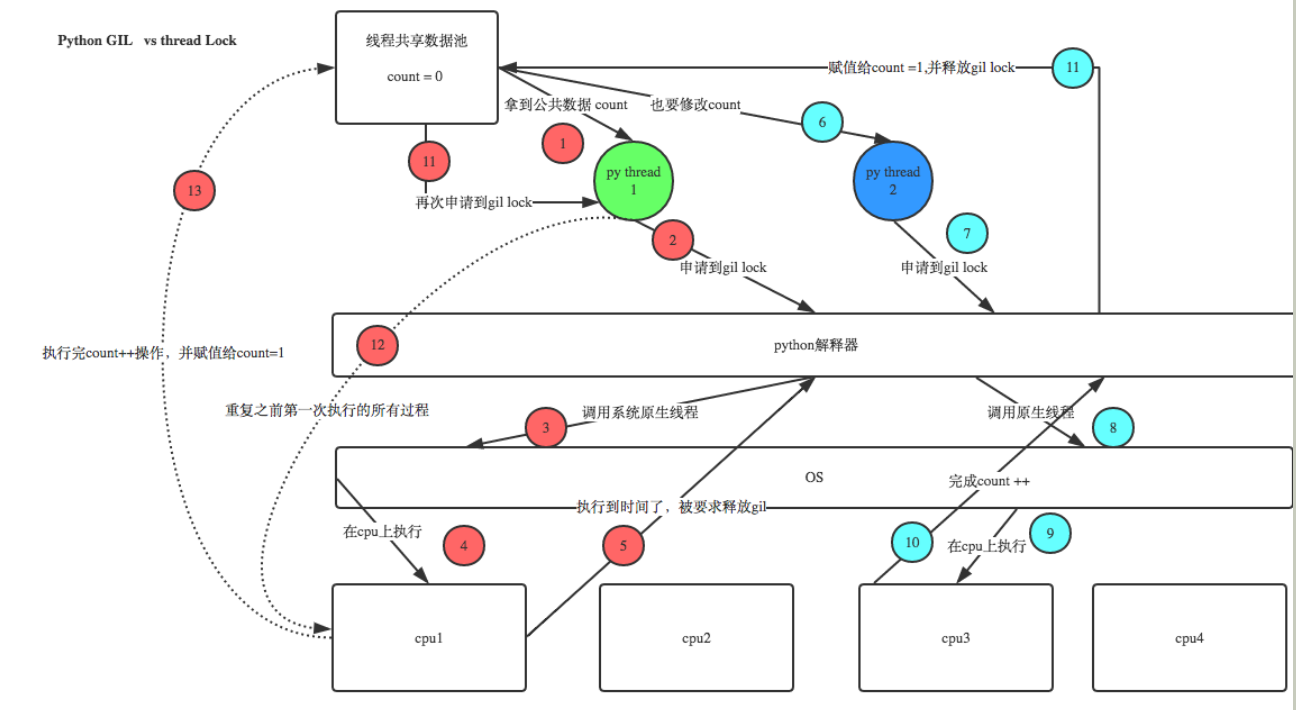
一次只允许一个线程进入
在Cpython解释器中,同一个进程下开启的多线程,同一时刻只能有一个线程执行,无法利用多核优势
2.2 互斥锁
def sub():
    global count
    lock.acquire()  #上锁,第一个线程如果申请到锁,会在执行公共数据的过程中持续阻塞后续线程
                    #即后续第二个或其他线程依次来了发现已经被上锁,只能等待第一个线程释放锁
                    #当第一个线程将锁释放,后续的线程会进行争抢

    '''线程的公共数据  下'''
    temp=count
    time.sleep(0.001)
    count=temp+1
    '''线程的公共数据  上'''

    lock.release()  #释放锁
    time.sleep(2)
count=0

l=[]
lock=threading.Lock()   #将锁内的代码串行化
for i in range(100):
    t=threading.Thread(target=sub,args=())
    t.start()
    l.append(t)
for t in l:
    t.join()
print(count)
2.3 递归锁
import threading
import time
def foo():
    rlock.acquire()
    print('func foo ClockA lock')
    rlock.acquire()
    print('func foo ClockB lock')
    rlock.release()
    rlock.release()

def bar():
    rlock.acquire()
    print('func bar ClockB lock')
    time.sleep(2)
    rlock.acquire()
    print('func bar ClockA lock')
    rlock.release()
    rlock.release()


def run():
    foo()
    bar()

rlock=threading.RLock() #RLock本身有一个计数器,如果碰到acquire,那么计数器+1
                        #如果计数器大于0,那么其他线程无法查收,如果碰到release,计数器-1

for i in range(10):
    t=threading.Thread(target=run,args=())
    t.start()
2.4 信号量
# 互斥锁同时只允许一个线程更改数据,而Semaphore是同时允许一定数量的线程更改数据,比如
# 一个厕所有3个坑,那么最多只允许3个人上厕所,后面的人只能等里面有人出来了才能再进去


import threading
import time

def run(n):
    semaphore.acquire()
    time.sleep(1)
    print("run the thread: %s" %n)
    semaphore.release()


if __name__ == '__main__':
    num = 0
    semaphore = threading.BoundedSemaphore(3)
    #最多允许3个线程同时运行
    for i in range(20):
        t = threading.Thread(target=run,args=[i,])
        t.start()


while threading.active_count() != 1:
    print(threading.active_count())
    pass
else:
    print("----all threads done----------")
    print(num)
2.5 条件变量
# *-* coding=gb2312 *-*
'''
信号量semaphore
是一个变量,控制着对公共资源或者临界区的访问。信号量维护着一个计数器,指定可同时访问资源或者进入临界区的线程数。
每次有一个线程获得信号量时,计数器-1。若计数器为0,其他线程就停止访问信号量,直到另一个线程释放信号量。
'''
import threading
import random
import time

class MyThread(threading.Thread):
    availableTables=['A','B','C','D','E']

    def __init__(self,threadName,semaphore):
        self.interval =random.randrange(1,6)
        self.semaphore =semaphore
        threading.Thread.__init__(self,name=threadName)

    def run(self):
        self.semaphore.acquire()
        #acquire a semaphore
        table = MyThread.availableTables.pop()
        print "%s entered;seated at table %s." %(self.getName(),table)
        time.sleep(self.interval)

        #free a table
        print "%s exiting,freeing table %s." %(self.getName(),table)
        MyThread.availableTables.append(table)

        self.semaphore.release()

mySemaphore = threading.Semaphore(len(MyThread.availableTables))

def Test():
    threads=[]

    for i in range(1,10):
        threads.append(MyThread("thread"+str(i),mySemaphore))

    for i in range(len(threads)):
        threads[i].start()

if __name__ == '__main__':
    Test()
2.6 同步变量
ecent的4个方法:
event.isSet():返回event的状态值
event.set():将event的状态值设置为True
event.wait():等待,直到event的值变为True,否则,一直阻塞住
event.clear():将event的值设置为False
例子:
import threading
import time
event = threading.Event()#创建了一个event

class boss(threading.Thread):
    def run(self):

        print("开始工作了")
        event.isSet() or event.set()#将event的状态置为ture,让worker开始干活
        time.sleep(4)#在这个时间段,工人们开始干活
        print('可以下班了')
        event.isSet() or event.set()#将event的状态置为ture,工人们下班


class worker(threading.Thread):
    def run(self):
        # r.acquire()
        event.wait()#等待boss发指令
        print("不要阿")
        time.sleep(1)#开始干活
        # r.release()
        event.clear()#将event的状态置为false
        event.wait()#等待boss的进一步指令
        print("好也,回家吃莽莽")


if __name__ == '__main__':
    p = []

    for i in range(3):
        p.append(worker())

    p.append(boss())
    for i in p:
        i.start()
    # for i in p:
    #     i.join()