我们做的项目好多都是多语言的项目,针对不同国家需要展示不同的语言的标题。我们在classic中的VF page可谓是得心应手,因为系统中已经封装好了我们可以直接在VF获取label/api name等方法。但是我们在lightning aura中开发却发现这个常用的功能并没有包含,好吧,既然没有现成可用的那我们就要有workaround的方式去后台获取。此篇主要封装好组件去实现获取某个object或者某些object相关字段的label。
那我们来开始进行这个组件的开发,开发以前我们需要先思考一下,组件化的东西,传参应该是什么,返回应该是什么,应该实现哪些功能解决哪些痛点。如何用到更好的优化。本人思考可能并不特别的完全,感兴趣的可以进行优化。
1. object 的API name应该为必填项。 这里应该实现可以同时获取多个表的字段的label信息,我们画component时,很可能需要获取当前的对象,父对象以及相关的子对象的字段的label,所以此处传参应该能做到传递list而不是单一的object
2. object对应的指定的field的api name列表,此项应该为可选项,非必填。我们都知道aura开发现在很慢,而且我们在前台获取label时,可能一个object有上百个字段,但是我们在页面只需要某几个字段的label的信息,如果全部查出来放在前台特别影响view state,所以我们此处应该支持可以通过指定的一些字段进行查询。因为object传参是list,所以此参数应该为Map<String,List<String>>方式。
3. 返回类型应该为 Map<String,Map<String,String>>类型,外层的key是objectAPIName,内层的map的key是fieldAPIName,内层的map的value为我们需要的field label
OK,上面的已经梳理出来,那干就完了。
一. 公用组件搭建
FieldLabelServiceController.cls 用于后台搭建查询指定的obj / field的value -> label信息
 1 public with sharing class FieldLabelServiceController {
 2     /*
 3     * @param objApiNameList : object API name list. eg:['Account','Contact']
 4     * @param objApiName2FieldsMap: object API name 2 fields map. eg:{'Account':['Name','Type'],'Contact':['LastName','Phone']}
 5     * @return object API name 2 map of field API name -> label name. eg:{'Account':{'Type':'类型'},'Contact':{'LastName':'姓'}}
 6     */
 7     @AuraEnabled
 8     public static Map<String,Map<String,String>> getFieldLabelService(List<String> objApiNameList,Map<String,List<String>> objApiName2FieldsMap) {
 9         // key: object API name ; value : (Map: key:field API name, value: field label)
10         Map<String,Map<String,String>> object2FieldLabelMap = new Map<String,Map<String,String>>();
11         //get all sobject sObjectType map
12         Map<String,sObjectType> objName2ObjTypeMap = Schema.getGlobalDescribe();
13         for(String objApiName : objApiNameList) {
14
15             //1. get specific object sObjectType
16             sObjectType objType = objName2ObjTypeMap.get(objApiName);
17             //2. get all of the fields map via specific object
18             Map<String,Schema.SObjectField> fieldsMap = objType.getDescribe().fields.getMap();
19
20             //3. check if retrieve specific field list or all the fields mapping via object
21             Set<String> retrieveFieldList = new Set<String>();
22             if(objApiName2FieldsMap != null && objApiName2FieldsMap.containsKey(objApiName)) {
23                 retrieveFieldList = new Set<String>(objApiName2FieldsMap.get(objApiName));
24             }
25
26             Map<String,String> fieldApiName2FieldLabelMap = new Map<String,String>();
27             //4. get all / specific field api name -> label name mapping
28             for(String fieldApiName : fieldsMap.keySet()){
29                 if(retrieveFieldList.size() > 0 && !retrieveFieldList.contains(String.valueOf(fieldsMap.get(fieldApiName)))) {30                     continue;
31                 }
32
33                 String label = fieldsMap.get(fieldApiName).getDescribe().getLabel();
34                 fieldApiName2FieldLabelMap.put(String.valueOf(fieldsMap.get(fieldApiName)), label == null ? fieldApiName : label);
35             }
36
37             object2FieldLabelMap.put(objApiName, fieldApiName2FieldLabelMap);
38         }
39         return object2FieldLabelMap;
40     }
41 }
FieldLabelService.cmp:用于封装共用方法
1 <aura:component access="global" description="Field label service" controller="FieldLabelServiceController">
2     <aura:method access="global" name="getFieldLabel" action="{!c.getFieldLabelAction}">
3         <aura:attribute type="List" name="objectAPINameList" required="true" description="object list to retrieve field label" />
4         <aura:attribute type="Map" name="objectFieldAPINameMap" description="specific fields need to retrieve via object api name"/>
5         <aura:attribute type="Function" name="callback" required="true" />
6     </aura:method>
7 </aura:component>
FieldLabelServiceController.js:用于封装对应的controller js方法,调用后台获取结果
 1 ({
 2     getFieldLabelAction : function(component, event, helper) {
 3         const params = event.getParam('arguments');
 4         const action = component.get('c.getFieldLabelService');
 5         action.setParams({
 6             "objApiNameList" : params.objectAPINameList,
 7             "objApiName2FieldsMap":params.objectFieldAPINameMap
 8         });
 9         action.setCallback(this, function(response) {
10             const state = response.getState();
11             if (state === 'SUCCESS') {
12                 params.callback(response.getReturnValue());
13             } else if (state === 'ERROR') {
14                 const errors = response.getError();
15                 if (errors) {
16                     console.error(JSON.stringify(errors));
17                 } else {
18                     console.error('Unknown error');
19                 }
20             }
21         });
22
23         $A.enqueueAction(action);
24     }
25 })
至此组件封装完成,下面是调用部分。调用部分没有UI,感兴趣的自行画UI。
二. 公用组件测试
FieldLabelTestComponent:用于引入公用组件,并且初始化获取Account/Contact的field label。
<aura:component implements="flexipage:availableForAllPageTypes">
    <aura:handler name="init" value="{!this}" action="{!c.doInit}"/>
    <aura:attribute name="accountFieldLabelMap" type="Map"/>
    <aura:attribute name="contactFieldLabelMap" type="Map"/>
    <c:FieldLabelService aura:id="service"/>
</aura:component>
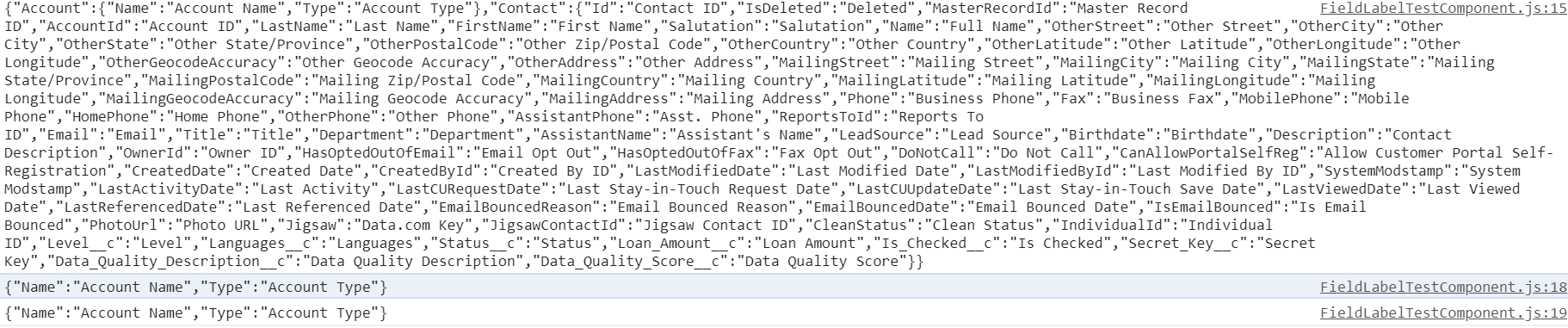
FieldLabelTestComponentController.js:用于后台调用公用组件的方法,传值,针对response进行解析获取自己需要的内容。demo中针对account只获取name以及type的值,对contact获取所有字段的label值。
 1 ({
 2     doInit : function(component, event, helper) {
 3         const service = component.find('service');
 4         let objectAPINameList = ['Account','Contact'];
 5         let objectFieldAPINameMap = {'Account':['Name','Type']};
 6         service.getFieldLabel(objectAPINameList,objectFieldAPINameMap,function(result) {
 7             console.log(JSON.stringify(result));
 8             component.set('v.accountFieldLabelMap',result['Account']);
 9             component.set('v.contactFieldLabelMap',result['Contact']);
10             console.log(JSON.stringify(result['Account']));
11             console.log(JSON.stringify(result.Account));
12         });
13     }
14 })
结果展示:针对account只获取了指定的字段的label,Contact获取了所有的label信息。可以使用[]方式或者.的方式获取详细内容。
总结:篇中简单的介绍了针对aura情况下获取field label的公用组件的实现。篇中有错误的地方欢迎指出,有不懂的欢迎留言,有可以优化的地方欢迎交流并且鼓励优化。