项目中UI需要用到树形结构显示内容,后来尽管不需要做了,不过还是自己做着玩玩,mark一下,免得以后项目中用到。
实现树形结构在此使用的是jquery的dynatree.js。关于dynatree的使用可以参考:http://wwwendt.de/tech/dynatree/doc/dynatree-doc.html#h4.2
对于树形结构,这里不做太多介绍,树一般需要一个根节点,根节点下面可以有很多子节点或者叶子节点,子结点也可以包含叶子结点或者子节点。我们在设计表结构的时候可以考虑自连接操作,实现节点之间的关联,表结构如下:
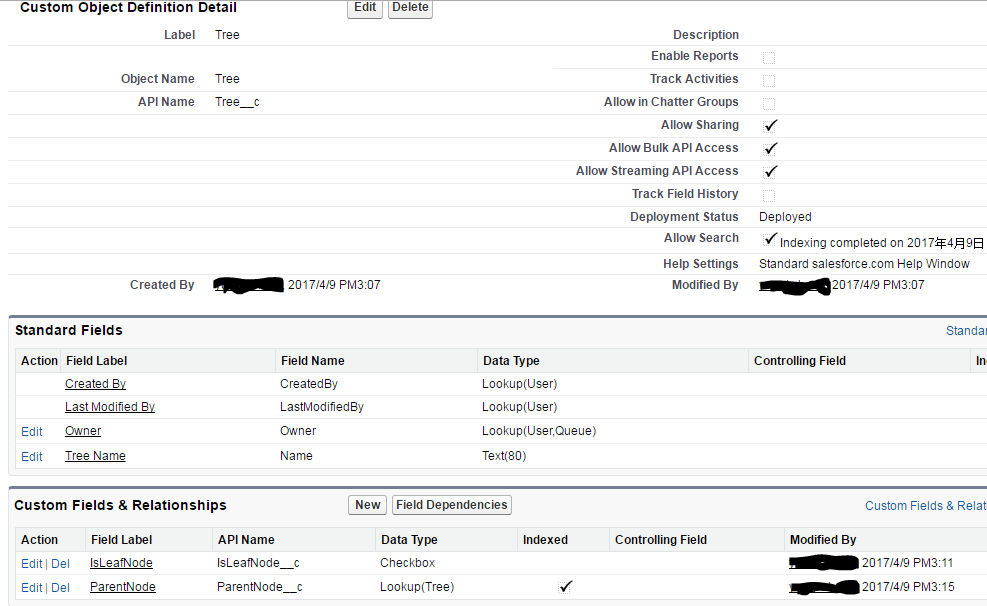
我们想要实现的数据结构如下。

对应的数据如下:

在设计树形结构的前台展示时,应该有如下信息:
- 节点名称
- 节点编号
- 当前节点对应的父节点
- 当前节点是否为叶子节点
- 当前节点是否有子节点
- 当前节点如果包含子节点情况下子节点的列表
对于程序设计,主要分成两个步骤:
- 递归将数据存储到自定义结构中;
- 对结构进行json处理,json串应该满足相关的结构,即类似JSONObject{JSONArray[...]}相关模式,可以查看上方链接了解详情。
代码如下:
1.TreeUtil:实现递归对节点关系获取以及json转换;
  1 public without sharing class TreeUtil {
  2
  3     // map to hold roles with Id as the key
  4     private static Map <Id, Tree__c> treeMap;
  5
  6     // map to hold child roles with parentRoleId as the key
  7     private static Map <Id, List<Tree__c>> parentNodeToChildNodeMap;
  8
  9
 10     private static List<NodeWrapper> nodes{get;set;}
 11
 12     private static JSONGenerator gen {get; set;}
 13
 14     private static Tree__c rootNode{get;set;}
 15
 16     static {
 17         initTreeDatas();
 18     }
 19
 20     public static void initTreeDatas() {
 21         treeMap = new Map<Id,Tree__c>([SELECT IsLeafNode__c, ParentNode__c, Id, Name FROM Tree__c order by ParentNode__c]);
 22         parentNodeToChildNodeMap = new Map<Id,List<Tree__c>>();
 23         for(Tree__c tree : treeMap.values()) {
 24             List<Tree__c> tempList;
 25             if(parentNodeToChildNodeMap.containsKey(tree.ParentNode__c)) {
 26                  tempList = parentNodeToChildNodeMap.get(tree.ParentNode__c);
 27                  tempList.add(tree);
 28                  parentNodeToChildNodeMap.put(tree.ParentNode__c,tempList);
 29              } else {
 30                  tempList = new List<Tree__c>();
 31                  tempList.add(tree);
 32                  if(tree.ParentNode__c != null) {
 33                      parentNodeToChildNodeMap.put(tree.ParentNode__c,tempList);
 34                  } else {
 35                     rootNode = tree;
 36                  }
 37              }
 38         }
 39     }
 40
 41
 42     private static void convertNodeToJSON(NodeWrapper nw){
 43         gen.writeStartObject();
 44         if(!nw.isLeafNode) {
 45             gen.writeStringField('title', nw.nodeName);
 46             gen.writeStringField('key', nw.nodeId);
 47             gen.writeBooleanField('unselectable', false);
 48             gen.writeBooleanField('expand', true);
 49             gen.writeBooleanField('isFolder', true);
 50             if (nw.hasChildNodes) {
 51                 gen.writeFieldName('children');
 52                 gen.writeStartArray();
 53                 for (NodeWrapper r : nw.childNodes) {
 54                     convertNodeToJSON(r);
 55                 }
 56                 gen.writeEndArray();
 57             }
 58         } else {
 59             gen.writeStringField('title', nw.nodeName);
 60             gen.writeStringField('key', nw.nodeId);
 61         }
 62         gen.writeEndObject();
 63     }
 64
 65     public static NodeWrapper createNode(Tree__c tree) {
 66         NodeWrapper n = new NodeWrapper();
 67         n.nodeName = tree.Name;
 68         n.nodeId = tree.Id;
 69         n.parentNodeId = tree.ParentNode__c;
 70
 71         if(tree.IsLeafNode__c) {
 72             n.isLeafNode = true;
 73             n.hasChildNodes = false;
 74         } else {
 75             List<NodeWrapper> nwList = new List<NodeWrapper>();
 76             if(parentNodeToChildNodeMap.get(tree.Id) != null) {
 77                 n.hasChildNodes = true;
 78                 n.isLeafNode = false;
 79                 for(Tree__c tempTree : parentNodeToChildNodeMap.get(tree.Id)) {
 80                     nwList.add(createNode(tempTree));
 81                 }
 82                 n.childNodes = nwList;
 83             }
 84
 85         }
 86         return n;
 87     }
 88
 89
 90     public static String getTreeAndSubTrees() {
 91         gen = JSON.createGenerator(true);
 92         NodeWrapper node = createNode(rootNode);
 93         gen.writeStartArray();
 94         convertNodeToJSON(node);
 95         gen.writeEndArray();
 96         return gen.getAsString();
 97     }
 98
 99
100     public class NodeWrapper {
101
102         //current node name
103         public String nodeName{get;set;}
104
105         //current node id
106         public String nodeId{get;set;}
107
108         //if current node isn't root,set it's parent parentNodeId
109         public String parentNodeId{get;set;}
110
111         //if this node set as a parent node,does it has child node
112         public Boolean hasChildNodes{get;set;}
113
114         //if current node is leaf node,set to true
115         public Boolean isLeafNode{get;set;}
116
117
118         //all of child nodes of current node
119         public List<NodeWrapper> childNodes{get;set;}
120
121         public NodeWrapper() {
122             hasChildNodes = false;
123         }
124     }
125
126 }
2.TreeController:调用TreeUtil实现数据获取
 1 public class TreeController {
 2
 3     public Boolean selectable {get; set;}
 4
 5     public String selectNodeKeys {get; set;}
 6
 7     public TreeViewController(){
 8         selectable = false;
 9         selectNodeKeys = 'No value selected';
10     }
11
12     public String JsonData {get; set;}
13
14     public String getJsonString() {
15         if (JsonData == null){
16             JsonData = TreeUtil.getTreeAndSubTrees();
17         }
18         return JsonData;
19     }
20
21 }
3.TreeComponent:通过jquery的dyna tree 库实现树形结构实现
 1 <apex:component controller="TreeController">
 2     <apex:attribute name="selectable" type="Boolean" assignTo="{!selectable}" description=""/>
 3     <apex:attribute name="value" type="String" description=""/>
 4     <apex:attribute name="JsonData" type="String" assignTo="{!JsonData}" description=""/>
 5     <apex:inputHidden id="selectedKeys" value="{!value}" />
 6     <apex:includeScript value="{!URLFOR($Resource.DynaTree, 'jquery/jquery.js' )}" />
 7     <apex:includeScript value="{!URLFOR($Resource.DynaTree, 'jquery/jquery-ui.custom.js' )}" />
 8     <apex:includeScript value="{!URLFOR($Resource.DynaTree, 'jquery/jquery.cookie.js' )}" />
 9     <apex:includeScript value="{!URLFOR($Resource.DynaTree, 'src/jquery.dynatree.js' )}" />
10
11     <apex:stylesheet value="{!URLFOR($Resource.DynaTree, 'src/skin/ui.dynatree.css')}" />
12     <script type="text/javascript">
13     $(function(){
14
15         $("#tree").dynatree({
16             onActivate: function(node) {
17
18             },
19             persist: false,
20             checkbox: {!selectable},
21             generateIds: false,
22             classNames: {
23                 checkbox: "dynatree-checkbox",
24                 expanded: "dynatree-expanded"
25             },
26             selectMode: 3,
27             children: {!JsonString},
28             onSelect: function(select, node) {
29                 var selKeys = $.map(node.tree.getSelectedNodes(), function(node){
30                     return node.data.key;
31                 });
32                 jQuery(document.getElementById("{!$Component.selectedKeys}")).val(selKeys.join(", "));
33                 var selRootNodes = node.tree.getSelectedNodes(true);
34                 var selRootKeys = $.map(selRootNodes, function(node){
35                     return node.data.key;
36                 });
37             },
38         });
39     });
40     </script>
41
42     <div id="tree"> </div>
43
44 </apex:component>
4.TreeView.page:调用component实现显示
1 <apex:page controller="TreeController">
2     <apex:form >
3         <c:TreeView selectable="true"value="{!selectedValues}" />
4         <br/>
5         Value:<apex:outputText value="{!selectedValues}" />
6         <br/>
7         <apex:commandButton value="Get Value" />
8     </apex:form>
9 </apex:page>
效果展示:

总结:实现树形结构可以有多种js库选择,后台大部分需要做的就是拼json串,通过指定的要求实现前台的展示,了解树形结构如何设计更加重要。本篇只是抛砖引玉,有对树形结构感兴趣的可以将此作为参考并进行优化。内容有错误的地方欢迎指出,篇中有不懂得欢迎留言。