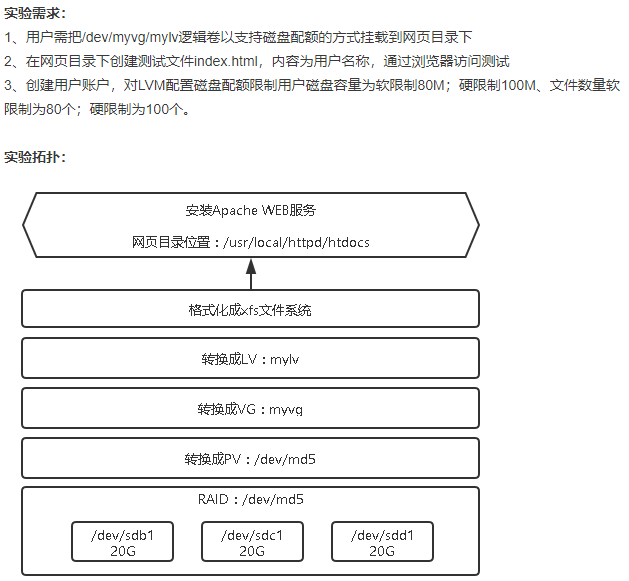
[root@localhost ~]# fdisk /dev/sdb
欢迎使用 fdisk (util-linux 2.23.2)。
更改将停留在内存中,直到您决定将更改写入磁盘。
使用写入命令前请三思。
Device does not contain a recognized partition table
使用磁盘标识符 0x4792c0e1 创建新的 DOS 磁盘标签。
命令(输入 m 获取帮助):n
Partition type:
p primary (0 primary, 0 extended, 4 free)
e extended
Select (default p): p
分区号 (1-4,默认 1):
起始 扇区 (2048-41943039,默认为 2048):
将使用默认值 2048
Last 扇区, +扇区 or +size{K,M,G} (2048-41943039,默认为 41943039):
将使用默认值 41943039
分区 1 已设置为 Linux 类型,大小设为 20 GiB
命令(输入 m 获取帮助):w
The partition table has been altered!
Calling ioctl() to re-read partition table.
正在同步磁盘。
[root@localhost ~]# fdisk /dev/sdc
欢迎使用 fdisk (util-linux 2.23.2)。
更改将停留在内存中,直到您决定将更改写入磁盘。
使用写入命令前请三思。
Device does not contain a recognized partition table
使用磁盘标识符 0x31bb99dc 创建新的 DOS 磁盘标签。
命令(输入 m 获取帮助):n
Partition type:
p primary (0 primary, 0 extended, 4 free)
e extended
Select (default p): p
分区号 (1-4,默认 1):
起始 扇区 (2048-41943039,默认为 2048):
将使用默认值 2048
Last 扇区, +扇区 or +size{K,M,G} (2048-41943039,默认为 41943039):
将使用默认值 41943039
分区 1 已设置为 Linux 类型,大小设为 20 GiB
命令(输入 m 获取帮助):w
The partition table has been altered!
Calling ioctl() to re-read partition table.
正在同步磁盘。
[root@localhost ~]# fdisk /dev/sdd
欢迎使用 fdisk (util-linux 2.23.2)。
更改将停留在内存中,直到您决定将更改写入磁盘。
使用写入命令前请三思。
Device does not contain a recognized partition table
使用磁盘标识符 0x657b022f 创建新的 DOS 磁盘标签。
命令(输入 m 获取帮助):n
Partition type:
p primary (0 primary, 0 extended, 4 free)
e extended
Select (default p): p
分区号 (1-4,默认 1):
起始 扇区 (2048-41943039,默认为 2048):
将使用默认值 2048
Last 扇区, +扇区 or +size{K,M,G} (2048-41943039,默认为 41943039):
将使用默认值 41943039
分区 1 已设置为 Linux 类型,大小设为 20 GiB
命令(输入 m 获取帮助):w
The partition table has been altered!
Calling ioctl() to re-read partition table.
正在同步磁盘。
[root@localhost ~]# mdadm -C /dev/md5 -l5 -n3 /dev/sd[bcd]1
mdadm: Defaulting to version 1.2 metadata
mdadm: array /dev/md5 started.
[root@localhost ~]# pvcreate /dev/md5
WARNING: ext4 signature detected on /dev/md5 at offset 1080. Wipe it? [y/n]: y
Wiping ext4 signature on /dev/md5.
Physical volume "/dev/md5" successfully created.
[root@localhost ~]# vgcreate myvg /dev/md5
Volume group "myvg" successfully created
[root@localhost ~]# lvcreate -L 20G -n mylv myvg
Logical volume "mylv" created.
[root@localhost ~]# mkfs.ext4 /dev/myvg/mylv
mke2fs 1.42.9 (28-Dec-2013)
文件系统标签=
OS type: Linux
块大小=4096 (log=2)
分块大小=4096 (log=2)
Stride=128 blocks, Stripe width=256 blocks
1310720 inodes, 5242880 blocks
262144 blocks (5.00%) reserved for the super user
第一个数据块=0
Maximum filesystem blocks=2153775104
160 block groups
32768 blocks per group, 32768 fragments per group
8192 inodes per group
Superblock backups stored on blocks:
32768, 98304, 163840, 229376, 294912, 819200, 884736, 1605632, 2654208,
4096000
Allocating group tables: 完成
正在写入inode表: 完成
Creating journal (32768 blocks): 完成
Writing superblocks and filesystem accounting information: 完成
[root@localhost ~]# mount /dev/myvg/mylv /usr/local/apache/htdocs/
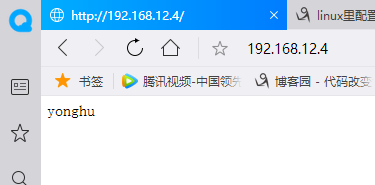
[root@localhost ~]# echo "yonghu" > /usr/local/apache/htdocs/index.html
[root@localhost ~]# cat /usr/local/apache/htdocs/index.html
yonghu
[root@localhost ~]# systemctl stop firewalld
[root@localhost ~]# /usr/local/apache/bin/apachectl start
[root@localhost htdocs]# mount -o remount,usrquota,grpquota /usr/local/apache/htdocs/
[root@localhost htdocs]# mount | tail -1
/dev/mapper/myvg-mylv on /usr/local/apache/htdocs type ext4 (rw,relatime,seclabel,quota,usrquota,grpquota,stripe=256,data=ordered)
[root@localhost ~]# vi /etc/fstab
/dev/myvg/mglv /usr/local/apache/htdocs ext4 defaults,usrquota,grpquota 0 0
[root@localhost ~]# quotacheck -avug
quotacheck: Your kernel probably supports journaled quota but you are not using it. Consider switching to journaled quota to avoid running quotacheck after an unclean shutdown.
quotacheck: Scanning /dev/mapper/myvg-mylv [/usr/local/apache/htdocs] done
quotacheck: Cannot stat old user quota file /usr/local/apache/htdocs/aquota.user: 没有那个文件或目录. Usage will not be subtracted.
quotacheck: Cannot stat old group quota file /usr/local/apache/htdocs/aquota.group: 没有那个文件或目录. Usage will not be subtracted.
quotacheck: Cannot stat old user quota file /usr/local/apache/htdocs/aquota.user: 没有那个文件或目录. Usage will not be subtracted.
quotacheck: Cannot stat old group quota file /usr/local/apache/htdocs/aquota.group: 没有那个文件或目录. Usage will not be subtracted.
quotacheck: Checked 2 directories and 1 files
quotacheck: Old file not found.
quotacheck: Old file not found.
[root@localhost ~]# quotaon -avug
/dev/mapper/myvg-mylv [/usr/local/apache/htdocs]: group quotas turned on
/dev/mapper/myvg-mylv [/usr/local/apache/htdocs]: user quotas turned on
[root@localhost ~]# useradd yonghu
[root@localhost ~]# edquota -u yonghu
Disk quotas for user yonghu (uid 1001):
Filesystem blocks soft hard inodes soft hard
/dev/mapper/myvg-mylv 0 81920 102400 0 80 100
[root@localhost ~]# chmod -R 777 /usr/
[root@localhost ~]# su - yonghu
[yonghu@localhost ~]$ dd if=/dev/zero of=/usr/local/apache/htdocs/ceshi bs=1M count=90
dm-2: warning, user block quota exceeded.
记录了90+0 的读入
记录了90+0 的写出
94371840字节(94 MB)已复制,0.33566 秒,281 MB/秒
[yonghu@localhost ~]$ touch /usr/local/apache/htdocs/{1..90}.txt
dm-2: warning, user file quota exceeded.