项目结构如下:
要求python3.0
selenium3.0
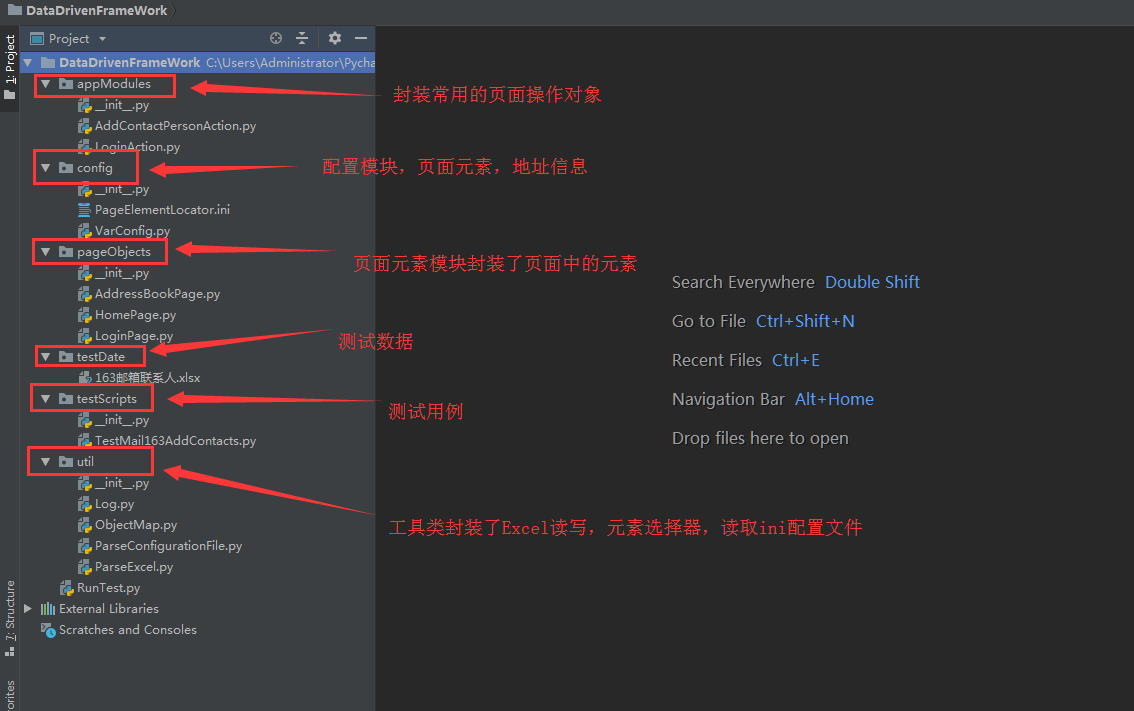
下面是代码:
appModubles:addContactPersonActtion.py和LoginAction.py
addContactPersonActtion.py再次对添加联系人进行封装
# encoding = utf-8
from pageObjects.HomePage import HomePage
from pageObjects.AddressBookPage import HomePage as Page
import traceback
import time
class AddContactPerson(object):
    def __init__(self):
        print("add contact person")

    @staticmethod
    def add(driver,contactName,contactEmail,isStar,contactPhone,contactComment):
        try:
            # 创建主页实例对象
            hp = HomePage(driver)
            # 点击通讯录链接
            hp.addressLink().click()
            time.sleep(3)
            # 创建添加联系人页实例对象
            apb = Page(driver)
            apb.createContactPersonButton().click()
            if contactName:
                #非必填项
                apb.contactPersonName().send_keys(contactName)
                #必填项
                apb.contactPersonEmail().send_keys(contactEmail)
            if isStar == u'是':
                #非必填项
                apb.starContacts().click()
            if contactPhone:
                # 非必填项
                apb.conttactPersonMobile().send_keys(contactPhone)
            if contactComment:
                apb.contactPersonComment().send_keys(contactComment)
            apb.savecontacePerson().click()
        except Exception as e:
            # 打印异常堆栈信息
            print(traceback.print_exc())
            raise e

if __name__ == "__main__":
    from selenium import webdriver
    from appModules.LoginAction import loginAction
    driver = webdriver.Chrome()
    driver.get("https://mail.163.com")
    time.sleep(3)
    loginAction.login(driver,"用户名","密码")
    time.sleep(3)
    AddContactPerson.add(driver,u"张三","602208333@qq.com",u"是","","")
    time.sleep(10)
    driver.quit()
LoginAction.py再次对登录进行封装
# encoding = utf-8
from pageObjects import LoginPage
import time
class loginAction(object):
    def __init__(self):
        print("login..........")

    @staticmethod
    def login(driver,username,password):
        try:
            login = LoginPage.loginPage(driver)
            # 将当前焦点切换到登录模块的frame中,以便能进行后续登录操作
            login.switchToFrame()
            # 输入登录用户名
            login.userNameObj().send_keys(username)
            # 输入密码
            login.passwordObj().send_keys(password)
            time.sleep(3)
            # 点击登录按钮
            login.loginButton().click()
            time.sleep(3)
            # 切换回主窗口
            login.switchToDefaultFrame()
        except Exception as e:
            raise e

if __name__ == "__main__":
    from selenium import webdriver
    driver = webdriver.Chrome()
    driver.get("https://mail.163.com/")
    time.sleep(3)
    loginAction.login(driver,"shzygdst","zihuijiayou")
    time.sleep(3)
    driver.quit()
config:PageElementLocator.ini和VarConfing.py
PageElementLocator.ini页面元素的定位
[163mail_login]
loginPage.frame = xpath>//iframe[starts-with(@id, 'x-URS-iframe')]
loginPage.usrename = name>email
loginPage.password = name>password
loginPage.loginbutton = id>dologin

[163mail_homePage]
homePage.addressbook = id>_mail_tabitem_1_4text

[163mail_addContactsPage]
addContactsPage.createContactctsBtn = xpath>//span[contains(.,'新建联系人')]
addContactsPage.contactPersonName = id>input_N
addContactsPage.contactPersonEmail = xpath>//div[2]/div/div/div/div/div/div/dl/dd/div/input
addContactsPage.starContacts = id>fly1
addContactsPage.conttactPersonMobile = xpath>//div[2]/dl/dd/div/input
addContactsPage.contactPersonComment = id>input_DETAIL
addContactsPage.savecontacePerson = xpath>//span[contains(.,'确 定')]
VarConfing.py需要配置的位置信息
# encoding = utf-8
import os

# 获取当前文在所在目录父级的绝对路径
parentDirPath = os.path.dirname(os.path.dirname(os.path.abspath(__file__)))

# 获取页面存放元素定位表达式的绝对路径
pageElementLocatorPath = parentDirPath+u'\config\PageElementLocator.ini'

# 获取数据文件存放的绝对路径
dataFilePath = parentDirPath + u'\testDate\163邮箱联系人.xlsx'

# Log文件存放路径
LogPath = parentDirPath+u'\confing\log'
# 163账号工作表中,每列所对应的数字序号
account_username = 2
account_password = 3
account_dataBook = 4
account_isExecute = 5
account_testResult = 6

# 联系人工作表中,每列对应的数字序号
contacts_contactPersonName = 2
contacts_contactPersonEmail = 3
contacts_isStar = 4
contacts_contactPersonMobile = 5
contacts_contactPersonComment = 6
contacts_assertKeyWords = 7
contacts_isExecute = 8
contacts_runTime = 9
contacts_textResult = 10


if __name__ == "__main__":
    print(parentDirPath)
    print(pageElementLocatorPath)
    print(dataFilePath)
pageObjects:AddressBookPage.py和HomePage.py和LoginPage.py
AddressBookPage.py封装新建联系人页面元素
# encoding = utf-8
from util.ObjectMap import *
from util.ParseConfigurationFile import ParseConfigFile

class HomePage(object):
    def __init__(self,driver):
        self.driver = driver
        self.parseCf = ParseConfigFile()
        self.addContactsOptions = self.parseCf.getItemsSection("163mail_addContactsPage")
        print(self.addContactsOptions)

    def createContactPersonButton(self):
        # 获取新建联系人按钮
        try:
            # 从定位表达式配置文件中读取定位新建联系人按钮的定位方式和表达式
            locateType,locatorExpression = self.addContactsOptions[
                "addContactsPage.createContactctsBtn".lower()].split(">")
            # 获取新建联系人按钮并返还给调用者
            elementObj = getElement(self.driver,locateType,locatorExpression)
            return elementObj
        except Exception as e:
            raise e

    def contactPersonName(self):
        # 获取新建联系人界面中的姓名输入框
        try:
            locateType,locatorExpression = self.addContactsOptions[
                "addContactsPage.contactPersonName".lower()].split(">")
            elementObj = getElement(self.driver,locateType,locatorExpression)
            return elementObj
        except Exception as e:
            raise e

    def contactPersonEmail(self):
        # 获取新建联系人界面中的邮箱输入框
        try:
            locateType,locatorExpression = self.addContactsOptions[
                "addContactsPage.contactPersonEmail".lower()].split(">")
            elementObj = getElement(self.driver,locateType,locatorExpression)
            return elementObj
        except Exception as e:
            raise e

    def starContacts(self):
        # 获取新建联系人界面中的星标选择框
        try:
            locateType, locatorExpression = self.addContactsOptions[
                "addContactsPage.starContacts".lower()].split(">")
            elementObj = getElement(self.driver, locateType, locatorExpression)
            return elementObj
        except Exception as e:
            raise e

    def conttactPersonMobile(self):
        # 获取新建联系人界面中的手机输入框
        try:
            locateType, locatorExpression = self.addContactsOptions[
                "addContactsPage.conttactPersonMobile".lower()].split(">")
            elementObj = getElement(self.driver, locateType, locatorExpression)
            return elementObj
        except Exception as e:
            raise e

    def contactPersonComment(self):
        # 获取新建联系人界面中的联系人备注输入框
        try:
            locateType, locatorExpression = self.addContactsOptions[
                "addContactsPage.contactPersonComment".lower()].split(">")
            elementObj = getElement(self.driver, locateType, locatorExpression)
            return elementObj
        except Exception as e:
            raise e

    def savecontacePerson(self):
        # 获取新建联系人界面中的保存联系人按钮
        try:
            locateType, locatorExpression = self.addContactsOptions[
                "addContactsPage.savecontacePerson".lower()].split(">")
            elementObj = getElement(self.driver, locateType, locatorExpression)
            return elementObj
        except Exception as e:
            raise e
HomePage.py封装联系人页面元素
# encoding = utf-8
from util.ObjectMap import *
from util.ParseConfigurationFile import ParseConfigFile

class HomePage(object):
    def __init__(self,driver):
        self.driver = driver
        self.parseCF = ParseConfigFile()

    def addressLink(self):
        try:
            # 从定位表达式配置文件中读取定位通讯录按钮的定位方式和表达式
            locateType,locatorExpression = self.parseCF.getOptionValue(
                "163mail_homePage","homePage.addressbook").split(">")
            # 获取登录成功页面通讯录页面元素,并返回给调用者
            elementObj = getElement(self.driver,locateType,locatorExpression)
            return elementObj
        except Exception as e:
            raise e
LoginPage.py封装登录页面元素
# encoding = utf-8
from util.ObjectMap import *
import time
from util.ParseConfigurationFile import ParseConfigFile
class loginPage(object):
    def __init__(self,driver):
        self.driver = driver
        self.parseCf = ParseConfigFile()
        self.loginOptions = self.parseCf.getItemsSection("163mail_login")
        print(self.loginOptions)
    # 进入frame框
    def switchToFrame(self):
        try:
            locatorExpression = self.loginOptions["loginPage.frame".lower()].split(">")[1]
            self.driver.switch_to.frame(self.driver.find_element_by_xpath(locatorExpression))
            # self.driver.switch_to.frame(self.driver.find_element_by_xpath("//iframe[starts-with(@id, 'x-URS-iframe')]"))
        except Exception as e:
            raise e


    # 回到默认界面
    def switchToDefaultFrame(self):

        self.driver.switch_to.default_content()

    def userNameObj(self):
        try:
            # 获取登录页面的用户名输入框页面对象,并返回给调用者
            locateType, locatorExpression = self.loginOptions["loginPage.usrename".lower()].split(">")
            elementObj = getElement(self.driver,locateType,locatorExpression)
            # elementObj = getElement(self.driver,"name","email")
            return elementObj
        except Exception as e:
            raise e

    def passwordObj(self):
        try:
            # 获取登录页面的密码输入框页面对象,并返回给调用者
            locateType, locatorExpression = self.loginOptions["loginPage.password".lower()].split(">")
            elementObj = getElement(self.driver, locateType, locatorExpression)
            # elementObj = getElement(self.driver,"name","password")
            return elementObj
        except Exception as e:
            raise e

    def loginButton(self):
        try:
            # 获取登录页面的登录按钮页面对象,并返回给调用者
            locateType, locatorExpression = self.loginOptions["loginPage.loginbutton".lower()].split(">")
            elementObj = getElement(self.driver,locateType,locatorExpression)
            # elementObj = getElement(self.driver,"id","dologin")
            return elementObj
        except Exception as e:
            raise e

if __name__ == "__main__":
    from selenium import webdriver
    driver  = webdriver.Chrome()
    driver.get("https://mail.163.com/")
    login = loginPage(driver)
    time.sleep(5)
    login.switchToFrame()
    login.userNameObj().send_keys("shzygdst")
    login.passwordObj().send_keys("zihuijiayou1")
    login.loginButton().click
    time.sleep(5)
    login.switchToDefaultFrame()
    driver.quit()
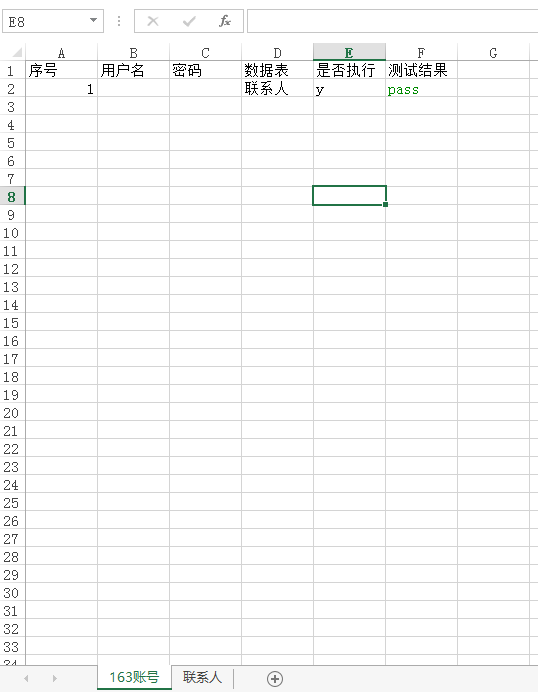
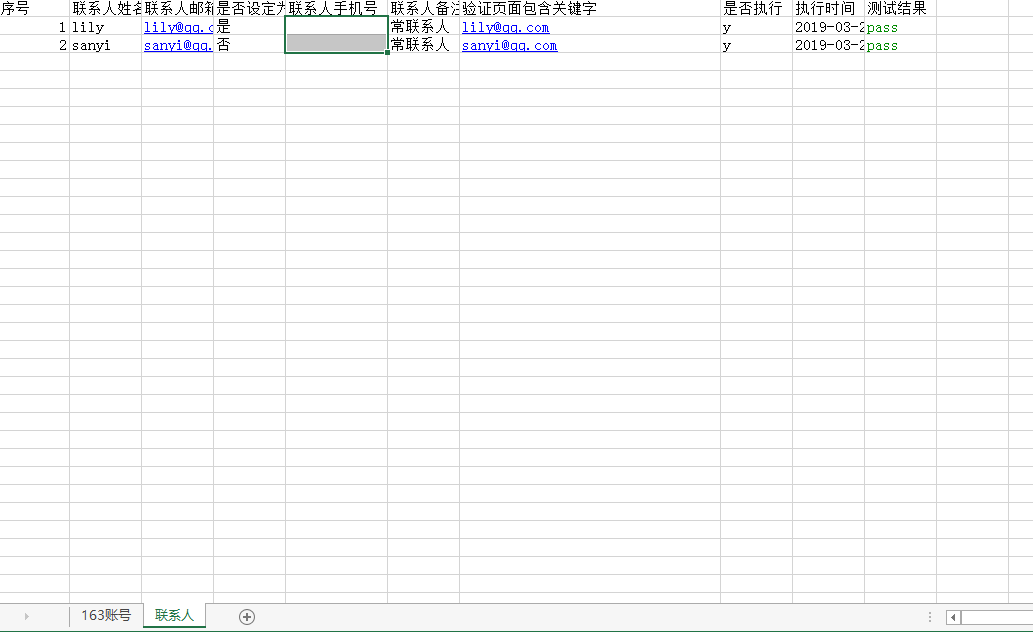
testDate:
testScripts:
TestMail163AddContacts.py
# encoding = utf-8
from selenium import webdriver
from appModules.LoginAction import loginAction
from util.ParseExcel import ParseExcel
from config.VarConfig import *
from appModules.AddContactPersonAction import AddContactPerson
import time
import traceback
from util.Log import Log

# 创建解析Excel对象
print(dataFilePath)
excelObj = ParseExcel()
# 将Excel文件加载到内存
excelObj.loadWorkBook(dataFilePath)
log = Log()
def LaunchBrowser():
    driver = webdriver.Chrome()
    driver.maximize_window()
    # 访问163邮箱地址
    driver.get("https://mail.163.com/")
    time.sleep(3)
    return driver
def test163MailAddCntacts():
    try:
        # 根据Excel文件中的sheet名获取此sheet对象
        userSheet = excelObj.getSheetByName("163账号")
        # 获取163账号sheet中是否执行列
        isExecuteUser = excelObj.getColumn(userSheet,account_isExecute)
        # 获取163账号sheet中的数据列表
        dataBookColumn = excelObj.getColumn(userSheet,account_dataBook)
        log.info('测试为163邮箱添加正式开始。。。。。')
        for idx,i in enumerate(isExecuteUser[1:]):
            # 遍历163表中的账号,为需要执行的账号添加联系人
            if i.value == "y":#表示要执行
                # 获取第i行的数据
                userRow = excelObj.getRow(userSheet,idx+2)
                # 获取第i行的用户名
                userName = userRow[account_username - 1].value
                # 获取i行的密码
                passWord = str(userRow[account_password -1].value)
                print(userName,passWord)
                # 创建浏览器实例
                driver = LaunchBrowser()
                # 登录163邮箱
                loginAction.login(driver,userName,passWord)
                time.sleep(3)
                # 获取为第i行中用户添加的联系人数据表sheet名
                dataBookName = dataBookColumn[idx +1].value
                log.info('执行'+dataBookName+'表中内容')
                # 获取相对应的数据表
                dataSheet = excelObj.getSheetByName(dataBookName)
                # 获取联系人数据表中是否执行列对象
                isExecuteData = excelObj.getColumn(dataSheet,contacts_isExecute)
                contactNum = 0 #记录添加成功联系人个数
                isExecuteNum = 0 #记录需要记录联系人个数
                for id,data in enumerate(isExecuteData[1:]):
                    # 循环遍历是否执行添加联系人
                    # 如果被设置为添加,则进行联系人添加操作
                    if data.value == "y":
                        # 如果第id行的联系人被设置为执行,则isExecuteNum自增1
                        isExecuteNum+=1
                        # 获取联系人表第id+2行对象
                        rowContent = excelObj.getRow(dataSheet,id +2)
                        # 获取联系人姓名
                        contactPersonName = rowContent[
                            contacts_contactPersonName -1].value
                        # 获取联系人邮箱
                        contactEmail = rowContent[
                            contacts_contactPersonEmail -1].value
                        # 是否标记为星标联系人
                        isStar = rowContent[contacts_isStar-1].value
                        # 获取手机号
                        contactPersonPhone = rowContent[contacts_contactPersonMobile-1].value
                        # 获取联系人备注信息
                        contactsPersonComment = rowContent[contacts_contactPersonComment - 1].value
                        # 添加联系人成功后,断言的关键字
                        assertKeyWord = rowContent[
                            contacts_assertKeyWords -1].value
                        log.info('联系人姓名:'+contactPersonName+'联系人邮箱:'+contactEmail+
                              '是否标记为星标联系人:'+isStar+"手机号:"+str(contactPersonPhone)+'联系人备注信息:'+contactsPersonComment)
                        # 执行添加联系人操作
                        AddContactPerson.add(driver,
                                             contactPersonName,
                                             contactEmail,
                                             isStar,
                                             contactPersonPhone,
                                             contactsPersonComment)
                        time.sleep(3)
                        # 在联系人工作表中写入添加联系人执行时间
                        excelObj.writeCellCurrentTime(dataSheet,rowNo= id+2,colsNo=contacts_runTime)
                        try:
                            # 断言给定的关键字是否出现在页面中
                            assert assertKeyWord in driver.page_source
                        except AssertionError as e:
                            excelObj.writeCell(dataSheet,"faild",rowNo= id+2,
                                               colsNo =contacts_textResult,style="red" )
                        else:
                            # 断言成功,写入添加联系人成功信息
                            excelObj.writeCell(dataSheet,"pass",rowNo= id+2,
                                               colsNo=contacts_textResult,style="green")
                            contactNum+=1
                    print("contactNum = %s,isExecuteNum=%s"
                        %(contactNum,isExecuteNum))
                if contactNum == isExecuteNum:
                        # 如果成功添加的联系人数与需要添加的联系人数相等,
                        # 说明给第i个用户添加联系人测试用例执行成功
                        # 在163账号工作表中写入成功信息,否则写入失败信息
                    excelObj.writeCell(userSheet,"pass",rowNo= idx+2,
                                           colsNo=account_testResult,style="green")
                    print(u'为用户%s添加%d个联系人,测试通过!'
                        %(userName,contactNum))
                else:
                    excelObj.writeCell(userSheet,"faild",rowNo= idx+2,
                                        colsNo=account_testResult,style="read")
            else:
                print(u'用户%s被设置为忽略执行!'%excelObj.getCellOfValue(userSheet,rowNo=idx+2,colsNo=account_username))
                # driver.quit()
    except Exception as e:
        log.info(u'数据驱动框架主程序发生异常,异常信息为:')
        log.error(traceback.print_exc())


if __name__=="__main__":
   test163MailAddCntacts()
util:ObjecMap.py和ParseConfigurationFile.py和ParseExcel.py
ObjecMap.py:封装元素对象
# encoding = utf-8
from selenium.webdriver.support.ui import WebDriverWait

# 获取单个页面元素对象
def getElement(driver,locateType,locateExpression):
    try:
        element = WebDriverWait(driver,30).until(
            lambda x:x.find_element(by = locateType,value= locateExpression))
        return element
    except Exception as e:
        raise e

# 获取多个相同页面元素对象,并已Lost返回
def getElements(driver,locateType,locateExpression):
    try:
        elements = WebDriverWait(driver,30).until(
            lambda x:x.find_elements(by=locateType,value=locateExpression))
        return elements
    except Exception as e:
        raise e

if __name__ == "__main__":
    from selenium import webdriver
    driver = webdriver.Chrome()
    driver.get("https://www.baidu.com")

    searchBox = getElement(driver,"id","kw")
    print(searchBox.tag_name)
    aList = getElements(driver,"tag name",'a')
    print(len(aList))
    driver.quit()
ParseConfigurationFile.py:封装读取ini文件
# encoding = utf-8
from config.VarConfig import pageElementLocatorPath
from configparser import ConfigParser
# 解析储存定位页面元素的定位表达式文件
class ParseConfigFile(object):
    def __init__(self):
        self.cf = ConfigParser()
        self.cf.read(pageElementLocatorPath,encoding='utf-8')

    def getItemsSection(self,sectionName):
        # 获取配置文件中指定section下所有option键值对
        # 并已字典类型返回给调用者
        '''注意:
        使用self.cf.items(sectionName)此种方法获取到的配置文件中options
        内容均被转换成小写,比如:loggingPage.frame被转换成loggingpage.frmae
        '''
        optionsDict = dict(self.cf.items(sectionName))
        return optionsDict

    def getOptionValue(self,sectionName,optionName):
        # 获取指定section下的指定option值
        value = self.cf.get(sectionName,optionName)
        return value

if __name__ == "__main__":
    pc = ParseConfigFile()
    print(pc.getItemsSection("163mail_addContactsPage"))
    print(pc.getOptionValue("163mail_addContactsPage","addContactsPage.createContactctsBtn"))
ParseExcel.py:封装了Excel读写
# encoding = utf-8
import openpyxl
from openpyxl.styles import Border,Side,Font
import time

class ParseExcel(object):
    def __init__(self):
        self.worbook = None
        self.excelFile = None
        self.font = Font(color = None)#设置字体颜色
        # 颜色对应的RGB值
        self.RGBDict = {'read':'FFFF3030','green':'FF008B00'}

    def loadWorkBook(self,excelPathAndName):
        # 将Excel文件加载到内存,并获取其workbook对象
        try:
            self.workbook = openpyxl.load_workbook(excelPathAndName)
        except Exception as e:
            raise e
        self.excelFile = excelPathAndName
        return self.workbook

    def getSheetByName(self,sheetName):
        # 根据sheet名获取该sheet对象
        try:
            sheet = self.workbook.get_sheet_by_name(sheetName)
            return sheet
        except Exception as e:
            raise e

    def getSheetByIndex(self,sheetIndex):
        # 根据sheet的索引号获取该sheet对象
        try:
            sheetName = self.workbook.get_sheet_names()[sheetIndex]
        except Exception as e:
            raise e
        sheet = self.workbook.get_sheet_by_name(sheetName)
        return sheet

    def getRowsNumber(self,sheet):
        # 获取sheet中有数据区域的结束行号
        return sheet.max_row

    def getColsNumber(self,sheet):
        # 获取sheet中数据区域的结束列号
        return sheet.max_column

    def getStartRowNumber(self,sheet):
        # 获取sheet中有数据区域的开始的行号
        return sheet.min_row

    def getStartColNumber(self,sheet):
        # 获取sheet中有数据区域的开始的列号
        return sheet.min_column

    def getRow(self,sheet,rowNo):
        # 获取sheet中某一行,返回的是这一行所有的数据内容组成的tuple,
        # 下标从1开始,sheet.rows[1]表示第一列
        try:
            return list(sheet.rows)[rowNo - 1]
        except Exception as e:
            raise e

    def getColumn(self,sheet,colNo):
        # 获取sheet中某一列,返回的是这一列所有的数据内容组成tuple,
        # 下标从1开始,sheet.coulumns[1]表示第一列
        try:
            return list(sheet.columns)[colNo -1]
        except Exception as e:
            raise e

    def getCellOfValue(self,sheet,coordinate = None,rowNo = None,colsNo = None):
        # 根据单元格所在的位置索引获取该单元格中的值,下表从1开始
        # sheet.cell(row =1,column = 1).value,表示Excel中第一行第一列的值
        if coordinate != None:
            try:
                return sheet.cell(coordinate = coordinate).value
            except Exception as e:
                raise e
        elif coordinate is None and rowNo is not None and rowNo is not None and colsNo is not None:
            try:
                return sheet.cell(row = rowNo,column = colsNo).value
            except Exception as e:
                raise e
        else:
            raise  Exception("Insufficient Coordinates of cell!")

    def getCellOfObject(self,sheet,coordinate = None,rowNo = None,colsNo = None):
        # 获取某个单元格的对象,可以根据单元格所在位置的数字索引,
        # 也可以直接根据Excel中单元格的编码及坐标
        # 如getCellObject(sheet,coordinate = 'A1')或
        # getCellObject(sheet,rowNo = 1,colsNo = 2)
        if coordinate != None:
            try:
                return sheet.cell(coordinate = coordinate)
            except Exception as e:
                raise e
        elif coordinate == None and rowNo is not None and colsNo is not None:
            try:
                return sheet.cell(row = rowNo,column = colsNo)
            except Exception as e:
                raise e
        else:
            raise Exception("Insufficient Coordinates of cell!")

    def writeCell(self,sheet,content,coordinate = None,rowNo = None,colsNo = None,style = None):
        # 根据单元格在Excel中的编码坐标或者数字索引坐标向单元格中写入数据,
        # 下表从1开始,参数style表示字体的颜色的名字,比如red,green
        if coordinate is not None:
            try:
                sheet.cell(coordinate = coordinate).value = content
                if style is not None:
                    sheet.cell(coordinate = coordinate).
                        font = Font(color= self.RGBDict[style])
                self.workbook.save(self.excelFile)
            except Exception as e:
                raise e
        elif coordinate == None and rowNo is not None and colsNo is not None:
            try:
                sheet.cell(row = rowNo,column = colsNo).value = content
                if style:
                    sheet.cell(row = rowNo,column = colsNo).
                        font = Font(color=self.RGBDict[style])
                    self.workbook.save(self.excelFile)
            except Exception as e:
                raise e
        else:
            raise Exception("Insufficient Coordinates of cell!")

    def writeCellCurrentTime(self,sheet,coordinate = None,rowNo = None,colsNo = None):
        # 写入当前的时间,下表从1开始
        now = int(time.time())#显示为时间戳
        timeArray = time.localtime(now)
        currentTime = time.strftime("%Y-%m-%d %H:%M:%S",timeArray)
        if coordinate is not None:
            try:
                sheet.cell(coordinate = coordinate).value = currentTime
                self.workbook.save(self.excelFile)
            except Exception as e:
                raise e
        elif coordinate == None and rowNo is not None and colsNo is not None:
            try:
                sheet.cell(row = rowNo,column = colsNo).value = currentTime
                self.workbook.save(self.excelFile)
            except Exception as e:
                raise e
        else:
            raise Exception("Insufficient Coordinates of cell!")


if __name__ == "__main__":
    from config.VarConfig import *
    pe = ParseExcel()
    pe.loadWorkBook(dataFilePath)
    print('通过名称获取sheet对象的名称:',pe.getSheetByName(u'联系人').title)
    print('通过索引号获取sheet对象的名称:',pe.getSheetByIndex(0).title)
    sheet = pe.getSheetByIndex(0)
    print(type(sheet))
    print('获取最大行',pe.getRowsNumber(sheet))#获取最大行
    print('获取最大列',pe.getColsNumber(sheet))#获取最大列
    rows = pe.getRow(sheet,1)#获取第一行
    print(rows().value)
    for i in rows:
        print(i.value)
    print(pe.getCellOfValue(sheet,rowNo=1,colsNo=1))
    # pe.writeCell(sheet,u'我爱祖国',rowNo=10,colsNo=10)
    # pe.writeCellCurrentTime(sheet,rowNo=10,colsNo=11)
get地址:https://github.com/zihui1/python-selenium