一张网图

因为我们使用了Docker in Docker技术,就是把jenkins部署在k8s里。jenkins master会动态创建slave pod,使用slave pod运行代码克隆,项目构建,镜像构建等指令操作。构成完成以后删除这个slave pod。减轻jenkins-master的负载,可以极大地提高资源利用率。
配置连接kubernetes
我们已经安装了Kubernetes插件,我们直接在jenkins中点击
manage jenkins -- > configure system -- > 拉到最底下有一个cloud。
新增一个cloud --> kubernetes
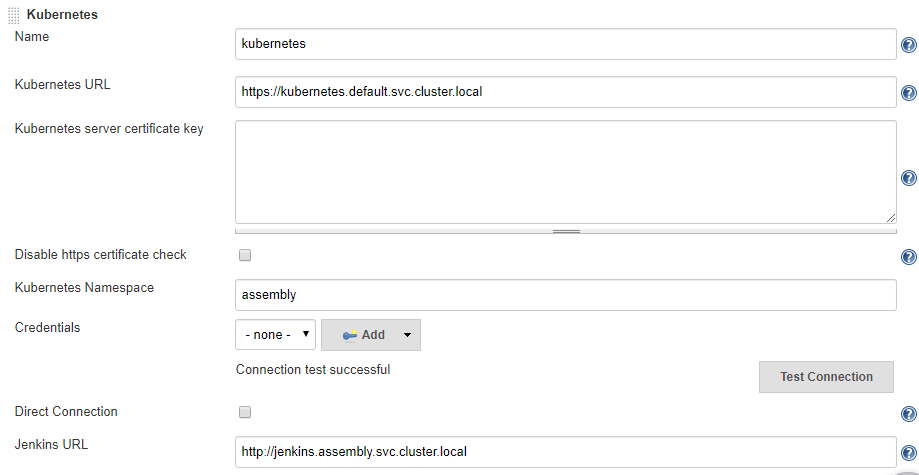
测试
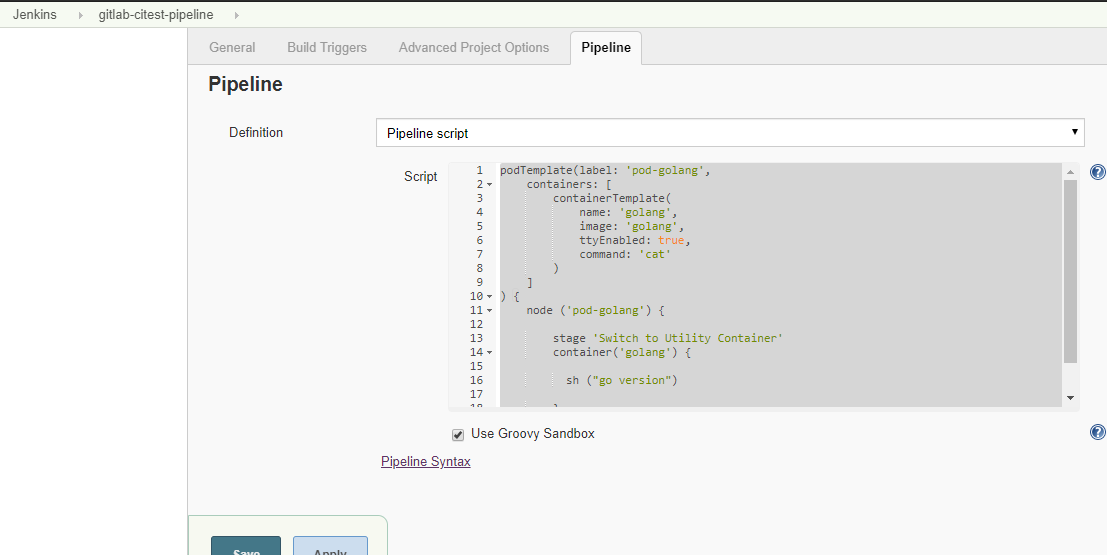
podTemplate(label: 'pod-golang',
    containers: [
        containerTemplate(
            name: 'golang',
            image: 'golang',
            ttyEnabled: true,
            command: 'cat'
        )
    ]
) {
    node ('pod-golang') {

        stage 'Switch to Utility Container'
        container('golang') {

          sh ("go version")

        }
    }
}
输出
# kubectl get pods -A -w
assembly      pod-golang-qbcxr-fbc73                       2/2     Running             0          28s
assembly      pod-golang-qbcxr-fbc73                       2/2     Terminating         0          69s


Started by user zisefeizhu
Running in Durability level: MAX_SURVIVABILITY
[Pipeline] Start of Pipeline
[Pipeline] podTemplate
[Pipeline] {
[Pipeline] node
Created Pod: pod-golang-qbcxr-gkbx2 in namespace assembly
Still waiting to schedule task
‘pod-golang-qbcxr-gkbx2’ is offline
Created Pod: pod-golang-qbcxr-4tn61 in namespace assembly
Created Pod: pod-golang-qbcxr-sqfqk in namespace assembly
Created Pod: pod-golang-qbcxr-lncp9 in namespace assembly
Created Pod: pod-golang-qbcxr-czccr in namespace assembly
Created Pod: pod-golang-qbcxr-3d6wq in namespace assembly
Created Pod: pod-golang-qbcxr-x9q5m in namespace assembly
Created Pod: pod-golang-qbcxr-fbc73 in namespace assembly
Agent pod-golang-qbcxr-fbc73 is provisioned from template pod-golang-qbcxr
---
apiVersion: "v1"
kind: "Pod"
metadata:
  annotations:
    buildUrl: "http://jenkins.assembly.svc.cluster.local/job/gitlab-citest-pipeline/4/"
    runUrl: "job/gitlab-citest-pipeline/4/"
  labels:
    jenkins: "slave"
    jenkins/label: "pod-golang"
  name: "pod-golang-qbcxr-fbc73"
spec:
  containers:
  - command:
    - "cat"
    image: "golang"
    imagePullPolicy: "IfNotPresent"
    name: "golang"
    resources:
      limits: {}
      requests: {}
    securityContext:
      privileged: false
    tty: true
    volumeMounts:
    - mountPath: "/home/jenkins/agent"
      name: "workspace-volume"
      readOnly: false
  - env:
    - name: "JENKINS_SECRET"
      value: "********"
    - name: "JENKINS_AGENT_NAME"
      value: "pod-golang-qbcxr-fbc73"
    - name: "JENKINS_NAME"
      value: "pod-golang-qbcxr-fbc73"
    - name: "JENKINS_AGENT_WORKDIR"
      value: "/home/jenkins/agent"
    - name: "JENKINS_URL"
      value: "http://jenkins.assembly.svc.cluster.local/"
    image: "jenkins/jnlp-slave:3.35-5-alpine"
    name: "jnlp"
    volumeMounts:
    - mountPath: "/home/jenkins/agent"
      name: "workspace-volume"
      readOnly: false
  nodeSelector:
    beta.kubernetes.io/os: "linux"
  restartPolicy: "Never"
  securityContext: {}
  volumes:
  - emptyDir:
      medium: ""
    name: "workspace-volume"

Running on pod-golang-qbcxr-fbc73 in /home/jenkins/agent/workspace/gitlab-citest-pipeline
[Pipeline] {
[Pipeline] stage (Switch to Utility Container)
Using the ‘stage’ step without a block argument is deprecated
Entering stage Switch to Utility Container
Proceeding
[Pipeline] container
[Pipeline] {
[Pipeline] sh
+ go version
go version go1.14.1 linux/amd64
[Pipeline] }
[Pipeline] // container
[Pipeline] }
[Pipeline] // node
[Pipeline] }
[Pipeline] // podTemplate
[Pipeline] End of Pipeline
Finished: SUCCESS
以上podTemplate是在Pipeline里面定义的
*注意name必须jnlp,如果不为jnlp pod会启两个容器
name必须jnlp Kubernetes 才能用自定义 images 指定的镜像替换默认的 jenkinsci/jnlp-slave 镜像
构建jenkins-slave镜像
github官方构建slave文档
https://github.com/jenkinsci/docker-jnlp-slave
# ll
总用量 80900
-rw-r--r-- 1 root root      596 3月  23 09:14 Dockerfile
-rwxr-xr-x 1 root root 38457344 3月  22 20:55 helm
-rw-r--r-- 1 root root     2229 3月  21 20:04 jenkins-slave
-rwxr-xr-x 1 root root 43491328 3月  23 09:13 kubectl
-rw-r--r-- 1 root root      619 3月  21 20:05 settings.xml
-rw-r--r-- 1 root root   877037 3月  23 08:40 slave.jar

# cat Dockerfile
FROM centos:7
LABEL maintainer lizhenliang

# 使镜像具有拖git仓库,编译java代码的能力
RUN yum install -y java-1.8.0-openjdk maven curl git libtool-ltdl-devel &&
    yum clean all &&
    rm -rf /var/cache/yum/* &&
    mkdir -p /usr/share/jenkins

# 将获取到slave.jar放入镜像
COPY slave.jar /usr/share/jenkins/slave.jar
# jenkins-slave执行脚本
COPY jenkins-slave /usr/bin/jenkins-slave
# settings.xml中设置了aliyun的镜像
COPY settings.xml /etc/maven/settings.xml
RUN chmod +x /usr/bin/jenkins-slave
COPY helm kubectl /usr/bin/

ENTRYPOINT ["jenkins-slave"]

# cat jenkins-slave
#!/usr/bin/env sh

if [ $# -eq 1 ]; then

    # if `docker run` only has one arguments, we assume user is running alternate command like `bash` to inspect the image
    exec "$@"

else

    # if -tunnel is not provided try env vars
    case "$@" in
        *"-tunnel "*) ;;
        *)
        if [ ! -z "$JENKINS_TUNNEL" ]; then
            TUNNEL="-tunnel $JENKINS_TUNNEL"
        fi ;;
    esac

    # if -workDir is not provided try env vars
    if [ ! -z "$JENKINS_AGENT_WORKDIR" ]; then
        case "$@" in
            *"-workDir"*) echo "Warning: Work directory is defined twice in command-line arguments and the environment variable" ;;
            *)
            WORKDIR="-workDir $JENKINS_AGENT_WORKDIR" ;;
        esac
    fi

    if [ -n "$JENKINS_URL" ]; then
        URL="-url $JENKINS_URL"
    fi

    if [ -n "$JENKINS_NAME" ]; then
        JENKINS_AGENT_NAME="$JENKINS_NAME"
    fi

    if [ -z "$JNLP_PROTOCOL_OPTS" ]; then
        echo "Warning: JnlpProtocol3 is disabled by default, use JNLP_PROTOCOL_OPTS to alter the behavior"
        JNLP_PROTOCOL_OPTS="-Dorg.jenkinsci.remoting.engine.JnlpProtocol3.disabled=true"
    fi

    # If both required options are defined, do not pass the parameters
    OPT_JENKINS_SECRET=""
    if [ -n "$JENKINS_SECRET" ]; then
        case "$@" in
            *"${JENKINS_SECRET}"*) echo "Warning: SECRET is defined twice in command-line arguments and the environment variable" ;;
            *)
            OPT_JENKINS_SECRET="${JENKINS_SECRET}" ;;
        esac
    fi

    OPT_JENKINS_AGENT_NAME=""
    if [ -n "$JENKINS_AGENT_NAME" ]; then
        case "$@" in
            *"${JENKINS_AGENT_NAME}"*) echo "Warning: AGENT_NAME is defined twice in command-line arguments and the environment variable" ;;
            *)
            OPT_JENKINS_AGENT_NAME="${JENKINS_AGENT_NAME}" ;;
        esac
    fi

    #TODO: Handle the case when the command-line and Environment variable contain different values.
    #It is fine it blows up for now since it should lead to an error anyway.

    exec java $JAVA_OPTS $JNLP_PROTOCOL_OPTS -cp /usr/share/jenkins/slave.jar hudson.remoting.jnlp.Main -headless $TUNNEL $URL $WORKDIR $OPT_JENKINS_SECRET $OPT_JENKINS_AGENT_NAME "$@"
fi

# cat settings.xml
<?xml version="1.0" encoding="UTF-8"?>
<settings xmlns="http://maven.apache.org/SETTINGS/1.0.0"
          xmlns:xsi="http://www.w3.org/2001/XMLSchema-instance"
          xsi:schemaLocation="http://maven.apache.org/SETTINGS/1.0.0 http://maven.apache.org/xsd/settings-1.0.0.xsd">
  <pluginGroups>
  </pluginGroups>
  <proxies>
  </proxies>
  <servers>
  </servers>
  <mirrors>
    <mirror>
      <id>central</id>
      <mirrorOf>central</mirrorOf>
      <name>aliyun maven</name>
      <url>https://maven.aliyun.com/repository/public</url>
    </mirror>
  </mirrors>
  <profiles>
  </profiles>
</settings>

构建镜像并打上标签
# docker build . -t harbor.linux.com/jenkinsci/jenkins-slave-jdk:1.8

推送镜像到harbor
#docker push harbor.linux.com/jenkinsci/jenkins-slave-jdk:1.8
创建应用Pipeline动态构建测试

// 镜像仓库地址
def registry = "harbor.linux.com"

podTemplate(label: 'jenkins-agent', cloud: 'kubernetes',
    containers: [
    containerTemplate(
        name: 'jnlp',
        image: "${registry}/jenkinsci/jenkins-slave-jdk:1.8"
    )],
    volumes: [
        hostPathVolume(mountPath: '/var/run/docker.sock', hostPath: '/var/run/docker.sock'),
        hostPathVolume(mountPath: '/usr/bin/docker', hostPath: '/usr/bin/docker')
    ])
{
  node("jenkins-agent"){
        stage('拉取代码') { // for display purposes
            echo 'ok'
        }
        stage('代码编译') {
            echo 'ok'
        }
        stage('部署') {
            echo 'ok'
        }
    }
}
输出
Started by user zisefeizhu
Running in Durability level: MAX_SURVIVABILITY
[Pipeline] Start of Pipeline
[Pipeline] podTemplate
[Pipeline] {
[Pipeline] node
Still waiting to schedule task
‘Jenkins’ doesn’t have label ‘jenkins-agent’
Created Pod: jenkins-agent-xnj85-cq1vx in namespace assembly
Agent jenkins-agent-xnj85-cq1vx is provisioned from template jenkins-agent-xnj85
---
apiVersion: "v1"
kind: "Pod"
metadata:
  annotations:
    buildUrl: "http://jenkins.assembly.svc.cluster.local/job/gitlab-citest-pipeline/18/"
    runUrl: "job/gitlab-citest-pipeline/18/"
  labels:
    jenkins: "slave"
    jenkins/label: "jenkins-agent"
  name: "jenkins-agent-xnj85-cq1vx"
spec:
  containers:
  - env:
    - name: "JENKINS_SECRET"
      value: "********"
    - name: "JENKINS_AGENT_NAME"
      value: "jenkins-agent-xnj85-cq1vx"
    - name: "JENKINS_NAME"
      value: "jenkins-agent-xnj85-cq1vx"
    - name: "JENKINS_AGENT_WORKDIR"
      value: "/home/jenkins/agent"
    - name: "JENKINS_URL"
      value: "http://jenkins.assembly.svc.cluster.local/"
    image: "harbor.linux.com/jenkinsci/jenkins-slave-jdk:1.8"
    imagePullPolicy: "IfNotPresent"
    name: "jnlp"
    resources:
      limits: {}
      requests: {}
    securityContext:
      privileged: false
    tty: false
    volumeMounts:
    - mountPath: "/var/run/docker.sock"
      name: "volume-0"
      readOnly: false
    - mountPath: "/usr/bin/docker"
      name: "volume-1"
      readOnly: false
    - mountPath: "/home/jenkins/agent"
      name: "workspace-volume"
      readOnly: false
  nodeSelector:
    beta.kubernetes.io/os: "linux"
  restartPolicy: "Never"
  securityContext: {}
  volumes:
  - hostPath:
      path: "/var/run/docker.sock"
    name: "volume-0"
  - hostPath:
      path: "/usr/bin/docker"
    name: "volume-1"
  - emptyDir:
      medium: ""
    name: "workspace-volume"
Running on jenkins-agent-xnj85-cq1vx in /home/jenkins/agent/workspace/gitlab-citest-pipeline
[Pipeline] {
[Pipeline] stage
[Pipeline] { (拉取代码)
[Pipeline] echo
ok
[Pipeline] }
[Pipeline] // stage
[Pipeline] stage
[Pipeline] { (代码编译)
[Pipeline] echo
ok
[Pipeline] }
[Pipeline] // stage
[Pipeline] stage
[Pipeline] { (部署)
[Pipeline] echo
ok
[Pipeline] }
[Pipeline] // stage
[Pipeline] }
[Pipeline] // node
[Pipeline] }
[Pipeline] // podTemplate
[Pipeline] End of Pipeline
Finished: SUCCESS

# kubectl get pods  --all-namespaces -w -o wide
NAMESPACE     NAME                                         READY   STATUS    RESTARTS   AGE     IP               NODE         NOMINATED NODE   READINESS GATES
assembly      jenkins-agent-7hbn2-5kwwv                    0/1     Pending   0          0s
assembly      jenkins-agent-7hbn2-5kwwv                    0/1     Pending   0          0s
assembly      jenkins-agent-7hbn2-5kwwv                    0/1     ContainerCreating   0          0s
assembly      jenkins-agent-7hbn2-5kwwv                    1/1     Running             0          3s
assembly      jenkins-agent-7hbn2-5kwwv                    1/1     Terminating         0          68s
assembly      jenkins-agent-7hbn2-5kwwv                    0/1     Terminating         0          72s
assembly      jenkins-agent-7hbn2-5kwwv                    0/1     Terminating         0          72s
assembly      jenkins-agent-7hbn2-5kwwv                    0/1     Terminating         0          77s
assembly      jenkins-agent-7hbn2-5kwwv                    0/1     Terminating         0          77s

会发现 jenkins-agent-xnj85-cq1vx  构建完成后自动删除