在windosw里清屏,是输入cls,再回车即可。
1、常见的两种方法:

(1)连接客户端时通过参数修改
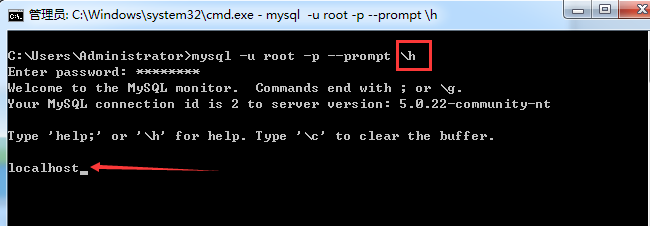
C:UsersAdministrator>mysql -u root -p --prompt h
Enter password: ********
Welcome to the MySQL monitor. Commands end with ; or g.
Your MySQL connection id is 2 to server version: 5.0.22-community-nt
Type 'help;' or 'h' for help. Type 'c' to clear the buffer.
localhost
即,我们的提示符,变成了localhost了,成功!
(2)连接上客户端之后,通过prompt命令修改
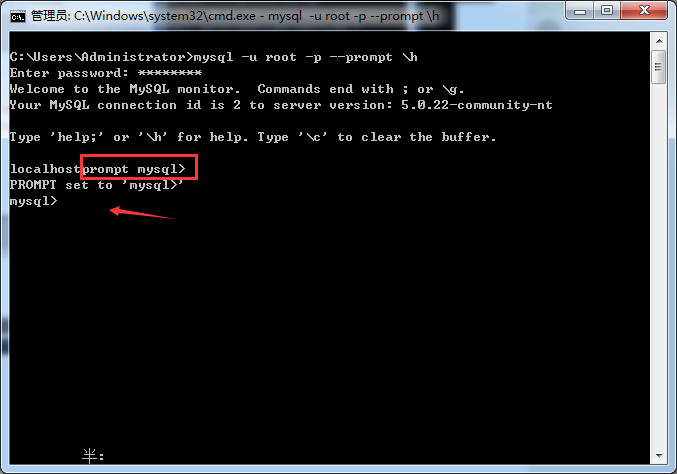
C:UsersAdministrator>mysql -u root -p --prompt h
Enter password: ********
Welcome to the MySQL monitor. Commands end with ; or g.
Your MySQL connection id is 2 to server version: 5.0.22-community-nt
Type 'help;' or 'h' for help. Type 'c' to clear the buffer.
localhostprompt mysql>
PROMPT set to 'mysql>'
mysql>
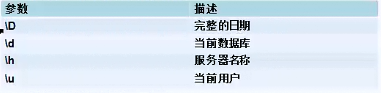
2、几种常见的MYSQL提示符
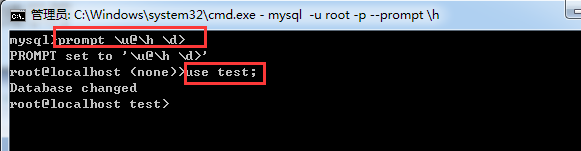
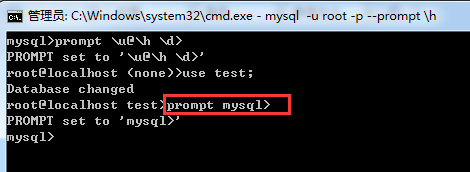
mysql>prompt u@h d>
PROMPT set to 'u@h d>'
root@localhost (none)>use test;
Database changed
root@localhost test>
use test; 的意思是打开系统的test数据库
我们再,改回去哈!