参考官方文档:
https://gitlab.com/gitlab-org/gitlab-ce/tree/master/doc/update
本地服务器为4.0.1版本
1)4.0.1->4.1
sudo service gitlab stop
cd /home/gitlab/gitlab/
sudo -u gitlab -H git fetch ===>获取最新代码
sudo -u gitlab -H git stash
sudo -u gitlab -H git checkout 4-1-stable
sudo -u gitlab -H vim Gemfile
修改内容为:modernizr 改为modernizr-rails 版本 2.7.1

Gemfile.lock同样修改
注册mysql gem:
sudo -u gitlab -H bundle install --without development test postgres
sudo -u gitlab -H bundle exec rake db:migrate RAILS_ENV=production
sudo mv /etc/init.d/gitlab /etc/init.d/gitlab.old
sudo curl --location --output /etc/init.d/gitlab https://raw.github.com/gitlabhq/gitlab-recipes/4-1-stable/init.d/gitlab
sudo chmod +x /etc/init.d/gitlab
cp /home/gitlab/gitlab/lib/hooks/post-receive /home/git/.gitolite/hooks/common/post-receive
chown git:git /home/git/.gitolite/hooks/common/post-receive
检查信息:
sudo -u gitlab -H bundle exec rake gitlab:check RAILS_ENV=production
service gitlab start
2) 4.1->4.2
停止gitlab nginx: service gitlab stop ,service nginx stop
cd /home/gitlab/gitlab/
sudo -u gitlab -H git fetch
sudo -u gitlab -H git stash
sudo -u gitlab -H git checkout 4-2-stable
sudo -u gitlab -H vim Gemfile
修改内容为:modernizr 改为modernizr-rails 版本 2.7.1
Gemfile.lock也修改
# Run a bundle install without deployment to generate the new Gemfile
sudo -u gitlab -H bundle install --without development test postgres --no-deployment
====》报rake版本低,
gem install rake -v '10.0.3'
gem uninstall rake -v '0.9.2.2'
重新执行命令
# Install libs (with deployment this time)
sudo -u gitlab -H bundle install --without development test postgres --deployment
# update db
sudo -u gitlab -H bundle exec rake db:migrate RAILS_ENV=production
检查状态:
sudo -u gitlab -H bundle exec rake gitlab:check RAILS_ENV=production
重启gitlab nginx服务
如果报错:
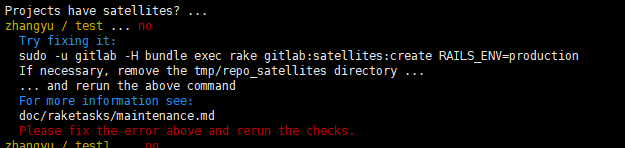
解决方案:
sudo -u gitlab -H bundle exec rake gitlab:satellites:create RAILS_ENV=production
3)4.2->5.0
3.1)停止nginx gitlab:
service nginx stop && service gitlab stop
3.2)#add bash to git user:
sudo chsh -s /bin/bash git
3.3)#git clone gitlab-shell
cd /home/git/
sudo -u git -H git clone https://github.com/gitlabhq/gitlab-shell.git /home/git/gitlab-shell
3.4)#set up gitlab-shell
sudo chown git:git -R /home/git/repositories/
sudo su git
cd /home/git/gitlab-shell
git checkout v1.1.0
cp config.yml.example config.yml
vim config.yml
修改内容如下:注意IP后面要有/作为结尾 格式 https://IP/ 不是http ,如果这里选择https 需要设置ssl
我选择http
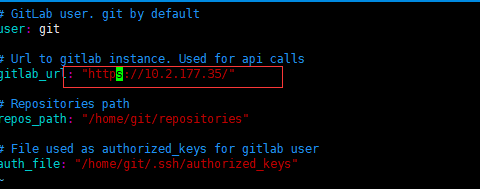
./support/rewrite-hooks.sh
ruby -v #ruby版本要在1.9
exit
3.5)#Copy GitLab instance to git user
sudo cp -R /home/gitlab/gitlab /home/git/gitlab
sudo chown git:git -R /home/git/gitlab
sudo rm -rf /home/gitlab/gitlab-satellites
#if exists
sudo rm /tmp/gitlab.socket ====>我验证时该文件不存在
3.6)#Update GitLab to recent version
cd /home/git/gitlab
sudo -u git -H cp config/gitlab.yml config/gitlab.yml.old
sudo -u git -H git fetch
sudo -u git -H git stash
sudo -u git -H git checkout 5-0-stable
sudo -u git -H cp config/gitlab.yml.example config/gitlab.yml
sudo -u git -H vim config/gitlab.yml 修改内容如下:
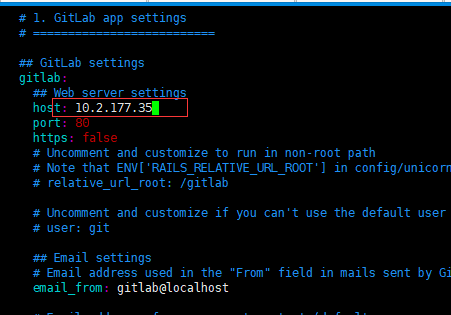
sudo -u git -H vim Gemfile
修改如下:

同理修改Gemfile.lock
sudo -u git -H bundle install --without development test postgres --no-deployment
====>这步如果出现输入密码也不行的问题
解决方案: root权限下 bundle install --without development test postgres --no-deloyment 再次执行上述命令
sudo -u git -H bundle install --without development test postgres --deployment
sudo -u git -H bundle exec rake db:migrate RAILS_ENV=production
sudo -u git -H bundle exec rake gitlab:shell:setup RAILS_ENV=production
sudo -u git -H bundle exec rake gitlab:shell:build_missing_projects RAILS_ENV=production
sudo -u git -H mkdir -p /home/git/gitlab-satellites
sudo -u git -H bundle exec rake gitlab:satellites:create RAILS_ENV=production
sudo -u git -H bundle exec rake gitlab:wiki:migrate RAILS_ENV=production
# check permissions for /home/git/.ssh/
sudo -u git -H chmod 700 /home/git/.ssh
sudo -u git -H chmod 600 /home/git/.ssh/authorized_keys
# check permissions for /home/git/gitlab/
sudo chown -R git /home/git/gitlab/log/
sudo chown -R git /home/git/gitlab/tmp/
sudo chmod -R u+rwX /home/git/gitlab/log/
sudo chmod -R u+rwX /home/git/gitlab/tmp/
sudo -u git -H mkdir -p /home/git/gitlab/tmp/pids/
sudo chmod -R u+rwX /home/git/gitlab/tmp/pids
3.7)#Update init.d script and Nginx config
# init.d
sudo rm /etc/init.d/gitlab
sudo curl --location --output /etc/init.d/gitlab https://raw.github.com/gitlabhq/gitlab-recipes/5-0-stable/init.d/gitlab
sudo chmod +x /etc/init.d/gitlab
# unicorn
sudo -u git -H cp /home/git/gitlab/config/unicorn.rb /home/git/gitlab/config/unicorn.rb.old
sudo -u git -H cp /home/git/gitlab/config/unicorn.rb.example /home/git/gitlab/config/unicorn.rb
# Nginx
# Replace path from '/home/gitlab/' to '/home/git/'
sudo vim /etc/nginx/sites-enabled/gitlab ==>或者直接修改nginx.conf
sudo service nginx restart
3.8)启动gitlab
sudo service gitlab start
# check if unicorn and sidekiq started
# If not try to logout, also check replaced path from '/home/gitlab/' to '/home/git/'
# in Nginx, unicorn, init.d etc
ps aux | grep unicorn
ps aux | grep sidekiq
3.9)检查注册
sudo -u git -H /home/git/gitlab-shell/bin/check

sudo -u git -H bundle exec rake gitlab:check RAILS_ENV=production
3.10)清除旧版本
sudo userdel -r gitlab
cd /home/git
sudo -u git -H vim .profile ===>清除内容
sudo rm -R bin
sudo rm -Rf gitolite
sudo rm -R .gitolite
sudo rm .gitolite.rc
sudo rm -f gitlab.pub
sudo rm projects.list
sudo service gitlab stop
cd /home/git/gitlab
sudo rm -R tmp
sudo -u git -H mkdir tmp
sudo chmod -R u+rwX tmp/
sudo -u git -H mkdir tmp/pids/
sudo chmod -R u+rwX tmp/pids/
sudo reboot
启动gitlab :
/usr/local/bin/redis-server && service nginx start & service gitlab start
检查运行状况:
cd /home/git/gitlab
sudo -u git -H bundle exec rake gitlab:check RAILS_ENV=production
4)5.0->5.1
4.1)停止gitlab nginx服务
service gitlab stop && service nginx stop
4.2)获取最新的code
cd /home/git/gitlab
sudo -u git -H git fetch
sudo -u git -H git stash
sudo -u git -H git checkout 5-1-stable
4.3)更新gitlab-shell
cd /home/git/gitlab-shell
sudo -u git -H git fetch
sudo -u git -H git stash
sudo -u git -H git checkout v1.3.0
sudo -u git -H mv config.yml config.yml.old
sudo -u git -H cp config.yml.example config.yml
sudo -u git -H vi config.yml ===>修改url gitlab_url: "http://10.2.177.35/"
4.4)Install libs, migrations
cd /home/git/gitlab
sudo rm tmp/sockets/gitlab.socket
sudo -u git -H cp config/puma.rb.example config/puma.rb
sudo -u git -H vim Gemfile ====>修改`gem "modernizr-rails", "2.7.1"``
sudo -u git -H bundle install --without development test postgres --no-deployment
===》出现输入密码不起作用,解决方案之前一样:
root权限执行bundle 在执行该命令
===》
sudo -u git -H bundle install --without development test postgres --deployment
sudo -u git -H bundle exec rake db:migrate RAILS_ENV=production
sudo -u git -H bundle exec rake migrate_merge_requests RAILS_ENV=production
sudo -u git -H bundle exec rake assets:precompile RAILS_ENV=production
4.5)更新启动脚本
sudo rm /etc/init.d/gitlab
sudo curl --location --output /etc/init.d/gitlab https://raw.github.com/gitlabhq/gitlab-recipes/5-1-stable/init.d/gitlab
sudo chmod +x /etc/init.d/gitlab
4.6)更改MySQL权限
登陆MySQL
GRANT LOCK TABLES ON `gitlabhq_production`.* TO 'gitlab'@'localhost';
flush privileges;
quit;
4.7)检查注册信息
service nginx start ===>nginx要先于gitlab启动,否则会报错
service gitlab start
sudo -u git -H /home/git/gitlab-shell/bin/check
sudo -u git -H bundle exec rake gitlab:check RAILS_ENV=production
5)5.1->5.2
备份:
cd /home/git/gitlab
sudo -u git -H bundle exec rake gitlab:backup:create RAILS_ENV=production
停止服务:
service gitlab stop && service nginx stop
更新代码:
cd /home/git/gitlab
sudo -u git -H git fetch
sudo -u git -H git stash
sudo -u git -H git checkout 5-2-stable
更新gitlab-shell
cd /home/git/gitlab-shell
sudo -u git -H git fetch
sudo -u git -H git checkout v1.4.0
更新lib等
cd /home/git/gitlab
sudo -u git -H vim Gemfile ===》`gem "modernizr-rails", "2.7.1"``
sudo -u git -H bundle install --without development test postgres --no-deployment
sudo -u git -H bundle install --without development test postgres --deployment
sudo -u git -H bundle exec rake db:migrate RAILS_ENV=production
sudo -u git -H bundle exec rake assets:precompile RAILS_ENV=production
更新config文件
vim /home/git/gitlab/config/gitlab.yml ===>我的host是IP ,所以不用修改
vim home/git/gitlab/config/puma.rb ====>我才用默认
更新启动脚本
cd /home/git/gitlab
sudo rm /etc/init.d/gitlab
sudo cp lib/support/init.d/gitlab /etc/init.d/gitlab
sudo chmod +x /etc/init.d/gitlab
清理uploads目录
cd /home/git/gitlab
sudo -u git -H mkdir public/uploads
sudo chmod -R u+rwX public/uploads
启动应用:
service gitlab start
service nginx restart
信息检查:
sudo -u git -H bundle exec rake gitlab:env:info RAILS_ENV=production
sudo -u git -H bundle exec rake gitlab:check RAILS_ENV=production
6)5.2->5.4
备份:
cd /home/git/gitlab
sudo -u git -H bundle exec rake gitlab:backup:create RAILS_ENV=production
停止服务:
sudo service gitlab stop
更新代码:
cd /home/git/gitlab
sudo -u git -H git fetch
sudo -u git -H git checkout 5-4-stable
更新gitlab-shell:
cd /home/git/gitlab-shell
sudo -u git -H git fetch
sudo -u git -H git checkout v1.7.9
更新lib等:
cd /home/git/gitlab
sudo -u git -H vim Gemfile ===>gem "modernizr-rails", "2.7.1"
sudo -u git -H bundle install --without development test postgres --no-deployment
sudo -u git -H bundle install --without development test postgres --deployment
sudo -u git -H bundle exec rake db:migrate RAILS_ENV=production
#sudo -u git -H bundle exec rake db:migrate RAILS_ENV=production
sudo -u git -H bundle exec rake assets:precompile RAILS_ENV=production
更新config文件:
vim /home/git/gitlab/config/gitlab.yml ===》不改,原因同上 host没变
vim /home/git/gitlab/config/puma.rb ===》不改
更新启动脚本:
sudo rm /etc/init.d/gitlab
sudo curl --location --output /etc/init.d/gitlab https://raw.github.com/gitlabhq/gitlabhq/5-4-stable/lib/support/init.d/gitlab
sudo chmod +x /etc/init.d/gitlab
启动服务:
sudo service gitlab start
sudo service nginx restart
检查运行状态:
sudo -u git -H bundle exec rake gitlab:env:info RAILS_ENV=production
sudo -u git -H bundle exec rake gitlab:check RAILS_ENV=production
7)5.4->6.0
备份:
cd /home/git/gitlab
sudo -u git -H bundle exec rake gitlab:backup:create RAILS_ENV=production
停止服务:
sudo service gitlab stop
获取新代码:
cd /home/git/gitlab
sudo -u git -H git fetch
sudo -u git -H git stash
sudo -u git -H git checkout 6-0-stable
更新gitlab-shell
cd /home/git/gitlab-shell
sudo -u git -H git fetch
sudo -u git -H git checkout v1.7.9
安装额外依赖包
yum install python-docutils
更新lib等:
cd /home/git/gitlab
sudo -u git -H vim Gemfile ===》`gem "modernizr-rails", "2.7.1"``
Gemfile.lock也要修改
sudo -u git -H bundle install --without development test postgres --no-deployment
sudo -u git -H bundle install --without development test postgres --deployment
sudo -u git -H bundle exec rake db:migrate RAILS_ENV=production
sudo -u git -H bundle exec rake migrate_groups RAILS_ENV=production
sudo -u git -H bundle exec rake migrate_global_projects RAILS_ENV=production
sudo -u git -H bundle exec rake migrate_keys RAILS_ENV=production
sudo -u git -H bundle exec rake migrate_inline_notes RAILS_ENV=production
sudo -u git -H bundle exec rake gitlab:satellites:create RAILS_ENV=production
sudo -u git -H bundle exec rake cache:clear RAILS_ENV=production
sudo -u git -H bundle exec rake assets:clean RAILS_ENV=production
sudo -u git -H bundle exec rake assets:precompile RAILS_ENV=production
更新config文件
vim /home/git/gitlab/config/gitlab.yml
vim /home/git/gitlab/config/unicorn.rb
更新启动脚本
sudo rm /etc/init.d/gitlab
sudo cp lib/support/init.d/gitlab /etc/init.d/gitlab
sudo chmod +x /etc/init.d/gitlab
启动脚本
sudo service gitlab start
sudo service nginx restart
运行检查:
sudo -u git -H bundle exec rake gitlab:env:info RAILS_ENV=production
sudo -u git -H bundle exec rake gitlab:check RAILS_ENV=production
8)6.0->7.14md
//git stash
8.1)停止服务:
service gitlab stop
8.2)更新ruby==>2.1.6
mkdir /tmp/ruby && cd /tmp/ruby
wget https://cache.ruby-lang.org/pub/ruby/2.1/ruby-2.1.6.tar.gz
tar zxvf ruby-2.1.6.tar.gz
cd ruby-2.1.6
./configure --disable-install-rdoc
make
sudo make install
sudo gem install bundler --no-ri --no-rdoc
8.3)获取新代码
cd /home/git/gitlab
sudo -u git -H git fetch --all
sudo -u git -H git checkout -- db/schema.rb
sudo -u git -H git checkout 7-14-stable
8.4)安装额外包
yum install logrotate cmake krb5-devel nodejs pkg-config ===>pkg-config不知道redhat包名是上面,which pkg-config显示有输出,代表安装了
8.5)设置redis
由于已经安装了redis,修改配置
sudo cp /etc/redis/redis.conf /etc/redis/redis.conf.orig
sed 's/^port .*/port 0/' /etc/redis/redis.conf.orig | sudo tee /etc/redis/redis.conf
echo 'unixsocket /var/run/redis/redis.sock' | sudo tee -a /etc/redis/redis.conf
sudo sed -i '/# unixsocketperm/ s/^# unixsocketperm.*/unixsocketperm 0775/' /etc/redis/redis.conf
sudo service redis-server restart
sudo usermod -aG redis git
############如果没有在/etc/redis/下发现redis.conf
自己重新拷贝,创建目录即可
cp /opt/redis-xxx/utils/redis_init_script /etc/init.d/redisd
chmod +x /etc/init.d/redisd ===>之后可以使用service redisd start 启动服务
vim /etc/init.d/redisd ===>修改redis 的相关信息 如redis config的名字等
mkdir /etc/redis
cp /opt/redis-xxx/redis.conf /etc/redis/redis.conf
############
sudo -u git -H cp config/resque.yml.example config/resque.yml
sudo -u git -H editor config/resque.yml ====》默认不用修改
sudo -u git -H sed -i 's|^ # socket.*| socket: /var/run/redis/redis.sock|' /home/git/gitlab-shell/config.yml
8.6)更新gitlab-shell
cd /home/git/gitlab-shell
sudo -u git -H git fetch
sudo -u git -H git checkout v2.6.5
8.7)更新lib
cd /home/git/gitlab
sudo -u git -H bundle install --without development test postgres --deployment
====>报Downloading gollum-lib-4.0.2 revealed dependencies not in the API or the lockfile (rouge (~> 1.7.4))
解决方案:修改rouge 版本为1.7.4 ===》修改 Gemfile.lock文件
sudo -u git -H bundle exec rake db:migrate RAILS_ENV=production VERSION=20130909132950
sudo -u git -H bundle exec rake migrate_iids RAILS_ENV=production
sudo -u git -H bundle exec rake db:migrate RAILS_ENV=production
sudo -u git -H bundle exec rake assets:clean assets:precompile cache:clear RAILS_ENV=production
sudo chmod u+rwx,g+rx,o-rwx /home/git/gitlab-satellites
sudo cp lib/support/init.d/gitlab /etc/init.d/gitlab
8.8)更新config文件
检查 /home/git/gitlab/config/gitlab.yml /home/git/gitlab/config/unicorn.rb /home/git/gitlab-shell/config.yml 三个文件的配置
sudo -u git -H cp config/initializers/rack_attack.rb.example config/initializers/rack_attack.rb
sudo cp lib/support/logrotate/gitlab /etc/logrotate.d/gitlab
8.9)检查nginx配置
检查nginx.conf配置 ====》可以不用改
检查tmp/uploads目录是否存在==》存在
8.10)启动服务检查运行状态
sudo service gitlab start
sudo service nginx restart
cd /home/git/gitlab
sudo -u git -H bundle exec rake gitlab:env:info RAILS_ENV=production
sudo -u git -H bundle exec rake gitlab:check RAILS_ENV=production ===》如果报错

检查/home/git/gitlab-shell/config.yml中关于redis的路径/端口/IP是否与redis实际一致===》我的问题是redis-cli路径不对
9)7.14->8.0
要求git版本>2.2 ====>符合要求跳过
sudo service gitlab stop
cd /home/git/gitlab
sudo -u git -H bundle exec rake gitlab:backup:create RAILS_ENV=production
sudo -u git -H git fetch --all
sudo -u git -H git checkout -- db/schema.rb
sudo -u git -H git checkout 8-0-stable
cd /home/git/gitlab-shell
sudo -u git -H git fetch
sudo -u git -H git checkout v2.6.5
#######安装go
cd /opt/
wget http://storage.googleapis.com/golang/go1.5.linux-amd64.tar.gz
sudo tar -C /usr/local -xzf go1.5.linux-amd64.tar.gz
sudo ln -sf /usr/local/go/bin/{go,godoc,gofmt} /usr/local/bin/
rm -rf go1.5.linux-amd64.tar.gz
######安装gitlab-git-http-server
cd /home/git
sudo -u git -H git clone https://gitlab.com/gitlab-org/gitlab-git-http-server.git
cd gitlab-git-http-server
sudo -u git -H git checkout 0.2.14
sudo -u git -H make
cd /home/git/gitlab
sudo -u git tee -a config/unicorn.rb <<EOF
listen "127.0.0.1:8080", :tcp_nopush => true
EOF
cd /home/git/gitlab
sudo -u git -H cp config/secrets.yml.example config/secrets.yml
sudo -u git -H chmod 0600 config/secrets.yml
cd /home/git/gitlab
vim Gemfile Gemfile.lock 把rouge版本改成1.7.4
sudo -u git -H bundle install --without postgres development test --deployment
sudo -u git -H bundle exec rake db:migrate RAILS_ENV=production
sudo -u git -H bundle exec rake assets:clean assets:precompile cache:clear RAILS_ENV=production
sudo cp lib/support/init.d/gitlab /etc/init.d/gitlab
###########修改配置文件
更新日志 cp lib/support/logrotate/gitlab /etc/logrotate.d/gitlab
更新nginx文件
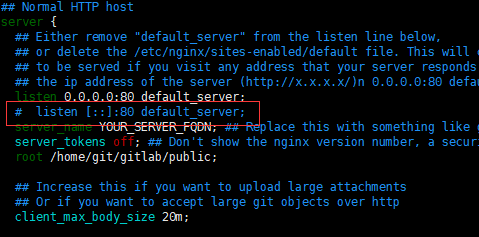
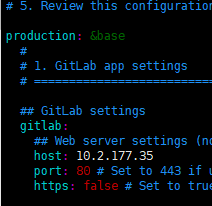

git 路径按照实际修改即可
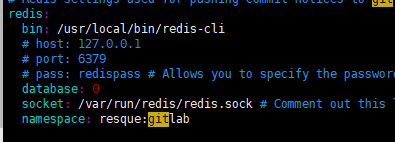

重启ngnx gitlab 服务
检查运行状态
10)8.0->8.2升级
停止服务: sudo service gitlab stop
备份:
cd /home/git/gitlab
sudo -u git -H bundle exec rake gitlab:backup:create RAILS_ENV=production
获取最新代码:
sudo -u git -H git fetch --all
sudo -u git -H git checkout -- db/schema.rb
sudo -u git -H git stash
sudo -u git -H git checkout 8-2-stable
更新gitlab-shell
cd /home/git/gitlab-shell
sudo -u git -H git fetch
sudo -u git -H git checkout v2.6.8
安装gitworkshore
cd /home/git
sudo -u git -H git clone https://gitlab.com/gitlab-org/gitlab-workhorse.git
cd gitlab-workhorse
sudo -u git -H git checkout 0.4.2
sudo -u git -H make
重置lib等目录
cd /home/git/gitlab
sudo -u git -H bundle install --without postgres development test --deployment
sudo -u git -H bundle exec rake db:migrate RAILS_ENV=production
sudo -u git -H bundle exec rake assets:clean assets:precompile cache:clear RAILS_ENV=production
sudo cp lib/support/init.d/gitlab /etc/init.d/gitlab
修改配置文件
cp config/gitlab.yml.example config/gitlab.yml
vim config/gitlab.yml
=====>修该host
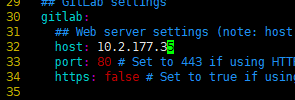
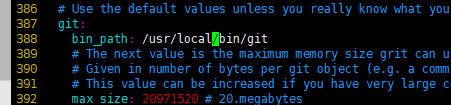
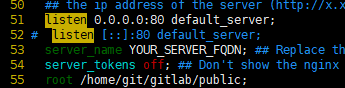
cp lib/support/nginx/gitlab /etc/nginx/conf.d/gitlab8_2.conf
vim /etc/nginx/conf.d/gitlab8_2.conf
===>
启动服务&状态检查
sudo service gitlab start
sudo service nginx restart
sudo -u git -H bundle exec rake gitlab:env:info RAILS_ENV=production
sudo -u git -H bundle exec rake gitlab:check RAILS_ENV=production