This is a very simple demo which can help you create a wcf applition quickly.
Create a Solution
Open Vistual Stuido and create a solution named WCFDemoJoey. It looks like this:
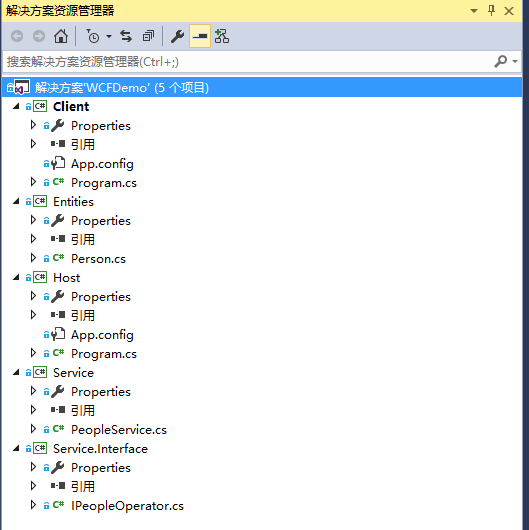
Crate a Entity
using System.Runtime.Serialization;
namespace Entities
{
    [DataContract]
    public class Person
    {
        [DataMember]
        public int PersonId { get; set; }

        [DataMember]
        public string Name { get; set; }

        [DataMember]
        public int Age { get; set; }
    }
}
The attribute DataConract and DataMember represents a way of Serialization.
Create a Service Contract
A contract is a interface which defines some remote methods:
namespace Service.Interface
{
    [ServiceContract(Name = "PeopleOperatorService", Namespace ="http://zzy0471.cnblogs.com")]
    public interface IPeopleOperator
    {
        [OperationContract]
        Person GetPerson();
    }
}
We can identify a interface as a contract by using attribute ServiceContract
Create a Service
A service is a implement of a contract:
using Service.Interface;
using Entities;

namespace Service
{
    public class PeopleService : IPeopleOperator
    {
        public Person GetPerson()
        {
            return new Person { PersonId = 1, Name = "Joey", Age = 30 };
        }
    }
}
Create a Host
WCF must be in a process which be called Host:
namespace Host
{
    class Program
    {
        static void Main(string[] args)
        {
            using (ServiceHost host = new ServiceHost(typeof(PeopleService)))
            {
                host.AddServiceEndpoint(typeof(IPeopleOperator),
                new WSHttpBinding(),
                "http://localhost:9999/PeopleService");

                if (host.Description.Behaviors.Find<ServiceMetadataBehavior>() == null)
                {
                    ServiceMetadataBehavior behavior = new ServiceMetadataBehavior();
                    behavior.HttpGetEnabled = true;
                    behavior.HttpGetUrl = new Uri("http://localhost:9999/PeopleService/PeopleService/metadata");
                    host.Description.Behaviors.Add(behavior);
                }

                host.Opened += (s, e) => Console.WriteLine("Service is running, press any key to stop");
                host.Open();
                Console.Read();
            }
        }
    }
}
Create a Clinet
using Service.Interface;
using System;
using System.ServiceModel;

namespace Client
{
    class Program
    {
        static void Main(string[] args)
        {
            using (ChannelFactory<IPeopleOperator> channelFactory = new ChannelFactory<IPeopleOperator>(new WSHttpBinding(),
                "http://localhost:9999/PeopleService"))
            {
                IPeopleOperator proxy = channelFactory.CreateChannel();

                var person = proxy.GetPerson();
                Console.WriteLine(person.Name + " " + person.Age);
                Console.Read();
            }
        }
    }
}
There are three points we must pay close attention to:
- Address
- Binding
- Contract
Address represents where should we visit the service.
Binding represents how do we Transfer information, the WSHttpBinding is one of the ways.
Contract represents what romate mehods we can call.