android 连接蓝牙打印机 BluetoothAdapter

源码下载地址:https://github.com/yylxy/BluetoothText.git
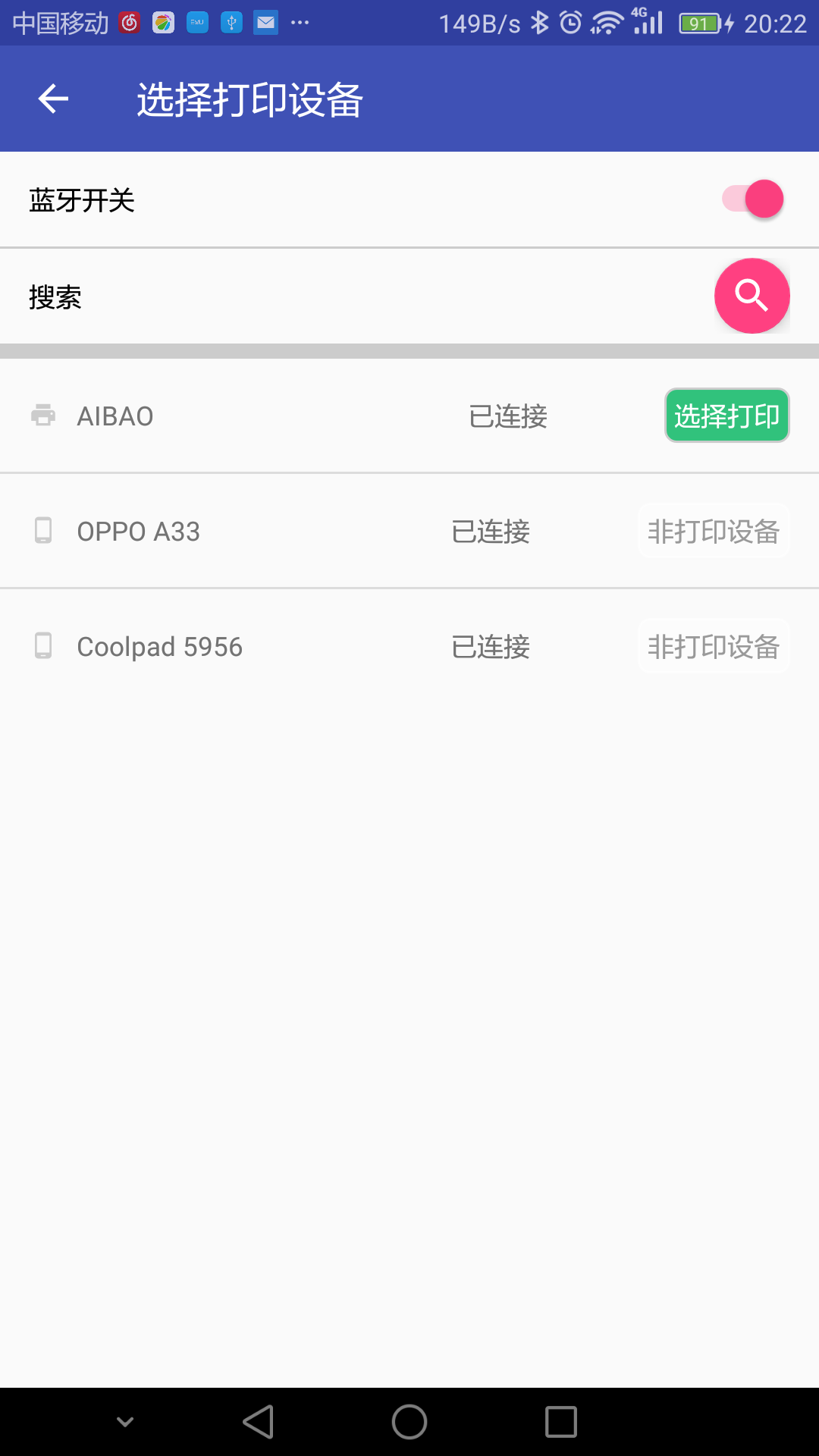
public class PrintActivity extends AppCompatActivity {
    //设备列表
    private ListView listView;
    private ArrayList<PrintBean> mBluetoothDevicesDatas;
    private PrintAdapter adapter;
    //蓝牙适配器
    private BluetoothAdapter mBluetoothAdapter;
    //请求的code
    public static final int REQUEST_ENABLE_BT = 1;

    private Switch mSwitch;
    private FloatingActionButton mFloatingActionButton;
    private ProgressBar mProgressBar;
    private Toolbar toolbar;
    private TextView searchHint;

    /**
     * 启动打印页面
     *
     * @param printContent 要打印的内容
     */
    public static void starUi(Context context, String printContent) {
        Intent intent = new Intent(context, PrintActivity.class);
        intent.putExtra("id", id);
        intent.putExtra("printContent", printContent);
        context.startActivity(intent);
    }

    @Override
    protected void onCreate(Bundle savedInstanceState) {
        super.onCreate(savedInstanceState);
        setContentView(R.layout.activity_main);
        //广播注册
        IntentFilter filter = new IntentFilter(BluetoothDevice.ACTION_FOUND);
        filter.addAction(BluetoothAdapter.ACTION_DISCOVERY_FINISHED);
        registerReceiver(mReceiver, filter); // Don't forget to unregister during onDestroy
        //初始化
        mBluetoothAdapter = BluetoothAdapter.getDefaultAdapter();
        mSwitch = (Switch) findViewById(R.id.switch1);
        mFloatingActionButton = (FloatingActionButton) findViewById(R.id.floatingActionButton);
        mProgressBar = (ProgressBar) findViewById(R.id.progressBar3);
        toolbar = (Toolbar) findViewById(R.id.toolbar);
        searchHint = (TextView) findViewById(R.id.searchHint);
        toolbar.setTitle("选择打印设备");

        listView = (ListView) findViewById(R.id.listView);
        mBluetoothDevicesDatas = new ArrayList<>();
        String printContent=getIntent().getStringExtra("printContent");
        adapter = new PrintAdapter(this, mBluetoothDevicesDatas, TextUtils.isEmpty(printContent)?"123456789完


":printContent);
        listView.setAdapter(adapter);

        chechBluetooth();
        addViewListener();

    }


    /**
     * 判断有没有开启蓝牙
     */
    private void chechBluetooth() {
        //没有开启蓝牙
        if (mBluetoothAdapter != null) {
            if (!mBluetoothAdapter.isEnabled()) {
                Intent intent = new Intent(BluetoothAdapter.ACTION_REQUEST_ENABLE); // 设置蓝牙可见性,最多300秒
                intent.putExtra(BluetoothAdapter.EXTRA_DISCOVERABLE_DURATION, 20);
                startActivityForResult(intent, REQUEST_ENABLE_BT);
                setViewStatus(true);
                //开启蓝牙
            } else {
                searchDevices();
                setViewStatus(true);
                mSwitch.setChecked(true);
            }
        }
    }

    /**
     * 搜索状态调整
     *
     * @param isSearch 是否开始搜索
     */
    private void setViewStatus(boolean isSearch) {

        if (isSearch) {
            mFloatingActionButton.setVisibility(View.GONE);
            searchHint.setVisibility(View.VISIBLE);
            mProgressBar.setVisibility(View.VISIBLE);
        } else {
            mFloatingActionButton.setVisibility(View.VISIBLE);
            mProgressBar.setVisibility(View.GONE);
            searchHint.setVisibility(View.GONE);
        }
    }


    /**
     * 添加View的监听
     */
    private void addViewListener() {
        //蓝牙的状态
        mSwitch.setOnCheckedChangeListener(new CompoundButton.OnCheckedChangeListener() {
            @Override
            public void onCheckedChanged(CompoundButton buttonView, boolean isChecked) {
                if (isChecked) {
                    openBluetooth();
                    setViewStatus(true);
                } else {
                    closeBluetooth();
                }
            }
        });
        //重新搜索
        mFloatingActionButton.setOnClickListener(new View.OnClickListener() {
            @Override
            public void onClick(View v) {
                if (mSwitch.isChecked()) {
                    searchDevices();
                    setViewStatus(true);
                } else {
                    openBluetooth();
                    setViewStatus(true);
                }
            }
        });

        toolbar.setNavigationIcon(R.drawable.ic_arrow_back_black_24dp);
        toolbar.setNavigationOnClickListener(new View.OnClickListener() {
            @Override
            public void onClick(View view) {
                Toast.makeText(PrintActivity.this, "88", Toast.LENGTH_SHORT).show();
            }
        });
    }

    @Override
    protected void onActivityResult(int requestCode, int resultCode, Intent data) {
        super.onActivityResult(requestCode, resultCode, data);
        if (resultCode == RESULT_OK && requestCode == REQUEST_ENABLE_BT) {
            Log.e("text", "开启蓝牙");
            searchDevices();
            mSwitch.setChecked(true);
            mBluetoothDevicesDatas.clear();
            adapter.notifyDataSetChanged();
        } else if (resultCode == RESULT_CANCELED && requestCode == REQUEST_ENABLE_BT) {
            Log.e("text", "没有开启蓝牙");
            mSwitch.setChecked(false);
            setViewStatus(false);
        }

    }

    /**
     * 打开蓝牙
     */
    public void openBluetooth() {
        Intent intent = new Intent(BluetoothAdapter.ACTION_REQUEST_ENABLE); // 设置蓝牙可见性,最多300秒
        intent.putExtra(BluetoothAdapter.EXTRA_DISCOVERABLE_DURATION, 20);
        startActivityForResult(intent, REQUEST_ENABLE_BT);

    }

    /**
     * 关闭蓝牙
     */
    public void closeBluetooth() {
        mBluetoothAdapter.disable();
    }


    /**
     * 搜索蓝牙设备
     */
    public void searchDevices() {
        mBluetoothDevicesDatas.clear();
        adapter.notifyDataSetChanged();
        //开始搜索蓝牙设备
        mBluetoothAdapter.startDiscovery();
    }


    /**
     * 通过广播搜索蓝牙设备
     */
    private final BroadcastReceiver mReceiver = new BroadcastReceiver() {
        public void onReceive(Context context, Intent intent) {
            String action = intent.getAction();
            // 把搜索的设置添加到集合中
            if (BluetoothDevice.ACTION_FOUND.equals(action)) {
                BluetoothDevice device = intent.getParcelableExtra(BluetoothDevice.EXTRA_DEVICE);
                //已经匹配的设备
                if (device.getBondState() == BluetoothDevice.BOND_BONDED) {
                    addBluetoothDevice(device);

                    //没有匹配的设备
                } else {
                    addBluetoothDevice(device);
                }
                adapter.notifyDataSetChanged();
                //搜索完成
            } else if (BluetoothAdapter.ACTION_DISCOVERY_FINISHED.equals(action)) {
                setViewStatus(false);
            }
        }

        /**
         * 添加数据
         * @param device 蓝牙设置对象
         */
        private void addBluetoothDevice(BluetoothDevice device) {
            for (int i = 0; i < mBluetoothDevicesDatas.size(); i++) {
                if (device.getAddress().equals(mBluetoothDevicesDatas.get(i).getAddress())) {
                    mBluetoothDevicesDatas.remove(i);
                }
            }
            if (device.getBondState() == BluetoothDevice.BOND_BONDED && device.getBluetoothClass().getDeviceClass() == PRINT_TYPE) {
                mBluetoothDevicesDatas.add(0, new PrintBean(device));
            } else {
                mBluetoothDevicesDatas.add(new PrintBean(device));
            }
        }
    };


}
class PrintAdapter extends BaseAdapter {
    private ArrayList<PrintBean> mBluetoothDevicesDatas;
    private Context mContext;
    //蓝牙适配器
    private BluetoothAdapter mBluetoothAdapter;
    //蓝牙socket对象
    private BluetoothSocket mmSocket;
    private UUID uuid;
    //打印的输出流
    private static OutputStream outputStream = null;
    //搜索弹窗提示
    ProgressDialog progressDialog = null;
    private final int exceptionCod = 100;
    //打印的内容
    private String mPrintContent;
    //在打印异常时更新ui
    Handler handler = new Handler() {
        @Override
        public void handleMessage(Message msg) {
            super.handleMessage(msg);
            if (msg.what == exceptionCod) {
                Toast.makeText(mContext, "打印发送失败,请稍后再试", Toast.LENGTH_SHORT).show();
                if (progressDialog != null) {
                    progressDialog.dismiss();
                }
            }
        }
    };

    /**
     * @param context                上下文
     * @param mBluetoothDevicesDatas 设备列表
     * @param printContent           打印的内容
     */
    public PrintAdapter(Context context, ArrayList<PrintBean> mBluetoothDevicesDatas, String printContent) {
        this.mBluetoothDevicesDatas = mBluetoothDevicesDatas;
        mContext = context;
        mBluetoothAdapter = BluetoothAdapter.getDefaultAdapter();
        mPrintContent = printContent;
        uuid = UUID.fromString("00001101-0000-1000-8000-00805F9B34FB");
    }

    public int getCount() {
        return mBluetoothDevicesDatas.size();
    }

    @Override
    public Object getItem(int position) {
        return position;
    }

    @Override
    public long getItemId(int position) {
        return position;
    }

    @Override
    public View getView(final int position, View convertView, ViewGroup parent) {
        convertView = LayoutInflater.from(mContext).inflate(R.layout.itme, null);
        View icon = convertView.findViewById(R.id.icon);
        TextView name = (TextView) convertView.findViewById(R.id.name);
        TextView address = (TextView) convertView.findViewById(R.id.address);
        TextView start = (TextView) convertView.findViewById(R.id.start);

        final PrintBean dataBean = mBluetoothDevicesDatas.get(position);
        icon.setBackgroundResource(dataBean.getTypeIcon());
        name.setText(dataBean.name);
        address.setText(dataBean.isConnect ? "已连接" : "未连接");
        start.setText(dataBean.getDeviceType(start));

        //点击连接与打印
        convertView.setOnClickListener(new View.OnClickListener() {
            @Override
            public void onClick(View v) {
                try {
                    //如果已经连接并且是打印机
                    if (dataBean.isConnect && dataBean.getType() == PRINT_TYPE) {
                        if (mBluetoothAdapter.isEnabled()) {
                            new ConnectThread(mBluetoothAdapter.getRemoteDevice(dataBean.address)).start();
                            progressDialog = ProgressDialog.show(mContext, "提示", "正在打印...", true);
                        } else {
                            Toast.makeText(mContext, "蓝牙没有打开", Toast.LENGTH_SHORT).show();
                        }
                        //没有连接
                    } else {
                        //是打印机
                        if (dataBean.getType() == PRINT_TYPE) {
                            setConnect(mBluetoothAdapter.getRemoteDevice(dataBean.address), position);
                            //不是打印机
                        } else {
                            Toast.makeText(mContext, "该设备不是打印机", Toast.LENGTH_SHORT).show();
                        }
                    }
                } catch (Exception e) {
                    e.printStackTrace();
                }
            }
        });

        return convertView;
    }

    /**
     * 匹配设备
     *
     * @param device 设备
     */
    private void setConnect(BluetoothDevice device, int position) {
        try {
            Method createBondMethod = BluetoothDevice.class.getMethod("createBond");
            createBondMethod.invoke(device);
            mBluetoothDevicesDatas.get(position).setConnect(true);
            notifyDataSetChanged();
        } catch (Exception e) {
            e.printStackTrace();
        }
    }

    /**
     * 发送数据
     */
    public void send(String sendData) {
        try {
            byte[] data = sendData.getBytes("gbk");
            outputStream.write(data, 0, data.length);
            outputStream.flush();
            outputStream.close();
            progressDialog.dismiss();
        } catch (IOException e) {
            e.printStackTrace();
            handler.sendEmptyMessage(exceptionCod); // 向Handler发送消息,更新UI

        }
    }

    /**
     * 连接为客户端
     */
    private class ConnectThread extends Thread {
        public ConnectThread(BluetoothDevice device) {
            try {
                mmSocket = device.createRfcommSocketToServiceRecord(uuid);
            } catch (IOException e) {
                e.printStackTrace();
            }
        }

        public void run() {
            //取消的发现,因为它将减缓连接
            mBluetoothAdapter.cancelDiscovery();
            try {
                //连接socket
                mmSocket.connect();
                //连接成功获取输出流
                outputStream = mmSocket.getOutputStream();

                send(mPrintContent);
            } catch (Exception connectException) {
                Log.e("test", "连接失败");
                connectException.printStackTrace();
                //异常时发消息更新UI
                Message msg = new Message();
                msg.what = exceptionCod;
                // 向Handler发送消息,更新UI
                handler.sendMessage(msg);

                try {
                    mmSocket.close();
                } catch (Exception closeException) {
                    closeException.printStackTrace();
                }
                return;
            }
        }
    }
}