json-server makes it extremely easy to setup robust JSON apis to use for demos and proof of concepts. John walks you through the process of using pre-built json files for a server and how to generate larger datasets using lodash and faker.
Install:
npm install -g json-server
Create a json file:
{
    "people": [
        {
            "id": 0,
            "name": "John"
        }
    ]
}
Run:
json-server db.json
It will run the localhost:3000:
It return the data:
[{"id":0,"name":"John"}]
or db:
{"people":[{"id":0,"name":"John"}]}
You also can do POST; DELETE; GET;
For example POST:
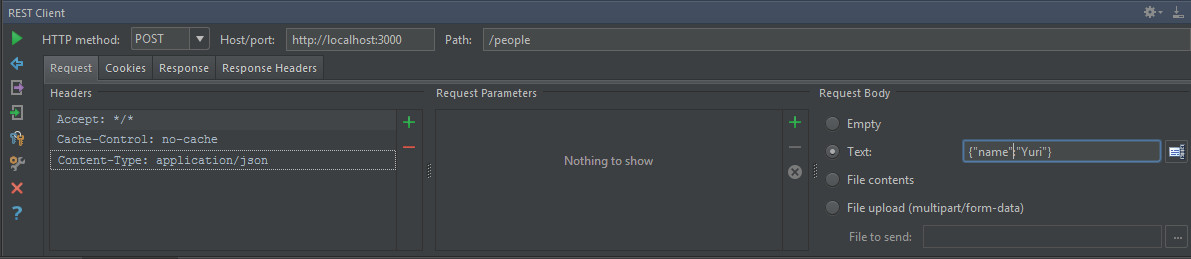
After I post twice, we got three results:
[{"id":0,"name":"John"},{"name":"Yuri","id":1},{"name":"Yuri","id":2}]
We can UPDATE the last one also:
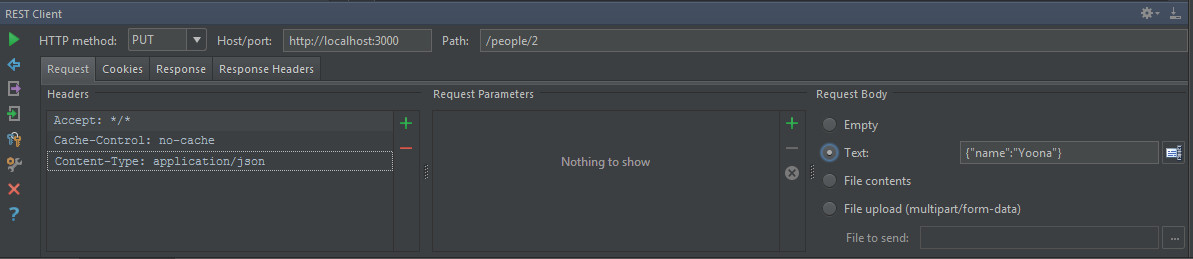
Get more data to play with:
/**
 * Created by Answer1215 on 1/13/2015.
 */
module.exports = function() {
    var faker = require('faker');
    var _ = require('lodash');

    return {
        people: _.times(100, function(n) {
            return{
                id: n,
                name: faker.name.findName(),
                avater: faker.internet.avatar()
            }
        })
    }
}
Query:
