Student.cs
 1 using System;
 2 using System.Collections.Generic;
 3 using System.Linq;
 4 using System.Text;
 5 using System.Threading.Tasks;
 6
 7 namespace ComboBox_ListView
 8 {
 9     class Student
10     {
11         // 属性
12         public int ID { get; set; }
13         public string Name { get; set; }
14         public DateTime BirthDate { get; set; }
15         public int Age { get; set; }
16
17         // 构造
18         public Student(int id, string name, DateTime birthdate)
19         {
20             this.ID = id;
21             this.Name = name;
22             this.BirthDate = birthdate;
23             this.Age = DateTime.Now.Year - birthdate.Year;
24         }
25
26         // 方法
27         /// <summary>   重写ToString()方法
28         ///
29         /// </summary>
30         /// <returns>返回Student类的Name属性</returns>
31         public override string ToString()
32         {
33             return this.Name;
34         }
35     }
36 }
Form1.cs
 1 using System;
 2 using System.Collections.Generic;
 3 using System.ComponentModel;
 4 using System.Data;
 5 using System.Drawing;
 6 using System.Linq;
 7 using System.Text;
 8 using System.Threading.Tasks;
 9 using System.Windows.Forms;
10
11 namespace ComboBox_ListView
12 {
13     public partial class Form1 : Form
14     {
15         public Form1()
16         {
17             InitializeComponent();
18         }
19
20         private void Form1_Load(object sender, EventArgs e)
21         {
22             // 设置comboBox1 样式: DropDownList
23             comboBox1.DropDownStyle = ComboBoxStyle.DropDownList;
24             // comboBox1 绑定数据源
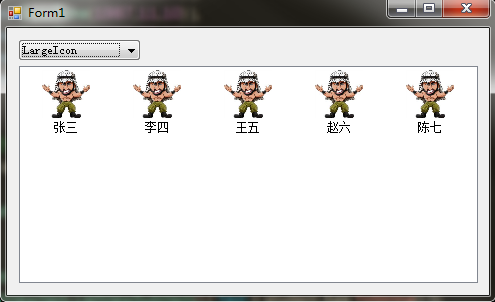
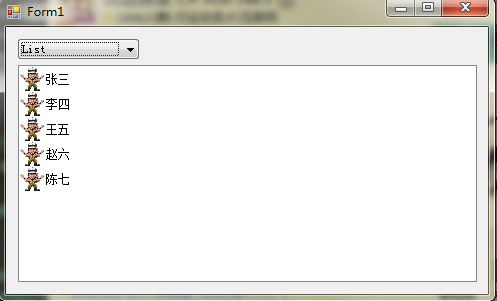
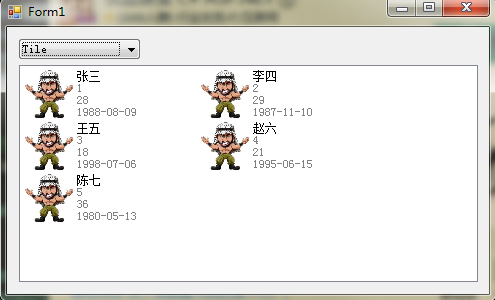
25             comboBox1.DataSource = Enum.GetNames( typeof(View) );
26             // comboBox1 默认选中第二项: Details
27             comboBox1.SelectedIndex = 1;
28             // listView1指定大图标
29             listView1.LargeImageList = imageList1;
30             // listView1指定小图标
31             listView1.SmallImageList = imageList2;
32             // listView1处于列表状态时,全行选中
33             listView1.FullRowSelect = true;
34             // listView1添加列
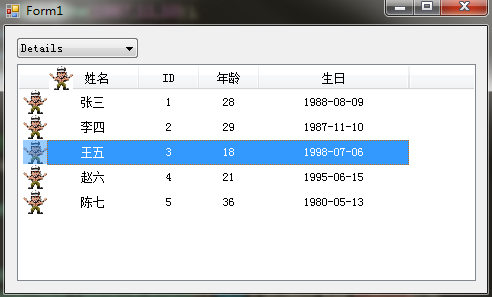
35             listView1.Columns.Add(new ColumnHeader() { Text = "姓名", Width = 120, ImageIndex = 0, TextAlign = HorizontalAlignment.Center });
36             listView1.Columns.Add(new ColumnHeader() { Text = "ID", TextAlign = HorizontalAlignment.Center });
37             listView1.Columns.Add(new ColumnHeader() { Text = "年龄", TextAlign = HorizontalAlignment.Center});
38             listView1.Columns.Add(new ColumnHeader() { Text = "生日", Width = 150, TextAlign = HorizontalAlignment.Center});
39
40
41             // 绑定ListViewItem
42             BindListViewItem();
43
44         }
45
46         private void BindListViewItem()
47         {
48             List<Student> lstStudent = new List<Student>
49             {
50                 new Student(1, "张三", new DateTime(1988,08,09) ),
51                 new Student(2, "李四", new DateTime(1987,11,10) ),
52                 new Student(3, "王五", new DateTime(1998,07,06) ),
53                 new Student(4, "赵六", new DateTime(1995,06,15) ),
54                 new Student(5, "陈七", new DateTime(1980,05,13) )
55             };
56
57             // 将信息写入到listView1控件
58             foreach (Student student in lstStudent)
59             {
60                 ListViewItem lvi = new ListViewItem();
61                 lvi.Text = student.Name;
62                 lvi.ImageIndex = 0;
63                 lvi.SubItems.Add(new ListViewItem.ListViewSubItem(lvi, student.ID.ToString()));
64                 lvi.SubItems.Add(new ListViewItem.ListViewSubItem() { Text = student.Age.ToString() });
65                 lvi.SubItems.Add(new ListViewItem.ListViewSubItem() { Text = student.BirthDate.ToString("yyyy-MM-dd") });
66
67                 // 将构造好的带有子项的列表项添加到listView1控件
68                 listView1.Items.Add(lvi);
69             }
70
71         }
72         // comboBox1选择项更改时触发
73         private void comboBox1_SelectedIndexChanged(object sender, EventArgs e)
74         {
75             // listView1的视图根据comboBox的内容改变
76             listView1.View = (View)Enum.Parse(typeof(View), comboBox1.Text);
77         }
78
79     }
80 }