1.install-package system.text.json;
2.
using System.Text.Json;
using System.IO;
3.
 1 static void SystemTextJsonDemo()
 2         {
 3             var obj = new[]
 4             {
 5                 new
 6                 {
 7                     Id=1,
 8                     Name="Fred",
 9                     Age=10
10                 },
11                 new
12                 {
13                     Id=2,
14                     Name="Fred2",
15                     Age=20
16                 },
17                 new
18                 {
19                     Id=3,
20                     Name="Fred3",
21                     Age=30
22                 }
23             };
24             JsonSerializerOptions jso = new JsonSerializerOptions();
25             jso.WriteIndented = true;
26             string jsonValue = JsonSerializer.Serialize(obj, typeof(object), jso);
27             File.WriteAllText("JsonText2.json", jsonValue);
28             Console.WriteLine(jsonValue);
29         }
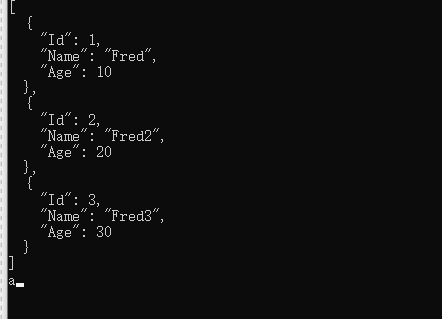
Please pay attention to the indented parts.Such as the JsonConvert.Serialize(obj,Formating.Indented);

When you want to show the original plain text as defined. Replate the encoder with belowing.
1 jso.Encoder = System.Text.Encodings.Web.JavaScriptEncoder.UnsafeRelaxedJsonEscaping;
The result illustrated the fact.

As the declaration of below,The UnsafeRelaxedJsonEscaping option.
//
// Summary:
// Gets a built-in JavaScript encoder instance that is less strict about what is
// encoded.
//
// Returns:
// A JavaScript encoder instance.
public static JavaScriptEncoder UnsafeRelaxedJsonEscaping { get; }