使用Rotativa在ASP.NET Core MVC中创建PDF
在本文中,我们将学习如何使用Rotativa.AspNetCore工具从ASP.NET Core中的视图创建PDF。如果您使用ASP.NET MVC,那么Rotativa工具已经可用,我们可以使用它来生成pdf。
创建一个MVC项目,无论您是core或不core,都可以nuget下包.命令如下:
Install-Package Rotativa
#或者
Install-Package Rotativa.AspNetCore
这个工具由意大利人Giorgio Bozio创建。他需要在ASP.NET MVC中生成pdf,并且重复的任务是设置一种方法来创建PDF文档,用于业务流程或报告,下面废话不多说,我们开始吧。
在startup.cs类中配置Rotativa.AspNetCore设置
我们在Configure方法内的startup.cs类中添加此设置,以设置要访问的wkhtmltopdf.exe文件的相对路径。
public void Configure(IApplicationBuilder app, IHostingEnvironment env)
        {
            RotativaConfiguration.Setup(env);
        }
我们需要在wwwroot中添加Rotativa文件夹,然后放入这两个exe,我把这两个文件已经放到了百度云盘。
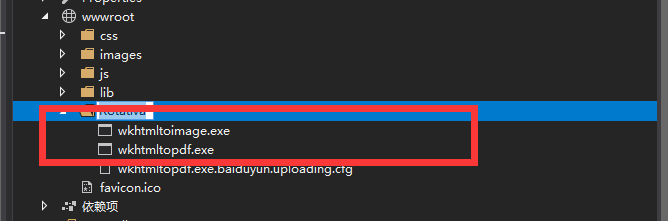
然后我们添加一个Demo控制器,定义一个Get方法,其定义如下,通过ViewAsPdf方法,就可以通过pdf的形式去套住cshtml,也就达到了pdf的效果。

public class DemoController : Controller
    {
        [HttpGet]
        public IActionResult DemoViewAsPdf()
        {
            return new ViewAsPdf("DemoViewAsPdf");
        }
    }
就现在,我们需要通过控制器去创建一个视图,然后在视图中有如下定义:
@{
    ViewData["Title"] = "DemoViewAsPdf";
}
<html>
<head>
    <meta charset="utf-8">
    <title>Demo</title>
</head>
<body>
    <p>Hello AspNetCore!!</p>
</body>
</html>
现在,我们把页面重定与
http://localhost:55999/Demo/DemoViewAsPdf

边距
除了普通的展示pdf,我们还可以进行操作,例如下载,打印。当然如果宽和高不太满意,你可以对视图进行设置,其中有一个类是对视图进行配置的,其定义如下,有四大配置值。
public class Margins
    {
        [OptionFlag("-B")]
        public int? Bottom;
        [OptionFlag("-L")]
        public int? Left;
        [OptionFlag("-R")]
        public int? Right;
        [OptionFlag("-T")]
        public int? Top;

        public Margins();
        public Margins(int top, int right, int bottom, int left);

        public override string ToString();
    }
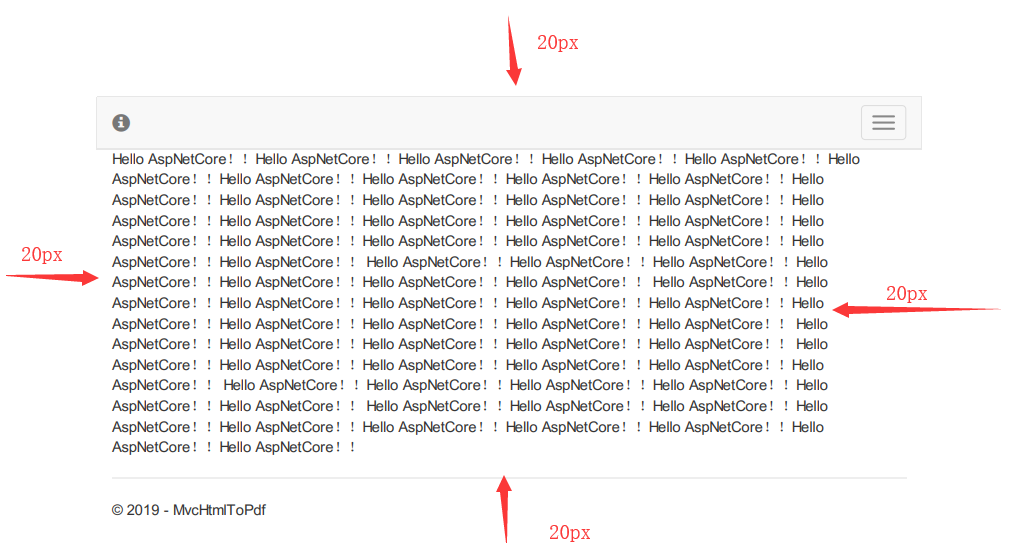
在控制器中直接new出它,然后直接return,和上面类似,现在你可以将html中的p标签添加一些内容,然后看一下效果。
[HttpGet]
        public IActionResult DemoViewAsPdf()
        {
            return new ViewAsPdf("DemoPageMarginsPDF")
            {
                PageMargins = { Left = 20, Bottom = 20, Right = 20, Top = 20 },
            };
        }
就这样,我们再次启动,可见已经有了外边距!
横向与纵向
它还给我们提供了横向还是竖向的pdf效果,如以下定义:
[HttpGet]
        public IActionResult DemoViewAsPdf(string Orientation)
        {
            if (Orientation == "Portrait")
            {
                var demoViewPortrait = new ViewAsPdf("DemoViewAsPDF")
                {
                    FileName = "Invoice.pdf",
                    PageOrientation = Rotativa.AspNetCore.Options.Orientation.Portrait,
                };
                return demoViewPortrait;
            }
            else
            {
                var demoViewLandscape = new ViewAsPdf("DemoViewAsPDF")
                {
                    FileName = "Invoice.pdf",
                    PageOrientation = Rotativa.AspNetCore.Options.Orientation.Landscape,
                };
                return demoViewLandscape;
            }
        }
通过 http//localhost:60042/demo/DemoOrientationPDF?Orientation=Portrait 或者其它路由进行访问,你对比以下就可以看到效果。
设置PDF大小
基本上都是A4,枚举里很多值,自己看~
[HttpGet]
        public IActionResult DemoViewAsPdf(string Orientation)
        {
            return new ViewAsPdf("DemoPageSizePDF")
            {
                PageSize = Rotativa.AspNetCore.Options.Size.A4
            };
        }
小案例
创建一个模型,这是一个非常简单的模型,定义如下:
public class Customer
    {
        public int CustomerID { get; set; }
        public string Name { get; set; }
        public string Address { get; set; }
        public string Country { get; set; }
        public string City { get; set; }
        public string Phoneno { get; set; }
    }
在控制器中new几个对象,然后返回pdf。
[HttpGet]
        public IActionResult DemoViewAsPdf()
        {
            List<Customer> customerList = new List<Customer>() {
                 new Customer { CustomerID = 1, Address = "Taj Lands Ends 1", City = "Mumbai" , Country ="India", Name ="Sai", Phoneno ="9000000000"},
                 new Customer { CustomerID = 2, Address = "Taj Lands Ends 2", City = "Mumbai" , Country ="India", Name ="Ram", Phoneno ="9000000000"},
                 new Customer { CustomerID = 3, Address = "Taj Lands Ends 3", City = "Mumbai" , Country ="India", Name ="Sainesh", Phoneno ="9000000000"},
                 new Customer { CustomerID = 4, Address = "Taj Lands Ends 4", City = "Mumbai" , Country ="India", Name ="Saineshwar", Phoneno ="9000000000"},
                 new Customer { CustomerID = 5, Address = "Taj Lands Ends 5", City = "Mumbai" , Country ="India", Name ="Saibags", Phoneno ="9000000000"}
            };
            return new ViewAsPdf("DemoModelPDF", customerList);
        }
在视图中,我们只是迭代集合,渲染页面。
@model List<MvcHtmlToPdf.Models.Customer>
@{
    Layout = null;
}

<!DOCTYPE html>
<html lang="en">
<head>
    <title>Bootstrap Example</title>
    <meta charset="utf-8">
    <meta name="viewport" content="width=device-width, initial-scale=1">
</head>
<body>
    <div class="container">
        <h2>Customer</h2>
        <p>Customer Details</p>
        <table class="table table-bordered">
            <thead>
                <tr>
                    <th>CustomerID</th>
                    <th>Name</th>
                    <th>Address</th>
                    <th>Country</th>
                    <th>City</th>
                    <th>Phoneno</th>
                </tr>
            </thead>
            <tbody>

                @foreach (var item in Model)
                {
                    <tr>
                        <td>@item.CustomerID</td>
                        <td>@item.Name</td>
                        <td>@item.Address</td>
                        <td>@item.Country</td>
                        <td>@item.City</td>
                        <td>@item.Phoneno</td>
                    </tr>
                }

            </tbody>
        </table>
    </div>
</body>
</html>
