1、直接部署在网站下面不会出现 Servers 这个选项,部署到应用程序下就会出现这个东西。导致登录接口的URL错误。 Login failed !
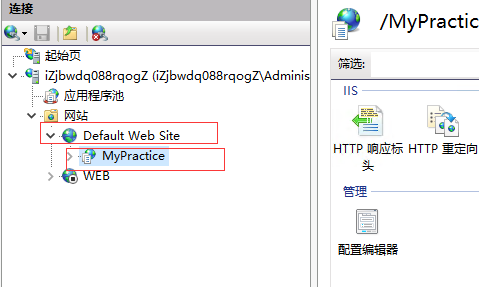

2、原本这样设置了,其他的接口都能正常访问了, 但是登录接口 Authenticate URL后还是缺少了 /MyPractice 。
Startup.cs
 app.UseSwaggerUI(options =>
            {
                string address = _appConfiguration["App:ServerRootAddress"];
                // specifying the Swagger JSON endpoint.
                options.SwaggerEndpoint(address.EnsureEndsWith('/')+"swagger/v1/swagger.json", "MyPractice API V1");
                options.IndexStream = () => Assembly.GetExecutingAssembly()
                    .GetManifestResourceStream("MyPractice.Web.Host.wwwroot.swagger.ui.index.html");
                options.DisplayRequestDuration(); // Controls the display of the request duration (in milliseconds) for "Try it out" requests.
            }); // URL: /swagger
appsettings.json
"App": {
    "ServerRootAddress": "http://118.178.191.71/MyPractice/",
    "ClientRootAddress": "http://118.178.191.71/MyPractice/"
  },
3、然后我就直接在 abp.swagger.js 这个js文件中加上了 /MyPractice 。 临时先这样吧,我觉得应该可以和上面一样写在json 文件中,那样方便些。
