传值5种方式
1,ViewBag
2,ViewData
3,TempData
4,Model
5,Session
控制器代码
 public IActionResult Index()
        {
            base.ViewBag.UserName = "李潇潇";
            base.ViewData["UserName"] = "王萌萌";
            base.TempData["UerName"] = "彭晓晓";

            User user = new() { Id = 1, Name = "吴思思", Email = "123@163.com" };
            return View(user);
        }
Index.cshtml代码
@model AspNetCore5Demo.Models.User
@{
    ViewData["Title"] = "Home Page";
}

<div class="text-center">
    <h1>ViewBag传值</h1>
    <h2>UserName:@ViewBag.UserName</h2>
    <h1>ViewData传值</h1>
    <h2>UserName:@ViewData["UserName"]</h2>
    <h1>TempData传值</h1>
    <h2>UserName:@TempData["UerName"]</h2>

    <hr />
    <h1>Model传值</h1>
    <h2>Id:@Model.Id</h2>
    <h2>Name:@Model.Name</h2>
    <h2>Email:@Model.Email</h2>
</div>
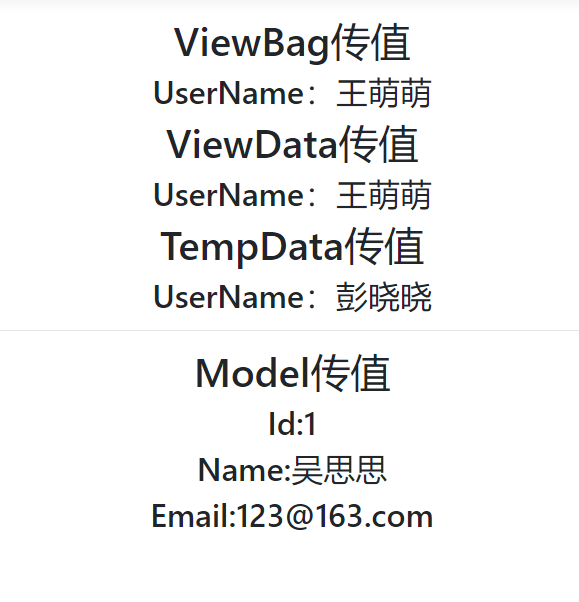
界面显示效果
Session传值
1,Startup.cs文件中增加配置
方法-ConfigureServices 添加代码
 public void ConfigureServices(IServiceCollection services)
        {
            services.AddSession();//添加Session
            services.AddControllersWithViews();
        }
2,方法-Configure 添加代码
app.UseSession();
3,控制器代码
a,需要添加引用:using Microsoft.AspNetCore.Http;
b,获取值:HttpContext.Session.GetString("UserNameSession");
c,设置值:HttpContext.Session.SetString("UserNameSession", "刘晴晴");
 public IActionResult Index()
        {
            base.ViewBag.UserName = "李潇潇";
            base.ViewData["UserName"] = "王萌萌";
            base.TempData["UerName"] = "彭晓晓";
            User user = new() { Id = 1, Name = "吴思思", Email = "123@163.com" };

            //获取Session值,判断若为null则设置Session值
           var sUserName= HttpContext.Session.GetString("UserNameSession");
            if (sUserName == null)
                HttpContext.Session.SetString("UserNameSession", "刘晴晴");

            return View(user);
        }
4,index.cshtml代码
a,引入 @using Microsoft.AspNetCore.Http
b,获取值 @Context.Session.GetString("UserNameSession")
@model AspNetCore5Demo.Models.User
@using Microsoft.AspNetCore.Http
@{
    ViewData["Title"] = "Home Page";
}

<div class="text-center">
    <h1>ViewBag传值</h1>
    <h2>UserName:@ViewBag.UserName</h2>
    <h1>ViewData传值</h1>
    <h2>UserName:@ViewData["UserName"]</h2>
    <h1>TempData传值</h1>
    <h2>UserName:@TempData["UerName"]</h2>

    <hr />
    <h1>Model传值</h1>
    <h2>Id:@Model.Id</h2>
    <h2>Name:@Model.Name</h2>
    <h2>Email:@Model.Email</h2>

    <!--获取Session值-->
    <h1>Session</h1>
    <h2>
        @Context.Session.GetString("UserNameSession")
    </h2>
</div>