本文基于ext-6.0.0
一、写login页
1、在view文件夹中创建login文件夹,在login中创建文件login.js和loginController.js(login.js放在classic/view/login,loginController.js放在app/view/login)
2、在app.js中禁用 mainView: 'Learning.view.main.Main'
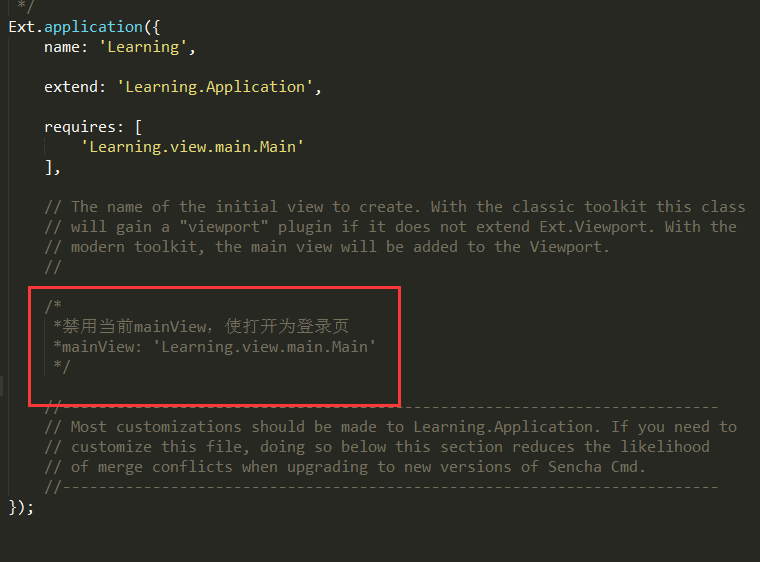
3、在login.js中写页面
①创建窗口 ②写依赖、配置 ③写登录的表单和按钮
Ext.define('FirstTest.view.login.login', {
    extend: 'Ext.window.Window',
    xtype: 'login',

    requires: [
        'Ext.form.Panel',
        'FirstTest.view.login.loginController'
    ],

    controller:'login',

    bodyPadding: 10,
    title:'用户登录',

    closable:false,//窗口是否可关闭
    autoShow:true,//windows默认是隐藏,要设置为显示

    items: {
        xtype:'form',
        reference: 'form',
        items: [{
            xtype:'textfield',
            name: 'username',
            fieldLabel: '用户名',
            allowBlank: false
        },{
            xtype:'textfield',
            name: 'password',
            fieldLabel: '密码',
            allowBlank: false
        }],
        buttons: [{
            text:'登录',
            formBind: true,//按钮是否可用取决于form
            listeners:{
                click: 'onLoginClick'
            }
        }]
    }
});
4、在loginController.js中写登录按钮的onLoginClick事件
①在localStorage中记录登录状态(写入TutorialLoggedIn:true) ②destroy登录页 ③create首页
Ext.define('FirstTest.view.login.loginController',{
    extend:'Ext.app.ViewController',
    alias:'controller.login',
    onLoginClick: function() {

        // Set the localStorage value to true
        localStorage.setItem("TutorialLoggedIn", true);

        // Remove Login Window
        this.getView().destroy();

        // Add the main view to the viewport
        Ext.create({
            xtype: 'app-main'
        });

    }
})
5、添加启动逻辑到Application.js(app/Application.js)
①判断是否登录(通过判断localStorage中的TutorialLoggedIn是否存在),若登录则打开首页,否则打开登录页
Ext.define('FirstTest.Application', {
    extend: 'Ext.app.Application',

    name: 'FirstTest',

    stores: [
        // TODO: add global / shared stores here
    ],

    views: [
        'FirstTest.view.login.login',
        'FirstTest.view.main.Main'
    ],

    launch: function () {
        // TODO - Launch the application

        var loggedIn;

        // Check to see the current value of the localStorage key
        loggedIn = localStorage.getItem("TutorialLoggedIn");

        // This ternary operator determines the value of the TutorialLoggedIn key.
        // If TutorialLoggedIn isn't true, we display the login window,
        // otherwise, we display the main view
        Ext.create({
            xtype: loggedIn ? 'app-main' : 'login'
        });
    },

    onAppUpdate: function () {
        Ext.Msg.confirm('Application Update', 'This application has an update, reload?',
            function (choice) {
                if (choice === 'yes') {
                    window.location.reload();
                }
            }
        );
    }
});
6、在main.js中添加Viewport插件
plugins: 'viewport',
这个不加,登录后就是一片空白。
----------------------------------------到这里,整个登录就写好啦。下面写一下怎么注销。----------------------------------------------
二、注销
1、写一个注销按钮
{
    xtype:'button',
    text:'注销',
    iconCls:'x-fa fa-power-off',
    handler: 'onClickButton'
}
2、在MainController.js中写注销的方法onClickButton
  onClickButton: function () {
        // Remove the localStorage key/value
        localStorage.removeItem('TutorialLoggedIn');

        // Remove Main View
        this.getView().destroy();

        // Add the Login Window
        Ext.create({
            xtype: 'login'
        });
    },
到此,登录注销就都写好了。