SQL SERVER – Fix: Error : 402 The data types ntext and varchar are incompatible in the equal to operator
Some errors are very simple to understand but the solution of the same is not easy to figure out. Here is one of the similar errors where it clearly suggests where the problem is but does not tell what is the solution. Additionally, there are multiple solutions so developers often get confused with which one is correct and which one is not correct.
Let us first recreate scenario and understand where the problem is. Let us run following
CREATE TABLE TestTable (ID INT, MyText NTEXT)
GO
SELECT ID, MyText
FROM TestTable
WHERE MyText = 'AnyText'
GO
DROP TABLE TestTable
GO
When you run above script it will give you following error.
Msg 402, Level 16, State 1, Line 1
The data types ntext and varchar are incompatible in the equal to operator.
One of the questions I often receive is that voucher is for sure compatible to equal to operator, then why does this error show up. Well, the answer is much simpler I think we have not understood the error message properly. Please see the image below. The next and varchar are not compatible when compared with each other using equal sign.
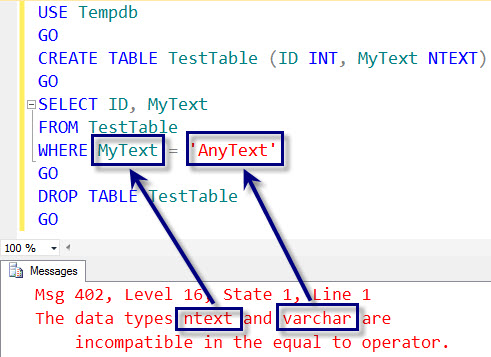
Now let us change the data type on the right side of the string to nvarchar from varchar. To do that we will put N’ before the string.
CREATE TABLE TestTable (ID INT, MyText NTEXT)
GO
SELECT ID, MyText
FROM TestTable
WHERE MyText = N'AnyText'
GO
DROP TABLE TestTable
GO
When you run above script it will give following error.
Msg 402, Level 16, State 1, Line 1
The data types ntext and nvarchar are incompatible in the equal to operator.
You can see that error message also suggests that now we are comparing next to nvarchar. Now as we have understood the error properly, let us see various solutions to the above problem.
Solution 1: Convert the data types to match with each other using CONVERT function.
Change the datatype of the MyText to nvarchar.
SELECT ID, MyText
FROM TestTable
WHERE CONVERT(NVARCHAR(MAX), MyText) = N'AnyText'
GO
Solution 2: Convert the data type of columns from NTEXT to NVARCHAR(MAX) (TEXT to VARCHAR(MAX))
ALTER TABLE TestTable
ALTER COLUMN MyText NVARCHAR(MAX)
GO
Now you can run the original query again and it will work fine.
Solution 3: Using LIKE command instead of Equal to command.
SELECT ID, MyText
FROM TestTable
WHERE MyText LIKE 'AnyText'
GO
Well, any of the three of the solutions will work. Here is my suggestion if you can change the column data type from ntext or text to nvarchar or varchar, you should follow that path as text and ntext datatypes are marked as deprecated(弃用了). All developers any way to change the deprecated data types in future, it will be a good idea to change them right early.
If due to any reason you can not convert the original column use Solution 1 for temporary fix. Solution 3 is the not the best solution and use it as a last option. Did I miss any other method? If yes, please let me know and I will add the solution to original blog post with due credit.
微软官方ntext, text, image类型弃用声明:
IMPORTANT! ntext, text, and image data types will be removed in a future version of SQL Server. Avoid using these data types in new development work, and plan to modify applications that currently use them. Use nvarchar(max), varchar(max), and varbinary(max) instead.