由于我使用树莓派的场景大多数是在没有显示器、只用terminal连接它的情况下,所以,它的IP地址有时会在重启之后变掉(DHCP的),导致我无法通过terminal连接上它。然后我又要很麻烦地登录路由器的管理界面里,去看它被分配到的新IP是什么,然后用terminal重连,太麻烦了,不是么?作为一个树莓派玩家,这种麻烦简直是无法接受的!
为了解决这个问题,我让Pi开机的时候,自动向我指定的Email发送一封邮件,告诉我它此次开机时的IP地址。
步骤: 开机时执行一个脚本,检测网络可用性→网络通畅后获取自己的IP地址→发送邮件到指定的邮箱。
下面一一道来。
1、开机启动项
开机执行一个脚本是怎么做到的?
只需要向 /etc/rc.local 文件中添加一句话,即可开机执行一个脚本了:
|
1
2
|
# send a mail to notify the IP address of Pi/root/data/source/send-ip-mail.sh >> /root/data/source/send-ip-mail.log 2>&1 |
2、上报IP地址的脚本实现
send-ip-mail.sh脚本的内容如下:(vim不会自动创建指定目录)
|
1
2
3
4
5
6
7
8
9
10
11
12
13
14
15
16
17
18
19
20
21
22
|
#!/bin/bash # check network availabilitywhile truedo TIMEOUT=5 SITE_TO_CHECK="www.126.com" RET_CODE=`curl -I -s --connect-timeout $TIMEOUT $SITE_TO_CHECK -w %{http_code} | tail -n1` if [ "x$RET_CODE" = "x200" ]; then echo "Network OK, will send mail..." break else echo "Network not ready, wait..." sleep 1s fidone # get the IP address of eth0, e.g. "192.168.16.5"ETH0_IP_ADDR=`ifconfig eth0 | sed -n "2,2p" | awk '{print substr($2,1)}'` # send the Emailecho "Current time: `date '+%F %T'`. Enjoy it" | mutt -s "IP Address of Raspberry Pi: $ETH0_IP_ADDR" xxx@gmail.com |
脚本很简单,分为3部分:第一部分检测网络可用性;第二部分取树莓派的eth0网卡的IP地址;第三部分发送邮件到指定的Email。
其中,第一部分是必须要有的,因为经过我试验,在本脚本执行时,树莓派的网络还没有初始化好,此时你直接发邮件是发不出去的。在这里我通过访问www.126.com来确定网络可用性。
第三部分需要你预先配置好mutt和msmtp。
3、安装配置mutt和msmtp
配置好mutt和msmtp后,就可以像上面一样,通过一句代码将邮件发送出去。
首先要在Pi上安装mutt和msmtp:
|
1
2
|
pacman -S msmtppacman -S mutt |
安装后,先配置msmtp。在你用户的根目录下创建文件 .msmtprc,内容如下:
|
1
2
3
4
5
6
7
|
account defaulthost smtp.126.comfrom xxx@126.comauth plainuser xxx@126.compassword your_passwordlogfile /var/log/msmtp.log |
其中,smtp.126.com是我使用的邮箱的SMTP服务器地址,xxx@126.com是我用于发送邮件的邮箱,your_password是邮箱密码,你要根据你的情况修改。
然后配置mutt。在你用户的根目录下创建文件 .muttrc,内容如下:
|
1
2
3
4
|
set sendmail="/usr/bin/msmtp"set use_from=yesset realname="Alarm"set editor="vim" |
其中,realname是发件人的名字,接收到的邮件中会显示出来。
4、msmtp测试
|
1
2
|
测试配置文件:msmtp -P测试smtp服务器:msmtp -S |
|
1
2
3
4
5
6
7
8
9
10
11
12
|
bitnami@linux:~$ msmtp --host=smtp.163.com --serverinfoSMTP server at smtp.163.com (smtp.163.gslb.netease.com [220.181.12.18]), port 25: 163.com Anti-spam GT for Coremail System (163com[20121016])Capabilities: PIPELINING: Support for command grouping for faster transmission STARTTLS: Support for TLS encryption via the STARTTLS command AUTH: Supported authentication methods: PLAIN LOGINThis server might advertise more or other capabilities when TLS is active. |
从返回信息中我们可以看到,这个smtp是支持TLS的,验证方式支持 PLAIN 和 LOGIN
5、测试邮件
命令行输入:
|
1
|
echo "test" |mutt -s "my_first_test" aaa@126.com |
6、至此全部搞定,以后每次Pi开机的时候,就会“自报家门”,我们再也不愁找不到Pi啦!
7、常见问题:
错误1:
msmtp: account default not found: no configuration file available
msmtp有bug,必须手动指定对应的配置文件
更改/etc/Muttrc中set sendmail="/usr/bin/msmtp"为set sendmail="/usr/bin/msmtp -C .msmtprc"
错误2:
msmtp: GNU SASL: Base 64 coding error in SASL library
遇到Base64 编码错误
更改~/.msmtprc中auth login
为 auth plain
错误3:
语句:echo "testtest"|mutt -F/home/spider/.muttrc -s "tttttttt" test@163.com
发邮件时提示:寄送讯息出现在错误,子程序已结束 127 (Exec error.).
无法寄出信件
一般是设置文件出现问题了,
先使用msmtp进行发送测试
|
1
2
3
4
5
6
7
8
9
10
|
[iyunv@zabbix ~]# /usr/local/msmtp/bin/msmtp -SSMTP server at smtp.sohu.com ([220.181.90.34]), port 25: zw_71_37 ESMTP readyCapabilities: STARTTLS: Support for TLS encryption via the STARTTLS command AUTH: Supported authentication methods: PLAIN LOGINThis server might advertise more or other capabilities when TLS is active. |
发现没有问题
再利用msmtp查看当前文件路径
|
1
2
3
4
5
6
7
8
9
10
11
12
13
14
15
16
17
18
19
20
21
22
23
24
25
26
27
28
29
30
31
32
33
34
35
36
|
[iyunv@zabbix ~]# /usr/local/msmtp/bin/msmtp -Ploaded system configuration file /usr/local/msmtp/etc/msmtprcignoring user configuration file /root/.msmtprc: No such file or directoryfalling back to default accountusing account default from /usr/local/msmtp/etc/msmtprchost = smtp.sohu.comport = 25timeout = offprotocol = smtpdomain = localhostauth = LOGINuser = zabbix2018password = *passwordeval = (not set)ntlmdomain = (not set)tls = offtls_starttls = ontls_trust_file = (not set)tls_crl_file = (not set)tls_fingerprint = (not set)tls_key_file = (not set)tls_cert_file = (not set)tls_certcheck = ontls_force_sslv3 = offtls_min_dh_prime_bits = (not set)tls_priorities = (not set)auto_from = offmaildomain = (not set)from = zabbix2018@sohu.comdsn_notify = (not set)dsn_return = (not set)keepbcc = offlogfile = /var/log/zabbix/msmtp.logsyslog = (not set)aliases = (not set)reading recipients from the command line |
从上面显示配置文件也没有什么问题,但是查看.muttrc时同时注意到双引号字符错误。修改键盘布局。
错误4:
ding@ubuntu:~/Desktop/python$ sudo echo hello world | mutt -s "test mail" XXXXXXX@qq.com
msmtp: authentication failed (method PLAIN)
msmtp: server message: 550 User is locked
msmtp: could not send mail (account default from /home/ding/.msmtprc)
Error sending message, child exited 77 (Insufficient permission.).
Could not send the message.
没有开启SMTP服务,新注册的用户默认好像是关闭的,一些邮箱是默认关闭smtp服务的,需要手动开启。
开启SMTP服务后,将163邮箱服务器发给的授权密码作为/home/ding/.msmtprc 文件中的password=授权码
参考:http://jingyan.baidu.com/article/3f16e003e327772591c1039f.html?st=2&os=0&bd_page_type=1&net_type=2
错误5:
str0101@str0101:/u1/str0101>mutt -s dfdf zgq@mail.tm <.tmp
Error sending message, child exited 69 (Service unavailable.).
Segmentation fault (core dumped)
邮件服务器限制,查看sent日志文件。(我由QQ更换为网易邮箱)
扩展:
使用标准pc104键盘
国内多使用标准104键盘,下面就开始树莓派的设置。
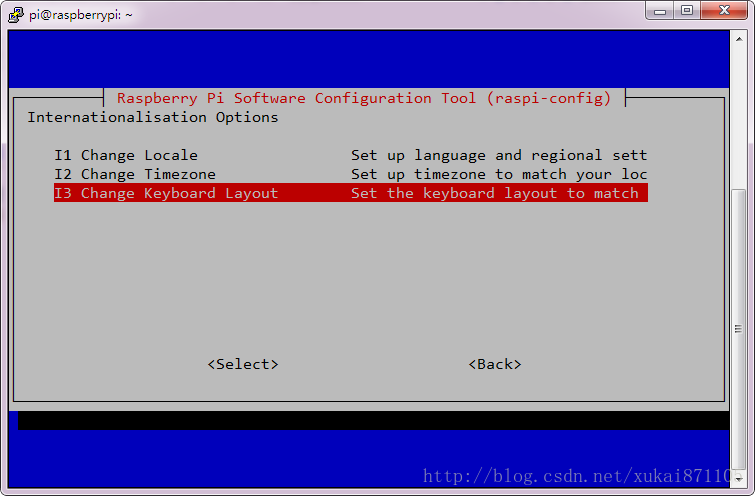
1、sudo raspi-config
2、进入国际化配置选项

3、修改键盘布局
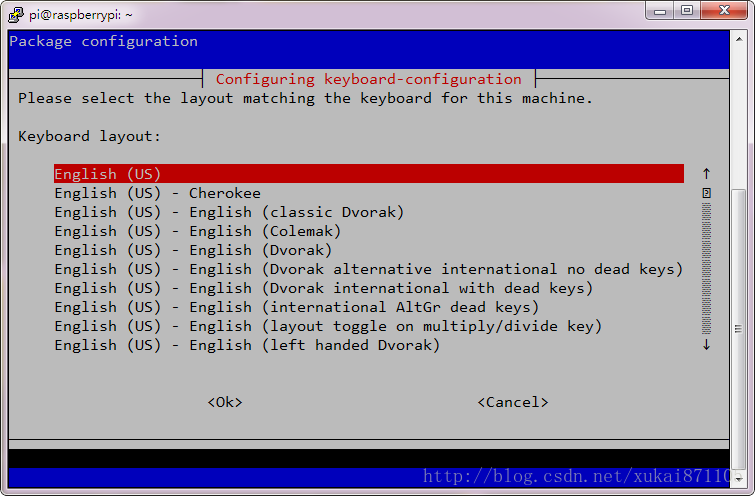
4、选择PC104标准键盘

5、选择美国标准
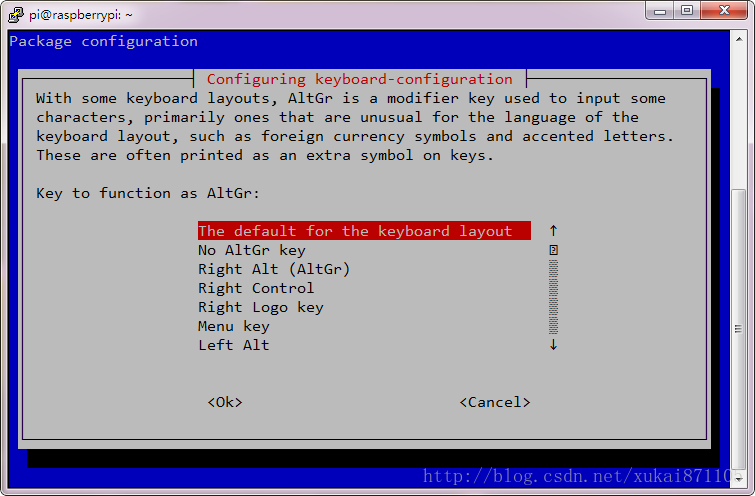
6、选择键盘默认布局
7、compose key设置

8、ctrl+alt+backspace组合键,类似于windows的ctrl+alt+delete。

9、完成设置
