在https://mvnrepository.com/search?q=thumbnailator找到依赖相关的版本,然后加到pom.xml中
<!-- https://mvnrepository.com/artifact/net.coobird/thumbnailator -->
<dependency>
    <groupId>net.coobird</groupId>
    <artifactId>thumbnailator</artifactId>
    <version>0.4.8</version>
</dependency>
Thumbnailator是一个优秀的图片处理的开源Java类库,处理效果远比Java API的好
使用方法参看:https://blog.csdn.net/chenleixing/article/details/44685817
public static void main(String[] args) throws IOException {

        String basePath = Thread.currentThread().getContextClassLoader().getResource("").getPath();

        Thumbnails.of(new File(basePath + "/1.png")).scale(0.2f).toFile("D:\Java\picture\2.png");

        Thumbnails.of(new File("D:\Java\picture\meidada.jpg")).size(200, 200)
                .watermark( Positions.BOTTOM_LEFT, ImageIO.read(new File(basePath + "/1.png")), 0.25f)
                .outputQuality(0.8f).toFile("D:\Java\picture\meidadanew1.jpg");
    }
其中basePath是通过当前线程获取保存在classpath下的绝对路径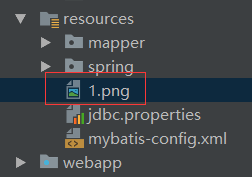
scale()是将图片按照指定大小缩放
watermark(arg1, arg2, arg3)是给图片添加水印 arg1是水印在当前图片中的位置,arg2是水印的路径,arg3是水印的透明度
outputQuality()是压缩比
toFile()是输出位置
PathUtil工具类
1.根据执行环境(windows或其他)获取图片的根路径
2.获取各个店铺下的图片的子路径
public class PathUtil {
    //获取当前系统文件的分隔符
    private static String separator = System.getProperty("file.separator");

    //返回项目图片的根路径
    public static String getImgBasePath(){
        //获取当前操作系统
        String os = System.getProperty("os.name");
        String basePath = "";
        //若当前是windows操作系统
        if(os.toLowerCase().startsWith("win")){
            basePath = "D:\Java\picture\";
        } else{
            basePath = "/home/skye/picture/";
        }
        basePath = basePath.replace("/", separator);
        return basePath;
    }

    //返回各个店铺下的图片的子路径
    public static String getShopImgPath(long shopId){
        String imgPath = "\upload\item\shop\" + shopId + "\";
        return imgPath.replace("/", separator);
    }
}
ImgUtil处理图片的工具类
public class ImageUtil {

    //保存在classpath下的图片路径
    private static String basePath = Thread.currentThread().getContextClassLoader().getResource("").getPath();

    //时间格式与随机数,用来组成唯一的随机图片名
    private static final SimpleDateFormat simpleDateFormat = new SimpleDateFormat("yyyyMMddHHmmss");
    private static final Random random = new Random();

    //处理用户传递过来的店铺图片和
    //CommonsMultipartFile用户传递的文件流
    //targetAddr用户保存图片的地址  所属文件夹的相对路径
    public static String generateThumbnail(CommonsMultipartFile thumbnail, String targetAddr){
        //获取随机的文件名
        String realFileName = getRandomFileName();
        //获取输入流的文件扩展名
        String extensionName = getFileExtension(thumbnail);
        //创建目录
        makeDirPath(targetAddr);
        //相对路径
        String relativePath = targetAddr + realFileName + extensionName;
        //新的文件 绝对路径
        File newFile = new File(PathUtil.getImgBasePath() + relativePath);

        try {
            Thumbnails.of(thumbnail.getInputStream()).size(200, 200)
                    .watermark(Positions.BOTTOM_LEFT, ImageIO.read(new File(basePath + "/2.png")), 0.25f)
                    .outputQuality( 0.8f ).toFile(newFile);
        } catch (IOException e) {
            e.printStackTrace();
        }
        return relativePath;
    }

    /**
     *创建目标路径上所涉及到的路径,如D:Javapicturemeidada
     * 若其中的picture,meidada的文件夹不存在,则创建出来
     * @param targetAddr
     */
    private static void makeDirPath(String targetAddr) {
        //目标图片应该存储的绝对路径
        String realFileParentPath = PathUtil.getImgBasePath() + targetAddr;
        File dirPath = new File( realFileParentPath );
        if(!dirPath.exists()){
            //若文件夹不存在,则递归的创建出来
            dirPath.mkdirs();
        }
    }


    /**
     * 获取输入流的文件扩展名
     * @param thumbnail
     * @return
     */
    private static String getFileExtension(CommonsMultipartFile thumbnail) {
        //获取传入文件流的原始文件名
        String originalFileName = thumbnail.getOriginalFilename();
        return originalFileName.substring(originalFileName.lastIndexOf("."));
    }


    /**
     * 生成随机文件名,当前年月日小时分钟秒+五位随机数
     *
     * @return
     */
    private static String getRandomFileName() {
        //随机的五位数
        int randomNum = random.nextInt(89999) + 10000;
        String nowTimeStr = simpleDateFormat.format(new Date());

        return nowTimeStr + randomNum;
    }

}