本例示范了osg中Shape ---- 基本几何元素的绘制过程。参照osg官方文档,Shape 类包含以下子类:
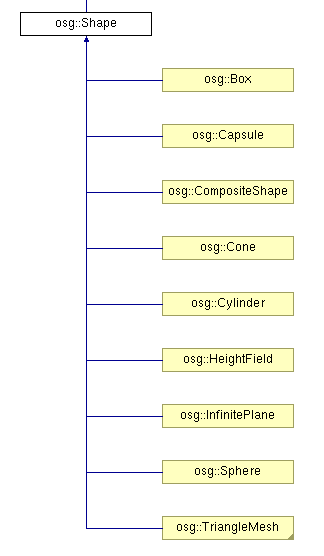
在示例程序中,函数createShapes函数用于生成需要绘制的几何形状。
 1 osg::Geode* createShapes(osg::ArgumentParser& arguments)
 2 {
 3     osg::Geode* geode = new osg::Geode();
 4
 5
 6     // ---------------------------------------
 7     // Set up a StateSet to texture the objects
 8     // ---------------------------------------
 9     osg::StateSet* stateset = new osg::StateSet();
10   //设置材质图片
11     osg::ref_ptr<osg::Image> image = osgDB::readRefImageFile( "Images/lz.rgb" );
12     if (image)
13     {
14         osg::Texture2D* texture = new osg::Texture2D;
15         texture->setImage(image);
16         texture->setFilter(osg::Texture::MIN_FILTER, osg::Texture::LINEAR);
17         stateset->setTextureAttributeAndModes(0,texture, osg::StateAttribute::ON);
18     }
19
20     stateset->setMode(GL_LIGHTING, osg::StateAttribute::ON);
21
22     geode->setStateSet( stateset );
23
24
25     float radius = 0.8f;
26     float height = 1.0f;
27
28     osg::TessellationHints* hints = new osg::TessellationHints;
29     hints->setDetailRatio(0.5f);
30   //建立各种几何实体
31     geode->addDrawable(new osg::ShapeDrawable(new osg::Sphere(osg::Vec3(0.0f,0.0f,0.0f),radius),hints));
32     geode->addDrawable(new osg::ShapeDrawable(new osg::Box(osg::Vec3(2.0f,0.0f,0.0f),2*radius),hints));
33     geode->addDrawable(new osg::ShapeDrawable(new osg::Cone(osg::Vec3(4.0f,0.0f,0.0f),radius,height),hints));
34     geode->addDrawable(new osg::ShapeDrawable(new osg::Cylinder(osg::Vec3(6.0f,0.0f,0.0f),radius,height),hints));
35     geode->addDrawable(new osg::ShapeDrawable(new osg::Capsule(osg::Vec3(8.0f,0.0f,0.0f),radius,height),hints));
36   //用于控制平面的高程起伏
37     osg::HeightField* grid = new osg::HeightField;
38     if (arguments.read("--large"))      //大范围
39     {
40         unsigned int numX = 512;
41         unsigned int numY = 512;
42         double sizeX = 10.0;
43         double sizeY = 10.0;
44         grid->allocate(numX,numY);
45         grid->setXInterval(sizeX/float(numX));
46         grid->setYInterval(sizeY/float(numY));
47
48         for(unsigned int r=0;r<numY;++r)
49         {
50             for(unsigned int c=0;c<numX;++c)
51             {
52                 double rx = double(c)/double(numX-1);
53                 double ry = double(r)/double(numY-1);
54
55                 grid->setHeight(c, r, 2.0*sin(rx*ry*4.0*osg::PI));
56             }
57         }
58     }
59     else              //小范围
60     {
61         grid->allocate(38,39);
62         grid->setXInterval(0.28f);
63         grid->setYInterval(0.28f);
64
65         for(unsigned int r=0;r<39;++r)
66         {
67             for(unsigned int c=0;c<38;++c)
68             {
69                 grid->setHeight(c,r,vertex[r+c*39][2]);
70             }
71         }
72     }
73
74     geode->addDrawable(new osg::ShapeDrawable(grid));
75
76     return geode;
77 }
在以上代码中,首先建立了几何节点Geode,加载纹理图像,并将其设置为节点的材质。
之后向节点中加入各种Shape模型,设置它们的集合参数。之后建立了高程域模型osg::HeightField* grid,根据运行程序时提供的命令行参数,设置其为不同的点密度。若运行命令中提供有--large选项,则建立高密度高程集,两层for循环中嵌套的语句,即为计算高程网格中各点的高程值方程。对于large情形,其在点(x,y)处的高程值为2*sin(x*y*4π)。而在普通情况下,点的高程值取决与vertex向量的第三个分量,因为在文件的开始,包含了地形坐标数据:
#include "../osghangglide/terrain_coords.h"
最后,将定义的地形平面添加到节点中去。
在主函数中,调用上面定义的createShapes函数,在进行一些其他准备工作即可:
int main(int argc, char **argv)
{
    osg::ArgumentParser arguments(&argc,argv);

    // construct the viewer.
    osgViewer::Viewer viewer(arguments);

    // add model to viewer.
    viewer.setSceneData( createShapes(arguments) );

    // add the state manipulator
    viewer.addEventHandler( new osgGA::StateSetManipulator(viewer.getCamera()->getOrCreateStateSet()) );

    return viewer.run();
}
按不同模式运行程序,得到不同的效果:
--large模式:

正常模式:

由此程序受到启发,可利用osg高程域,建立DEM(数字高程模型)浏览或仿真、编辑工具,达到学以致用的目的。
Enjoy!