为了解决单机处理的瓶颈,增强软件的可用性,我们需要将软件部署在多台服务器上启用多个二级子域名以频道化的方式,根据业务功能将网站分布部署在独立的服务器上,或通过负载均衡技术(如:DNS轮询、Radware、F5、LVS等)让多个频道共享一组服务器。当我们将网站程序分部到多台服务器上后,由于Session受实现原理的局限,无法跨服务器同步更新Session,使得登录状态难以通过Session共享。
我们使用MemCache+Cookie方案来解决分布式系统共享登录状态的问题。
Memcache服务器本身就是一个Socket服务端,内部数据采用键值对的形式存储在服务器的内存中,本质就是一个大型的哈希表。数据的删除采用惰性删除机制。虽然Memcache并没有提供集群功能,但是通过客户端的驱动程序很容易就可以实现Memcache的集群配置。
先简单介绍一下Memcache的用法
1. 下载安装Memcache(Windows平台)
(1)将程序解压到磁盘任意位置
(2)进入cmd窗口,运行Memcached.exe -d install安装服务,安装后打开服务窗口查看服务是否安装成功。

(3)直接在服务管理中启动服务,或者使用cmd命令 net start "Memcache Server"
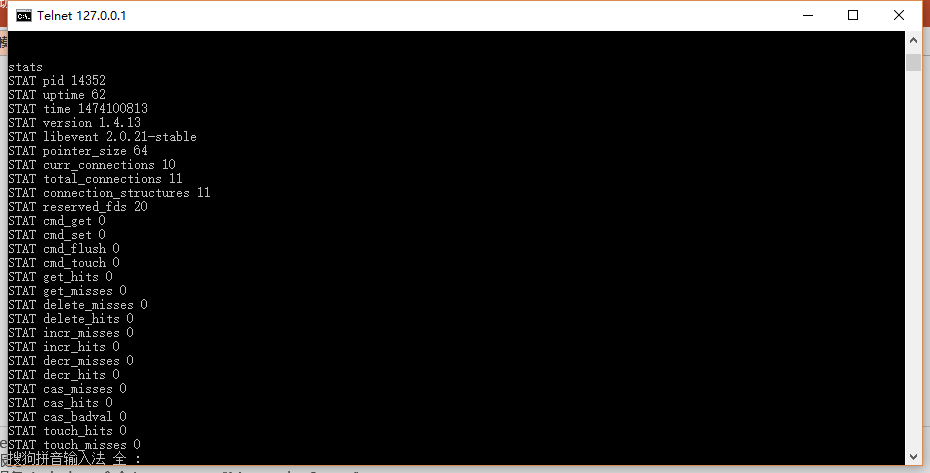
(4)使用Telnet连接到Memcache控制台,验证服务是否正常 telnet 127.0.0.1 11211
使用stats指令查看当前Memcache服务器状态
2. 程序中的用法
(1)在程序中添加 Memcached.ClientLibrary.dll 的引用
(2)C#中操作Memcache的代码示例
String[] serverlist = { "192.168.1.100:11211",
"192.168.1.101:11211"  };
// initialize the pool for memcache servers
SockIOPool pool = SockIOPool.GetInstance("test");
pool.SetServers(serverlist);
pool.Initialize();
mc = new MemcacheClient();
mc.PoolName = "test";
mc.EnableCompression = false;
pool.Shutdown();//关闭连接池
下面我们做方案的具体实现
1. 首先在Common层中引入Memcached.ClientLibrary.dll,并封装Memcache的帮助类,MemcacheHelper
using Memcached.ClientLibrary;
using System;

namespace PMS.Common
{
   public class MemcacheHelper
    {
       private static readonly MemcachedClient Mc = null;

       static MemcacheHelper()
       {
           //最好放在配置文件中
           string[] serverlist = { "127.0.0.1:11211", "10.0.0.132:11211" };

           //初始化池
           var pool = SockIOPool.GetInstance();
           pool.SetServers(serverlist);

           pool.InitConnections = 3;
           pool.MinConnections = 3;
           pool.MaxConnections = 5;

           pool.SocketConnectTimeout = 1000;
           pool.SocketTimeout = 3000;

           pool.MaintenanceSleep = 30;
           pool.Failover = true;

           pool.Nagle = false;
           pool.Initialize();

           // 获得客户端实例
           Mc = new MemcachedClient {EnableCompression = false};
       }
       /// <summary>
       /// 存储数据
       /// </summary>
       /// <param name="key"></param>
       /// <param name="value"></param>
       /// <returns></returns>
       public static bool Set(string key,object value)
       {
          return Mc.Set(key, value);
       }
       public static bool Set(string key, object value,DateTime time)
       {
           return Mc.Set(key, value,time);
       }
       /// <summary>
       /// 获取数据
       /// </summary>
       /// <param name="key"></param>
       /// <returns></returns>
       public static object Get(string key)
       {
           return Mc.Get(key);
       }
       /// <summary>
       /// 删除
       /// </summary>
       /// <param name="key"></param>
       /// <returns></returns>
       public static bool Delete(string key)
       {
           return Mc.KeyExists(key) && Mc.Delete(key);
       }
    }
}
2. 改变用户登录方法UserLogin,用户登录成功后生成GUID,将此GUID存入Cookie并以GUID为键将登录用户信息序列化存入Memcache服务器。
public ActionResult UserLogin()
{
    #region 验证码校验
    var validateCode = Session["validateCode"] != null ? Session["validateCode"].ToString() : string.Empty;
    if (string.IsNullOrEmpty(validateCode))
        return Content("no:验证码错误!!");
    Session["validateCode"] = null;
    var txtCode = Request["ValidateCode"];
    if (!validateCode.Equals(txtCode, StringComparison.InvariantCultureIgnoreCase))
        return Content("no:验证码错误!!");
    #endregion

    var userName = Request["UserName"];
    var userPwd = Request["PassWord"];
    //查询用户是否存在
    var user = UserService.LoadEntities(u => u.UserName == userName && u.PassWord == userPwd).FirstOrDefault();
    if (user == null) return Content("no:登录失败");

    //产生一个GUID值作为Memache的键.
    var sessionId = Guid.NewGuid().ToString();
    //将登录用户信息存储到Memcache中。
    MemcacheHelper.Set(sessionId, SerializeHelper.SerializeToString(user), DateTime.Now.AddMinutes(20));
    //将Memcache的key以Cookie的形式返回给浏览器。
    Response.Cookies["sessionId"].Value = sessionId;
    return Content("ok:登录成功");
}
3. 改变登录校验控制器FilterController的OnActionExecuting方法,使其校验方式改为从Memcache服务器中读取Cookie中值为键的对象:
protected override void OnActionExecuting(ActionExecutingContext filterContext)
{
    base.OnActionExecuting(filterContext);
    //if (Session["user"] == null)
    if (Request.Cookies["sessionId"] != null)
    {
        var sessionId = Request.Cookies["sessionId"].Value;
        //根据该值查Memcache.
        var obj = MemcacheHelper.Get(sessionId);
        if (obj == null)
        {
            filterContext.Result = Redirect("/Login/Index");
            return;
        }
        var user = SerializeHelper.DeserializeToObject<User>(obj.ToString());
        LoginUser = user;
        //模拟出滑动过期时间.
        MemcacheHelper.Set(sessionId, obj, DateTime.Now.AddMinutes(20));
    }
    else
        filterContext.Result = Redirect("/Login/Index");
}