流程图:
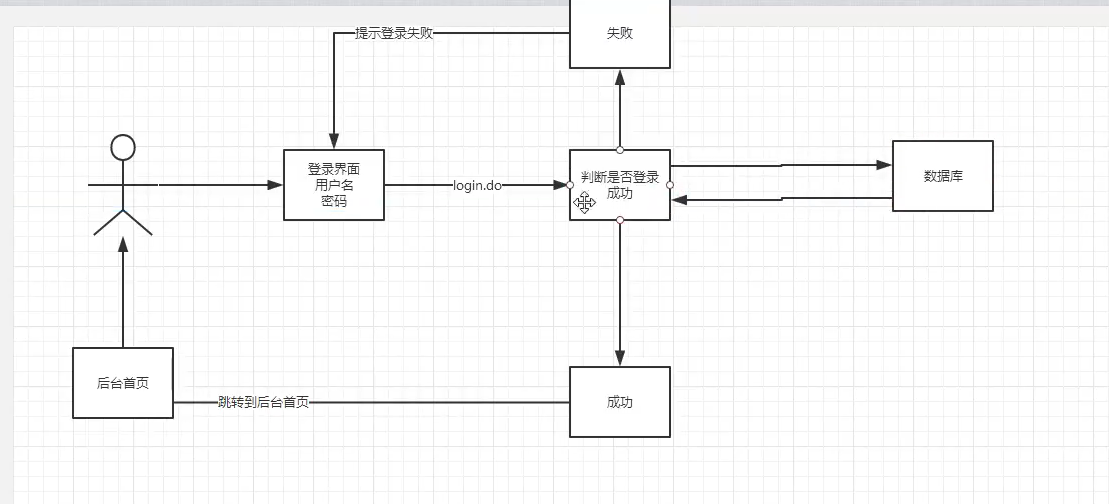
1)编写前端界面
2)在web.xml中设置欢迎页面(首页)
1 <!--    设置欢迎页面-->
2     <welcome-file-list>
3         <welcome-file>login.jsp</welcome-file>
4     </welcome-file-list>
3)编写dao层登录用户登录的接口
1 // 设置为面向接口编程的格式
2 public interface UserDao {
3     // 得到登录的用户
4     public User getLoginUser(Connection connection, String userCode) throws SQLException;
5 }
4)编写dao接口的实现类
 1 package com.mine.dao.user;
 2
 3 import com.mine.dao.BaseDao;
 4 import com.mine.pojo.User;
 5
 6 import java.sql.Connection;
 7 import java.sql.PreparedStatement;
 8 import java.sql.ResultSet;
 9 import java.sql.SQLException;
10
11 public class UserDaoImpl implements UserDao {
12     // 去数据库中查询得到用户
13     public User getLoginUser(Connection connection, String userCode) throws SQLException {
14
15         // 1)准备三个对象
16         PreparedStatement pstm = null; // 因为下面执行函数execute需要这两个参数,所以在这初始化
17         ResultSet rs = null;   // 结果
18         User user = null; // 可能会查出来的用户
19
20
21         // 2)判断数据库连接是否成功
22         if (connection != null) {
23             // 3)如果连接成功了,丢一个sql
24             String sql = "select * from smbms_user where userCode=?"; // 用问号保证安全
25             Object[] params = {userCode}; // 封装参数,它就是唯一的数据
26
27             // 4)执行sql
28             // sql也好了,userCode也好了,接下来需要PreparedStatement和ResultSet就可以调用执行方法了
29             rs = BaseDao.execute(connection, pstm, rs, sql, params);
30             // 遍历用户信息
31             if (rs.next()) {
32                 user = new User(); // new 一个User对象
33                 user.setId(rs.getInt("id")); // 设置id为查出来的对象的id
34                 user.setUserCode(rs.getString("userCode"));
35                 user.setUserName(rs.getString("userName"));
36                 user.setUserPassword(rs.getString("userPassword"));
37                 user.setGender(rs.getInt("gender"));
38                 user.setBirthday(rs.getDate("birthday"));
39                 user.setPhone(rs.getString("phone"));
40                 user.setAddress(rs.getString("address"));
41                 user.setUserRole(rs.getInt("userRole"));
42                 user.setCreatedBy(rs.getInt("createdBy"));
43                 user.setCreationDate(rs.getTimestamp("creationDate"));
44                 user.setModifyBy(rs.getInt("modifyBy"));
45                 user.setModifyDate(rs.getTimestamp("modifyDate"));
46             }
47             // 上面这些是从数据库查出来的,查完要关闭数据库
48             BaseDao.closeResource(null, pstm, rs);
49             // 最后返回user
50
51
52         }
53         return user;
54
55     }
56 }
5)业务层接口
1 public interface UserService {
2     // 用户登录,去公司写的大多就是这个业务层
3     public User login(String userCode, String password) throws SQLException;
4 }
6)业务层实现类
 1 package com.mine.service.user;
 2
 3 import com.mine.dao.BaseDao;
 4 import com.mine.dao.user.UserDao;
 5 import com.mine.dao.user.UserDaoImpl;
 6 import com.mine.pojo.User;
 7 import org.junit.Test;
 8
 9 import java.sql.Connection;
10 import java.sql.SQLException;
11
12 public class UserServiceImpl implements UserService {
13     // 业务层都会调用dao层,所以我们要引入dao层;
14     private UserDao userDao;
15     public UserServiceImpl() {
16         userDao = new UserDaoImpl();
17     }
18     /*
19        userCode:用户名
20        password:密码
21
22      */
23     // 调这个方法的人就能拿到用户
24     public User login(String userCode, String password) {
25         Connection connection = null;
26         User user = null;
27
28
29         try {
30             connection = BaseDao.getConnection(); // 建立连接
31             // 通过业务层调用对应的具体的数据库操作
32             user = userDao.getLoginUser(connection, userCode);
33         } catch (SQLException e) {
34             e.printStackTrace();
35         } finally {
36             BaseDao.closeResource(connection, null, null);
37         }
38         return user;
39     }
40
41     @Test   // 这个是在junit包里面的,所以要引入junit包
42     public void test() {
43         UserServiceImpl userService = new UserServiceImpl();
44         User admin = userService.login("admin", "1234567");
45         System.out.println(admin.getUserPassword());
46     }
47 }
7)编写servlet
 1 package com.mine.servlet.user;
 2
 3 import com.mine.pojo.User;
 4 import com.mine.service.user.UserService;
 5 import com.mine.service.user.UserServiceImpl;
 6 import com.mine.util.Constants;
 7
 8 import javax.servlet.ServletException;
 9 import javax.servlet.http.HttpServlet;
10 import javax.servlet.http.HttpServletRequest;
11 import javax.servlet.http.HttpServletResponse;
12 import java.io.IOException;
13 import java.sql.SQLException;
14
15 public class LoginServlet extends HttpServlet {
16     // servlet:控制层。去调业务层的代码,要么私有进来,要么去new
17     @Override
18     protected void doGet(HttpServletRequest req, HttpServletResponse resp) throws ServletException, IOException {
19         System.out.println("LoginServlet -- start....");
20
21         // 获取用户名和密码,去前端拿
22         String userCode = req.getParameter("userCode");
23         String userPassword = req.getParameter("userPassword");
24
25         // 和数据库中的密码进行对比,调业务层
26         UserService userService = new UserServiceImpl();
27         try {
28             User user = userService.login(userCode, userPassword); // 这里已经把登录的人查出来
29             if (user != null) { // 查有此人,可以登录
30                 // 将用户的信息放到session中
31                 req.getSession().setAttribute(Constants.USER_SESSION, user);
32                 // 登录成功之后跳转到内部主页
33                 resp.sendRedirect("jsp/frame.jsp");
34
35             } else { // 查无此人,无法登录
36                 // 转发回登录页面,顺带提示用户名或密码错误
37                 req.setAttribute("error", "用户名或密码不正确");
38                 req.getRequestDispatcher("login.jsp").forward(req, resp);
39
40             }
41         } catch (SQLException e) {
42             e.printStackTrace();
43         }
44
45
46     }
47
48     @Override
49     protected void doPost(HttpServletRequest req, HttpServletResponse resp) throws ServletException, IOException {
50         doGet(req, resp);
51     }
52 }
上面代码中的
Constants.USER_SESSION

8)注册servlet
 1 <!--Servlet-->
 2     <servlet>
 3         <servlet-name>LoginServlet</servlet-name>
 4         <servlet-class>com.mine.servlet.user.LoginServlet</servlet-class>
 5     </servlet>
 6     <servlet-mapping>
 7         <servlet-name>LoginServlet</servlet-name>
 8         <url-pattern>/login.do</url-pattern>
 9     </servlet-mapping>
10
9)测试访问,确保以上成功
出现bug:用户名和密码都正确,但是就是没有跳转到下一个页面,而是提示错误

错误信息:java.sql.SQLException: No suitable driver found for jdbc:mysql:/localhost:3306?useUnicode=true&characterEncoding=utf-8


preparedStatement = connection.prepareStatement(sql)和resultSet = preparedStatement.executeQuery(sql)是功能相同的两行代码。所以会报错。
登录功能优化:
注销功能:思路:移除session,返回登录页面
 1 package com.mine.servlet.user;
 2
 3 import com.mine.util.Constants;
 4
 5 import javax.servlet.ServletException;
 6 import javax.servlet.http.HttpServlet;
 7 import javax.servlet.http.HttpServletRequest;
 8 import javax.servlet.http.HttpServletResponse;
 9 import java.io.IOException;
10
11 public class LogoutServlet extends HttpServlet {
12     @Override
13     protected void doGet(HttpServletRequest req, HttpServletResponse resp) throws ServletException, IOException {
14         // 移除用户的session
15         req.getSession().removeAttribute(Constants.USER_SESSION);
16         // 回到登录页面
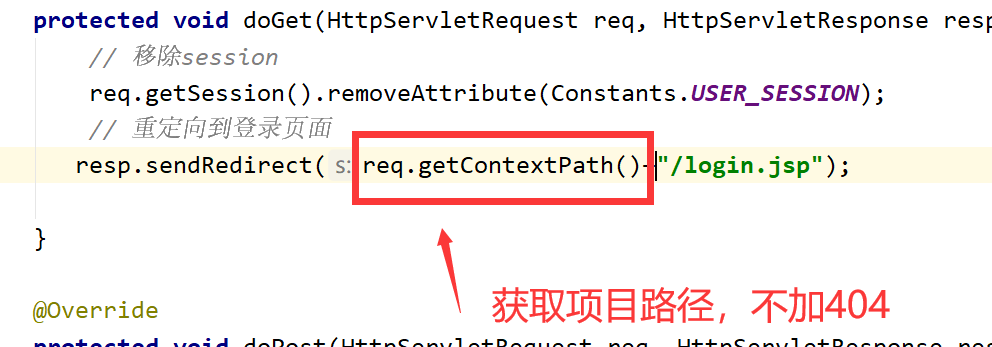
17         resp.sendRedirect("/login.jsp");
18     }
19
20     @Override
21     protected void doPost(HttpServletRequest req, HttpServletResponse resp) throws ServletException, IOException {
22         doGet(req, resp);
23     }
24 }
注册
1 <servlet>
2         <servlet-name>LogoutServlet</servlet-name>
3         <servlet-class>com.mine.servlet.user.LogoutServlet</servlet-class>
4     </servlet>
5     <servlet-mapping>
6         <servlet-name>LogoutServlet</servlet-name>
7         <url-pattern>/jsp/logout.do</url-pattern>
8     </servlet-mapping>
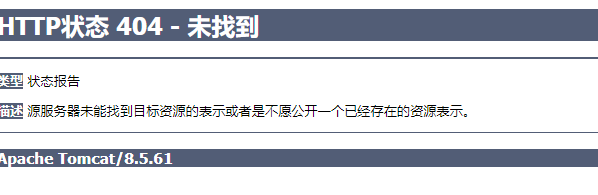
出现bug 404
解决方案:
登录拦截优化:
编写一个过滤器
 1 package com.mine.filter;
 2
 3 import com.mine.pojo.User;
 4 import com.mine.util.Constants;
 5
 6 import javax.servlet.*;
 7 import javax.servlet.http.HttpServletRequest;
 8 import javax.servlet.http.HttpServletResponse;
 9 import java.io.IOException;
10 import java.net.HttpRetryException;
11 import java.net.http.HttpRequest;
12 import java.net.http.HttpResponse;
13
14 public class SysFilter implements Filter {
15     @Override
16     public void init(FilterConfig filterConfig) throws ServletException {
17
18     }
19
20     @Override
21     public void doFilter(ServletRequest req, ServletResponse resp, FilterChain chain) throws IOException, ServletException {
22         HttpServletRequest request = (HttpServletRequest) req;  // 这个为了获取session
23         HttpServletResponse response = (HttpServletResponse) resp; // 这个为了重定向
24
25         // 过滤器从session中获取用户,如果把session移除掉,它一定获取不到
26         User user = (User) request.getSession().getAttribute(Constants.USER_SESSION);
27
28         if (user == null) { // 如果用户为空,说明session已经被移除或者注销了或者未登录,那就让它走error.jsp
29             response.sendRedirect("/smbms/error.jsp");
30
31         } else {
32             chain.doFilter(req, resp);
33         }
34     }
35
36     @Override
37     public void destroy() {
38
39     }
40 }
配置
1 <!--    用户登录过滤器-->
2     <filter>
3         <filter-name>SysFilter</filter-name>
4         <filter-class>com.mine.filter.SysFilter</filter-class>
5     </filter>
6     <filter-mapping>
7         <filter-name>SysFilter</filter-name>
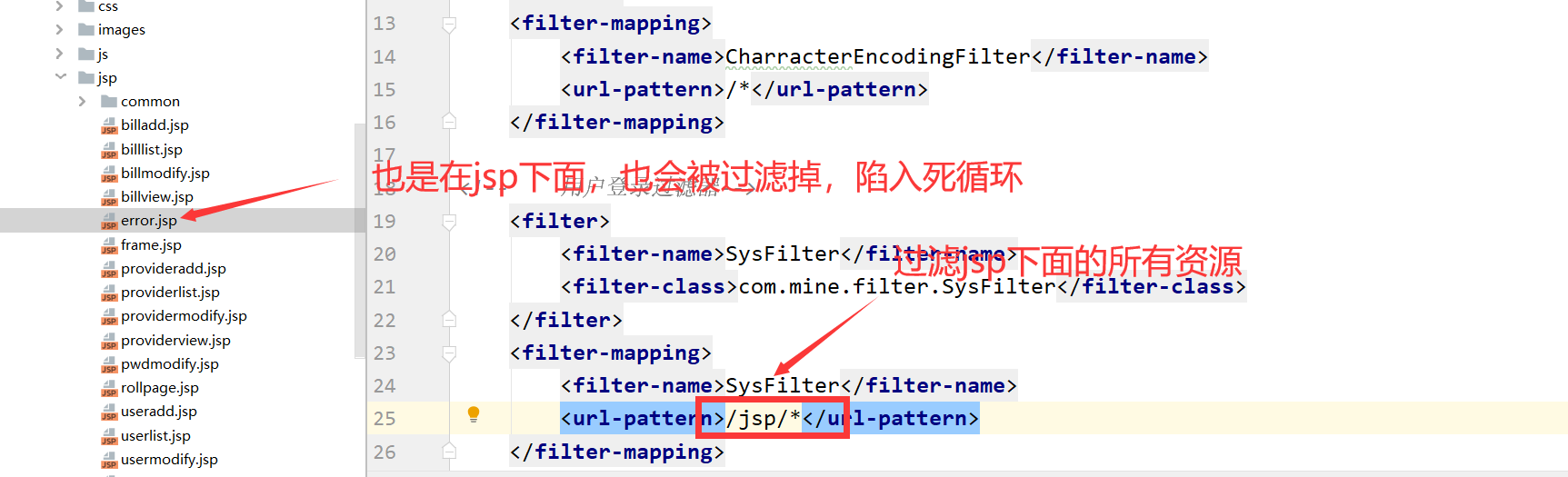
8         <url-pattern>/jsp/*</url-pattern>   <!-- jsp下面的所有页面 -->
9     </filter-mapping>
注:如果error.jsp访问找不到资源,把error改个名即可访问
bug: