java语言中,数组对象并不是从某个类实例化出来的,而是JVM动态创建的.对数组对象使用如下操作,可看到数组对应的Class对象.通过RTTI(Run-Time Type Information)可直接检查数组的运行时类型,以及它的签名.下方的 “[L”就是int[]/Integer[] 的运行类型.
1 Integer[] integers = (Integer[]) Array.newInstance(Integer.class,4);
2 System.out.println(integers.getClass());
3 结果: [Ljava.lang.Integer
Java反射机制使用Array类, java.lang.Class类在运行时获取数组的相关信息.
反射详解:反射操作
注意:Array 要和 Arrays区分开,后者是数组工具类.类比于Collections.
-
数组实例化
1 方法1: Integer[] integers = new Integer[4];
2 方法2: Integer[] integers = {1,2,4,5};
3 方法3: 使用反射 Integer[] integers = (Integer[])Array.newInstance(Integer.class,4);
4 方法4:
5 // componentType是数组类型;
6 Object array = Array.newInstance(componetType,lenght);
通过Array的set(),get()方法可以操作数组.
1 Array.set(integers,0,2);
2 Array.set(integers,1,4);
3 System.out.println(Array.get(integers,1));
4 结果: 4
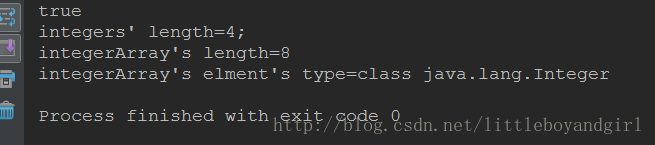
利用反射,可进行如下操作:
代码:
 1 //1-判断是否是数组
 2 boolean isArray = integers.getClass().isArray();
 3 System.out.println(isArray);
 4 //2-直接创建Object数组,通过Array.getLength()获取长度
 5 Object integerArray = Array.newInstance(Integer.class,8);
 6 Array.set(integerArray,0,88);
 7 int length = Array.getLength(integerArray);
 8 int lenght2 = Array.getLength(integers);
 9 System.out.println("integers' length="+lenght2+";
10 nintegerArray's length="+length);
11 //3-反射获取数组的对象类型;
12 Class componenttype = integerArray.getClass().getComponentType();
13 System.out.println("integerArray's elment's type="+componenttype);
结果: