1. 准备
我们需要:
- Docker Engine 1.12 or later installed
- the IP address of the manager machine
- open ports between the hosts
需要以下端口:
TCP port 2377 for cluster management communications
TCP and UDP port 7946 for communication among nodes
TCP and UDP port 4789 for overlay network traffic
2. 创建Swarm
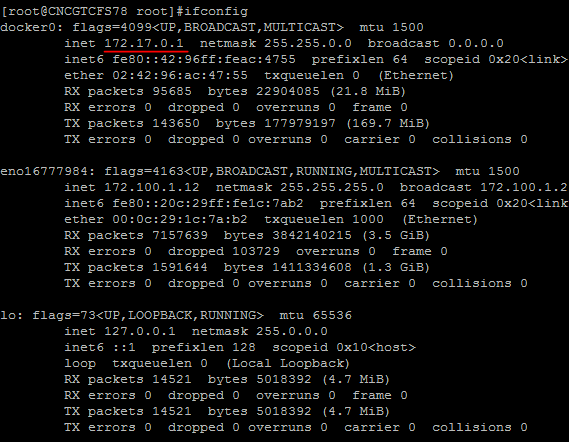
查看当前 host 的 IP:
创建一个新的Swarm
$ docker swarm init --advertise-addr <MANAGER-IP>

在创建 Swarm 的同时,生成了管理节点 (manager)--advertise-addr 将管理节点的地址发布为:172.17.0.1.其他工作节点如果要链接过来,需要确保它们能访问管理节点。
查看 Swarm 的信息$ docker info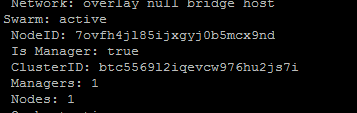
查看 docker 节点信息
$ docker node ls

“*” 标识当前连接的节点
3. 为 Swarm 添加 worker 节点
在 Manager node 所在的 host上面运行 CMD
$ docker swarm join-token worker
在 Worker node 所在的 host 上面 运行 CMD
$ docker swarm join
--token SWMTKN-1-5navvuqvscrredmgo6x9ovsy5kbf81a5mzbmipydgfuelo0wg5-cjirzq0zm2eu5uvmi2u9p27je
172.100.1.12:2377
注意:在做集群之前,必须确保以下事情!!! 重要事情说三遍~~~
1. Docker监听远程端口实现远程调用API
$ vim /lib/systemd/system/docker.service
添加以下内容
ExecStart=/usr/bin/dockerd -H tcp://0.0.0.0:2375 -H unix:///var/run/docker.sock
重新Load并且重启Docker程序
$ systemctl daemon-reload
$ service docker restart
2. 解决docker info报错docker bridge-nf-call-iptables is disabled办法
$ vim /etc/sysctl.conf
添加如下内容
net.bridge.bridge-nf-call-ip6tables = 1
net.bridge.bridge-nf-call-iptables = 1
net.bridge.bridge-nf-call-arptables = 1
3. 重启机器
shutdow -r now