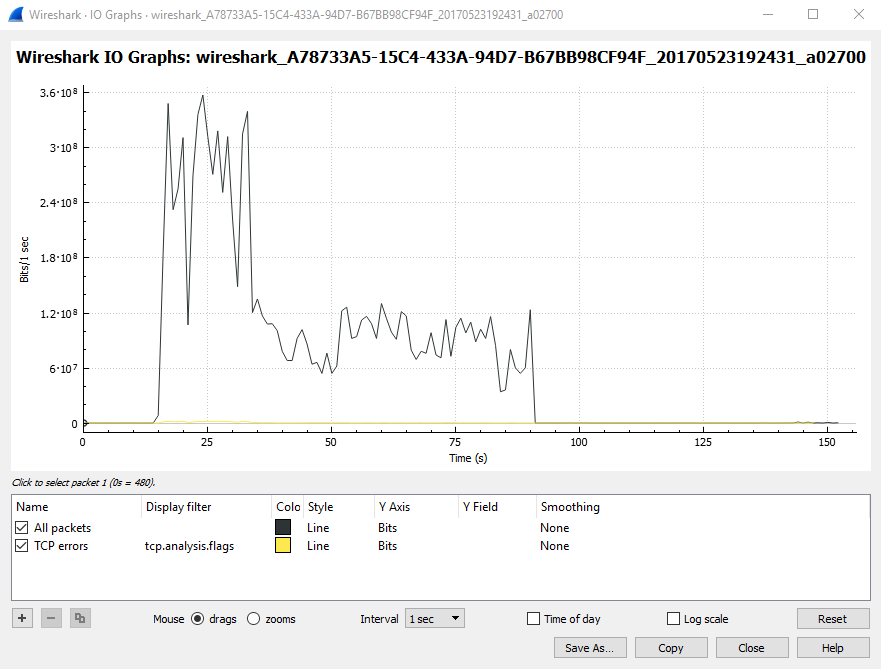
Let's take an example where there is a file named Stage1.php on the www.example.com web server, and Stage1.php contains the phrase Hello World.

When a client requets www.example.com/Stage1.php, the server will be able to transmit Stage1.php to the client in a single packet. In this example, the length of the HTTP/1.1 200 OK response packet is 230 bytes.
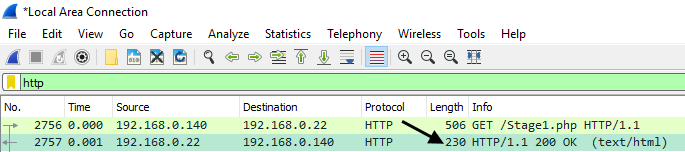
Now let's consider the scenario where Stage1.php includes a Click here link, and the link contains a very large file. In this example, the Click here link downloads a 2.6 GB .iso file.

Packets typically cannot exceed 1314 bytes. If a file is greater than 1314 bytes, numerous packets will need to be transmitted from the server to the client to produce the file. When numerous packets for a single file are transmitted, Wireshark will display HTTP Continuation or TCP segment of a reassembled PDU packets. As the name suggests, HTTP Continuation packets continue to send the data from the web server to the client. In this example, over a million packets were needed to download the 2.6 GB .iso file.

A high number of HTTP Continuation packets can cause latency. However, a high number of HTTP Continuation packets do not guarantee latency. There are some factors to consider, such as network throughput, the amount of memory and CPU available to the server, and the quality of the application that is used to produce the GET request.
For example, if HTTP Continuation packets are being sent from the server to the client, and then a new HTTP GET request for a web page is sent to the server while the server is currently sending HTTP Continuation packets, the server may be delayed in responding to the GET request.
In this example, Stage1.php was requested 15 seconds into the capture, which began the big spike, and then Stage1.php completed transmission 35 seconds into the capture, which is where the big spike levels off. It took the web server 20 seconds to send all of the HTTP Continuation packets to the client. Since the server was busy serving HTTP Continuation packets for 20 seconds, the server was delayed in responding to other HTTP GET requests.