JDBC重要界面有:
java.sgl.DriverManager:完成驱动程序的装载和建立新的数据库连接。
java.sgl.Connection:表示对某一指定数据库的连接。
java.sgl.Statement:管理在一指定数据库连接上的SQL语句的执行。
java.sgl.ResultSet:访问一指定语句的原始结果。
java.sgl.CallableStatement:用于执行存储的SQL过程的界面。
java.sgl.Connection: 一个连接表示与某一指定数据库的一个会话。在该连接中可以执行SQL语句和处理返回结果。
java.sql.DataTruncation:当JDBC碰到意外数据截断时,报告一个警告(读数据时)或产生一个异常(写数据时)。
java.sql.Date:是标准java.util.date的一个子集,只表示天数,而不包含时、分、秒。
java.sql.Driver:定义一个在每一个数据库驱动程序中必须实现的驱动程序界面。 java.sql.DriverManager:提供对全局SQL状态的访问。
java.sql.DriverPropertyInto:提供高级程序员与驱动程序之间对连接特性信息进行交互的手段。 java.sql.NullData:当由getXXX或getObiect方法读出一个SQL空值时,产生一个NullData警告。 java.sql.Numeric:是一个任意精度标量数值类,可用作表示SQL定点Numerlc和Decimal类型的数值。 java.sql.PreparedStatement:保存一个预编译的SQL语句的对象,该对象可被高效地执行多次。 java.sql.ResultSet:结果集提供对执行一个SQL语句后产生的结果表的访问。表中数据按行依次取出。为便于移植,建议对每一行数据从左至右按列读出。
java.sql.SQLException:处理数据库访问时的出错信息。
java.sql.SQLWarning:处理数据库访问时的警告信息。
java.sql.Statement:用作执行一条静态的SQL语句并接收产生的结果。
java.sql.Time:用于表示标准java.util.date类的一个信息子集,仅表示时、分、秒。 java.sql.Timestamp:扩展标准java.util.date类,使其能够表示SQL的时间戳,增加了一个以纳秒为单位的时间域。
java.sql.Types:定义区分SQL类型的常量。类常量值与XOPEN中的值相同。
JDBC驱动程序界面:可以通过"Class.forName("com.mysql.jdbc.Driver"); "来获取,(主要用于"java.sql.Connection; "类),它的作用是在访问一个指定的URL时可以查询到相应的驱动程序。
下面,我们来实践操作一个图书信息的添加:
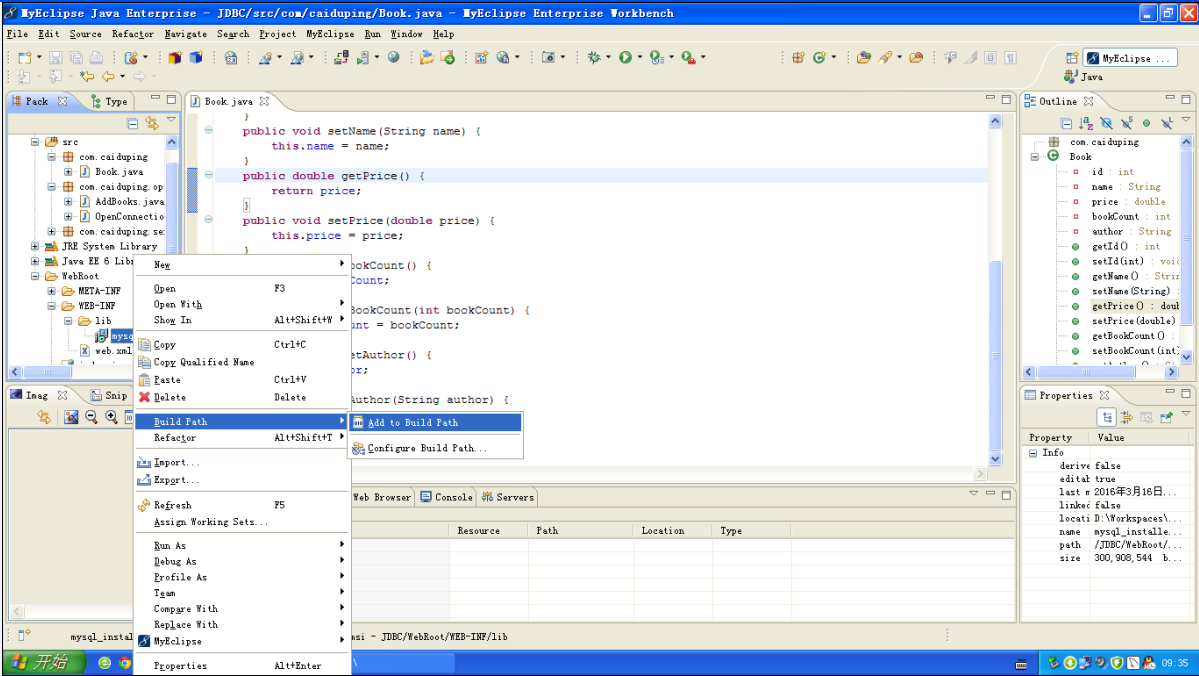
首先,我们先导入名为mysql-connector-java-5.1.18的程序包(已上传),把它粘贴在Webroot-->WEB-INF文件中,如图所示:
Book类:
package com.caiduping;

public class Book {
    private int id;
    private String name;
    private double price;
    private int bookCount;
    private String author;
    public int getId() {
        return id;
    }
    public void setId(int id) {
        this.id = id;
    }
    public String getName() {
        return name;
    }
    public void setName(String name) {
        this.name = name;
    }
    public double getPrice() {
        return price;
    }
    public void setPrice(double price) {
        this.price = price;
    }
    public int getBookCount() {
        return bookCount;
    }
    public void setBookCount(int bookCount) {
        this.bookCount = bookCount;
    }
    public String getAuthor() {
        return author;
    }
    public void setAuthor(String author) {
        this.author = author;
    }
}
AddBooks类:
package com.caiduping.open;

import java.sql.Connection;
import java.sql.PreparedStatement;
import java.sql.SQLException;

import com.caiduping.Book;

public class AddBooks {
    public int addbook(Book book) throws SQLException, ClassNotFoundException
    {int a=0;
    OpenConnection c=new OpenConnection();
    Connection conn=c.OpenConnection();
    String sql = "insert into tb_books(name,price,bookCount,author) values(?,?,?,?)";
    // 获取PreparedStatement
    PreparedStatement ps = conn.prepareStatement(sql);
    // 对SQL语句中的第1个参数赋值
    ps.setString(1, book.getName());
    System.out.println("name:"+book.getName());
    // 对SQL语句中的第2个参数赋值
    ps.setDouble(2, book.getPrice());
    // 对SQL语句中的第3个参数赋值
    ps.setInt(3,book.getBookCount());
    // 对SQL语句中的第4个参数赋值
    ps.setString(4, book.getAuthor());
    // 执行更新操作,返回所影响的行数
    int row = ps.executeUpdate();
    // 判断是否更新成功
    return row;
    }
}
OpenConnection类:
package com.caiduping.open;

import java.sql.Connection;
import java.sql.DriverManager;
import java.sql.SQLException;

public class OpenConnection {

    public Connection OpenConnection() throws SQLException, ClassNotFoundException {
        // TODO Auto-generated method stub
        Connection c=null;
        //加载驱动
        Class.forName("com.mysql.jdbc.Driver");
        c=DriverManager.getConnection("jdbc:mysql://localhost:3306/db_database10","Book","000000");
        return c;
    }

}
C类:
package com.caiduping.servlet;

import java.io.IOException;

import javax.servlet.Filter;
import javax.servlet.FilterChain;
import javax.servlet.FilterConfig;
import javax.servlet.ServletException;
import javax.servlet.ServletRequest;
import javax.servlet.ServletResponse;

public class CharFilter implements Filter {

    @Override
    public void destroy() {
        // TODO Auto-generated method stub

    }

    @Override
    public void doFilter(ServletRequest request, ServletResponse response,
            FilterChain chain) throws IOException, ServletException {
        // TODO Auto-generated method stub
        request.setCharacterEncoding("UTF-8");
        response.setCharacterEncoding("UTF-8");
        //System.out.println("cdp");
        chain.doFilter(request, response);
    }

    @Override
    public void init(FilterConfig arg0) throws ServletException {
        // TODO Auto-generated method stub

    }

}
AddBooks.jsp:
<%@page import="java.sql.DriverManager"%>
<%@ page language="java" import="java.util.*" pageEncoding="utf-8"%>
<%
String path = request.getContextPath();
String basePath = request.getScheme()+"://"+request.getServerName()+":"+request.getServerPort()+path+"/";
%>

<!DOCTYPE HTML PUBLIC "-//W3C//DTD HTML 4.01 Transitional//EN">
<html>
  <head>
    <base href="<%=basePath%>">

    <title>My JSP 'AddBooks.jsp' starting page</title>

    <meta http-equiv="pragma" content="no-cache">
    <meta http-equiv="cache-control" content="no-cache">
    <meta http-equiv="expires" content="0">
    <meta http-equiv="keywords" content="keyword1,keyword2,keyword3">
    <meta http-equiv="description" content="This is my page">
    <!--
    <link rel="stylesheet" type="text/css" href="styles.css">
    -->

  </head>

  <body>
  <%request.setCharacterEncoding("utf-8"); %>
  <jsp:useBean id="book" class="com.caiduping.Book"></jsp:useBean>
  <jsp:setProperty property="*" name="book"/>
  <%int n=0;
  n=book.getId();
  if(n>0) {%>书籍添加成功<%} %>
    <a href="index.jsp">返回</a>
  </body>
</html>
indes.jsp:
<%@ page language="java" import="java.util.*" pageEncoding="UTF-8"%>
<%
String path = request.getContextPath();
String basePath = request.getScheme()+"://"+request.getServerName()+":"+request.getServerPort()+path+"/";
%>

<!DOCTYPE HTML PUBLIC "-//W3C//DTD HTML 4.01 Transitional//EN">
<html>
  <head>
    <base href="<%=basePath%>">

    <title>My JSP 'index.jsp' starting page</title>
    <meta http-equiv="pragma" content="no-cache">
    <meta http-equiv="cache-control" content="no-cache">
    <meta http-equiv="expires" content="0">
    <meta http-equiv="keywords" content="keyword1,keyword2,keyword3">
    <meta http-equiv="description" content="This is my page">
    <!--
    <link rel="stylesheet" type="text/css" href="styles.css">
    -->
  </head>

  <body>
   <form id="book" method="post" action="AddBooks.jsp">
  <table width="600" border="2">
    <tr>
      <td colspan="2"><div align="center">添加图书信息</div></td>
    </tr>
    <tr>
      <td>图书名称:</td>
      <td><label>
        <input name="name" type="text" id="name" />
      </label></td>
    </tr>
    <tr>
      <td>价格:</td>
      <td><label>
        <input name="price" type="text" id="price" />
      </label></td>
    </tr>
    <tr>
      <td>数量:</td>
      <td><label>
        <input name="bookCount" type="text" id="bookCount" />
      </label></td>
    </tr>
    <tr>
      <td>作者:</td>
      <td><label>
        <input name="author" type="text" id="author" />
      </label></td>
    </tr>
    <tr>
      <td colspan="2"><label>
        <div align="center">
          <input type="submit" name="Submit" value="提交" />
        </div>
      </label></td>
    </tr>
  </table>
</form>
  </body>
</html>