1. 下载(http://mirror.bit.edu.cn/apache/zookeeper/zookeeper-3.4.12/):
# wget http://mirror.bit.edu.cn/apache/zookeeper/zookeeper-3.4.12/zookeeper-3.4.12.tar.gz

2. 解压:
# tar zxvf zookeeper-3.4.12.tar.gz -C ../

3. 修改配置:
进入到conf目录:
# cd zookeeper-3.4.12/conf/
拷贝zoo_samle.cfg为zoo.cfg:
# cp zoo_sample.cfg zoo.cfg
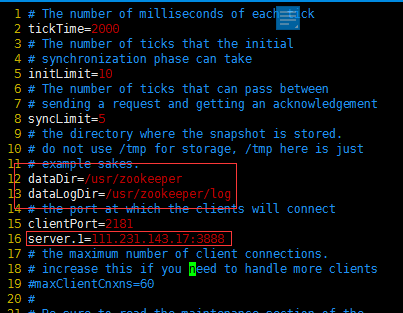
编辑zoo.cfg文件,修改为:
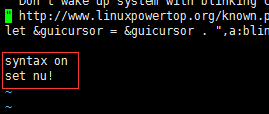
Tip:vim 永久设置行号与高亮显示
复制一份到用户目录,修改复制的文件,只对当前用户有效果。直接修改会对所有用户生效。
# cp /etc/vimrc ~/.vimrc
# vi ~/.vimrc
在最后加:
# vim zoo.cfg
4. 配置环境变量:
# vim /etc/profile

# source /etc/profile
5. 启动:
# zkServer.sh start

6. 测试:
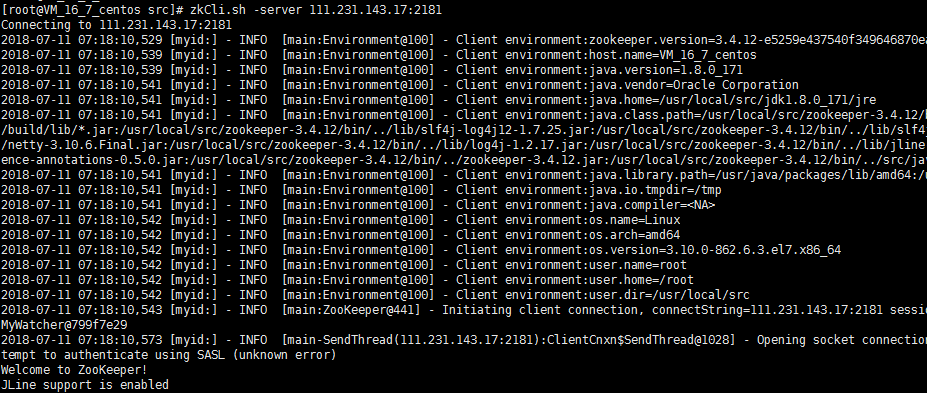
# zkCli.sh -server 111.231.143.17:2181